sketchucation logo sketchucation
    • 登入
    Oops, your profile's looking a bit empty! To help us tailor your experience, please fill in key details like your SketchUp version, skill level, operating system, and more. Update and save your info on your profile page today!
    🔌 Smart Spline | Fluid way to handle splines for furniture design and complex structures. Download

    [Plugin][$] RoundCorner - v3.4a - 31 Mar 24


    已排程 已置頂 已鎖定 已移動 Plugins
    1.5k 貼文 473 Posters 3.4m 瀏覽 472 Watching
    正在載入更多貼文
    • 從舊到新
    • 從新到舊
    • 最多點贊
    回覆
    • 在新貼文中回覆
    登入後回覆
    此主題已被刪除。只有擁有主題管理權限的使用者可以查看。
    • R 離線
      RHD
      最後由 編輯

      I'm on a Mac 10.6.8 and I can't install this plugin.

      I've looked above to see what's happening with other people but can't see what I'm doing wrong. I have Fredoscale, that works. I clicked "yes" when the installation wanted to overwrite something.

      I'm downloading the Zip file, copying it to the folder in macintosh HD/Library/Application Support/Google SketchUp 9/Plugins and unzipping it there as per the instructions.
      I've done the same with LibFredo6 and that doesn't seem to work either as far as I can tell.

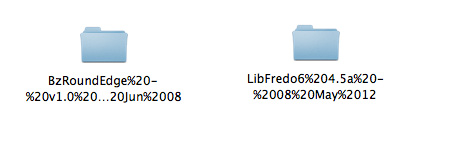
      When extracted from the zip file using Safari the spaces in the file names were replaced with 20% etc - see image - which probably messes things up so I tried again using Firefox to download and reinstalled so now the file names look right but even after restarting SketchUp the Plugin is not there. Can anyone help. Thanks.

      fredo.jpg

      1 條回覆 最後回覆 回覆 引用 0
      • TIGT 離線
        TIG Moderator
        最後由 編輯

        @rhd said:

        I'm on a Mac 10.6.8 and I can't install this plugin.

        I've looked above to see what's happening with other people but can't see what I'm doing wrong. I have Fredoscale, that works. I clicked "yes" when the installation wanted to overwrite something.

        I'm downloading the Zip file, copying it to the folder in macintosh HD/Library/Application Support/Google SketchUp 9/Plugins and unzipping it there as per the instructions.
        I've done the same with LibFredo6 and that doesn't seem to work either as far as I can tell.

        When extracted from the zip file the folders come out with weird names. Is this correct?
        I'm uploading an image
        No, it's completely wrong !
        Your download/unzipping software is in someway messed up...
        It's leaving the files with html character encoding - like 20% = <space>
        This is plain weird.
        Are there settings you can adjust ?
        Perhaps some MAC user can come up with an idea on settings - I'm on PC... 😕

        TIG

        1 條回覆 最後回覆 回覆 引用 0
        • Dave RD 離線
          Dave R
          最後由 編輯

          @rhd said:

          I'm downloading the Zip file, copying it to the folder in macintosh HD/Library/Application Support/Google SketchUp 9/Plugins and unzipping it there as per the instructions.
          I've done the same with LibFredo6 and that doesn't seem to work either as far as I can tell.

          Well, that might be your problem. SketchUp 9 doesn't exist, yet.

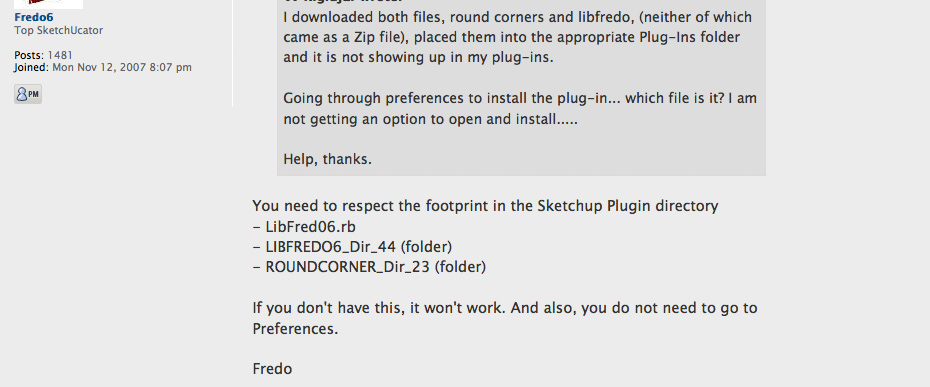
          It's hard to tell from your little screen shot because it doesn't tell us much. The folder names do need to be straightened out. Did you look at the first post for the foot print of the files? Make them look like that.

          Etaoin Shrdlu

          %

          (THERE'S NO PLACE LIKE)

          G28 X0.0 Y0.0 Z0.0

          M30

          %

          1 條回覆 最後回覆 回覆 引用 0
          • R 離線
            RHD
            最後由 編輯

            Yes, I figured that out and used Firefox which doesn't do the HTML thing on spaces.

            Now the files come out with dates on. I found Fredos instructions (see attached image) and renamed the folders accordingly as the names were differently written on mine but that just gave me an error on opening SketchUp about it now being able to load the plugins, at which point I gave up and trashed them. There is some problem on Mac with unzipping these particular files and I don't know why. I unzip stuff all the time without the file names getting messed up like this.

            fredo2.jpg

            1 條回覆 最後回覆 回覆 引用 0
            • thomthomT 離線
              thomthom
              最後由 編輯

              @RHD: Try this installation utility and see if that makes the process easier: http://forums.sketchucation.com/viewtopic.php?t=42315

              Thomas Thomassen — SketchUp Monkey & Coding addict
              List of my plugins and link to the CookieWare fund

              1 條回覆 最後回覆 回覆 引用 0
              • T 離線
                Toucan
                最後由 編輯

                Installs on MAC (10.6.8) as RoundCorner%202; LibFredo6 v4 comes in as LibFredo%204. I assume the %20 is a "space" but removal does nothing. Where am I going wrong?

                1 條回覆 最後回覆 回覆 引用 0
                • Dave RD 離線
                  Dave R
                  最後由 編輯

                  Go back and look at the first post. It shows you what the file footprint should be. It sounds to me as if you haven't extracted the contents of the downloaded ZIP files correctly.

                  Etaoin Shrdlu

                  %

                  (THERE'S NO PLACE LIKE)

                  G28 X0.0 Y0.0 Z0.0

                  M30

                  %

                  1 條回覆 最後回覆 回覆 引用 0
                  • T 離線
                    Toucan
                    最後由 編輯

                    Regarding problem with installation: SOLVED! Safari was unzipping the files automatically and including a %20 (SPACE) in the filename; I was also "dragging" the downloaded directories into the Plugin directory on my MAC. Solved the issue by use of Firefox which downloaded the files as intact .zip files. But, I had to move the unzipped directories (which wound up below the Plugin directory) into the Plugin directory itself, as shown in the Windows image on the first post. Now the real fun can commence. Thanx.

                    1 條回覆 最後回覆 回覆 引用 0
                    • A 離線
                      alvin_clk
                      最後由 編輯

                      THANKS 👍 👍

                      1 條回覆 最後回覆 回覆 引用 0
                      • K 離線
                        Kurochi
                        最後由 編輯

                        pretty cool.

                        1 條回覆 最後回覆 回覆 引用 0
                        • B 離線
                          blaze3d
                          最後由 編輯

                          I can't get the round corner to work no matter what I try. The other stuff like Fredo taper and scale work great. But all this does for me is literally explode (not the ungroup kind)every thing I apply it on. Its installed properly. Sketchup pro 8 here. Any thoughts would be appreciated thanks.

                          1 條回覆 最後回覆 回覆 引用 0
                          • Dave RD 離線
                            Dave R
                            最後由 編輯

                            Your description doesn't give us much to go on. Could you post an SKP file with before and after examples showing us what you mean by "explode"? Maybe you could tell us what settings you're using for rounding? Give us something useful so we can help you.

                            Etaoin Shrdlu

                            %

                            (THERE'S NO PLACE LIKE)

                            G28 X0.0 Y0.0 Z0.0

                            M30

                            %

                            1 條回覆 最後回覆 回覆 引用 0
                            • S 離線
                              shauko
                              最後由 編輯

                              Thank you so much, so useful !!

                              1 條回覆 最後回覆 回覆 引用 0
                              • T 離線
                                technogod
                                最後由 編輯

                                top of the line .thanks alot.

                                1 條回覆 最後回覆 回覆 引用 0
                                • M 離線
                                  mmurdock
                                  最後由 編輯

                                  I am running windows 7 and using the latest version of sketchup pro. My plugins are all working well, but when I log off as an administrator to my personal user name, the round corner plugin stops working while all the other Fredo6 plugins work fine. I click the icon and nothing happens. Any ideas?

                                  1 條回覆 最後回覆 回覆 引用 0
                                  • Dave RD 離線
                                    Dave R
                                    最後由 編輯

                                    Megan, do you have administrator privileges under your own log in to add files to the Plugins folder? Did you install the other plugins while logged in under your user name and Round Corner while logged in as Administrator? What happens if, while logged in as you, you reinstall Round corner?

                                    Etaoin Shrdlu

                                    %

                                    (THERE'S NO PLACE LIKE)

                                    G28 X0.0 Y0.0 Z0.0

                                    M30

                                    %

                                    1 條回覆 最後回覆 回覆 引用 0
                                    • R 離線
                                      resall
                                      最後由 編輯

                                      Hi,
                                      I'm trying to install the round corner plugin but it just wont work.
                                      I've installed LibFredo6 4.6 in the plugins folder, then Round Corner 2.3
                                      I even tried unistalling everything (including sketchup and all of its folders) and installing again, and nothing...
                                      Then I tried deleting the date that came on the name of the folders available for download at the begining of this post and again, nothing...
                                      I'm using Mac OS X 10.6.8 and Sketchup 8 (free version).
                                      Can someone please help me.
                                      Thanx


                                      footprint

                                      1 條回覆 最後回覆 回覆 引用 0
                                      • TIGT 離線
                                        TIG Moderator
                                        最後由 編輯

                                        You haven't actually installed them. 😲

                                        The two subfolders [called 'LibFredo...' and 'RoundCorner...'] that you show are what the extraction of the zipped archive produces - the package - if you will.

                                        Inside those folders are the files and subfolders containing other files that auto-load and make the tool available to you when you restart Sketchup.

                                        So these need to be in the 'plugins' folder - not left inside the package that they came in.

                                        So move these two folders onto your Desktop... then move their contents back into the 'plugins' folder.
                                        Ensure that all files in the subfolders stay inside those subfolders, when they are moved - it is another frequent error - to move the items out of subfolders - which will surely break everything - because the .rb 'loaders' files expect to find these files in the subfolders, which are supplied with the tool, and also sometimes extra 'support' files in additional 'libraries' - like in the case of this tool !

                                        TIG

                                        1 條回覆 最後回覆 回覆 引用 0
                                        • R 離線
                                          resall
                                          最後由 編輯

                                          SOOO SIMPLE! Thanks!

                                          1 條回覆 最後回覆 回覆 引用 0
                                          • A 離線
                                            art4smart
                                            最後由 編輯

                                            Thank YOUUUU

                                            1 條回覆 最後回覆 回覆 引用 0
                                            • 1
                                            • 2
                                            • 13
                                            • 14
                                            • 15
                                            • 16
                                            • 17
                                            • 73
                                            • 74
                                            • 15 / 74
                                            • 第一個貼文
                                              最後的貼文
                                            Buy SketchPlus
                                            Buy SUbD
                                            Buy WrapR
                                            Buy eBook
                                            Buy Modelur
                                            Buy Vertex Tools
                                            Buy SketchCuisine
                                            Buy FormFonts

                                            Advertisement




