[Plugin][$] RoundCorner - v3.4a - 31 Mar 24




-
Hello, I have a problem.
Does the corner have to be at a 90 degree angle, or can it be any angle? Because when I try to do it at a non-90 degree angle it goes crazy and does this:
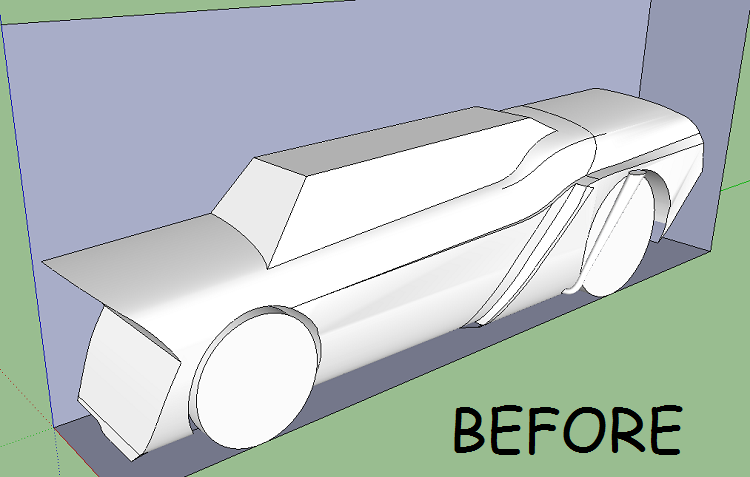
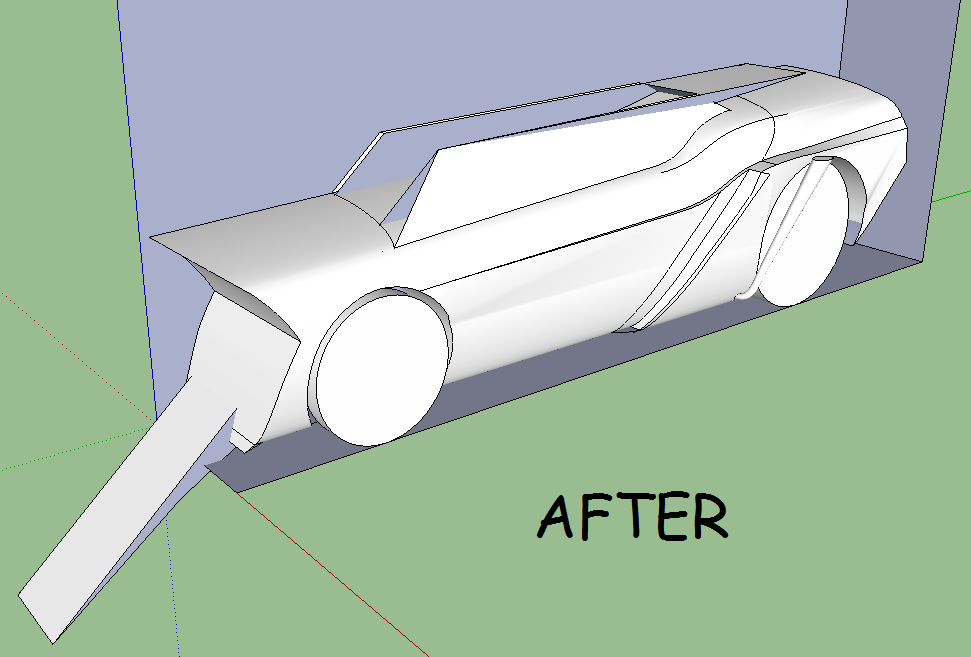
I am running windows 7, 32bit. I have 2048mb RAM. All help is appreciated
-
Hello Everybody
I tried that tool on my model but it doest work correctly, does anybody have an idea what should i do to make all edges and corners smooth ? Help please

-
@maciejs said:
Hello Everybody
I tried that tool on my model but it doest work correctly, does anybody have an idea what should i do to make all edges and corners smooth ? Help please
Could you post the model, so that we can find out.
I guess this could be done piece by piece (plus duplication x6, as the wheel is symmetrical)Fredo
-
Yes, all parts of the model are symmetrical. All i need is to smooth every edge and make smooth transitions between parts.
here is a link: http://www.sendspace.com/file/1s2pol
-
@maciejs said:
Yes, all parts of the model are symmetrical. All i need is to smooth every edge and make smooth transitions between parts.
here is a link: http://www.sendspace.com/file/1s2pol
There are several problems with the model:
-
you have hidden internal faces at the ends of the branches of the steering wheel. This is why you cannot select some edges.
-
most corners have 4 edges, and their configurations seems to reach the limit of RoundCorner (4 edges and more are supported, but the algorithm is not very robust)
I think you have to either do the roundings manually or reconsider the design to have corners with 3 edges or try a subdivision with Whaat's Artisan.
Fredo
-
-
Thank you Bro, i am going to fix it manually doing one branch separately and copy as you said. Could you tell me how can i check if my models have hidden internal faces?
-
If you make a group and in the entity info box, you cannot see "solid", there may be internal faces (but other errors can also cause this)
You can also use this plugin to remove them:
http://forums.sketchucation.com/viewtopic.php?t=12668 -
It seems to be very useful plugin, thank you Gai. Im gonna try it out.
-
Please, someone help me. A client asked me to do him a render of a logo. I made it for him like this:

Notice I used ROUNDCORNER around the logo, because the client wanted a glossy shiny effect on the borders, as seen in many rasterized 2D logos made in CorelDraw.
I submitted the logo, but he wants MORE GLOSSY EFFECT, and sent me this logo as an example

Ok, lets not enter the question of how to make that material in VRAY. I will create a topic at the VRAY section for that.
Right now, I will try to create that effect by INCREASING the roundness of the corners of the logo.
BUT THATS WHERE MY PROBLEMS START. I uploaded the same logo before any round-corner effect was applied.
As you can see, the plugin doesnt work very well with the shapes of the logo, specially the upper and lower sections (darker blue).
-
@aceshigh said:
Fredo, this was probably asked before, but I didnt find it in this very long thread. Neither I found the answer in the quick manual.
Check the image attached... the offset somehow overlaps itself. It happens quite often when I try to use your tool. And when the offset overlaps, it usually results in problems in the end.
How do I solve this issue?
this is my previous post about the same issue...
-
I guess nobody has a solution? At least a suggestion of another program where I might try to round the corners of my object?
-
@aceshigh said:
I guess nobody has a solution? At least a suggestion of another program where I might try to round the corners of my object?
RoundCorner is based on pure geometry and therefore the overlap issues (when the offset is too large) has no satisfactory solution.
I think that Artisan by Whaat, which is based on a softer method, by subdivision, could help.Fredo
-
@unknownuser said:
@aceshigh said:
I guess nobody has a solution? At least a suggestion of another program where I might try to round the corners of my object?
RoundCorner is based on pure geometry and therefore the overlap issues (when the offset is too large) has no satisfactory solution.
I think that Artisan by Whaat, which is based on a softer method, by subdivision, could help.Fredo
Fredo, I noticed that the overlap issues in certain shapes occur even when the offset is MINIMAL...its just harder to notice, unless you zoom in.
-
@aceshigh said:
Fredo, I noticed that the overlap issues in certain shapes occur even when the offset is MINIMAL...its just harder to notice, unless you zoom in.
The fact is that the algorithm is too geometrical to handle complex meshes. It is more adapted when the edges to round are aligned.
Fredo
-
@unknownuser said:
@aceshigh said:
Fredo, I noticed that the overlap issues in certain shapes occur even when the offset is MINIMAL...its just harder to notice, unless you zoom in.
The fact is that the algorithm is too geometrical to handle complex meshes. It is more adapted when the edges to round are aligned.
Fredo
from a non programer´s point of view (mine) it seems the plugin works very well with some very complex objects, but cant deal with other specific shape objects, that sometimes dont seem to complex.
in this particular shape I am getting problems, the overlapping occurs because the curve has like 10 lines/faces. When the plugin offsets the inner border, SOME of the inner lines get negative.
cant you adjust the offsetting feature to NEVER get negative values?
-
I have a working [but yet unreleased] version of 'smartoffset.rb' that works on 2d shapes which ignores reversed curves like this where the internal offset's smallness/radius results in negative flipped forms. Thus, instead of an unwanted 'ear' of reversed edges getting made, the internal offset's corner is a made as a simple angle when necessary.
I use similar 3d code in the 'shell' part of my recent 'honeycomber' tool, to avoid convoluted forms where the internal offsets can flip over... So instead of unwanted 'appendages' being made on the tighter internal corners, they are made simple, with no reversing or interpenetrating of facets etc.
Fredo, perhaps you could look through that part of the code and crib some ideas to use in your own code... I can PM you other code if you like...
-
@aceshigh said:
@unknownuser said:
@aceshigh said:
Fredo, I noticed that the overlap issues in certain shapes occur even when the offset is MINIMAL...its just harder to notice, unless you zoom in.
The fact is that the algorithm is too geometrical to handle complex meshes. It is more adapted when the edges to round are aligned.
Fredo
from a non programer´s point of view (mine) it seems the plugin works very well with some very complex objects, but cant deal with other specific shape objects, that sometimes dont seem to complex.
in this particular shape I am getting problems, the overlapping occurs because the curve has like 10 lines/faces. When the plugin offsets the inner border, SOME of the inner lines get negative.
cant you adjust the offsetting feature to NEVER get negative values?
i saw your post in the artisan thread that had example pictures of the overlap problems you're having.. the problem, as i see it, is that you're trying to use roundCorner to put round (i.e.- radius) corners on geometry that doesn't accommodate a radius.. (trying to put a square peg in a round hole type situation)… there are ways to get surfaces in the areas you're showing (in that thread) but not with radius edges.. you'll need to use curviloft (et.al) instead..
-
thank you for all the input folks.
right now, I solved my problem by reducing the number of lines in the bezier curves (to only 7, the minimal), so when using roundcorner, the problem remains, but it takes a bigger offset to cause the problem (since each inner line of the offset created is larger) and its also easier to MANUALLY delete the overlapping areas and fix them by recreating the lines correctly.
Fredo, your plugin is greater and I hope you find the time (easier said than done, specially since I am not the one spending time with it!) to look through TIG´s code and maybe improve RoundCorner to make it even greater!
This forum is definitly full of awesome people!
-
@aceshigh said:
thank you for all the input folks.
right now, I solved my problem by reducing the number of lines in the bezier curves (to only 7, the minimal), so when using roundcorner, the problem remains, but it takes a bigger offset to cause the problem (since each inner line of the offset created is larger) and its also easier to MANUALLY delete the overlapping areas and fix them by recreating the lines correctly.
have a look at the attached skp which uses copy/pasted geometry from the model you posted in the artisan thread..
i'm not sure if that's the best example to explain what's going on but it is what's going on…
roundcorner automates a procedure which you could draw manually.. maybe if you try to do this manually then you can begin to recognize the issue? as well as understand what exactly it is that roundCorner is attempting to do?
-
@tig said:
I have a working [but yet unreleased] version of 'smartoffset.rb' that works on 2d shapes which ignores reversed curves like this where the internal offset's smallness/radius results in negative flipped forms. Thus, instead of an unwanted 'ear' of reversed edges getting made, the internal offset's corner is a made as a simple angle when necessary.
I use similar 3d code in the 'shell' part of my recent 'honeycomber' tool, to avoid convoluted forms where the internal offsets can flip over... So instead of unwanted 'appendages' being made on the tighter internal corners, they are made simple, with no reversing or interpenetrating of facets etc.
Fredo, perhaps you could look through that part of the code and crib some ideas to use in your own code... I can PM you other code if you like...
TIG,
Thanks for the offer. Actually, RoundCorner does not rely on an Offset algorithm and simplification would not be useful here (I use simplification in OffsetOnSurface). Instead, RoundCorner strictly rely on the faces that border the edges to round, so that it can reconstruct the geometry without modifying the rest of the model.
So, if the offset is too large, or some faces are too narrow, the overlap effect makes it fail.The solution would be to cut in a clean fashion the bordering faces at the given offset distance and then do the rounding. By 'clean fashion', I mean possibly reorganizing and smoothing the faces beyond those which are strictly bordering the edges to round. I am thinking about doing this one day, as well as introduce a quadmeshing method for the angles. But that's still in a non-predicatble future.
As Jeff mentioned, RoundCorner is just automating what can be done by hand with a pure geometric approach. And in some topology, there is no decidable solutions by this approach.
Fredo






Advertisement