sketchucation logo sketchucation
    • 登入
    Oops, your profile's looking a bit empty! To help us tailor your experience, please fill in key details like your SketchUp version, skill level, operating system, and more. Update and save your info on your profile page today!
    🔌 Smart Spline | Fluid way to handle splines for furniture design and complex structures. Download

    [Plugin][$] RoundCorner - v3.4a - 31 Mar 24


    已排程 已置頂 已鎖定 已移動 Plugins
    1.5k 貼文 473 Posters 3.4m 瀏覽 472 Watching
    正在載入更多貼文
    • 從舊到新
    • 從新到舊
    • 最多點贊
    回覆
    • 在新貼文中回覆
    登入後回覆
    此主題已被刪除。只有擁有主題管理權限的使用者可以查看。
    • N 離線
      nwarner33
      最後由 編輯

      Hi there. I installed what I believe to be the most up to date version of the plugin. I'm using Sketchup 8 pro on a Mac Lion. I tried the plugin on what something that had around 50 edges. Sketchup froze. Tried it a few times actually and every time, it would get to a different point. 90%, 10%, 40% complete. I then tried it on a simple cube. Same problem. I then tried it on one face. 4 edges. same problem. sketch up freezes. does any one have any idea what the problem is and how i can fix it? thanks in advance?

      1 條回覆 最後回覆 回覆 引用 0
      • C 離線
        chrisjk
        最後由 編輯

        What version of LibFredo6 are you running?
        In which folders have you installed the plugin and library?

        Chris

        1 條回覆 最後回覆 回覆 引用 0
        • K 離線
          kubusipit
          最後由 編輯

          I have the same problem with crash issue. I use Win XP SP 3 with skethup 8. I'm using 2 GB RAM. everytime I applied round corners, my sketchup always crash and shut down. I've tried every setting, it didn't work. Is there any way to solve this problem? I'm totaly confused, whether my XP had something wrong or my Sketchup? thanx for respond.

          Jeem

          1 條回覆 最後回覆 回覆 引用 0
          • M 離線
            mac1
            最後由 編輯

            @kubusipit said:

            I have the same problem with crash issue. I use Win XP SP 3 with skethup 8. I'm using 2 GB RAM. everytime I applied round corners, my sketchup always crash and shut down. I've tried every setting, it didn't work. Is there any way to solve this problem? I'm totaly confused, whether my XP had something wrong or my Sketchup? thanx for respond.

            Jeem

            Just happen to see this in passing:

            1. The way the windows 32 bit memory manager works it splits the memory somewhat equally between the kernel and the program. In addition any device memory ( graphics etc) gets mapped into that a subtracts form the usable memory. Check you task manager and think you will find low memory. Check what you have set for the paging file size and the memory manager will use the hard disk to help that problem but then the PC slows down because of the slower disk. IMO you should install more RAM if possible and is not hard to do just make sure you use an anti static strap.
            1 條回覆 最後回覆 回覆 引用 0
            • fredo6F 離線
              fredo6
              最後由 編輯

              @kubusipit said:

              I have the same problem with crash issue. I use Win XP SP 3 with skethup 8. I'm using 2 GB RAM. everytime I applied round corners, my sketchup always crash and shut down. I've tried every setting, it didn't work. Is there any way to solve this problem? I'm totaly confused, whether my XP had something wrong or my Sketchup? thanx for respond.

              Jeem

              Just in case, could you open the Ruby console in case messages are displayed when running RoundCorner.

              There are a few plugins that create incompatibility problems (for instance some versions of Matchhbox and SunPosition). This may also be a source of problem.

              Fredo

              1 條回覆 最後回覆 回覆 引用 0
              • C 離線
                chalky
                最後由 編輯

                I too have this problem. Lion 10.7.3 - SU v8. Latest Plugins too. Please help 😞

                1 條回覆 最後回覆 回覆 引用 0
                • S 離線
                  sketchdraw
                  最後由 編輯

                  only one thing: thank you
                  its amazing

                  1 條回覆 最後回覆 回覆 引用 0
                  • bagateloB 離線
                    bagatelo
                    最後由 編輯

                    I have found the fourth icon.
                    Download the attachment and think about.


                    dream.skp

                    While the cat's away, the mice will play

                    1 條回覆 最後回覆 回覆 引用 0
                    • J 離線
                      janmakowka
                      最後由 編輯

                      Hello, I have a problem.
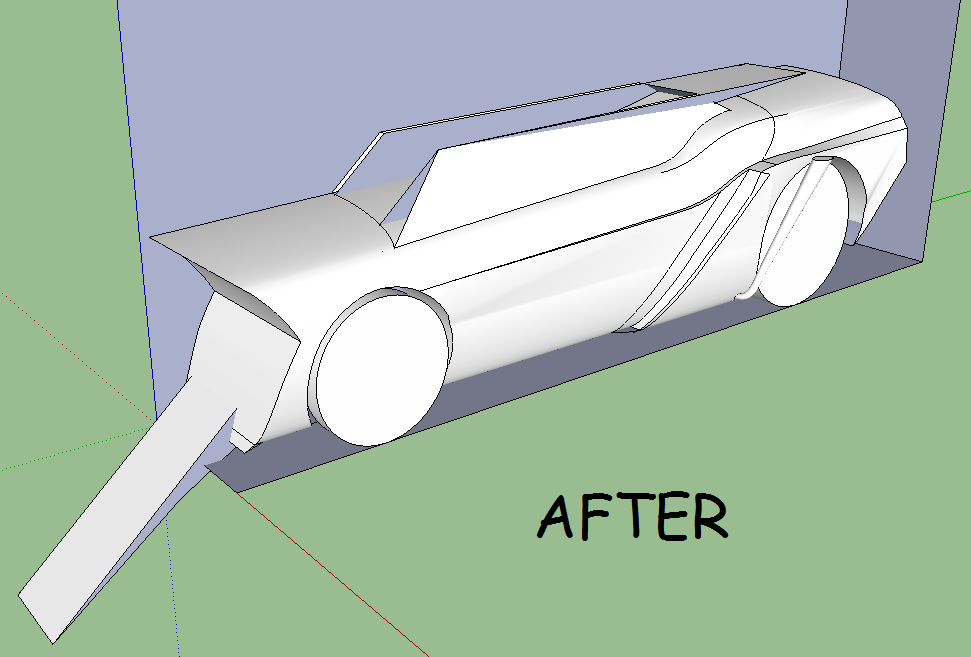
                      Does the corner have to be at a 90 degree angle, or can it be any angle? Because when I try to do it at a non-90 degree angle it goes crazy and does this:
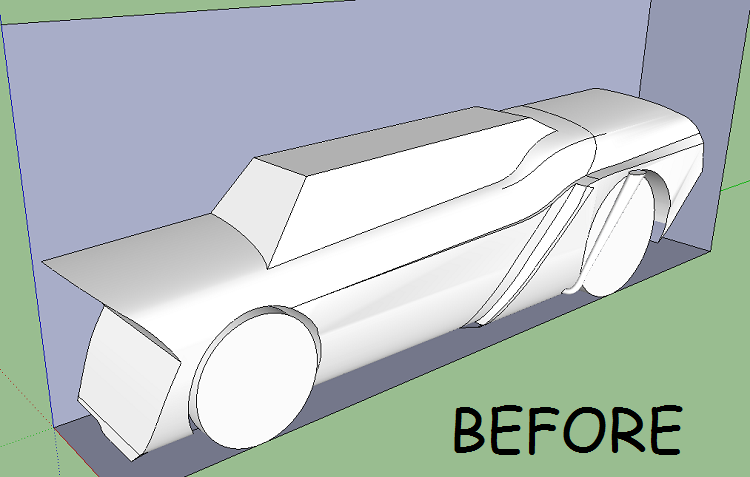
                      Before.png
                      After.png
                      I am running windows 7, 32bit. I have 2048mb RAM. All help is appreciated 😄

                      1 條回覆 最後回覆 回覆 引用 0
                      • M 離線
                        MaciejS
                        最後由 編輯

                        Hello Everybody

                        I tried that tool on my model but it doest work correctly, does anybody have an idea what should i do to make all edges and corners smooth ? Help please

                        http://www.newcolorstudio.pl/valve.jpg

                        1 條回覆 最後回覆 回覆 引用 0
                        • fredo6F 離線
                          fredo6
                          最後由 編輯

                          @maciejs said:

                          Hello Everybody

                          I tried that tool on my model but it doest work correctly, does anybody have an idea what should i do to make all edges and corners smooth ? Help please

                          http://www.newcolorstudio.pl/valve.jpg

                          Could you post the model, so that we can find out.
                          I guess this could be done piece by piece (plus duplication x6, as the wheel is symmetrical)

                          Fredo

                          1 條回覆 最後回覆 回覆 引用 0
                          • M 離線
                            MaciejS
                            最後由 編輯

                            Yes, all parts of the model are symmetrical. All i need is to smooth every edge and make smooth transitions between parts.

                            here is a link: http://www.sendspace.com/file/1s2pol

                            1 條回覆 最後回覆 回覆 引用 0
                            • fredo6F 離線
                              fredo6
                              最後由 編輯

                              @maciejs said:

                              Yes, all parts of the model are symmetrical. All i need is to smooth every edge and make smooth transitions between parts.

                              here is a link: http://www.sendspace.com/file/1s2pol

                              There are several problems with the model:

                              1. you have hidden internal faces at the ends of the branches of the steering wheel. This is why you cannot select some edges.

                              2. most corners have 4 edges, and their configurations seems to reach the limit of RoundCorner (4 edges and more are supported, but the algorithm is not very robust)

                              I think you have to either do the roundings manually or reconsider the design to have corners with 3 edges or try a subdivision with Whaat's Artisan.

                              Fredo

                              1 條回覆 最後回覆 回覆 引用 0
                              • M 離線
                                MaciejS
                                最後由 編輯

                                Thank you Bro, i am going to fix it manually doing one branch separately and copy as you said. Could you tell me how can i check if my models have hidden internal faces?

                                1 條回覆 最後回覆 回覆 引用 0
                                • GaieusG 離線
                                  Gaieus
                                  最後由 編輯

                                  If you make a group and in the entity info box, you cannot see "solid", there may be internal faces (but other errors can also cause this)

                                  You can also use this plugin to remove them:
                                  http://forums.sketchucation.com/viewtopic.php?t=12668

                                  Gai...

                                  1 條回覆 最後回覆 回覆 引用 0
                                  • M 離線
                                    MaciejS
                                    最後由 編輯

                                    It seems to be very useful plugin, thank you Gai. Im gonna try it out.

                                    1 條回覆 最後回覆 回覆 引用 0
                                    • A 離線
                                      AcesHigh
                                      最後由 編輯

                                      Please, someone help me. A client asked me to do him a render of a logo. I made it for him like this:

                                      http://img341.imageshack.us/img341/6302/prototipo02.jpg

                                      Notice I used ROUNDCORNER around the logo, because the client wanted a glossy shiny effect on the borders, as seen in many rasterized 2D logos made in CorelDraw.

                                      I submitted the logo, but he wants MORE GLOSSY EFFECT, and sent me this logo as an example

                                      http://img12.imageshack.us/img12/5246/exemplologoglossy.jpg

                                      Ok, lets not enter the question of how to make that material in VRAY. I will create a topic at the VRAY section for that.

                                      Right now, I will try to create that effect by INCREASING the roundness of the corners of the logo.

                                      BUT THATS WHERE MY PROBLEMS START. I uploaded the same logo before any round-corner effect was applied.

                                      As you can see, the plugin doesnt work very well with the shapes of the logo, specially the upper and lower sections (darker blue).


                                      logocru.rar

                                      1 條回覆 最後回覆 回覆 引用 0
                                      • A 離線
                                        AcesHigh
                                        最後由 編輯

                                        @aceshigh said:

                                        Fredo, this was probably asked before, but I didnt find it in this very long thread. Neither I found the answer in the quick manual.

                                        Check the image attached... the offset somehow overlaps itself. It happens quite often when I try to use your tool. And when the offset overlaps, it usually results in problems in the end.

                                        How do I solve this issue?

                                        this is my previous post about the same issue...

                                        1 條回覆 最後回覆 回覆 引用 0
                                        • A 離線
                                          AcesHigh
                                          最後由 編輯

                                          I guess nobody has a solution? At least a suggestion of another program where I might try to round the corners of my object?

                                          1 條回覆 最後回覆 回覆 引用 0
                                          • fredo6F 離線
                                            fredo6
                                            最後由 編輯

                                            @aceshigh said:

                                            I guess nobody has a solution? At least a suggestion of another program where I might try to round the corners of my object?

                                            RoundCorner is based on pure geometry and therefore the overlap issues (when the offset is too large) has no satisfactory solution.
                                            I think that Artisan by Whaat, which is based on a softer method, by subdivision, could help.

                                            Fredo

                                            1 條回覆 最後回覆 回覆 引用 0
                                            • 1
                                            • 2
                                            • 3
                                            • 4
                                            • 5
                                            • 73
                                            • 74
                                            • 3 / 74
                                            • 第一個貼文
                                              最後的貼文
                                            Buy SketchPlus
                                            Buy SUbD
                                            Buy WrapR
                                            Buy eBook
                                            Buy Modelur
                                            Buy Vertex Tools
                                            Buy SketchCuisine
                                            Buy FormFonts

                                            Advertisement