[Plugin][$] RoundCorner - v3.4a - 31 Mar 24




-
Thanks, TIG! Much obliged.

Andrew - sorry, the blondes and the gold are being shipped to TIG's as we speak. I'm sure you understand the supply's limited. I do still have a bag of musty lint.
-
Thats' OK mate. Blonde's are hard work anyway.... I'll let someone else put up with there shit....

-
NEW RELEASE: RoundCorner 2.2a- 12 Jan 11
This is mostly a new release in relation with the migration to LibFredo6 3.6 and to small SU8 issues.
There is no functional evolution, but it is advised to upgrade when you can in order to get a better support with up-to-date code. You will also get the two-phase loading in this version.You will need to migrate to LibFredo6 3.6 or higher
Please see main post for download
Fredo
-
When will work Piсk Profile?
Thank you!
-
@pokery said:
When will work Piсk Profile?
Thank you!
Do you refer to this function:
http://forums.sketchucation.com/viewtopic.php?f=323&t=20485&hilit=plugin&start=45#p172163If so, this is on the list, but I am not sure that it would be terribly helpful, because with 1 or 2 edges, FollowMe can do it, and at 3-edges corners, the intersection may not be something that exist with real designs. In any case, the profile would have to be symmetrical.
Fredo
-
Thank You for a very useful plugin.
-
Hello,
I wasted all day trying to install this, and when I finally did, it didn't work. Must be a reason...
Before I waste your time...does the plugin only work on PRO versions? if so, you can disregard this.
I have google sketchup 8 (not Pro), on Windows 7. I had to create the DEFPARAM_Dir folder myself due to admin rights on my laptop.
I got it installed, and I have the tool on the program currently, including the preferences and such but nothing happens when I click on the icons. So if I have the select tool, or the erase tool or the arc tool selected, and then select the round corner tool, it is as if I selected nothing. The 3 icons from the plugin are now just decorative. I do not get any prompts to continue.
Any ideas?
-
It works on free.
Can you post a screenshot of your plugins folder where you installed the files?
If you open the Ruby Console, do you see any error then when you try to activate the tool? -
Hi Nalkhayat,
Did you also installed the LibFredo library as instructed on the first page of the plugin topic?
And yes, it works on the Free version of SU, too.
-
@thomthom said:
It works on free.
Can you post a screenshot of your plugins folder where you installed the files?
If you open the Ruby Console, do you see any error then when you try to activate the tool?Attached is the screenshot. I had installed both the Roundcorner and Fredolibrary plugin. Had no idea what the ruby console was but you're right! Here's the error I got:
Error: #<Errno::EACCES: Permission denied - C:/Program Files/Google/Google SketchUp 8/Plugins/Fredo6Trace.txt>
C:/Program Files/Google/Google SketchUp 8/Plugins/LIBFREDO6_Dir_36/Lib6Core_36.rb:593:ininitialize' C:/Program Files/Google/Google SketchUp 8/Plugins/LIBFREDO6_Dir_36/Lib6Core_36.rb:593:inopen'
C:/Program Files/Google/Google SketchUp 8/Plugins/LIBFREDO6_Dir_36/Lib6Core_36.rb:593:intrace6' C:/Program Files/Google/Google SketchUp 8/Plugins/ROUNDCORNER_Dir_22/RoundCorner_Tool.rb:313:ininit_palette'
C:/Program Files/Google/Google SketchUp 8/Plugins/ROUNDCORNER_Dir_22/RoundCorner_Tool.rb:128:ininitialize' C:/Program Files/Google/Google SketchUp 8/Plugins/ROUNDCORNER_Dir_22/RoundCorner_Tool.rb:42:innew'
C:/Program Files/Google/Google SketchUp 8/Plugins/ROUNDCORNER_Dir_22/RoundCorner_Tool.rb:42:inlaunch' C:/Program Files/Google/Google SketchUp 8/Plugins/ROUNDCORNER_Dir_22/RoundCorner_Tool.rb:33:inaction__mapping'
C:/Program Files/Google/Google SketchUp 8/Plugins/LIBFREDO6_Dir_36/Lib6Plugin.rb:117:incall' C:/Program Files/Google/Google SketchUp 8/Plugins/LIBFREDO6_Dir_36/Lib6Plugin.rb:117:inlaunch_action'
C:/Program Files/Google/Google SketchUp 8/Plugins/ROUNDCORNER_Dir_22/bootstrap_RoundCorner.rb:143:inlaunch_action' C:/Program Files/Google/Google SketchUp 8/Plugins/ROUNDCORNER_Dir_22/bootstrap_RoundCorner.rb:159:instartup'
C:/Program Files/Google/Google SketchUp 8/Plugins/LIBFREDO6_Dir_36/Lib6Plugin.rb:672:incall' C:/Program Files/Google/Google SketchUp 8/Plugins/LIBFREDO6_Dir_36/Lib6Plugin.rb:672:incommand_invoke'
C:/Program Files/Google/Google SketchUp 8/Plugins/LIBFREDO6_Dir_36/Lib6Plugin.rb:654:inbuild_config_commands' C:/Program Files/Google/Google SketchUp 8/Plugins/LIBFREDO6_Dir_36/Lib6Traductor.rb:874:incall'
C:/Program Files/Google/Google SketchUp 8/Plugins/LIBFREDO6_Dir_36/Lib6Traductor.rb:874:in `add_command'
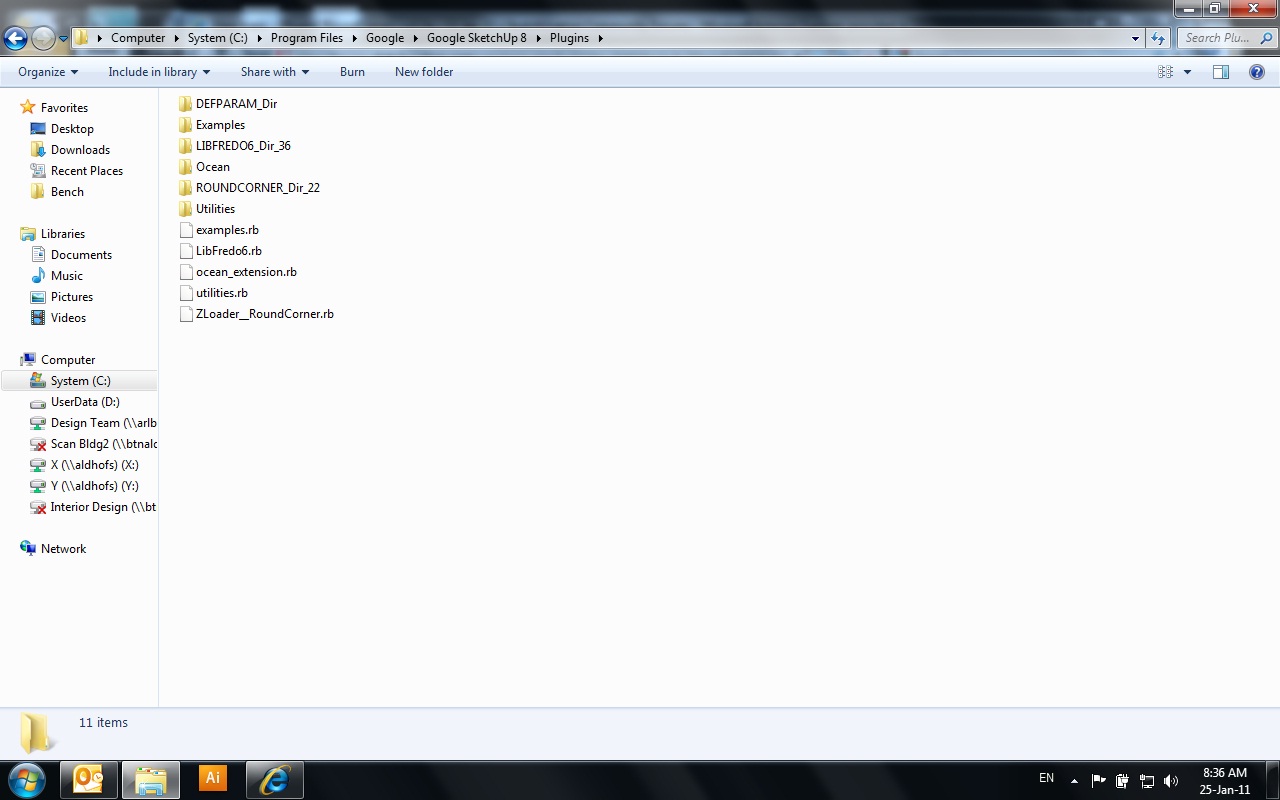
-
One more thing. I just noticed a second plugins folder…called sdk plugins. Is this relevant? Also, I’m very new to sketchup, and I normally would try to do this the old fashioned way and not bother with extras and posting the problems but I kinda need this, so thanks.
-
Please, HELP!!!
Installed this plugin on MAC OS 10.6.6 - it does not work. I copied all files into plugin folder, installed LibFredo6 (by the instruction provided at the link) - now when SketchUp starts up, it displays "Load Errors":
Error Loading File __loader.rb
uninitialized constant TraductorError Loading File bootstrap_RoundCorner.rb
uninitialized constant RoundCorner::T6Error Loading File Lib6__obsolete.rb
uninitialized constant Traductor::T6Error Loading File Lib6Config.rb
uninitialized constant Traductor::T6Error Loading File Lib6EdgePicker.rb
uninitialized constant Traductor::T6Error Loading File Lib6Input.rb
uninitialized constant Traductor::T6Error Loading File Lib6Operation.rb
uninitialized constant Traductor::T6Error Loading File Lib6Palette.rb
uninitialized constant Traductor::T6Error Loading File Lib6Plugin.rb
uninitialized constant Traductor::T6Error Loading File Lib6Protractor.rb
uninitialized constant Traductor::T6Error Loading File Lib6Selmode.rb
uninitialized constant Traductor::T6Error Loading File Lib6Startup.rb
uninitialized constant Traductor::T6Error Loading File Lib6Tool.rb
uninitialized constant Traductor::T6Error Loading File Lib6Web.rb
uninitialized constant Traductor::T6(yes, the message looks truncated) and then starts up normally. Of course, there is no "Tools > Fredo6 Collection" menu item.
SketchUp version 8.0.3161. BTW, I copied libraries into Macintosh HD/Library/Application Support/Google SketchUp 8/SketchUp/plugins (not "Google SketchUp 7" as was suggested. Could it be caused by this?..
-
natush

If you are wanting to use it in v8 then put it into the v8 ../Plugins/ folder [conversely for v7 use the v7 ../Plugins/ folder - the installation guide is based on v7 but it expects you to have enough brain cells to substitute the appropriate 'version' number when not using it in v7
 ].
].The 'error message' is trying to tell you that you don't have many of the files that are needed loading...
The 'Traductor' referred to is what would load from the correct 'Lib' IF you had installed that properly.
Go back to the download page [first page] and read it all.
Immediately after the link to download the tool itself it tells you that you must also install 'LibFredo6' 3.6 or higher - there is a link to its thread go to its download page - and download it, unzip the downloaded zip file and put the one folder [LIBFREDO6_Dir_36] and the one associated script [LibFredo6.rb] which loads the Library Contents - into the appropriate ../Plugins/ folder [i.e. to suit the 'version' of Sketchup].Restart Sketchup and see if it works then... BUT Please note, that as also explained on the download page, Fredo's tools are often 'Extensions'; which means that this tool might need 'activating' [just the one time] before it thereafter appears as a menu item or makes its toolbar - Window > Preferences > Extensions > Roundcorner Tool and 'tick' + OK to close - now there should be its menu/toolbars available to use...
-
Does RoundCorner work on curved edges?
I've downloaded and installed the plugin. I successfully used it on an 3 inch cube. Everything worked fine, as far as I could tell. And fast (less than a second).
Then I tried using it on a shape I'm designing - a curved "arm" (like the arm of a chair). It guessed very wrong on the offset, so I manually set it to 1/8". That is, I want to "roundover" the edges of the arm - an 1/8" roundover. (BTW, this is a very typical activity for woodworkers.)
Well, it started, and ran forever, and after about 10 minutes I cancelled it. The "Processing" statistics in the lower right of the window frame never updated. However, it did leave artifacts (several "softened" line segments).
I tried Sharp, and 4 segments (instead of the default 6), and working on only a portin of the original shape. Same results.
Does RoundCorner just NOT work with curved edges?
-
It does - or it should. I have also encountered occasions when it just hung and did nothing.
-
@jmaher said:
Does RoundCorner work on curved edges?
I think it will help if you could post the model.
In general the answer is that RoundCorner does NOT work on curved edges, because it assumes that for each edges selected you have two faces bordering the edge and not 3 or 4, which is the case when the model is triangulated.If you are in this case, then I would suggest you use SDS.
Fredo
-
@unknownuser said:
I think it will help if you could post the model.
Fredo,
I'd be grateful if you'd take a look.
Thanks,
j
-
Thank you!!
I reinstalled SketchUp8, and placed all folders into recommended folders and activated "rounded Corners" from Profiles. Now it works!!!
Thank you very much!!!! -
Thank you very much
-
@jmaher said:
I'd be grateful if you'd take a look.
Jim,
I could round the 2 faces of the arm model without problem and in less than 10 seconds. I used 6 segments and 0.4 cm offset (sorry, I am not comfortable with fractional inches).
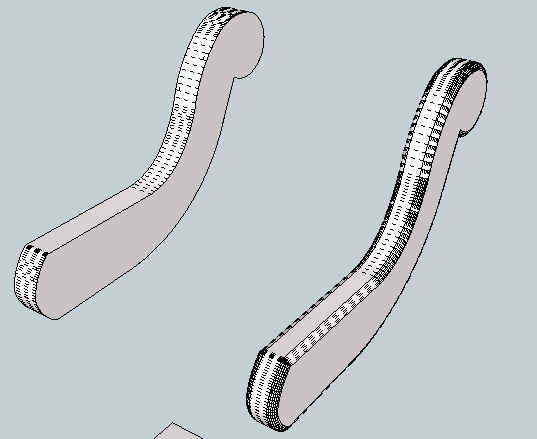
The few issues in the generated model comes from the too high sampling of the curved sections and some transverse edges. So you probably need to do some clean up. But overall, I could not reproduce the hang situation you described.Did you select the whole model (I mean all edges) or just the two lateral faces?
Fredo








Advertisement