[Plugin][$] RoundCorner - v3.4a - 31 Mar 24




-
@countercharge said:
Loving it so far but I can't figure out how to round edges that are on the inside/interior of an object. If I try to do that, it covers the opening. I'm sure that's somewhere in this long thread.. any idea what page to look at?
Just erase the cover face(s). The rounding is underneath.
Fredo
-
NEW RELEASE: RoundCorner v3.2e - 25 Oct 17
RoundCorner 3.2e is a maintenance release. It fixes a weird issue on French platforms, preventing the plugin to launch (in relation with decimal separator differences)..
Home Page of RoundCorner for information and Download.
-
I am working on knife and when I use the round over tool I loose faces. A copy of the handle is at 1000x as I wanted to show that scaling up does not fix the issue I have. My model is at the origin original size and it has a volume.
I have used this wonderful tool many times before but I seem to have developed this model in a way that is not compatible with the round over tool.
I used Cuviloft to skin if that is a factor. Also I welded all the perimeter lines hoping that might help, it did fix some issues.
Thanks
Jeff
-
Even scaled up, the tiny radius on the round overs creates some bad geometry. Make a reasonable radius and it works. I used 10 in.
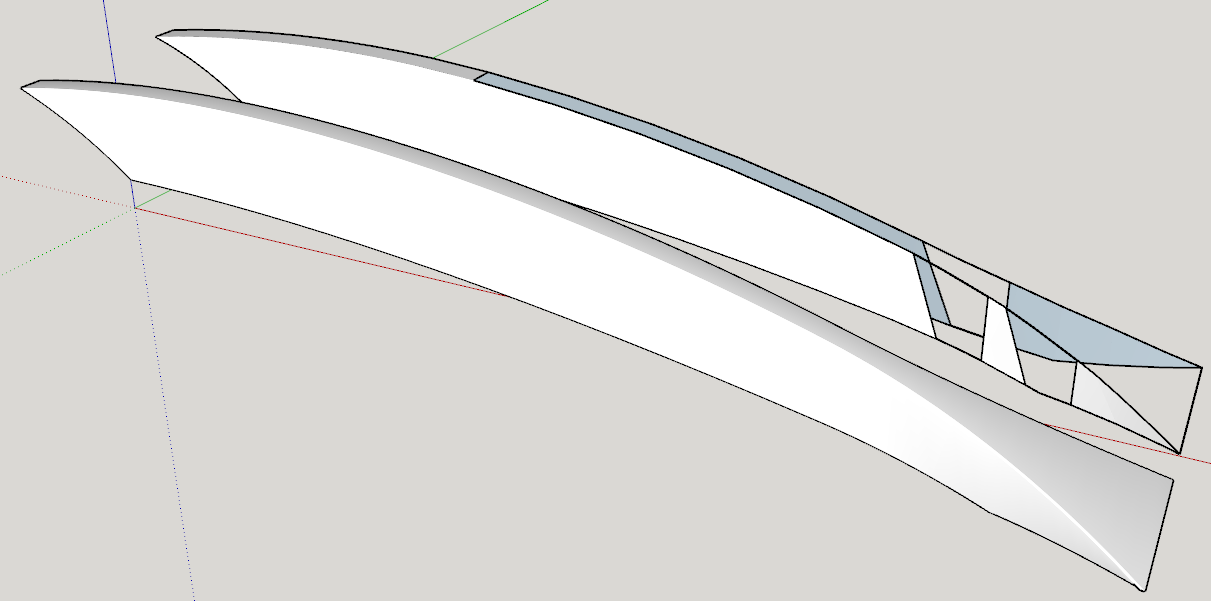
-
Dave
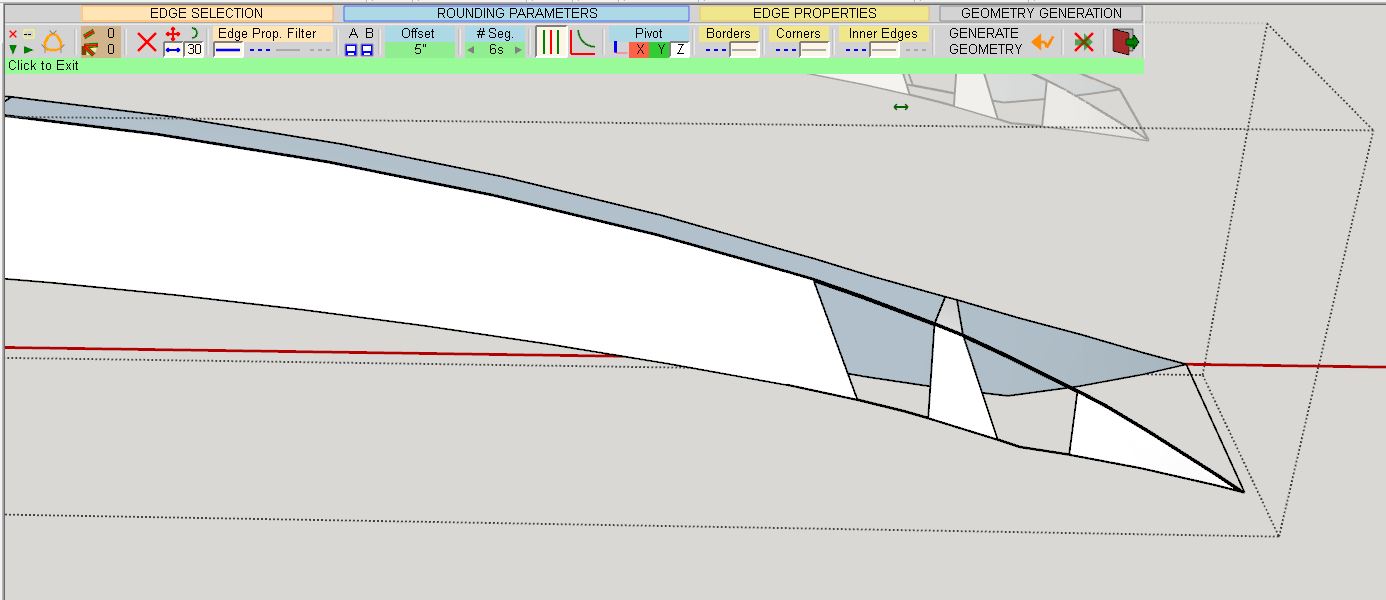
Thanks for you quick reply but I am unable to duplicate your results. Maybe the screen shot can help
Thanks
Jeff
-
It all depends on your geometry.
As it has been generated by Curviloft, I imagine it is triangulated. Just turn on Hidden Geometry to verify it.
In that case, I am afraid that RoundCorner will have difficulty to perfrom its task, whatever the scale is. Sorry for that. Another algorithm is needed to handle those cases.
Fredo
-
Did you try with a larger radius? I used 10 in., not 5 in.
Edit to add: I redrew the shape rather than trying to reconstruct yours. I didn't use Curviloft so I didn't have the triangulation.
-
Thanks so much for the help!
-
I had some trouble in using this plugin. The object I had rounded seemed like useless afterwards, I could not move nor color it, or anything else since my SU 2013 would crash if I do that. Before rounding, I have set the offset etc to the appropriate value. Could someone advice me what to do? I have also installed the newest LibFred
-
@riuslyp said:
I had some trouble in using this plugin. The object I had rounded seemed like useless afterwards, I could not move nor color it, or anything else since my SU 2013 would crash if I do that. Before rounding, I have set the offset etc to the appropriate value. Could someone advice me what to do? I have also installed the newest LibFred
Can you share an example?
What is your graphics card? Are it's drivers up to date?
-
@dave r said:
@riuslyp said:
I had some trouble in using this plugin. The object I had rounded seemed like useless afterwards, I could not move nor color it, or anything else since my SU 2013 would crash if I do that. Before rounding, I have set the offset etc to the appropriate value. Could someone advice me what to do? I have also installed the newest LibFred
Can you share an example?
What is your graphics card? Are it's drivers up to date?
I use AMD A8-7410 APU with AMD Radeon R5 Graphics, 2200 Mhz, 4 Core(s), and yes, my graphic card is up to date.
I was just trying to round a cube and I wanted to move it, but my SU then suddenly crashed. I had also tried to uncheck the 'hardware accelerator' but for no use. -
Are you really running SU2013 (as your profile indicates)?
Fredo
-
Thanks for the plug-in Fredo. It seems to do a fine job.
My issue is not in getting the tool to work - my issue is what is happening you my shape after the round-over.
What I'm working on is not a complex shape - it's essentially a rectangle 15x100x455 mm. The top face has a radius of 254mm into it. It's a long box with a grove in it

My issue is that after I round all my edges the "entities" in SketchUp are basically lost. I now have an amorphous rectangle shape and I've lost all the "dimensional attributes" to all the elements/faces - I cannot submit this to a manufacturer for production with the dimensional data visible as I'd like to.
I am arguably very new to SketchUp - have I missed something obvious here - perhaps some sort of layering or overlay where I can apply the round-over and still have all the "square" reference data in place?
EDIT:
Well - I can use the dimensions tool to indicate the dimensions, and that's technically "good enough" for my need. But I'm still curious to know if there's a way to keep that entity data in place..... -
How about sharing the SKP file so we can see exactly what you've got and give you some guidance?
-
@vancod said:
My issue is that after I round all my edges the "entities" in SketchUp are basically lost. I now have an amorphous rectangle shape and I've lost all the "dimensional attributes" to all the elements/faces - I cannot submit this to a manufacturer for production with the dimensional data visible as I'd like to.
That's not a problem with the plugin. If you were doing the rounding manually, you would have the same problem. You need to modify the faces affected by the rounding and create new facets.
So, it's more the sequence in your workflow. Do the rounding first (and other editing tasks) and then put the decoration (dimensions, textures, ...)Fredo
-
Hi Fredo,
Absolutely amazing plugin, I am new to Sketchup and am busy playing with some designs to see if it is worth buying a 3d printer, no point in getting a printer if I cannot create designs to print. This plugin works perfectly for external corners but I cannot seem to get this to work on internal shapes. For example I have cube with a hole through it and would like the edge of the hole rounded. When I use this tool it just erases the hole completely. Is this normal behavior or am I being stupid?
Thank you for all this work you have put in your tool
Nick
-
@99hash said:
Hi Fredo,
Absolutely amazing plugin, I am new to Sketchup and am busy playing with some designs to see if it is worth buying a 3d printer, no point in getting a printer if I cannot create designs to print. This plugin works perfectly for external corners but I cannot seem to get this to work on internal shapes. For example I have cube with a hole through it and would like the edge of the hole rounded. When I use this tool it just erases the hole completely. Is this normal behavior or am I being stupid?
Thank you for all this work you have put in your tool
Nick
This is a small inconvenience in the current version.
Just select the face occulting the hole and erase it. It should reveals the rounding of the hole.Fredo
-
often when I use Round Corner it crashes Sketchup. If I am working and then click on round corner it almost always crashes. Then when I re-open SU and try using Round Corner it works fine. I have the same problem in SU17 and SU18. I am using a mac on the latest MacOS. (it has been happening for a long time in various versions of MacOS) Any solution to this? The only solution i have found is to close SU and reopen it, which is very frustrating if I am doing a lot of Round Corner. Thanks
-
@steuart said:
often when I use Round Corner it crashes Sketchup. If I am working and then click on round corner it almost always crashes. Then when I re-open SU and try using Round Corner it works fine. I have the same problem in SU17 and SU18. I am using a mac on the latest MacOS. (it has been happening for a long time in various versions of MacOS) Any solution to this? The only solution i have found is to close SU and reopen it, which is very frustrating if I am doing a lot of Round Corner. Thanks
Actually, first time I hear about these crashes from users, and also that this has happened before.
I would suggest you give the list of the other plugins you run in your environment, as some are known to be in conflict with RoundCorner (and other plugins).
Thanks
Fredo
-
Hi Fredo, Thanks for fast reply. I have: Advanced Camera Tools, Dynamic Components, Sandbox, Trimble Connect (no idea what any of those do), plus your LibFredo6, Curviloft (looks great - only downloaded it yesterday, not tried it out yet), Round Corner. I used to have pipe along, which I think caused similar issues, but have not installed that in SU18. I am running the latest version of everything and Mac OS10.13.3 on a 2013 MacBook pro retina. (new iMac arriving tomorrow)
Thanks




Advertisement