sketchucation logo sketchucation
    • Login
    Oops, your profile's looking a bit empty! To help us tailor your experience, please fill in key details like your SketchUp version, skill level, operating system, and more. Update and save your info on your profile page today!
    ⚠️ Update | Sketchucation Tools 5.0.8 released with licensing improvements and bugfixes Download

    [Plugin][$] RoundCorner - v3.4a - 31 Mar 24


    Scheduled Pinned Locked Moved Plugins
    1.5k Posts 477 Posters 4.1m Views 477 Watching
    Loading More Posts
    • Oldest to Newest
    • Newest to Oldest
    • Most Votes
    Reply
    • Reply as topic
    Log in to reply
    This topic has been deleted. Only users with topic management privileges can see it.
    • B
      Ben Ritter
      last edited by

      Thank you Fredo!

      1 Reply Last reply
      Reply Quote 0
      • L
        LucasBarbos4
        last edited by

        Wow. Thanks for this Fredo.

        1 Reply Last reply
        Reply Quote 0
        • P
          pedrinalex
          last edited by

          Many Thanks Freddo ¡¡¡

          MB ASUS x99M-WS, Xeon e5 2695 v3, 64 GB RAM 2400, 2x gforce gtx 1060, 1 SSDH 1 tb & 3 HD 1 TB c/u

          1 Reply Last reply
          Reply Quote 0
          • R
            rolopolo
            last edited by

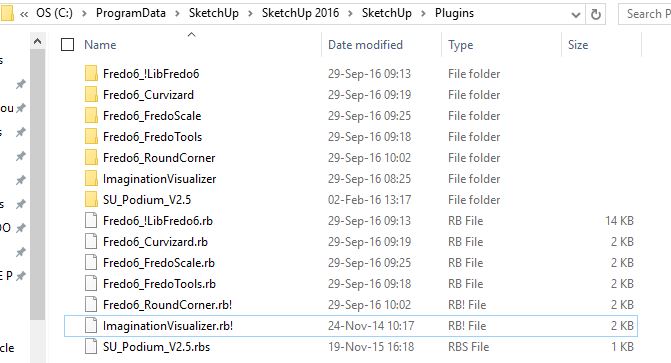
            roundcorner will not work! i cant get the palette to load.

            i have installed roundcorner via the extension store.
            all other fredo tools are working correctly
            libfredo6 is all up to date
            the footprint is correct - see upload attach

            win10 sketchup2016pro

            I cant think what to try next after reinstalling multiple times

            Can anybody help?

            thanks

            Capture.JPG

            1 Reply Last reply
            Reply Quote 0
            • N
              namelessone
              last edited by

              Hey fredo,

              I'm having difficulties with getting round corners correct on some edges of my model. To make things simpler, I can provide screenshots of selected problematic edges and .skp file of model part I'm working on. Is it just limitation or perhaps plugin is confused?

              http://tonic-art.com/round1.jpg

              http://tonic-art.com/round2.jpg

              http://tonic-art.com/round.skp

              1 Reply Last reply
              Reply Quote 0
              • gillesG
                gilles
                last edited by

                First thing, SU does not manage too small faces; so make your part a component, create a copy, scale up the copy X1000, work on the copy.

                " c'est curieux chez les marins ce besoin de faire des phrases "

                1 Reply Last reply
                Reply Quote 0
                • Dave RD
                  Dave R
                  last edited by

                  @rolopolo said:

                  roundcorner will not work! i cant get the palette to load.

                  i have installed roundcorner via the extension store.
                  all other fredo tools are working correctly
                  libfredo6 is all up to date
                  the footprint is correct - see upload attach

                  win10 sketchup2016pro

                  I cant think what to try next after reinstalling multiple times

                  Can anybody help?

                  thanks

                  According to your screenshot you have round Corner disabled by the addition of ! to the file extension. Try changing it to just .rb

                  Etaoin Shrdlu

                  %

                  (THERE'S NO PLACE LIKE)

                  G28 X0.0 Y0.0 Z0.0

                  M30

                  %

                  1 Reply Last reply
                  Reply Quote 0
                  • TIGT
                    TIG Moderator
                    last edited by

                    @rolopolo

                    Somehow you have disabled the Fredo6_RoundCorner .RB file.
                    It is listed a an .RB! file, which mean it is disabled using the SketchUcation Plugins Manager, therefore it will not load as SketchUp starts.

                    In SketchUp open the SketchUcation Plugins Manager, in the right-hand column are the disabled plugins.
                    Select the RoundCorner one and use the Green button to move it into the enabled left-hand column.

                    Because of the nature of Fredo's tools and his Lib [which should also be enabled/active] you are best off closing SketchUp and restarting.
                    That way everything will be registered properly.

                    Since it is an Extension it might be deactivated and at this point not add menu of toolbar entries, so you should then check the SketchUcation Extensions Manager's listing: if it appears in the deactivated right-column, again activate it by selecting and using the green-button to move it into the left-column.
                    You might need to activate the toolbar from the separate Toolbar list...

                    It should then load and be active every time SketchUp starts...

                    TIG

                    1 Reply Last reply
                    Reply Quote 0
                    • N
                      namelessone
                      last edited by

                      @gilles said:

                      First thing, SU does not manage too small faces; so make your part a component, create a copy, scale up the copy X1000, work on the copy.

                      Sadly, that's not it

                      1 Reply Last reply
                      Reply Quote 0
                      • Dave RD
                        Dave R
                        last edited by

                        How about sharing the SKP file so we can see what happens?

                        Etaoin Shrdlu

                        %

                        (THERE'S NO PLACE LIKE)

                        G28 X0.0 Y0.0 Z0.0

                        M30

                        %

                        1 Reply Last reply
                        Reply Quote 0
                        • R
                          rv1974
                          last edited by

                          There are some areas in your printscreen that couldn't get rounded even theoretically.

                          1 Reply Last reply
                          Reply Quote 0
                          • N
                            namelessone
                            last edited by

                            @dave r said:

                            How about sharing the SKP file so we can see what happens?

                            I gave link below screenshots,
                            http://tonic-art.com/round.skp

                            1 Reply Last reply
                            Reply Quote 0
                            • TIGT
                              TIG Moderator
                              last edited by

                              I'm sure it's already been said here, and it's been commonly said elsewhere...
                              SketchUp cannot create geometry less than 1/1000".
                              With start/end of edges closer than that are regarded as coincident so that edge fails to form, then any faces that might rely on that edge are also missed out...

                              Your model contains some tiny geometry - it's a wonder that it's survived thus far.

                              It is easily resolved.
                              Try Scaling everything x1000.
                              Then set your Model Info > Units to m rather than mm.
                              Switch off Units display.
                              Change the number of d.p. displayed.
                              Model in units assuming they are mm...

                              Tiny edges are avoided.
                              They can still exist in SketchUp but you can't make them...

                              When you are ready to export to some other format, rescale the model down and use that.
                              You'll need to reset the Model Units.
                              A simple rescaling trick is to draw a line at the existing size that's 1000 units long and use the Tapemeasure tool to pick the start/end, which should show 1000, then type 1 + <enter>
                              When prompted, accept the rescale and everything is reduced by 1/1000th

                              TIG

                              1 Reply Last reply
                              Reply Quote 0
                              • A
                                ardianto0951
                                last edited by

                                Thanks Fredo, it Helps.......

                                1 Reply Last reply
                                Reply Quote 0
                                • A
                                  alankong
                                  last edited by

                                  Great

                                  1 Reply Last reply
                                  Reply Quote 0
                                  • D
                                    deadstar
                                    last edited by

                                    thanks

                                    1 Reply Last reply
                                    Reply Quote 0
                                    • N
                                      numerobis
                                      last edited by

                                      @numerobis said:

                                      @numerobis said:

                                      The edges are showing up correctly (hard edges) but the shading is messed up in display and rendering.
                                      I have to use the smoothing controls after the beveling and set it to hard egdes again to get this fixed.

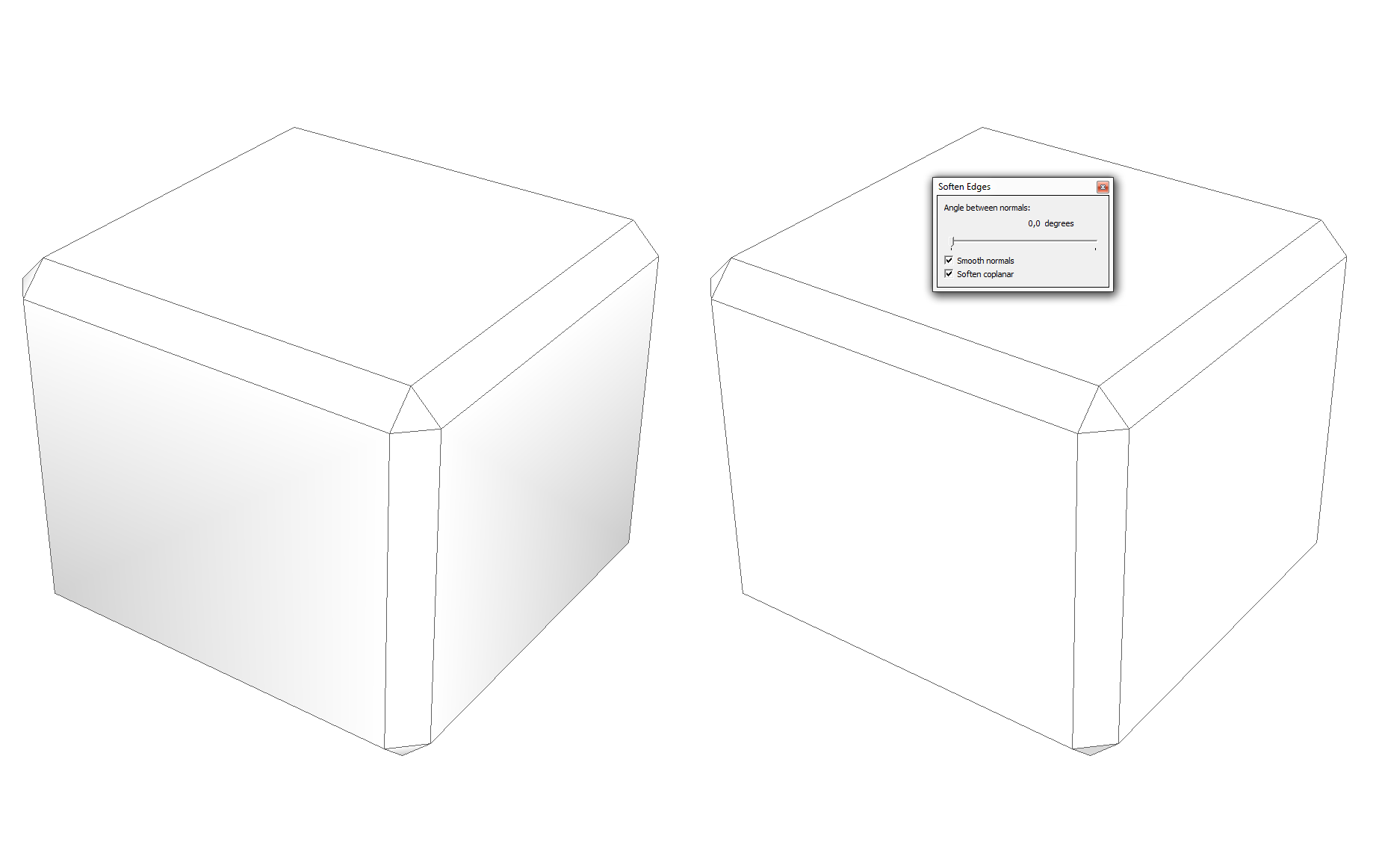
                                      Any chance to get this fixed? Here is an example how it looks like in SU. Just like smoothing >45° + hard edges.
                                      The left cube is the direct result of the beveling. The right one is the same model with corrected normals (0°).
                                      https://abload.de/img/chamfer017fu3y.png

                                      (The lighting is the same)

                                      no? ❓

                                      1 Reply Last reply
                                      Reply Quote 0
                                      • fredo6F
                                        fredo6
                                        last edited by

                                        @numerobis said:

                                        @numerobis said:

                                        The edges are showing up correctly (hard edges) but the shading is messed up in display and rendering.
                                        I have to use the smoothing controls after the beveling and set it to hard egdes again to get this fixed.

                                        Any chance to get this fixed? Here is an example how it looks like in SU. Just like smoothing >45° + hard edges.
                                        The left cube is the direct result of the beveling. The right one is the same model with corrected normals (0°).

                                        https://abload.de/img/chamfer017fu3y.png

                                        (The lighting is the same)
                                        no? ❓

                                        I am unclear on what is the problem.
                                        Do you have a model to share as well as the parameters you use for the Bevel operation.

                                        Thanks

                                        Fredo

                                        1 Reply Last reply
                                        Reply Quote 0
                                        • N
                                          numerobis
                                          last edited by

                                          Sure, but i think there is nothing special at all.

                                          https://abload.de/img/bevelcjspt.png

                                          And here is model (v2015). The left cube shows the result of the beveling and the right one is the same model with fixed normals (0°).


                                          bevel01.skp

                                          1 Reply Last reply
                                          Reply Quote 0
                                          • TIGT
                                            TIG Moderator
                                            last edited by

                                            I can see no visible difference between the two versions.
                                            Perhaps due to my OpenGL settings.

                                            However, using Entity Info on the contents...
                                            The edges in the right-hand one are all 'normal' [i.e. solid with no behaviors checked].
                                            But the edges in the left-hand one have their behaviors set differently -
                                            'smooth' is checked, 'soft' is not.
                                            However, they do not appear as softened/smoothed dotted-edges, but as 'normal' solid edges ??

                                            TIG

                                            1 Reply Last reply
                                            Reply Quote 0

                                            Hello! It looks like you're interested in this conversation, but you don't have an account yet.

                                            Getting fed up of having to scroll through the same posts each visit? When you register for an account, you'll always come back to exactly where you were before, and choose to be notified of new replies (either via email, or push notification). You'll also be able to save bookmarks and upvote posts to show your appreciation to other community members.

                                            With your input, this post could be even better 💗

                                            Register Login
                                            • 1
                                            • 2
                                            • 48
                                            • 49
                                            • 50
                                            • 51
                                            • 52
                                            • 74
                                            • 75
                                            • 50 / 75
                                            • First post
                                              Last post
                                            Buy SketchPlus
                                            Buy SUbD
                                            Buy WrapR
                                            Buy eBook
                                            Buy Modelur
                                            Buy Vertex Tools
                                            Buy SketchCuisine
                                            Buy FormFonts

                                            Advertisement