[Plugin][$] RoundCorner - v3.4a - 31 Mar 24




-
Just amazing!!!!!!!

Thank you very, very much, Fredo!!!!!
Jörg -
Has anyone got this to work on a Mac?
I cannot get the plugin to show.
I have tried installing to the following locations:
Macintosh HD/Library/Application Support/Google SketchUp 7/SketchUp/plugins
User/Library/Application Support/Google SketchUp 7/SketchUp/plugins -
Fredo
Splats as before, hourglass appears very briefly before splat-screen.
Here's latest report...FredoTraceRoundCorner[TIG-20090711].txt -
With which words I could thank for your work, Fredo6? Simply fantastic.
And with me again, in SU 7 bug splat, SU 6, works fine.
Thanks again.
-
WOW! This is incredible!


Great Work!
Thank You very very much!!!!the whole skp dev team (if there is one existing - don't know, after seeing v7) should quit developing new functions and concentrate on x64 and highpoly support ...or go home instead.
Sketchup v6.9 "Community Edition" rockz!!!


-
I have been trying in SU7 on more complex models. Still does not get a bugsplat.
On 3D letters, RoundCorner gives better results than the old RoundEdge.
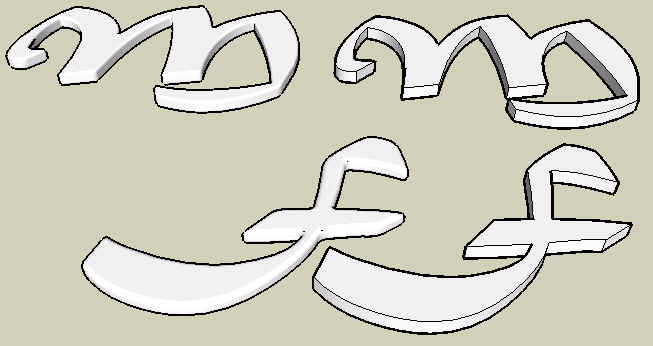
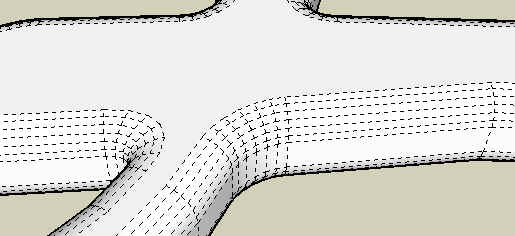
-
I have using SU 7 on Windows Vista x64 SP1 and I have always bug splat.
I have instaled Windows XP SP3 x86 on another HD and until now I don't have Bug Splat.Maybe the problem is with Windows Vista.
-
@bagatelo said:
I have using SU 7 on Windows Vista x64 SP1 and I have always bug splat.
I have instaled Windows XP SP3 x86 on another HD and until now I don't have Bug Splat.Maybe the problem is with Windows Vista.
I doubt this comes from the operating system. I have myself Vista x64 and does not have problem. Did you try with the latest ruby files I posted (2 messages above)?
-
This plug in works incredible and very easy to use ... Thank you very much Fredo6...
-
Fredo
I don't know what you did exactly to the files BUT all of the options now work perfectly... without a single bugsplat - despite my best [worst] efforts to make one !Well fixed !!!
[Now all you have to do is stop it writing the 'FredoTraceRoundCorner.txt' file into Plugins and it'll be 'perfect'...]
-
Fredo
I have tested the new version and it works perfectly too... even tried a very small bevel <1mm OK...
It still writes the temp txt file...
-
Only relevant for bugsplats issues
I still don't understand what is the exact problem. I tried under SU7 with a cube of 10 meters dimensions and a 1 mm bevel, and it works without any splat (though you hardly see the bevel).
In any case, as the origin might be subtle, I have equipped the processing methods with a file trace (file FredoTraceRoundCorner.txtin the Sketchup Plugins directory). You just drop the attached file in the ROUNDCORNDER_Dir_20 folder.
If you are able to reproduce a bugsplat, could you please send me the text file.
Thanks
Fredo
[Edit 11 Jul 09] Attachment removed. Fix in release 2.0b
-
@tig said:
Here's my error message...[attachment=0:nm089gv7]<!-- ia0 -->FredoTraceRoundCorner[1mcube100mmbevel all edgesTIG].txt<!-- ia0 -->[/attachment:nm089gv7]
TIG,
Very strange. The trace files says that you executed the whole operation with no problem.
That was the same for Pilou's trace file.Please keep the model where you can reproduce the bugsplat until I can identify the problem and find a solution.
If so, could you try again with the attached file (it still contain traces).
Also, do you see the hour glass before the splat?Fred
[Edit 11 Jul 09] Attachment removed. Fix in release 2.0b
-
About the bugsplat in SU7
@tig said:
Fredo
Splats as before, hourglass appears very briefly before splat-screen.
Here's latest report...[attachment=0:2kckf8n5]<!-- ia0 -->FredoTraceRoundCorner[TIG-20090711].txt<!-- ia0 -->[/attachment:2kckf8n5]It seems that the whole operation completes normally. The bugsplat may be right afterward.
I have tweaked the code, just in case, with the attached files.
If you can reproduce again the same situation you had before, would you mind to test.
ThanksFredo
[Edit 11 Jul 09] Attachment removed. Fix in release 2.0b
-
@tig said:
Fredo
I don't know what you did exactly to the files BUT all of the options now work perfectly... without a single bugsplat - despite my best [worst] efforts to make one !Well fixed !!!
**[Now all you have to do is stop it writing the 'FredoTraceRoundCorner.txt' file into Plugins and it'll be 'perfect'...]
**Apparently SU7 does not like calling GUI functions via UI.start_timer.
Before I release the fix, would you mind to test the attached file (still with traces) so that I am sure this is the problem (whether you get or not the splat, I would know what it is).[Edit 11 Jul 09] Attachment removed. Fix in release 2.0b
Again, thanks very much for your help.
Fredo
-
NEW version 2.0b, hopefully fixing the bugsplat problem in SU7.
Thanks to TIG and others for helping debug this one.See main post at http://forums.sketchucation.com/viewtopic.php?f=180&t=20485#p171721
-
Here is a question coming from another thread
@unknownuser said:
through the round corners parameters under Tools is ther any way to make is so that the geometry isnt automatically softened?
In the RoundCorner palette, you have 2 sections to set up the edge properties of the generated roundings: one for the borders(outer edges), one for the inner edges.
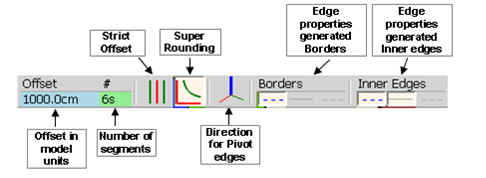
The 3 buttons are for Soft, Smooth and Hidden. When none are selected, it indeed means plain edges.
The default is Soft for borders and Soft + Smooth for inner edges (you can set these default by clicking on the small title button above).
-
@unknownuser said:
I'm feeling bad for not helping you with nothing since your plugins more than once have helped finishing my (personal or professional) projects, and you never ask nothing in return for this plugins, so if you need any help in any project of yours, (modeling, texturing , rendering etc), some tips, tricks, toturials, info on software or whatever or even just a good discussion, anything that i can help just tell me. i would gladly help you.
DavidThanks for your encouragements and warm feelings.
I am just curious to see what RoundCorner gives when shapes are rendered with tools like Kerkythea, Podium and other nice engines.
Fredo -
Not completely sure it could be very useful in practical life, but I forgot to mention that the algorithm used by the script allows for custom profiles, under 2 conditions:
- The profile must be symmetrical
- it only works in Round mode (not in Sharp mode)
Of course, I would need to build some GUI to design and select custom profiles.
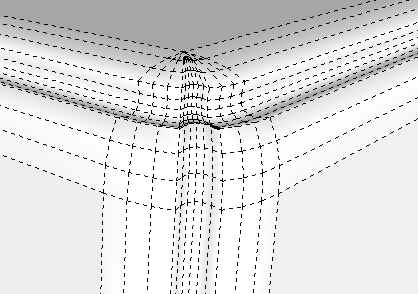
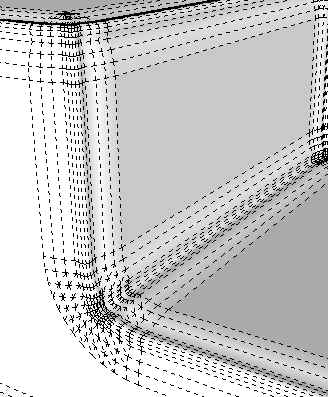
I enclosed a few examples in the attached SKP file (SU7 format).
Fredo
-
..amazing, Fredo.






Advertisement