sketchucation logo sketchucation
    • 登入
    Oops, your profile's looking a bit empty! To help us tailor your experience, please fill in key details like your SketchUp version, skill level, operating system, and more. Update and save your info on your profile page today!
    ⚠️ Important | Libfredo 15.6b introduces important bugfixes for Fredo's Extensions Update

    Move groups with different measures?

    已排程 已置頂 已鎖定 已移動 Developers' Forum
    55 貼文 4 Posters 29.4k 瀏覽 4 Watching
    正在載入更多貼文
    • 從舊到新
    • 從新到舊
    • 最多點贊
    回覆
    • 在新貼文中回覆
    登入後回覆
    此主題已被刪除。只有擁有主題管理權限的使用者可以查看。
    • thomthomT 離線
      thomthom
      最後由 編輯

      You don't have to do one loop to filter out the groups and then one to process them. That isn't too efficient.

      
      model = Sketchup.active_model
      entities = model.entities
      selection = model.selection
      groups = []
      z=0
      
      entities.each do |e|
        # Skip all entities that aren't groups
        next unless e.is_a? Sketchup;;Group
        # Now we process the groups
        z += 100 # self increments can be written shorter like this
        point = Geom;;Point3d.new 0,0,z
        t = Geom;;Transformation.new point
        # Apply the transformation
        e.transform!(t)
      end


      Thomas Thomassen — SketchUp Monkey & Coding addict
      List of my plugins and link to the CookieWare fund

      1 條回覆 最後回覆 回覆 引用 0
      • thomthomT 離線
        thomthom
        最後由 編輯

        @tig said:

        There's a typo in your code too groups.each do |e|...
        should be entities.each do |e|... as you have and empty array 'groups'...

        Ooops! Corrected. 👍

        Thomas Thomassen — SketchUp Monkey & Coding addict
        List of my plugins and link to the CookieWare fund

        1 條回覆 最後回覆 回覆 引用 0
        • pilouP 離線
          pilou
          最後由 編輯

          Just to find now apply that just only for a selection! 😄

          Frenchy Pilou
          Is beautiful that please without concept!
          My Little site :)

          1 條回覆 最後回覆 回覆 引用 0
          • TIGT 離線
            TIG Moderator
            最後由 編輯

            @unknownuser said:

            à Tig Some cryptic but I will see that 😉
            Joint an image for no ambiguities
            So here the increment is 300 cm

            My method adds '100mm' to each group's Z and moves then to suit: the other way with 'z+=100.mm' increments z by 100mm each step through the loop so then the groups get progressively further apart !

            If you want to move all groups a certain amount use my way, if [for some unfathomable reason] you want to do a pseudo-grow then increment the offset each time...

            My method finds each group's transformation [as an array], changes just its Z value and then resets it: the other way invents a new transformation and applies it to the group...

            TIG

            1 條回覆 最後回覆 回覆 引用 0
            • TIGT 離線
              TIG Moderator
              最後由 編輯

              @unknownuser said:

              Just to find now apply that just only for a selection! 😄

              
              def movegallgroupsup100mm()
                  model = Sketchup.active_model
                  entities = model.active_entities
                  selection = model.selection
                  ###groups = [];entities.each{|entity|groups.push(entity) if entity.kind_of?(Sketchup;;Group)}###
                  groups=[];selection.each{|entity|groups.push(entity) if entity.kind_of?(Sketchup;;Group)}
                  groups.each{|group|
                    transformation_as_array = group.transformation.to_a
                    # Z value is at position 14 ###...
                    transformation_as_array[14] = transformation_as_array[14] + 100.mm
                    ### or whatever increment is desired
                    ### they each move up by 100mm from where they are currently...
                    group.transformation = transformation_as_array
                  }
              end#def


              Note that I've keep making the array of groups separate from the loop though the selection - changing them - since this way allows you to do other things to that array later if desired... e.g. groups[0].material="Red"###colours the first group red !
              PS: The test definition 'movegallgroupsup100mm' is optional !!! 😉
              To test your code I suggest you type this in the Ruby-Console [assuming the file is called "tester.rb"]
              load"tester.rb";movegallgroupsup100mm
              this will load and run the script... if it's not doing what you expect then change the script and copy+paste the line back into the console and it will load/run repeat... etc etc

              TIG

              1 條回覆 最後回覆 回覆 引用 0
              • thomthomT 離線
                thomthom
                最後由 編輯

                
                model = Sketchup.active_model
                entities = model.entities
                selection = model.selection
                groups = []
                z=0
                
                selection.each do |e| # update!
                  # Skip all entities that aren't groups
                  next unless e.is_a? Sketchup;;Group
                  # Now we process the groups
                  z += 100 # self increments can be written shorter like this
                  point = Geom;;Point3d.new 0,0,z
                  t = Geom;;Transformation.new point
                  # Apply the transformation
                  e.transform!(t)
                end


                Thomas Thomassen — SketchUp Monkey & Coding addict
                List of my plugins and link to the CookieWare fund

                1 條回覆 最後回覆 回覆 引用 0
                • pilouP 離線
                  pilou
                  最後由 編輯

                  @Tig
                  I have the "Web console" so no problem for copy/ past and launch it
                  Seems your plug move all selection of groups, but not each by each 😄
                  Result stay grouped without interval

                  What is precisely this "14" value?
                  ( i have just 5 group and one component (Bryce) for the moment and just 3 selected for the test 😉
                  Why not take the first value of the array?

                  The ThomThom method works except that woks for the 5 groups and not only for the selection 😄
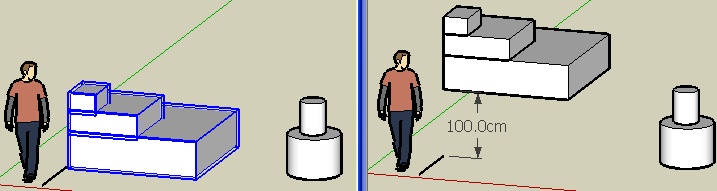

                  move01.jpg

                  Frenchy Pilou
                  Is beautiful that please without concept!
                  My Little site :)

                  1 條回覆 最後回覆 回覆 引用 0
                  • thomthomT 離線
                    thomthom
                    最後由 編輯

                    SU always uses inches internally.

                    If you want 100mm type 100.mm . See http://code.google.com/intl/nb/apis/sketchup/docs/ourdoc/numeric.html for more units.

                    Thomas Thomassen — SketchUp Monkey & Coding addict
                    List of my plugins and link to the CookieWare fund

                    1 條回覆 最後回覆 回覆 引用 0
                    • pilouP 離線
                      pilou
                      最後由 編輯

                      
                      model = Sketchup.active_model
                      entities = model.entities
                      selection = model.selection
                      groups = []
                      z=0
                      
                      selection.each do |e| # update!
                        # Skip all entities that aren't groups
                        next unless e.is_a? Sketchup;;Group
                        # Now we process the groups
                           point = Geom;;Point3d.new 0,0,z
                        t = Geom;;Transformation.new point
                        # Apply the transformation
                        e.transform!(t)
                        z = z*2 + 100
                      end
                      

                      Perfect 👍 (I put the z=z*2+100 at the end for have the first group of selection with no move)
                      Last thing I obtain 254 cm ( I suppose that is a conversion between inch/cm ?)
                      My first volume is at level z = 0 and I work in cm

                      Frenchy Pilou
                      Is beautiful that please without concept!
                      My Little site :)

                      1 條回覆 最後回覆 回覆 引用 0
                      • TIGT 離線
                        TIG Moderator
                        最後由 編輯

                        Pilou

                        Do you want to move each of the selected groups by the same amount (my code - e.g. 100.mm) or by an ever changing amount ?

                        If you want it to change then you need to define how, and add this into the loop - e.g. z=1..... then loop... z += 2*z
                        exponential type increase !

                        If you are applying different offsets, and you have made the groups in order, then the increments will apply in that way; but it would be possible to 'stack' groups made at different times and the loop would process then in their made order, but not the 'stacked' order you want ! Perhaps you need to add in another test... for each of the group.bounds.min.z. which sorts them by their relative heights, so at least the groups array would be in the height order you expect...

                        TIG

                        1 條回覆 最後回覆 回覆 引用 0
                        • pilouP 離線
                          pilou
                          最後由 編輯

                          @unknownuser said:

                          If you want 100mm type 100.mm

                          Yes! Works like a charm! ☀
                          For my first one that was not like a true romance but with your help, ThomThom, Tig (yet a lot of cryptic for me 😄, and the Chris tutorial and a dash of milk of Tod Burch
                          Many thx for the helps 😎

                          Next will maybe an "explode view" of several groups 😄
                          Just need to know position of a group 😄

                          PS @ Tig Sorry but I had no chance with yours! (see previous page) 😲
                          And yes I want any sort of increments so now I can have any sort of it! Thx! ☀
                          Just play with parameters 😄
                          I keep your group.bounds.min.z. trick in my mind!
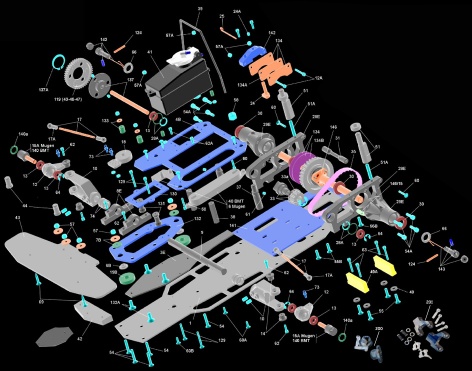

                          eclaté.jpg

                          Frenchy Pilou
                          Is beautiful that please without concept!
                          My Little site :)

                          1 條回覆 最後回覆 回覆 引用 0
                          • TIGT 離線
                            TIG Moderator
                            最後由 編輯

                            for a completely random offset try

                            
                            selection.each do |e|
                                next unless e.is_a? Sketchup;;Group
                                ###point = Geom;;Point3d.new 0,0,(1000.mm * rand)
                                ### offset in Z somewhere between 0m and 1m - 'rand' makes a random number 0><1
                                point = Geom;;Point3d.new (1000.mm * rand),(1000.mm * rand),(1000.mm * rand)
                                ### offset in all XYZ axes by 0 to 1m
                                t = Geom;;Transformation.new point
                                e.transform!(t)
                            end
                            

                            Swap the ### between the different points = to see the effect

                            TIG

                            1 條回覆 最後回覆 回覆 引用 0
                            • thomthomT 離線
                              thomthom
                              最後由 編輯

                              The entities are not returned in their order in z height. You would need to sort the objects by their Z position before applying the transformations.

                              Thomas Thomassen — SketchUp Monkey & Coding addict
                              List of my plugins and link to the CookieWare fund

                              1 條回覆 最後回覆 回覆 引用 0
                              • pilouP 離線
                                pilou
                                最後由 編輯

                                Before testing your new randomizer plug 😄

                                I have a little problem 😄
                                I have used "Grow" by Tig for make the "volume" on the left (50 groups), then my "Plug" Thomthomised 😒
                                with a normal interval of course!
                                Seems there is something wrong somewhere 😮
                                Groups are not recorded following the "grow" generation?
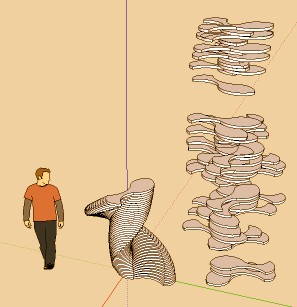

                                humhum.jpg

                                Frenchy Pilou
                                Is beautiful that please without concept!
                                My Little site :)

                                1 條回覆 最後回覆 回覆 引用 0
                                • pilouP 離線
                                  pilou
                                  最後由 編輯

                                  So i must use the Tig Advertissement more soon than I have expected 💚

                                  Frenchy Pilou
                                  Is beautiful that please without concept!
                                  My Little site :)

                                  1 條回覆 最後回覆 回覆 引用 0
                                  • pilouP 離線
                                    pilou
                                    最後由 編輯

                                    This group.bounds.min.z. can be found somewhere or the sorting of Groups must be forged again?
                                    (nothing about sort, sorting in the API helping) 😮

                                    Frenchy Pilou
                                    Is beautiful that please without concept!
                                    My Little site :)

                                    1 條回覆 最後回覆 回覆 引用 0
                                    • thomthomT 離線
                                      thomthom
                                      最後由 編輯

                                      Build a hash with the entities as the key and their Z posiiton as value and then sort the hash by the values.

                                      Thomas Thomassen — SketchUp Monkey & Coding addict
                                      List of my plugins and link to the CookieWare fund

                                      1 條回覆 最後回覆 回覆 引用 0
                                      • pilouP 離線
                                        pilou
                                        最後由 編輯

                                        Each groups has not a "time creation" trace board? So no need to remake a sorting ?
                                        Seems I have re-open a new nightmare door 💚

                                        Frenchy Pilou
                                        Is beautiful that please without concept!
                                        My Little site :)

                                        1 條回覆 最後回覆 回覆 引用 0
                                        • Chris FullmerC 離線
                                          Chris Fullmer
                                          最後由 編輯

                                          Awesome Pilou! Keep it up, its looking great. You've got lots of good help around here.

                                          Chris

                                          Lately you've been tan, suspicious for the winter.
                                          All my Plugins I've written

                                          1 條回覆 最後回覆 回覆 引用 0
                                          • TIGT 離線
                                            TIG Moderator
                                            最後由 編輯

                                            Try something like...

                                            
                                            zeds=[]
                                            index=0
                                            groups.each{|group|
                                               zeds.push(group.bounds.min.z, index)
                                               index+=1
                                            }
                                            zeds.sort!
                                            sorted_groups=[]
                                            zeds.each{|z|sorted_groups.push(groups[z[1]]) }
                                            ### sorted_groups is now groups sorted by Z



                                            TIG

                                            1 條回覆 最後回覆 回覆 引用 0
                                            • 1
                                            • 2
                                            • 3
                                            • 1 / 3
                                            • 第一個貼文
                                              最後的貼文
                                            Buy SketchPlus
                                            Buy SUbD
                                            Buy WrapR
                                            Buy eBook
                                            Buy Modelur
                                            Buy Vertex Tools
                                            Buy SketchCuisine
                                            Buy FormFonts

                                            Advertisement

