sketchucation logo sketchucation
    • Login
    Oops, your profile's looking a bit empty! To help us tailor your experience, please fill in key details like your SketchUp version, skill level, operating system, and more. Update and save your info on your profile page today!
    Mac User? | Join the Rayscaper Beta for Mac Learn More

    [Plugin] Q JS ALIGN TOOLBAR

    Scheduled Pinned Locked Moved Plugins
    63 Posts 35 Posters 113.3k Views 35 Watching
    Loading More Posts
    • Oldest to Newest
    • Newest to Oldest
    • Most Votes
    Reply
    • Reply as topic
    Log in to reply
    This topic has been deleted. Only users with topic management privileges can see it.
    • CadFatherC
      CadFather
      last edited by

      Hi Coen - yes try with a grouped triangle, the centre differs from the bounding box

      (thanks all for the feedback) ๐Ÿ‘

      EDIT: Coen you got 3 answers in one go - watch your servers.. ๐Ÿ˜‰

      1 Reply Last reply
      Reply Quote 0
      • D
        Daniel S
        last edited by

        Thankyou Cadfather!!!

        @unknownuser said:

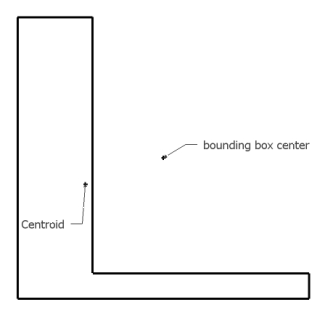
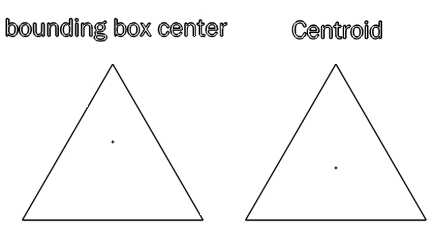
        Can you show me an example where the center of the Group's bounding box is dissimilar from the geometric one?

        Quick example:
        centro.gif
        (centroid is the geometric center)

        Daniel S

        Edit: another example:
        centro2.gif

        1 Reply Last reply
        Reply Quote 0
        • CadFatherC
          CadFather
          last edited by

          there are two issues i think merit attention: centroid reference and spacing/distribution of objects

          we could have icons or a small dialog, sort of this settings.PNG
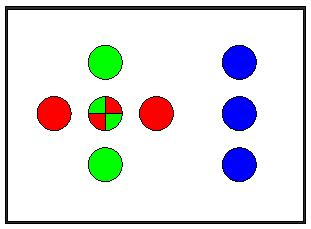
          actually i have looked at the centroid script by Alex Schreyer, but have not been able to implement it into the align script yet (it's going to take me some time)

          in fact if any of the great masters can help, might be better! ๐Ÿ˜’ ๐Ÿ˜„

          1 Reply Last reply
          Reply Quote 0
          • Chris FullmerC
            Chris Fullmer
            last edited by

            EDIT: THis is wrong, I was looking at his shape wrong.

            Thom I think on yours the bounding box center is the geometric center or centroid. Your face runs the diagonal of the bounding box, so placing a centerpoint on that face is just like placing a centerpoint in the middle of a diagonal line of the bounding box.

            Chris

            Lately you've been tan, suspicious for the winter.
            All my Plugins I've written

            1 Reply Last reply
            Reply Quote 0
            • thomthomT
              thomthom
              last edited by

              The bounding box' centre point is not the centre of that extruded triangle.

              Thomas Thomassen โ€” SketchUp Monkey & Coding addict
              List of my plugins and link to the CookieWare fund

              1 Reply Last reply
              Reply Quote 0
              • CadFatherC
                CadFather
                last edited by

                @thomthom said:

                The bounding box' centre point is not the centre of that extruded triangle.

                Chris, it's the background colour throwing you off.. (must have been on purpose!)

                1 Reply Last reply
                Reply Quote 0
                • Chris FullmerC
                  Chris Fullmer
                  last edited by

                  @thomthom said:

                  The bounding box' centre point is not the centre of that extruded triangle.

                  OOooohhh! I get it. Yes, Cadfather is right, I could not see a 3d object there at all. I just saw the front, bright face.

                  So yes thom, you're right. That construction point is not the center of the geometry. ๐Ÿ˜ณ

                  Chris

                  Lately you've been tan, suspicious for the winter.
                  All my Plugins I've written

                  1 Reply Last reply
                  Reply Quote 0
                  • thomthomT
                    thomthom
                    last edited by

                    thehe
                    messing with your head! ๐Ÿ˜‰ ๐Ÿ˜„

                    Thomas Thomassen โ€” SketchUp Monkey & Coding addict
                    List of my plugins and link to the CookieWare fund

                    1 Reply Last reply
                    Reply Quote 0
                    • I
                      ideas_arte
                      last edited by

                      http://www.addemoticons.com/emoticon/animated/AddEmoticons0423.gif
                      Nice...!

                      Thank you very much...!

                      1 Reply Last reply
                      Reply Quote 0
                      • Bob JamesB
                        Bob James
                        last edited by

                        @cadfather said:

                        (tested only on PC - unzip the contents to your plugins folder)

                        Works on Mac except the toolbar doesn't "stick" - have to use View/Toolbars each time SU loads.

                        i7-4930K 3.4Ghz, 2x GTX780 6GB, 32GB DDR3-1600 ECC, OCZ Vertex 4 500GB, WD Black 3TB, 32TB NAS, 4x 27" Monitors, SpaceMouse Pro, X-keys XK-60

                        1 Reply Last reply
                        Reply Quote 0
                        • CadFatherC
                          CadFather
                          last edited by

                          thanks Bob - i hope someone with a mac will be able to fix this ๐Ÿ˜’

                          1 Reply Last reply
                          Reply Quote 0
                          • B
                            BTM
                            last edited by

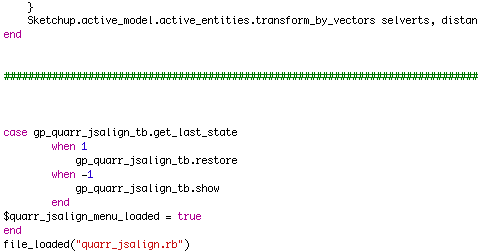
                            Just add this:

                            case gp_quarr_jsalign_tb.get_last_state when 1 gp_quarr_jsalign_tb.restore when -1 gp_quarr_jsalign_tb.show end
                            Picture 1.png

                            1 Reply Last reply
                            Reply Quote 0
                            • utilerU
                              utiler
                              last edited by

                              Thanks Coen, good tip. Could have used it last week while trying to flatten some survey dwgs.... ๐Ÿ‘

                              Just Curious...

                              1 Reply Last reply
                              Reply Quote 0
                              • CadFatherC
                                CadFather
                                last edited by

                                That's great Coen, thanks..and it is really fast as well

                                1 Reply Last reply
                                Reply Quote 0
                                • O
                                  opla457
                                  last edited by

                                  A big thank for this plugin, so great - the function sketchup messed !!

                                  1 Reply Last reply
                                  Reply Quote 0
                                  • jason_marantoJ
                                    jason_maranto
                                    last edited by

                                    Thank you both for this wonderful script -- something I've always wanted in Sketchup.

                                    Best,
                                    Jason.

                                    I create video tutorial series about several 2D & 3D graphics programs.

                                    1 Reply Last reply
                                    Reply Quote 0
                                    • bagateloB
                                      bagatelo
                                      last edited by

                                      I change the plugin to show menus in "Plugins" Menu. Now we can set keyboard keys, is very useful to me.

                                      I thought about a function of "smart drop" for all of the possible directions of the axis, like this, the aligned objects if they would not fix in the most distant part of the object of alignment reference, but they would collide in the surface. Look image example. It would be as the plugin drop, but it would work in all possible directions by axes(9 possibilities, or 6, if we not consider middle). Maybe some keys like SHIFT can change this behavior.


                                      jsAlign.zip


                                      before and after.jpg

                                      While the cat's away, the mice will play

                                      1 Reply Last reply
                                      Reply Quote 0
                                      • bagateloB
                                        bagatelo
                                        last edited by

                                        Two years later I had another idea. Could someone modify this script to reposition the axes of the selected objects? Maybe by pressing a modifier key on the keyboard, such as alt or shift.

                                        While the cat's away, the mice will play

                                        1 Reply Last reply
                                        Reply Quote 0
                                        • V
                                          Vicspa
                                          last edited by

                                          very useful plug-in, thank you ๐Ÿ‘

                                          1 Reply Last reply
                                          Reply Quote 0
                                          • Bob JamesB
                                            Bob James
                                            last edited by

                                            There does not seem to be a way to select which object the others are to align with. I've tried selecting #1 first and then #2, but get the same result if I select #2 first then #1.

                                            It would be very helpful if you could effectively say "make the other(s)" align with "this one"

                                            i7-4930K 3.4Ghz, 2x GTX780 6GB, 32GB DDR3-1600 ECC, OCZ Vertex 4 500GB, WD Black 3TB, 32TB NAS, 4x 27" Monitors, SpaceMouse Pro, X-keys XK-60

                                            1 Reply Last reply
                                            Reply Quote 0

                                            Hello! It looks like you're interested in this conversation, but you don't have an account yet.

                                            Getting fed up of having to scroll through the same posts each visit? When you register for an account, you'll always come back to exactly where you were before, and choose to be notified of new replies (either via email, or push notification). You'll also be able to save bookmarks and upvote posts to show your appreciation to other community members.

                                            With your input, this post could be even better ๐Ÿ’—

                                            Register Login
                                            • 1
                                            • 2
                                            • 3
                                            • 4
                                            • 1 / 4
                                            • First post
                                              Last post
                                            Buy SketchPlus
                                            Buy SUbD
                                            Buy WrapR
                                            Buy eBook
                                            Buy Modelur
                                            Buy Vertex Tools
                                            Buy SketchCuisine
                                            Buy FormFonts

                                            Advertisement