sketchucation logo sketchucation
    • 登入
    Oops, your profile's looking a bit empty! To help us tailor your experience, please fill in key details like your SketchUp version, skill level, operating system, and more. Update and save your info on your profile page today!
    🔌 Smart Spline | Fluid way to handle splines for furniture design and complex structures. Download

    [Plugin] extrudeEdgesByEdges.rb

    已排程 已置頂 已鎖定 已移動 Plugins
    190 貼文 76 Posters 219.2k 瀏覽 76 Watching
    正在載入更多貼文
    • 從舊到新
    • 從新到舊
    • 最多點贊
    回覆
    • 在新貼文中回覆
    登入後回覆
    此主題已被刪除。只有擁有主題管理權限的使用者可以查看。
    • M 離線
      mpowell1234567890
      最後由 編輯

      Help, I cannot get it to work..
      Plugin seen not to work..
      Is there a way to fix it?

      @tig said:

      EDIT:
      1.1 20090625
      Speed improvements - face making time ~halved,
      typename >> kind_of?, triangulation glitch trapped
      and orientation improved.
      1.2 20090625
      Orientation speed optimised.
      Glitch on groups erase fixed.
      1.3 20090626
      Edges not facing in convoluted shapes trapped.
      1.4 20090707
      Triangulation improved. Rare intersect glitch fixed.

      This is extrudeEdgesByEdges.rb - it does what its name implies...
      [attachment=2:t7jruxbl]<!-- ia2 -->ExtrudeEdgesByEdgesExample.png<!-- ia2 -->[/attachment:t7jruxbl]
      [attachment=3:t7jruxbl]<!-- ia3 -->ExtrudeEdgesByEdgesEsamples.skp<!-- ia3 -->[/attachment:t7jruxbl]
      [attachment=1:t7jruxbl]<!-- ia1 -->extrudeEdgesByEdges.rb<!-- ia1 -->[/attachment:t7jruxbl]

      1 條回覆 最後回覆 回覆 引用 0
      • TIGT 離線
        TIG Moderator
        最後由 編輯

        @mpowell1234567890 said:

        Help, I cannot get it to work..
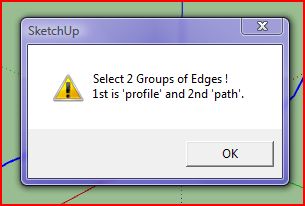
        [attachment=0:1yi83ajh]<!-- ia0 -->Plugin error.JPG<!-- ia0 -->[/attachment:1yi83ajh]
        Is there a way to fix it?

        On the face of it, it looks like you aren't making a set of edges and grouping them as the 'profile', and also a set of edges and grouping them as the 'path'... Do this, then select the two groups and run the tool... The error message is telling you you haven't selected two groups...

        If you have other problems then please expand in your explanation...

        TIG

        1 條回覆 最後回覆 回覆 引用 0
        • TIGT 離線
          TIG Moderator
          最後由 編輯

          Here's v1.5 - It now Zooms to show the new group [at Pilou's request]
          http://forums.sketchucation.com/viewtopic.php?p=166780#p166780
          ...

          TIG

          1 條回覆 最後回覆 回覆 引用 0
          • bazB 離線
            baz
            最後由 編輯

            This is an astounding plugin, I've already found myself using it on lots of 'ordinary' tasks where usually I would have had to stuff around for ages with followme, copypaste, etc.
            Thank you very much Tig.
            Baz

            1 條回覆 最後回覆 回覆 引用 0
            • pilouP 離線
              pilou
              最後由 編輯

              THX! Very reactive! 😎 👍

              Edit 😄
              Seems there is something wrong in the "Zoom" 😉

              That don't work 😮
              zoom out must be made before the first dialog box "Orient faces"
              Without that zoom don't work even at the end 😄
              (I have of course the 1.5)


              zoom.skp

              Frenchy Pilou
              Is beautiful that please without concept!
              My Little site :)

              1 條回覆 最後回覆 回覆 引用 0
              • TIGT 離線
                TIG Moderator
                最後由 編輯

                Here's v1.6 http://forums.sketchucation.com/viewtopic.php?p=166780#p166780
                It fixes a glitch with large mesh group results not zooming properly so that you can see them all...
                The way it works is that it selects the group, 'zooms selected' and then removes group from selection - fine for modest sized meshes BUT if the group is too large SUp hasn't found the selection to 'zoom to' before the selection is cleared... so I've put the 'remove from selection' part after the first dialog so it has time !

                TIG

                1 條回覆 最後回覆 回覆 引用 0
                • JClementsJ 離線
                  JClements
                  最後由 編輯

                  TIG:

                  Is the result you wanted when erasing coplanar edges?

                  John

                  P.S.
                  JSClements is a temp login until I can get JClements restored.


                  Is this the result you wanted when deleting coplanar edges.skp

                  John | Illustrator | Beaverton, Oregon

                  1 條回覆 最後回覆 回覆 引用 0
                  • C 離線
                    cyan.archnet
                    最後由 編輯

                    really SUPERB plugin, THANKS A LOT!

                    1 條回覆 最後回覆 回覆 引用 0
                    • pilouP 離線
                      pilou
                      最後由 編輯

                      Perfect zoom this time 👍


                      perfect.jpg

                      Frenchy Pilou
                      Is beautiful that please without concept!
                      My Little site :)

                      1 條回覆 最後回覆 回覆 引用 0
                      • TIGT 離線
                        TIG Moderator
                        最後由 編輯

                        Here's v1.7 http://forums.sketchucation.com/viewtopic.php?p=166780#p166780
                        Some rare coplanar edge erasure errors have now been trapped...

                        TIG

                        1 條回覆 最後回覆 回覆 引用 0
                        • TIGT 離線
                          TIG Moderator
                          最後由 編輯

                          @unknownuser said:

                          TIG:
                          Is the result you wanted when erasing coplanar edges?
                          John
                          P.S.
                          JSClements is a temp login until I can get JClements restored.

                          Obviously not ! 😠
                          I will check on why this might be happening... I thought such things had all got trapped... watch out for an update !!!

                          TIG

                          1 條回覆 最後回覆 回覆 引用 0
                          • pilouP 離線
                            pilou
                            最後由 編輯

                            Seems you will be quiet only when your true sweep 2 rails will be born 😄
                            Because the "stay parallel orientation" of curves is sometimes annoying for real forms 😉

                            Frenchy Pilou
                            Is beautiful that please without concept!
                            My Little site :)

                            1 條回覆 最後回覆 回覆 引用 0
                            • TIGT 離線
                              TIG Moderator
                              最後由 編輯

                              Pilou, patience ! 🎉

                              TIG

                              1 條回覆 最後回覆 回覆 引用 0
                              • pilouP 離線
                                pilou
                                最後由 編輯

                                😄
                                It's soon holiday so September will be Christmas surprise 💚

                                Frenchy Pilou
                                Is beautiful that please without concept!
                                My Little site :)

                                1 條回覆 最後回覆 回覆 引用 0
                                • F 離線
                                  Fletch
                                  最後由 編輯

                                  First, TIG, thank you so much for this awesome plugin! I've been begging Didier for years to write a Follow Me tool for Edges for a long time.

                                  The only issue is that the edge remains in its original orientation as it follows the path, it does not re-orient to be perpendicualar to the edge line, or at least keep the original angle between them.

                                  Please see attached to see what I mean, I am looking for a tool to create something like shown on the right of this image example.

                                  if this tool is not intended to do what I'm looking for here, please ignore this post. thx.
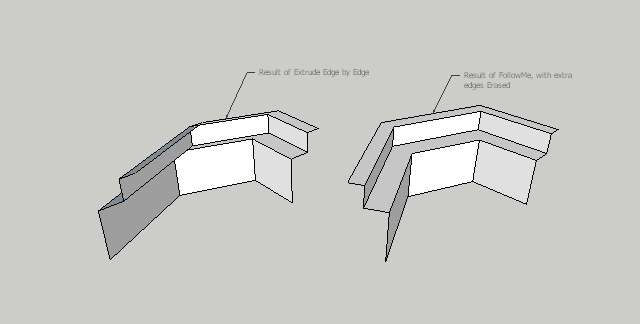

                                  ExtrudeEdgeByEdge - Scene 1.jpg

                                  Fletch
                                  Twilight Render Cross-platform Plugin for SketchUp on PC or Mac

                                  1 條回覆 最後回覆 回覆 引用 0
                                  • pilouP 離線
                                    pilou
                                    最後由 編輯

                                    I have ask also Didier with his new Extrude along a vector for have the same fonction but...
                                    💚

                                    http://forums.sketchucation.com/download/file.php?id=29592&t=1

                                    Frenchy Pilou
                                    Is beautiful that please without concept!
                                    My Little site :)

                                    1 條回覆 最後回覆 回覆 引用 0
                                    • TIGT 離線
                                      TIG Moderator
                                      最後由 編輯

                                      @fletch said:

                                      First, TIG, thank you so much for this awesome plugin! ...
                                      The only issue is that the edge remains in its original orientation as it follows the path, it does not re-orient to be perpendicualar to the edge line, or at least keep the original angle between them.
                                      Please see attached to see what I mean, I am looking for a tool to create something like shown on the right of this image example... if this tool is not intended to do what I'm looking for here, please ignore this post. thx.

                                      You are correct it is 'extrude edges *by*edges' and does NOT extrude alongedges as in the followme mode... It's not exactly what you want.
                                      However, I am looking at another tool 'extrude edge by rails' - you'll select a profile and two 'rail' edge-sets [or just one 'rail' and the other will be inferred as being like the first but at the other end of the profile] and then it extrudes the profile along the edges in a followme manner; these rails can be different shapes and orientations and a complex surface mesh is made from the three in combination... It's WIP at the moment... watch for first beta release...

                                      TIG

                                      1 條回覆 最後回覆 回覆 引用 0
                                      • J 離線
                                        japanNuke
                                        最後由 編輯

                                        my jaw just hit the ground 😮
                                        thank you tiger-sama

                                        %(#BFBFBF)[be cool
                                        be bad]

                                        1 條回覆 最後回覆 回覆 引用 0
                                        • T 離線
                                          tigerobj
                                          最後由 編輯

                                          cool hihi

                                          1 條回覆 最後回覆 回覆 引用 0
                                          • F 離線
                                            Fletch
                                            最後由 編輯

                                            @tig said:

                                            ...
                                            You are correct it is 'extrude edges *by*edges' and does NOT extrude alongedges as in the followme mode... It's not exactly what you want.
                                            However, I am looking at another tool ... watch for first beta release...

                                            😄
                                            will be looking, thanks, TIG!

                                            Fletch
                                            Twilight Render Cross-platform Plugin for SketchUp on PC or Mac

                                            1 條回覆 最後回覆 回覆 引用 0
                                            • 1
                                            • 2
                                            • 6
                                            • 7
                                            • 8
                                            • 9
                                            • 10
                                            • 9 / 10
                                            • 第一個貼文
                                              最後的貼文
                                            Buy SketchPlus
                                            Buy SUbD
                                            Buy WrapR
                                            Buy eBook
                                            Buy Modelur
                                            Buy Vertex Tools
                                            Buy SketchCuisine
                                            Buy FormFonts

                                            Advertisement