sketchucation logo sketchucation
    • Login
    Oops, your profile's looking a bit empty! To help us tailor your experience, please fill in key details like your SketchUp version, skill level, operating system, and more. Update and save your info on your profile page today!
    Mac User? | Join the Rayscaper Beta for Mac Learn More

    [Plugin] UV Toolkit

    Scheduled Pinned Locked Moved Plugins
    377 Posts 86 Posters 415.1k Views 86 Watching
    Loading More Posts
    • Oldest to Newest
    • Newest to Oldest
    • Most Votes
    Reply
    • Reply as topic
    Log in to reply
    This topic has been deleted. Only users with topic management privileges can see it.
    • R
      remon_v
      last edited by

      oke thnx

      1 Reply Last reply
      Reply Quote 0
      • GaieusG
        Gaieus
        last edited by

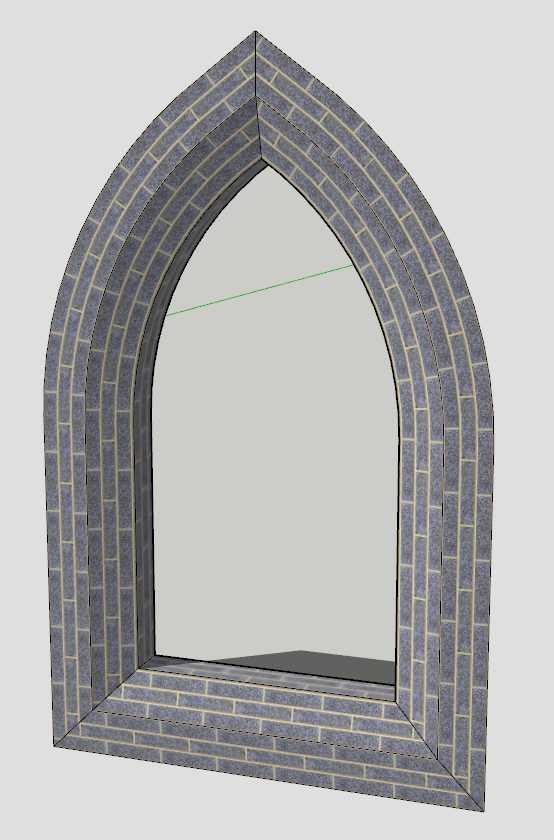
        I think this plugin deserves some further attention and care so I made a little tutorial how you can get the final arch texture nicely mapped on a single face (not a series of facets divided by interior edges).

        See it here (and thanks Thom for this useful plugin again)

        Gai...

        1 Reply Last reply
        Reply Quote 0
        • N
          notareal
          last edited by

          Great tutorial Gaieus.

          Welcome to try Thea Render, Thea support | kerkythea.net -team member

          1 Reply Last reply
          Reply Quote 0
          • thomthomT
            thomthom
            last edited by

            Made some internal adjustments after learning how to get UV data from distorted textures. Bumped out of beta.

            @unknownuser said:

            1.0.0 - 15.10.2009

            * Merge with Mirror UV.

            * Correct sampling of UV data. Distorted textures now works.

            * Mirror material speed increase.

            Thomas Thomassen β€” SketchUp Monkey & Coding addict
            List of my plugins and link to the CookieWare fund

            1 Reply Last reply
            Reply Quote 0
            • GaieusG
              Gaieus
              last edited by

              Thanks - updated my plugin folder!
              πŸ˜‰

              Gai...

              1 Reply Last reply
              Reply Quote 0
              • thomthomT
                thomthom
                last edited by

                Did some experimenting today.
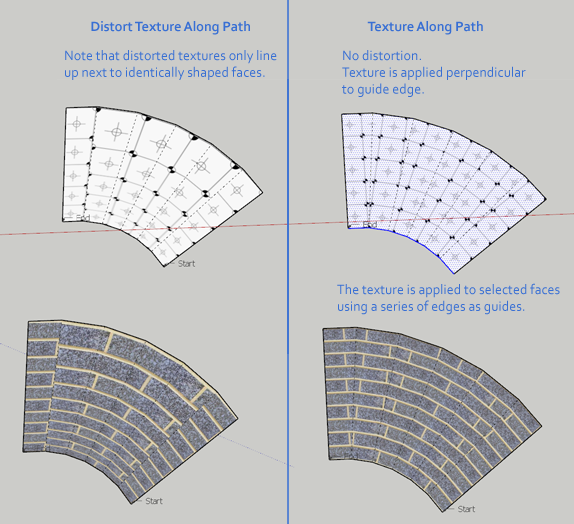
                Came up with a method that would texture selected quad-faces using a curve as a quide.

                At the moment it requires strips of quad-faces, and the guide has to be a welded curve. But before I release it I want to make it so it doesn't require the edges to be welded.

                Then, after the first release I'll see if I can extend it beyond being just strips of quad-faces. Maybe even make it texture triangulated quads.

                Anyway - here's the WIP shots. Whatcha think Gaieus? Something for you? πŸ˜„


                UVMapping01.png


                UVMapping02.png

                Thomas Thomassen β€” SketchUp Monkey & Coding addict
                List of my plugins and link to the CookieWare fund

                1 Reply Last reply
                Reply Quote 0
                • N
                  notareal
                  last edited by

                  Looks good!

                  Welcome to try Thea Render, Thea support | kerkythea.net -team member

                  1 Reply Last reply
                  Reply Quote 0
                  • jeff hammondJ
                    jeff hammond
                    last edited by

                    whoa, that's definitely something i'll be able to use.. (and this is heading into the direction of the type of UV functionality i'd actually need in SU)

                    in this example, it looks like it would work great along the top area as it's flat.. what about the curved areas near the bottom? (i drew this with a lot less segments for representational purposes.. an actually drawing would still be all quads though each one would be much smaller)
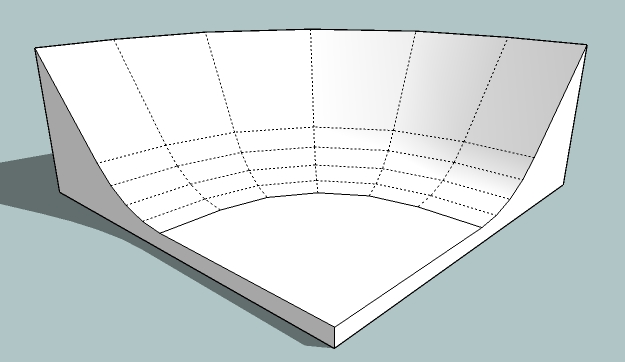

                    uvquestion.jpg

                    dotdotdot

                    1 Reply Last reply
                    Reply Quote 0
                    • thomthomT
                      thomthom
                      last edited by

                      As it is in it current state you'd have to select each row by it self. Your top row is no different from the lower ones except it got larger faces.
                      But I hope to be able to make it cascade through connected rows, but it'd still have to be quad-faces. Quad-faces are just so much more predictable.

                      Thomas Thomassen β€” SketchUp Monkey & Coding addict
                      List of my plugins and link to the CookieWare fund

                      1 Reply Last reply
                      Reply Quote 0
                      • jeff hammondJ
                        jeff hammond
                        last edited by

                        @thomthom said:

                        As it is in it current state you'd have to select each row by it self. Your top row is no different from the lower ones except it got larger faces.
                        But I hope to be able to make it cascade through connected rows, but it'd still have to be quad-faces. Quad-faces are just so much more predictable.

                        right, i realize that each row is the same.. i'm just wondering if everything will line up through those bends?

                        right now in SU, i can get basically two results:
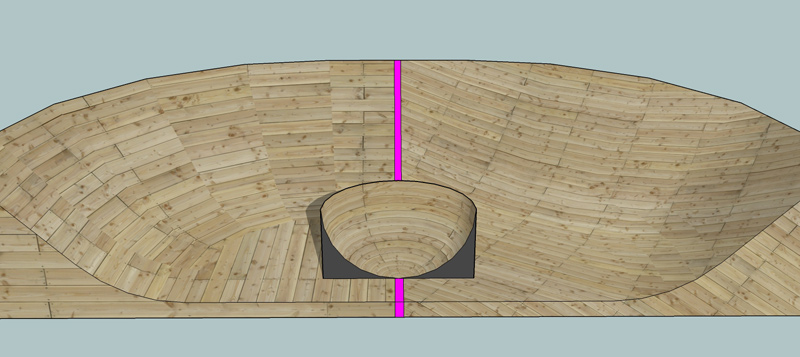
                        UVing2.jpg

                        on the left if i just import and paint it on.. the right if i turn on hidden geometry and sample/paint each quad.. i'm really hoping for something more like the middle but not necessarily on a sphere. (that's done with whaat's UVtools)

                        are you thinking you may have come up with a way to do this?

                        [EDIT] -- ouch.. and i just remembered if i want to render that sphere in indigo and have it turn out correctly, i have to triangulate the faces first. i'm wondering what would happen with these quads that aren't part of a sphere.

                        dotdotdot

                        1 Reply Last reply
                        Reply Quote 0
                        • thomthomT
                          thomthom
                          last edited by

                          @unknownuser said:

                          are you thinking you may have come up with a way to do this?

                          Like this?
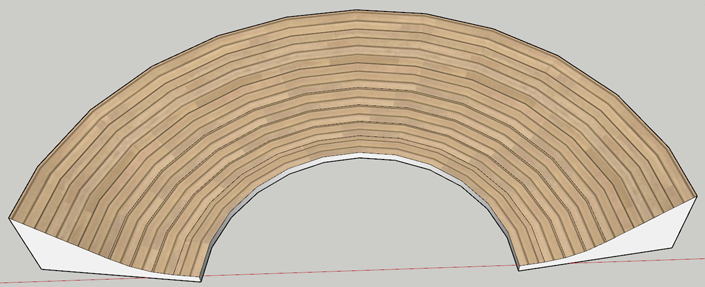
                          UVMapping03.png

                          @unknownuser said:

                          [EDIT] -- ouch.. and i just remembered if i want to render that sphere in indigo and have it turn out correctly, i have to triangulate the faces first. i'm wondering what would happen with these quads that aren't part of a sphere.

                          Could you triangulate after mapping?
                          I think I should be able to deal with triangulated quads - but it won't be the first to be implemented.

                          Thomas Thomassen β€” SketchUp Monkey & Coding addict
                          List of my plugins and link to the CookieWare fund

                          1 Reply Last reply
                          Reply Quote 0
                          • EscapeArtistE
                            EscapeArtist
                            last edited by

                            Oh man, this made texturing some of the stuff I do so much easier.

                            Thank you! πŸ‘ 😍

                            1 Reply Last reply
                            Reply Quote 0
                            • jeff hammondJ
                              jeff hammond
                              last edited by

                              @thomthom said:

                              Like this?

                              ha, yes.. exactly like that

                              @unknownuser said:

                              Could you triangulate after mapping?
                              I think I should be able to deal with triangulated quads - but it won't be the first to be implemented.

                              actually, yes.. i just tried it but i have to triangulate manually after mapping.. previously, i tried using the triangulateFaces ruby by TIG but it screws up the mapping if i do it afterwards.. i just assumed doing it manually would create the same problem but no, it works.

                              dotdotdot

                              1 Reply Last reply
                              Reply Quote 0
                              • Y
                                ygcl
                                last edited by

                                @frederik said:

                                Thanks,
                                @unknownuser said:

                                πŸ‘

                                1 Reply Last reply
                                Reply Quote 0
                                • GaieusG
                                  Gaieus
                                  last edited by

                                  Thom, great stuff so far! In my basilica, there was an arch in which there was literally hundreds of bricks. Even with the UV toolkit, it needed a lot of manual "quading" of the faces. 😲
                                  (and there were like 7 different sizes so you can imagine that day I was making them). πŸ˜†

                                  Gai...

                                  1 Reply Last reply
                                  Reply Quote 0
                                  • majidM
                                    majid
                                    last edited by

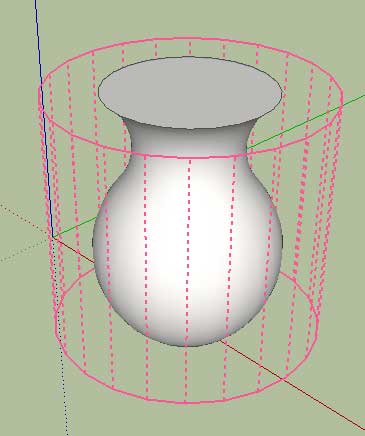
                                    maybe adding a "goust preview" of how plugin is going to UVmap (i.e. showing a sphere when choosing shepherical...etc) could improve the ui!!

                                    Untitled-1.jpg

                                    My inspiring A, B, Sketches book: https://sketchucation.com/shop/books/intermediate/2612-alphabet-inspired-sketches--inspiring-drills-for-architects--3d-artists-and-designers-

                                    1 Reply Last reply
                                    Reply Quote 0
                                    • thomthomT
                                      thomthom
                                      last edited by

                                      @majid said:

                                      maybe adding a "goust preview" of how plugin is going to UVmap (i.e. showing a sphere when choosing shepherical...etc) could improve the ui!!

                                      mm? I got no spherical mapping option.

                                      As for the mapping types I do have, I don't have any API to draw texture previews.

                                      Thomas Thomassen β€” SketchUp Monkey & Coding addict
                                      List of my plugins and link to the CookieWare fund

                                      1 Reply Last reply
                                      Reply Quote 0
                                      • PixeroP
                                        Pixero
                                        last edited by

                                        Just wanted to say thanks. I've had this plugin for a while but recently it saved me when doing some remapping of leaves on a highres tree. πŸ‘
                                        Looking forward to the next version.

                                        1 Reply Last reply
                                        Reply Quote 0
                                        • J
                                          Jim
                                          last edited by

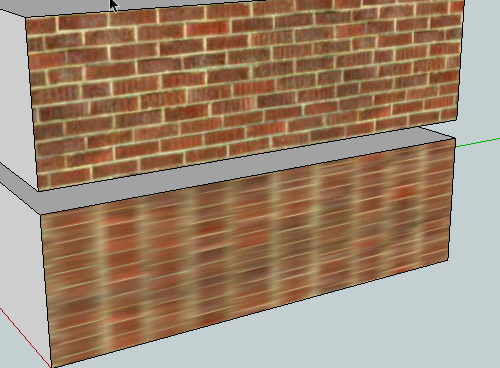
                                          Is this correct, or am I using it wrong? I applied the material, selected the face, and selected "Rotate QF Clockwise 90" from the menu.

                                          093.png

                                          Hi

                                          1 Reply Last reply
                                          Reply Quote 0
                                          • thomthomT
                                            thomthom
                                            last edited by

                                            I think it's doing it correct. As it rotates the orientation of the texture it stretch the texture to fit the quad-face.

                                            For normal texture rotation you use the rotate methods from the native Position Texture tool.

                                            Thomas Thomassen β€” SketchUp Monkey & Coding addict
                                            List of my plugins and link to the CookieWare fund

                                            1 Reply Last reply
                                            Reply Quote 0

                                            Hello! It looks like you're interested in this conversation, but you don't have an account yet.

                                            Getting fed up of having to scroll through the same posts each visit? When you register for an account, you'll always come back to exactly where you were before, and choose to be notified of new replies (either via email, or push notification). You'll also be able to save bookmarks and upvote posts to show your appreciation to other community members.

                                            With your input, this post could be even better πŸ’—

                                            Register Login
                                            • 1
                                            • 2
                                            • 9
                                            • 10
                                            • 11
                                            • 12
                                            • 13
                                            • 18
                                            • 19
                                            • 11 / 19
                                            • First post
                                              Last post
                                            Buy SketchPlus
                                            Buy SUbD
                                            Buy WrapR
                                            Buy eBook
                                            Buy Modelur
                                            Buy Vertex Tools
                                            Buy SketchCuisine
                                            Buy FormFonts

                                            Advertisement