sketchucation logo sketchucation
    • Login
    Oops, your profile's looking a bit empty! To help us tailor your experience, please fill in key details like your SketchUp version, skill level, operating system, and more. Update and save your info on your profile page today!
    Mac User? | Join the Rayscaper Beta for Mac Learn More

    Gif Animation

    Scheduled Pinned Locked Moved Extensions & Applications Discussions
    extensions
    19 Posts 10 Posters 3.4k Views 10 Watching
    Loading More Posts
    • Oldest to Newest
    • Newest to Oldest
    • Most Votes
    Reply
    • Reply as topic
    Log in to reply
    This topic has been deleted. Only users with topic management privileges can see it.
    • ton baetenT
      ton baeten
      last edited by

      On my Mac I have GIFfun from STONEdesign (http://www.stone.com).
      Pretty nice piece of software, easy to work with, with nice results and.....it is free!!
      Just used it to make a 3D animated Gif based 100% on 38 SU scenes.
      I cann't show you the result (yet). My client doesn't allow me, because it is going to be used
      on the opening page of his new website which is still 'under contruction'.
      Maybe something for you too.

      greetings,
      Ton

      1 Reply Last reply
      Reply Quote 0
      • thomthomT
        thomthom
        last edited by

        Hmm... my main system is PC. I do have a mac, but it's an old Mac Mini G4 (the second edition). Not sure if it's the best machine for the job... Will have to have a look.

        Thomas Thomassen β€” SketchUp Monkey & Coding addict
        List of my plugins and link to the CookieWare fund

        1 Reply Last reply
        Reply Quote 0
        • EdsonE
          Edson
          last edited by

          if you have photoshop you already have one.

          edson mahfuz, architect| porto alegre β€’ brasil
          http://www.mahfuz.arq.br

          1 Reply Last reply
          Reply Quote 0
          • thomthomT
            thomthom
            last edited by

            Yea? It can compile an animation from a series of images?

            Thomas Thomassen β€” SketchUp Monkey & Coding addict
            List of my plugins and link to the CookieWare fund

            1 Reply Last reply
            Reply Quote 0
            • jeff hammondJ
              jeff hammond
              last edited by

              i know you could do it with the older versions of PS (via image ready) but didn't they take that out?

              dotdotdot

              1 Reply Last reply
              Reply Quote 0
              • thomthomT
                thomthom
                last edited by

                Yea, that's what I was thinking. I have CS4, and I don't find any Image Ready.

                Thomas Thomassen β€” SketchUp Monkey & Coding addict
                List of my plugins and link to the CookieWare fund

                1 Reply Last reply
                Reply Quote 0
                • pilouP
                  pilou
                  last edited by

                  A curiosity πŸ˜‰
                  Microsoft Gif Animator 3.17 πŸ€“

                  HL Gif Animator 3.17
                  HL Free Gif Animator is a tool for creating animations that can be put into websites in GIF format. It is especially useful for webmasters. The software has build-in library of ready made figures, scenes and textures]

                  Frenchy Pilou
                  Is beautiful that please without concept!
                  My Little site :)

                  1 Reply Last reply
                  Reply Quote 0
                  • EdsonE
                    Edson
                    last edited by

                    it is in the View menu. in case it is not there, choose a workspace in which it does.

                    and, if you enter "animation cs3 tutorial" in google you'll find several good ones.
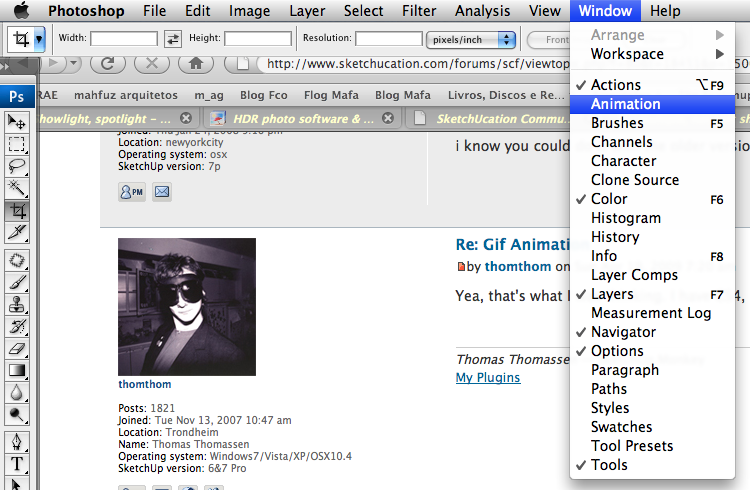

                    fotoxop.png

                    edson mahfuz, architect| porto alegre β€’ brasil
                    http://www.mahfuz.arq.br

                    1 Reply Last reply
                    Reply Quote 0
                    • thomthomT
                      thomthom
                      last edited by

                      I find in Brodge that if I make the exported SU animation frames into a stack I get a play button which plays an animation from the frames. But I've not managed to get this into PS...

                      Thomas Thomassen β€” SketchUp Monkey & Coding addict
                      List of my plugins and link to the CookieWare fund

                      1 Reply Last reply
                      Reply Quote 0
                      • S
                        sepo
                        last edited by

                        You can also use Gimp..open source soft.

                        1 Reply Last reply
                        Reply Quote 0
                        • thomthomT
                          thomthom
                          last edited by

                          GIMP also makes animated gifs? And it can compile the series of images from an SU animation?

                          Thomas Thomassen β€” SketchUp Monkey & Coding addict
                          List of my plugins and link to the CookieWare fund

                          1 Reply Last reply
                          Reply Quote 0
                          • FrederikF
                            Frederik
                            last edited by

                            Another great - and free - application capable of making animated gif's is Virtualdub... πŸ˜‰

                            Cheers
                            Kim Frederik

                            1 Reply Last reply
                            Reply Quote 0
                            • S
                              sepo
                              last edited by

                              Yes it does. Check this
                              http://www.instructables.com/id/How-to-create-gif-animations/

                              1 Reply Last reply
                              Reply Quote 0
                              • Chris FullmerC
                                Chris Fullmer
                                last edited by

                                Here's how to do it in Photoshop CS3 (the first version without Image-ready, so therefore its all built into Photoshop).

                                Basic instructions

                                • Use File>Open to opent he first image in the animation, and check "Image Sequence".
                                • To save it as an animted .gif file, you have to use File>Save for Web & Devices.

                                Slightly more Detailed instructions

                                • Export a series of animation images from SU. I prefer .png. Save them all to their own special folder.
                                • In photoshop, go to File>Open. Select the first image and check the box for "Image Sequence".
                                • It might ask what framerate to use. Enter the framerate that was exported from SU.
                                • Open Window>Animations window. Now you should have a single layer with a little film clicp icon on it, and you should have the animation window open. You can click on the play button in the animation window to see your animation in action.
                                • Now save the .gif file by going to File>Save for Web and Devices.
                                • In this window, play with the color reduction algorithm, amount of colors used in the animation, transparency, interlaced.
                                • Change looping from "Once" to "Forever".

                                That about does it. I'm sure there's more complex stuff to do, but that should be the basics to get anyone started.

                                very-optimized.gif

                                Chris

                                Lately you've been tan, suspicious for the winter.
                                All my Plugins I've written

                                1 Reply Last reply
                                Reply Quote 0
                                • GaieusG
                                  Gaieus
                                  last edited by

                                  And this is how Gimp would do it (two scenes to and fro).
                                  Thanks Sid (I didn't know that)

                                  MadeWithGimp.gif

                                  Gai...

                                  1 Reply Last reply
                                  Reply Quote 0
                                  • thomthomT
                                    thomthom
                                    last edited by

                                    @chris fullmer said:

                                    Use File>Open to opent he first image in the animation, and check "Image Sequence".

                                    That was the last piece of the puzzle! πŸ˜„ πŸ‘

                                    Thanks guys for the various solutions!

                                    Thomas Thomassen β€” SketchUp Monkey & Coding addict
                                    List of my plugins and link to the CookieWare fund

                                    1 Reply Last reply
                                    Reply Quote 0
                                    • Chris FullmerC
                                      Chris Fullmer
                                      last edited by

                                      For me it was the "Save for Web & Devices" that stumped me at first. Because even once you get it imported, it seems all but impossible to save it as an animated .gif. It lets you export to any filetype, or regular save as a ./gif that is not animated, but the animated .gif type is ONLY available in the "save for web & devices" window. Maybe they fixed that silliness though for CS4, I have only done it in CS3.

                                      Glad its wokring now. I really keep meaning to look into GiMP too,

                                      Chris

                                      Lately you've been tan, suspicious for the winter.
                                      All my Plugins I've written

                                      1 Reply Last reply
                                      Reply Quote 0

                                      Hello! It looks like you're interested in this conversation, but you don't have an account yet.

                                      Getting fed up of having to scroll through the same posts each visit? When you register for an account, you'll always come back to exactly where you were before, and choose to be notified of new replies (either via email, or push notification). You'll also be able to save bookmarks and upvote posts to show your appreciation to other community members.

                                      With your input, this post could be even better πŸ’—

                                      Register Login
                                      • 1 / 1
                                      • First post
                                        Last post
                                      Buy SketchPlus
                                      Buy SUbD
                                      Buy WrapR
                                      Buy eBook
                                      Buy Modelur
                                      Buy Vertex Tools
                                      Buy SketchCuisine
                                      Buy FormFonts

                                      Advertisement