sketchucation logo sketchucation
    • 登入
    Oops, your profile's looking a bit empty! To help us tailor your experience, please fill in key details like your SketchUp version, skill level, operating system, and more. Update and save your info on your profile page today!
    🔌 Easy Offset | Offset selected faces in SketchUp in positive and negative offsets. Download

    Subdivide and Smooth Feature Requests

    已排程 已置頂 已鎖定 已移動 Extensions & Applications Discussions
    extensions
    63 貼文 25 Posters 14.5k 瀏覽 25 Watching
    正在載入更多貼文
    • 從舊到新
    • 從新到舊
    • 最多點贊
    回覆
    • 在新貼文中回覆
    登入後回覆
    此主題已被刪除。只有擁有主題管理權限的使用者可以查看。
    • C 離線
      Click Draw
      最後由 編輯

      @utiler said:

      Certainly not mate..... I wouldn't have spent hours creating an Australian Steel profiles library to upload if it wasn't worth it!!!!!

      I'm a bit confused here. What profiles are you able to use in SDS? Are you maybe talking about profile builder?

      Jeff

      Have I mentioned how much of a laugh I get out of some of the Signatures on here!

      1 條回覆 最後回覆 回覆 引用 0
      • N 離線
        notareal
        最後由 編輯

        ely862me did address to most of my requests.

        Welcome to try [Thea Render](http://www.thearender.com/), Thea support | [kerkythea.net](http://www.kerkythea.net/) -team member

        1 條回覆 最後回覆 回覆 引用 0
        • N 離線
          notareal
          最後由 編輯

          @xrok1 said:

          make ver.3up dependant on one of the files from ver.2, maybe the icons or something. hell, i'm sure Whaat could figure something out. i know i don't want to pay full price for an upgrade thats for sure.

          Don't want to have a unused scrip hanging in the plugins folder. But perhaps installer that looks existing subsmooth, removes it and then installs a new one, would do the trick.

          Welcome to try [Thea Render](http://www.thearender.com/), Thea support | [kerkythea.net](http://www.kerkythea.net/) -team member

          1 條回覆 最後回覆 回覆 引用 0
          • utilerU 離線
            utiler
            最後由 編輯

            @click draw said:

            @utiler said:

            Certainly not mate..... I wouldn't have spent hours creating an Australian Steel profiles library to upload if it wasn't worth it!!!!!

            I'm a bit confused here. What profiles are you able to use in SDS? Are you maybe talking about profile builder?

            Jeff

            Sorry Jeff, yes, talking about PB... 😳

            Just Curious...

            1 條回覆 最後回覆 回覆 引用 0
            • R 離線
              remus
              最後由 編輯

              Not sure if you've seen this: http://www.cl.cam.ac.uk/~tc270/subdnurbs.html

              looks interesting, though.

              http://remusrendering.wordpress.com/

              1 條回覆 最後回覆 回覆 引用 0
              • P 離線
                p.almeida84
                最後由 編輯

                Hello there,

                There have been great sugestions for new for new SDS features, i would love to define the crease hardness or softness, kind of like you showed in your BLEND mock up. Also it would be very nice to have a free move tool, where we can select vertices and move them in a free way, just like it function on 3d studio max, so it would'nt be so anoying when the actual move tool kind of stick to the axes and the surounding geometry.
                And one more question, for when can we expect the new version of SDS?

                Greetings

                1 條回覆 最後回覆 回覆 引用 0
                • W 離線
                  Whaat
                  最後由 編輯

                  @p.almeida84 said:

                  Hello there,

                  There have been great sugestions for new for new SDS features, i would love to define the crease hardness or softness, kind of like you showed in your BLEND mock up. Also it would be very nice to have a free move tool, where we can select vertices and move them in a free way, just like it function on 3d studio max, so it would'nt be so anoying when the actual move tool kind of stick to the axes and the surounding geometry.
                  And one more question, for when can we expect the new version of SDS?

                  Greetings

                  Thanks for your suggestion. What do you mean by 'move them in a free way'? It sounds like you want inferencing disabled for vertex movement and be able to move them left/right/up/down relative to the current camera view. That should be possible.

                  As for the next version, development has been a bit delayed but I hope to resume work on the plugin very soon.

                  SketchUp Plugins for Professionals

                  1 條回覆 最後回覆 回覆 引用 0
                  • P 離線
                    p.almeida84
                    最後由 編輯

                    Hello there,

                    By "move them in a free way" i mean move the vertices (and if possible any other element such as edges, planes groups etc...) with much more control. For instance, in 3ds max the move tool offers the possibility to move on the axes, on a plane (xy, xz, zy) and it does not stick to any distances or surrounding geometry, therefor its much easier to move any geometry. Obviously it would be useful to enter a certain distance for the movement like it already works on sketchup. I've attached an example of the 3ds max interface, i suggest you install 3d studio and try it yourself to undertand how the move tool works.

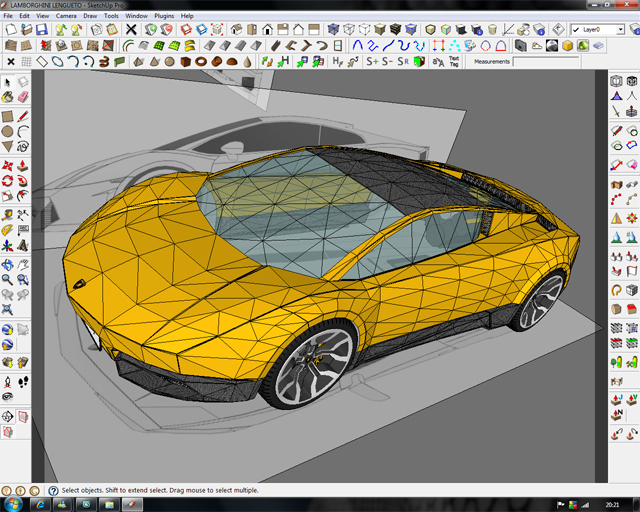
                    I also attached my work in progress for my LAMBO, i was waiting a long time for a tool like SDS, because i'm a great car design enthusiast, although sketchup was not a good option for car modeling. But now with SDS i'm in HEAVEN...LOlOL

                    Greetings;)
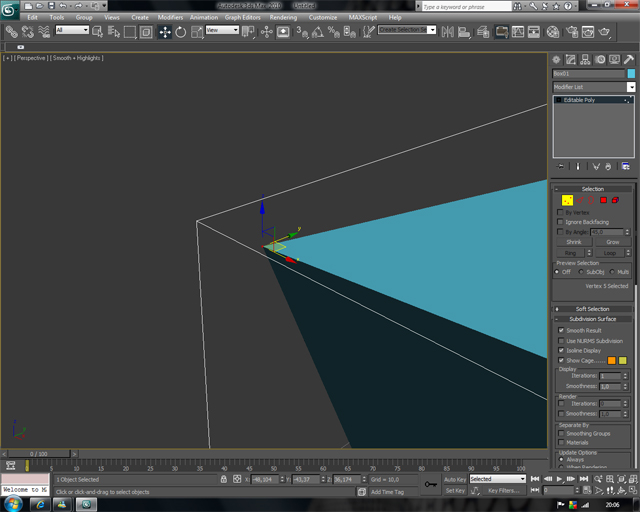

                    EXAMPLE


                    WORK IN PROGRESS

                    1 條回覆 最後回覆 回覆 引用 0
                    • ely862meE 離線
                      ely862me
                      最後由 編輯

                      There is no problem in SU with what u re asking for .
                      U can move whatever u want in whatever direction u want..for vertices take the move tool and when is highlighted left click on it and there u go ,,u can move it.
                      By pressing once the up ,left and right u lock the moving direction in blue ,green and red direction.

                      Hope it help!

                      Elisei

                      BTW: Nice Lambo!Are u gonna run sds on it?

                      Elisei (sketchupper)


                      Before no life was done on Earth it was THE LIFE ITSELF...GOD
                      Come and See EliseiDesign

                      1 條回覆 最後回覆 回覆 引用 0
                      • P 離線
                        p.almeida84
                        最後由 編輯

                        Hello there,

                        I know i can lock the move tool to the axes by pressing the arrows, but when i have geometry around the element i want to move it kind of sticks to it or jumps to a far distance and often i cannot move it without entering a value to the distance box. I think a move tool that don't stick to the surrounding geometry and that let you move by planes (xy, xz, zy) would be very useful to editing the geometry.

                        About the Lambo, sure i'm gonna run SDS on it, when i finish it i maby post a topic on the Gallery forum;)

                        Greetings

                        1 條回覆 最後回覆 回覆 引用 0
                        • P 離線
                          p.almeida84
                          最後由 編輯

                          Any news about SDS? the whole world is waiting for the 2.0 version:P Please keep us in touch about the release date and the new features.

                          Greetings

                          1 條回覆 最後回覆 回覆 引用 0
                          • R 離線
                            romain210
                            最後由 編輯

                            cool thing

                            1 條回覆 最後回覆 回覆 引用 0
                            • W 離線
                              Whaat
                              最後由 編輯

                              @p.almeida84 said:

                              Any news about SDS? the whole world is waiting for the 2.0 version:P Please keep us in touch about the release date and the new features.

                              Greetings

                              I actually have been working on it this week. I want to make this project a higher priority in 2010. However, I expect this to be another busy year so release date is anybody's guess. I hesitate to make an estimate of release date until it is ready for beta testing.

                              So, I ask for your patience. This will be a major upgrade with plenty of new toys to play with. 😉

                              SketchUp Plugins for Professionals

                              1 條回覆 最後回覆 回覆 引用 0
                              • D 離線
                                define
                                最後由 編輯

                                @unknownuser said:

                                @p.almeida84 said:

                                Hello there,

                                I know i can lock the move tool to the axes by pressing the arrows, but when i have geometry around the element i want to move it kind of sticks to it or jumps to a far distance and often i cannot move it without entering a value to the distance box. I think a move tool that don't stick to the surrounding geometry and that let you move by planes (xy, xz, zy) would be very ..useful to editing the geometry.

                                About the Lambo, sure i'm gonna run SDS on it, when i finish it i maby post a topic on the Gallery forum;)

                                Did you try to move single vertices whilst keeping the 'alt'-button pressed? if not - give it a try.
                                (you may sometimes have to switch to wireframe-mode temporarily to have it snap to another vertex correctly)
                                It works for me.

                                best

                                klaus

                                1 條回覆 最後回覆 回覆 引用 0
                                • A 離線
                                  archigrafix
                                  最後由 編輯

                                  Just discovered this topic..!

                                  My Number one demand is clearly about UV maping:
                                  I mean UV transfers smoothly from proxy to smooth object. It would be so nice!!!
                                  I hope it's not too late in your developpement process...
                                  So When are you planning for this famous update?

                                  Agir comme un homme de pensée, et penser comme un homme d'action...

                                  1 條回覆 最後回覆 回覆 引用 0
                                  • jeff hammondJ 離線
                                    jeff hammond
                                    最後由 編輯

                                    @archigrafix said:

                                    Just discovered this topic..!

                                    My Number one demand is clearly about UV maping:
                                    I mean UV transfers smoothly from proxy to smooth object. It would be so nice!!!
                                    I hope it's not too late in your developpement process...
                                    So When are you planning for this famous update?

                                    Well, that's a whole 'nuther beast but sure, why not.. +1! 😄

                                    dotdotdot

                                    1 條回覆 最後回覆 回覆 引用 0
                                    • W 離線
                                      Whaat
                                      最後由 編輯

                                      @archigrafix said:

                                      Just discovered this topic..!

                                      My Number one demand is clearly about UV maping:
                                      I mean UV transfers smoothly from proxy to smooth object. It would be so nice!!!
                                      I hope it's not too late in your developpement process...
                                      So When are you planning for this famous update?

                                      It's not too late... 😄

                                      I can't commit to a release date but I am hoping to release it before the end of this year.

                                      SketchUp Plugins for Professionals

                                      1 條回覆 最後回覆 回覆 引用 0
                                      • thomthomT 離線
                                        thomthom
                                        最後由 編輯

                                        Dale - videos, man videos. For us that had to stay back home during BaseCamp. big puppy eyes 😄

                                        Thomas Thomassen — SketchUp Monkey & Coding addict
                                        List of my plugins and link to the CookieWare fund

                                        1 條回覆 最後回覆 回覆 引用 0
                                        • soloS 離線
                                          solo
                                          最後由 編輯

                                          Not quite a video but here is a picture of Whaat doing a demo at base camp. 😉
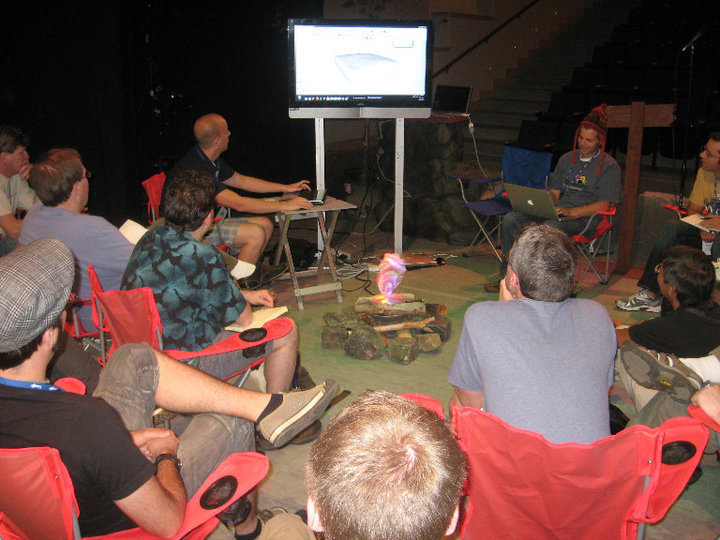

                                          sds 2.jpg

                                          http://www.solos-art.com

                                          If you see a toilet in your dreams do not use it.

                                          1 條回覆 最後回覆 回覆 引用 0
                                          • thomthomT 離線
                                            thomthom
                                            最後由 編輯

                                            Which one is Dale, the one of the left or the one on the right?

                                            The screen is all white - aaah the tease!

                                            Thomas Thomassen — SketchUp Monkey & Coding addict
                                            List of my plugins and link to the CookieWare fund

                                            1 條回覆 最後回覆 回覆 引用 0
                                            • 1
                                            • 2
                                            • 3
                                            • 4
                                            • 3 / 4
                                            • 第一個貼文
                                              最後的貼文
                                            Buy SketchPlus
                                            Buy SUbD
                                            Buy WrapR
                                            Buy eBook
                                            Buy Modelur
                                            Buy Vertex Tools
                                            Buy SketchCuisine
                                            Buy FormFonts

                                            Advertisement