sketchucation logo sketchucation
    • 登入
    Oops, your profile's looking a bit empty! To help us tailor your experience, please fill in key details like your SketchUp version, skill level, operating system, and more. Update and save your info on your profile page today!
    ⚠️ Important | Libfredo 15.8b introduces important bugfixes for Fredo's Extensions Update

    [Plugin] Shape Bender Beta

    已排程 已置頂 已鎖定 已移動 Plugins
    1.3k 貼文 331 Posters 1.8m 瀏覽 329 Watching
    正在載入更多貼文
    • 從舊到新
    • 從新到舊
    • 最多點贊
    回覆
    • 在新貼文中回覆
    登入後回覆
    此主題已被刪除。只有擁有主題管理權限的使用者可以查看。
    • EdsonE 離線
      Edson
      最後由 編輯

      I solved that little problem: there was something at the tip of the straight line that preveted SB from recognizing it as a line. fine.

      HOWEVER, having gone through the steps, as soon as I hit enter SU crashes every time. and I am not trying any complex operation, just to bend a simple box.

      edson mahfuz, architect| porto alegre • brasil
      http://www.mahfuz.arq.br

      1 條回覆 最後回覆 回覆 引用 0
      • Dave RD 離線
        Dave R
        最後由 編輯

        Edson,

        Have you successfully run SB before? Have you tried closing and restarting SketchUp/opening the model after fixing your line problem?

        Etaoin Shrdlu

        %

        (THERE'S NO PLACE LIKE)

        G28 X0.0 Y0.0 Z0.0

        M30

        %

        1 條回覆 最後回覆 回覆 引用 0
        • TIGT 離線
          TIG Moderator
          最後由 編輯

          @edson said:

          I solved that little problem: there was something at the tip of the straight line that prevented SB from recognizing it as a line. Fine.
          HOWEVER, having gone through the steps, as soon as I hit enter SU crashes every time. and I am not trying any complex operation, just to bend a simple box.

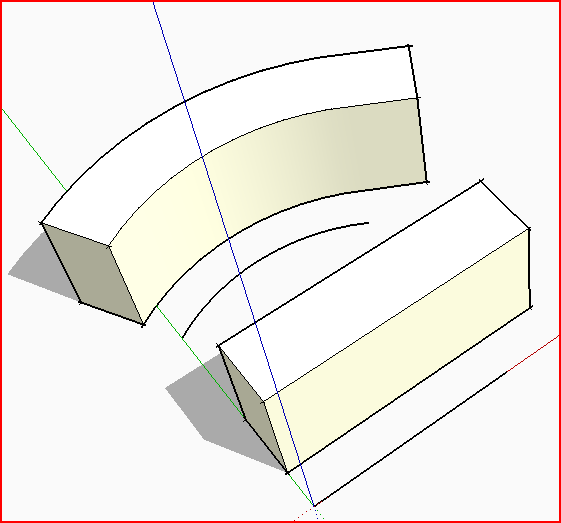
          The line on the red axis must be a single axial line with nothing touching it - as just have discovered.
          What size are these things, if they are very small [or enormously gigantic] SUp/OpenGL can't cope.
          I think the Entity info says ~382 cm ? Which I would expect to be absolutely fine, BUT have you tried scaling x10 ?
          I'm on PC and have no problems with a similar sized thing ~1m high/3m long...Capture.PNG
          TIG

          1 條回覆 最後回覆 回覆 引用 0
          • EdsonE 離線
            Edson
            最後由 編輯

            @dave r said:

            Edson,

            Have you successfully run SB before? Have you tried closing and restarting SketchUp/opening the model after fixing your line problem?

            dave,
            I had never tried it before. yes, i tried restarting SU several times. it keeps crashing.

            TIG,
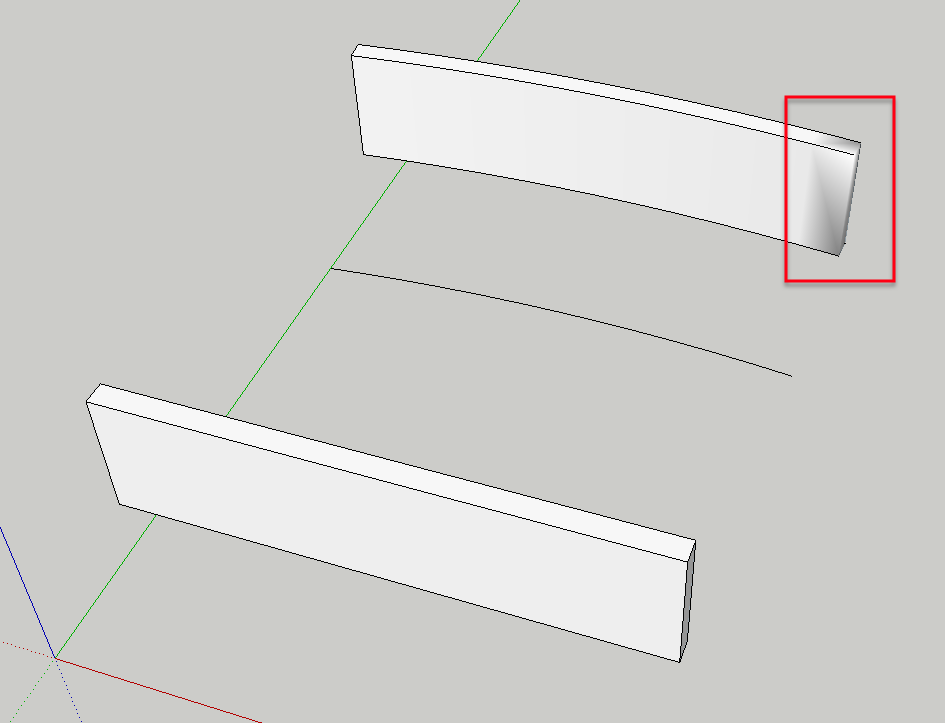
            I tried SB on a clean 7.1 install, that is, with no other plugins than the ones that ship with SU. it worked fine which leads me to believe thet either there is a conflict with some of the 200+ plugins I have installed on SU8 or some incompatibity with SU8 for mac itself. but my successful attempt with 7.1 was not without hitches: see what happened to one of the ends of the box that was bent.
            _SB4.png

            edson mahfuz, architect| porto alegre • brasil
            http://www.mahfuz.arq.br

            1 條回覆 最後回覆 回覆 引用 0
            • Dave RD 離線
              Dave R
              最後由 編輯

              I suppose there could be a conflict. I imagine you know what to do to sort it out so I won't go into that.

              That end isn't bent. the edge/s is/are just softened. Unsoften them and it'll look right. The plugin frequently does that. I don't know if there's a script fix but it isn't that hard to rectify manually.

              Etaoin Shrdlu

              %

              (THERE'S NO PLACE LIKE)

              G28 X0.0 Y0.0 Z0.0

              M30

              %

              1 條回覆 最後回覆 回覆 引用 0
              • TIGT 離線
                TIG Moderator
                最後由 編輯

                If you run it with the Ruby Console open are there any error messages at all ?

                TIG

                1 條回覆 最後回覆 回覆 引用 0
                • EdsonE 離線
                  Edson
                  最後由 編輯

                  @dave r said:

                  I suppose there could be a conflict. I imagine you know what to do to sort it out so I won't go into that.

                  That end isn't bent. the edge/s is/are just softened. Unsoften them and it'll look right. The plugin frequently does that. I don't know if there's a script fix but it isn't that hard to rectify manually.

                  how does one do that? I selected the geometry and ran the slider from one side to the other but nothing happened.

                  edson mahfuz, architect| porto alegre • brasil
                  http://www.mahfuz.arq.br

                  1 條回覆 最後回覆 回覆 引用 0
                  • EdsonE 離線
                    Edson
                    最後由 編輯

                    @tig said:

                    If you run it with the Ruby Console open are there any error messages at all ?

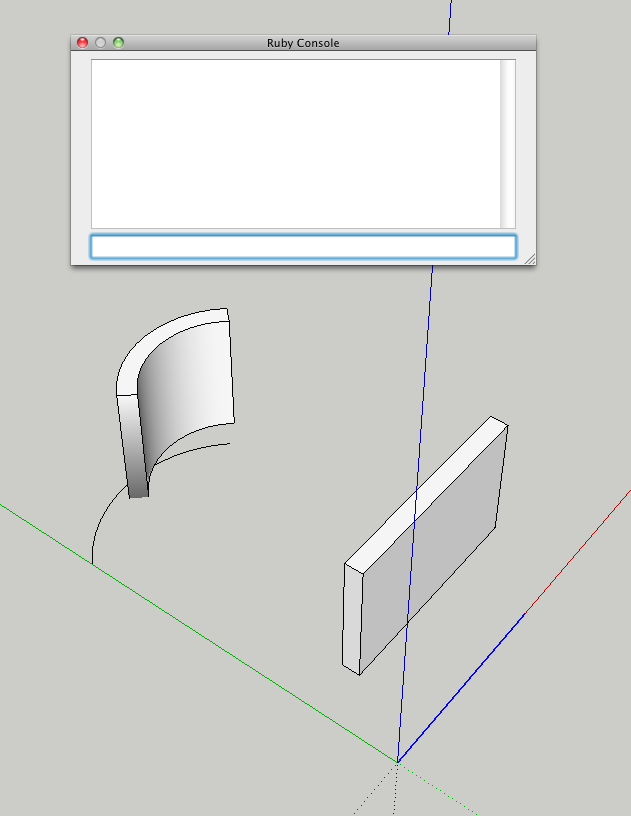
                    no messages at all (see below). the odd thing is that the problem occurs only when the group is exactly above the straight line. if I move the group ahead the problem does not occur.
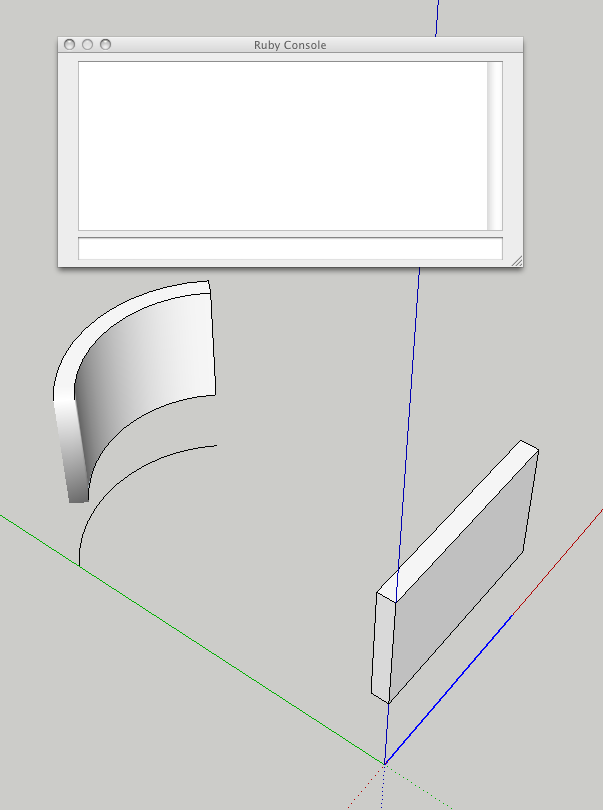
                    group to be bent exactly above the straight line
                    group no longer aligned with the straight line

                    edson mahfuz, architect| porto alegre • brasil
                    http://www.mahfuz.arq.br

                    1 條回覆 最後回覆 回覆 引用 0
                    • Dave RD 離線
                      Dave R
                      最後由 編輯

                      @edson said:

                      @dave r said:

                      I suppose there could be a conflict. I imagine you know what to do to sort it out so I won't go into that.

                      That end isn't bent. the edge/s is/are just softened. Unsoften them and it'll look right. The plugin frequently does that. I don't know if there's a script fix but it isn't that hard to rectify manually.

                      how does one do that? I selected the geometry and ran the slider from one side to the other but nothing happened.

                      I select the softened edges (View>Hidden Geometry) and then set the slider to 20 where it normally is by default. In the lower of your screen shots, there's a softened edge at the bottom to take care of.

                      Etaoin Shrdlu

                      %

                      (THERE'S NO PLACE LIKE)

                      G28 X0.0 Y0.0 Z0.0

                      M30

                      %

                      1 條回覆 最後回覆 回覆 引用 0
                      • H 離線
                        howardhong
                        最後由 編輯

                        i have same problem
                        i guess its about the default setting values of edge

                        1 條回覆 最後回覆 回覆 引用 0
                        • Dave RD 離線
                          Dave R
                          最後由 編輯

                          @howardhong said:

                          i have same problem
                          i guess its about the default setting values of edge

                          What do you mean by "default setting values of edge"?

                          Etaoin Shrdlu

                          %

                          (THERE'S NO PLACE LIKE)

                          G28 X0.0 Y0.0 Z0.0

                          M30

                          %

                          1 條回覆 最後回覆 回覆 引用 0
                          • H 離線
                            howardhong
                            最後由 編輯

                            dave, i said "i guess..".
                            when im using erase tool, i saw a sudden pop up window in the center of screen.
                            i didnt give any attension, and closed that window.
                            after that happened, i got same problem.

                            so i said "i guess..".

                            1 條回覆 最後回覆 回覆 引用 0
                            • Dave RD 離線
                              Dave R
                              最後由 編輯

                              The only possible edge setting would have to do with Smooth/Soften but it won't open when you are using the Eraser tool. What did the pop up box say?

                              Etaoin Shrdlu

                              %

                              (THERE'S NO PLACE LIKE)

                              G28 X0.0 Y0.0 Z0.0

                              M30

                              %

                              1 條回覆 最後回覆 回覆 引用 0
                              • H 離線
                                howardhong
                                最後由 編輯

                                i cant remember it exactly,
                                theres three scrool down menu and one of it said "sketchup model" or somewhat...

                                1 條回覆 最後回覆 回覆 引用 0
                                • Dave RD 離線
                                  Dave R
                                  最後由 編輯

                                  I guess, if I were you, I would wait until it shows up again and note what it says. Then report back. If you can make a screen shot showing it, that would be very useful.

                                  Etaoin Shrdlu

                                  %

                                  (THERE'S NO PLACE LIKE)

                                  G28 X0.0 Y0.0 Z0.0

                                  M30

                                  %

                                  1 條回覆 最後回覆 回覆 引用 0
                                  • EdsonE 離線
                                    Edson
                                    最後由 編輯

                                    @dave r said:

                                    I select the softened edges (View>Hidden Geometry) and then set the slider to 20 where it normally is by default. In the lower of your screen shots, there's a softened edge at the bottom to take care of.

                                    dave,

                                    I followed your advice and it worked. thanks. never had this problem before.

                                    edson mahfuz, architect| porto alegre • brasil
                                    http://www.mahfuz.arq.br

                                    1 條回覆 最後回覆 回覆 引用 0
                                    • B 離線
                                      BlueFalcon
                                      最後由 編輯

                                      I selected my group and clicked the shape bender icon, i click on the straight line than the curved line, and it gives an error telling me to select the group before clicking the shape bender icon

                                      wath is the problem? i did everything like you did in the video and it wont work

                                      also, how can i make those really soft curved lines?

                                      I'am not new to sketchup or somthing, but i never had problems using plugins.

                                      1 條回覆 最後回覆 回覆 引用 0
                                      • Dave RD 離線
                                        Dave R
                                        最後由 編輯

                                        It would be a big help if you either post the SKP file or at least a screen shot.

                                        Etaoin Shrdlu

                                        %

                                        (THERE'S NO PLACE LIKE)

                                        G28 X0.0 Y0.0 Z0.0

                                        M30

                                        %

                                        1 條回覆 最後回覆 回覆 引用 0
                                        • EdsonE 離線
                                          Edson
                                          最後由 編輯

                                          just to let you know that the crashing SU8 when running Shape Bender was due to the fact that I was running an outdated version of HOlePunchTool (1.6). as soon as I updated it the crashes stopped.

                                          edson mahfuz, architect| porto alegre • brasil
                                          http://www.mahfuz.arq.br

                                          1 條回覆 最後回覆 回覆 引用 0
                                          • Dave RD 離線
                                            Dave R
                                            最後由 編輯

                                            Edson,

                                            Glad that is sorted out. Now you can bend and punch. 😉

                                            Etaoin Shrdlu

                                            %

                                            (THERE'S NO PLACE LIKE)

                                            G28 X0.0 Y0.0 Z0.0

                                            M30

                                            %

                                            1 條回覆 最後回覆 回覆 引用 0
                                            • 1
                                            • 2
                                            • 34
                                            • 35
                                            • 36
                                            • 37
                                            • 38
                                            • 63
                                            • 64
                                            • 36 / 64
                                            • 第一個貼文
                                              最後的貼文
                                            Buy SketchPlus
                                            Buy SUbD
                                            Buy WrapR
                                            Buy eBook
                                            Buy Modelur
                                            Buy Vertex Tools
                                            Buy SketchCuisine
                                            Buy FormFonts

                                            Advertisement


