sketchucation logo sketchucation
    • 登入
    Oops, your profile's looking a bit empty! To help us tailor your experience, please fill in key details like your SketchUp version, skill level, operating system, and more. Update and save your info on your profile page today!
    🔌 Smart Spline | Fluid way to handle splines for furniture design and complex structures. Download

    [Plugin] Shape Bender Beta

    已排程 已置頂 已鎖定 已移動 Plugins
    1.3k 貼文 331 Posters 1.8m 瀏覽 329 Watching
    正在載入更多貼文
    • 從舊到新
    • 從新到舊
    • 最多點贊
    回覆
    • 在新貼文中回覆
    登入後回覆
    此主題已被刪除。只有擁有主題管理權限的使用者可以查看。
    • thomthomT 離線
      thomthom
      最後由 編輯

      @cizqa said:

      I have disabled Vray from the preferences. Error message doesn't show anymore, but still, I got bugsplat whenever I try to hit Enter (finalize the bending). Thanks in advance 😄

      What version of SketchUp are you using? The latest SU8M3 fixed even more bugsplats.

      Thomas Thomassen — SketchUp Monkey & Coding addict
      List of my plugins and link to the CookieWare fund

      1 條回覆 最後回覆 回覆 引用 0
      • TIGT 離線
        TIG Moderator
        最後由 編輯

        Can you post the simple SKP - group/line/curve - that you are trying to use...

        TIG

        1 條回覆 最後回覆 回覆 引用 0
        • R 離線
          rob-m
          最後由 編輯

          @hlferrell said:

          This tool looks incredible! I haven't gotten it to work yet, though. I have created a ramp and an arc and a line that stretches the length of the ramp - the line is on the red axis as the instructions indicate. I select the component (the ramp), then I select the shape bender tool and then try to select the single line. It doesn't seem to recognize the line - or anything once I've selected the shape bender tool.

          Any advice would be greatly appreciated. Thanks!!

          I have the same issue. I have an object(in this case some simple 3d text). I have a curve. I have a line on the red axis.
          I select the object, hit the bend button, and cannot do anything else. It won't let me click a line or otherwise.
          With the ruby console open, I get this message repeating on mouse move or clicks:
          Error: #<TypeError: can't convert nil into String>

          I am using the free version of SU8.0.14346
          I get the same issue on SU7

          1 條回覆 最後回覆 回覆 引用 0
          • TIGT 離線
            TIG Moderator
            最後由 編輯

            Rob-m

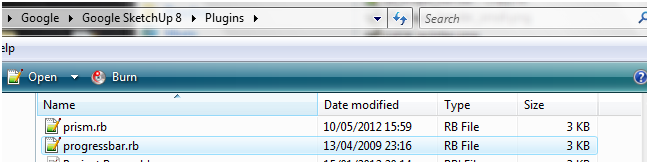
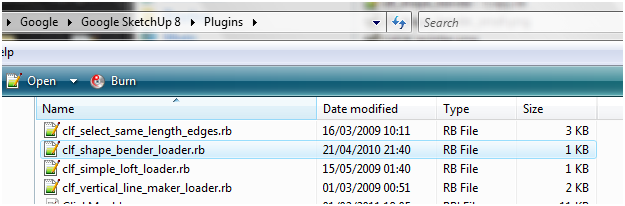
            Are you sure you have installed the files/subfolder correctly, and have got/installed the separate progressbar.rb helper file as directed on the download page ?
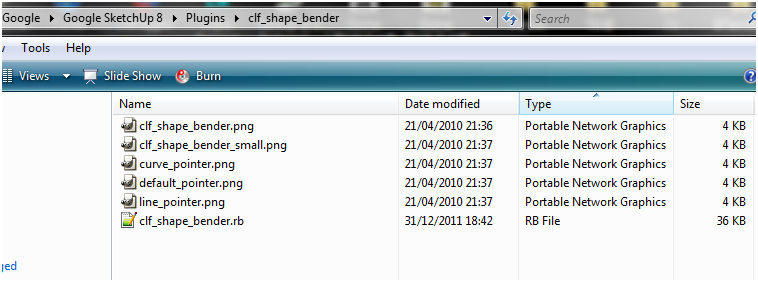
            I suspect that the tool is failing because it can't find some file it needs, probably a cursor image file in the tools subfolder...
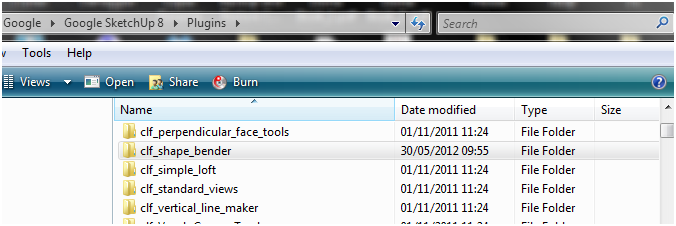
            This is what your file/folder 'footprint' should be...
            Also if it looks like this check there is no "Compatibility Files" button on the Plugins folder window - with Vista/Win7 if you don't have FULL security permissions to write to a folder the system might shunt things off into a side folder without telling you, thereby breaking the paths needed by the scripts...1.PNG2.PNG4.PNG3.PNG
            TIG

            1 條回覆 最後回覆 回覆 引用 0
            • R 離線
              rob-m
              最後由 編輯

              Thanks TIG. if progressbar.rb is not installed there is normally an error when the shape bender is started. the issue I had was putting everything in the TOOLS folder, not the PLUGINS folder.
              Dropped the clf_shape_bender folder and progressbar.rb into the plugins folder, retarted SU8 and all works fine now. Many thanks

              1 條回覆 最後回覆 回覆 引用 0
              • Dave RD 離線
                Dave R
                最後由 編輯

                @rob-m said:

                the issue I had was putting everything in the TOOLS folder, not the PLUGINS folder.

                You should never put anything into the Tools folder.

                Etaoin Shrdlu

                %

                (THERE'S NO PLACE LIKE)

                G28 X0.0 Y0.0 Z0.0

                M30

                %

                1 條回覆 最後回覆 回覆 引用 0
                • R 離線
                  rob-m
                  最後由 編輯

                  So I'm learning. Many of the plugins I have picked up had instructions for placing in the tools folder. I will remedy that on my end.

                  1 條回覆 最後回覆 回覆 引用 0
                  • thomthomT 離線
                    thomthom
                    最後由 編輯

                    @rob-m said:

                    So I'm learning. Many of the plugins I have picked up had instructions for placing in the tools folder. I will remedy that on my end.

                    Do you remember which ones? If they are located here on the forum we can see if we can correct that.

                    Thomas Thomassen — SketchUp Monkey & Coding addict
                    List of my plugins and link to the CookieWare fund

                    1 條回覆 最後回覆 回覆 引用 0
                    • R 離線
                      rv1974
                      最後由 編輯

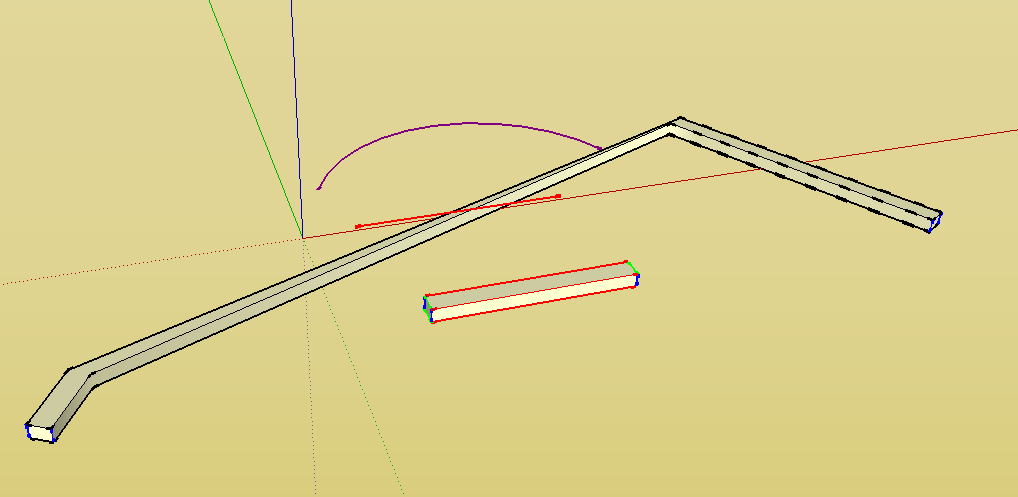
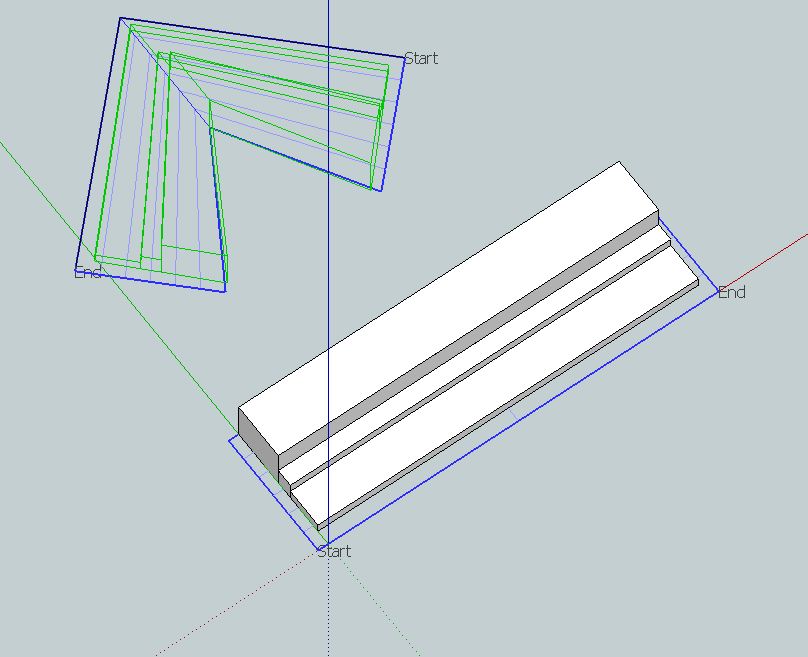
                      Chris bending along 2-segment curve results are wrong. It wont keep the parallels.
                      Could you tweak the code please?

                      Capture.JPG

                      1 條回覆 最後回覆 回覆 引用 0
                      • Dave RD 離線
                        Dave R
                        最後由 編輯

                        @rob-m said:

                        So I'm learning. Many of the plugins I have picked up had instructions for placing in the tools folder. I will remedy that on my end.

                        I've never seen a plugin with instructions to put it into the Tools folder. I'd also be interested to know which ones those are. There are plugins that will appear in the tools menu but that's entirely different.

                        Etaoin Shrdlu

                        %

                        (THERE'S NO PLACE LIKE)

                        G28 X0.0 Y0.0 Z0.0

                        M30

                        %

                        1 條回覆 最後回覆 回覆 引用 0
                        • R 離線
                          rob-m
                          最後由 編輯

                          I actually don't recall which ones, sorry. Not from this site, I found them elsewhere before I found SketchUcation. Everything I need seems to be here or referenced here. Strangely though, all other plugins I had in the Tools folder seemed to work.
                          Thanks for the help.
                          My goal was to take a 3d wall carving and wrap it around a post for cutting on a 4 axis cnc router. This should work very well. thanks for this great plugin!

                          1 條回覆 最後回覆 回覆 引用 0
                          • C 離線
                            carammilla
                            最後由 編輯

                            nice

                            1 條回覆 最後回覆 回覆 引用 0
                            • pbacotP 離線
                              pbacot
                              最後由 編輯

                              Hello,

                              Thanks for the great plugin work! This is one I've never tried before so I thought I would, since it is often mentioned here. Is it supposed to work on Macs?

                              In this test I wish to make the rectangular bar bend in the shape of the curve shown. Are there any further tips on how to make it look more like the arc shape?

                              Thanks, Peter

                              Screen shot 2012-06-02 at 2.07.11 PM.png
                              AutoSave_shape bender test.skp

                              MacOSX MojaveSketchUp Pro v19 Twilight v2 Thea v3 PowerCADD

                              1 條回覆 最後回覆 回覆 引用 0
                              • Dave RD 離線
                                Dave R
                                最後由 編輯

                                Peter,

                                I got it to go but only after I deleted your funny shape, purged unused stuff from the file, saved it and reopened it. Notice I also moved the line relative to the component. The distance between the line and the component will be used at the distance between the new component and the arc. I expect there distance you had in your set up was a bit too much for Shape bender to create the properly bent shape from the straight version.


                                AutoSave_shape bender test.skp

                                Etaoin Shrdlu

                                %

                                (THERE'S NO PLACE LIKE)

                                G28 X0.0 Y0.0 Z0.0

                                M30

                                %

                                1 條回覆 最後回覆 回覆 引用 0
                                • pbacotP 離線
                                  pbacot
                                  最後由 編輯

                                  Dave,

                                  Thanks for the help! I didn't pick that up about the distance. I didn't find anything to purge but the object created by the plugin.

                                  Peter

                                  MacOSX MojaveSketchUp Pro v19 Twilight v2 Thea v3 PowerCADD

                                  1 條回覆 最後回覆 回覆 引用 0
                                  • Dave RD 離線
                                    Dave R
                                    最後由 編輯

                                    You can play the distance thing to your advantage so it the curve is the centerline of the bent shape, you'll put the straight line on the centerline of the unbent form.

                                    I found 13 unused materials also.

                                    Etaoin Shrdlu

                                    %

                                    (THERE'S NO PLACE LIKE)

                                    G28 X0.0 Y0.0 Z0.0

                                    M30

                                    %

                                    1 條回覆 最後回覆 回覆 引用 0
                                    • pbacotP 離線
                                      pbacot
                                      最後由 編輯

                                      Thanks. Yeah, I forgot to look at the materials!

                                      MacOSX MojaveSketchUp Pro v19 Twilight v2 Thea v3 PowerCADD

                                      1 條回覆 最後回覆 回覆 引用 0
                                      • S 離線
                                        sags
                                        最後由 編輯

                                        thank you for the shape bender sir.. 👍

                                        1 條回覆 最後回覆 回覆 引用 0
                                        • H 離線
                                          huntress_ss
                                          最後由 編輯

                                          Hey Chris,
                                          I've tried ading this plug-in to my sketch-up but it's not working. Show's up with error load with "Error Loading File clf_shape_bender_loader.rb
                                          no such file to load -- progressbar.rb"

                                          Any suggestions on how to get this working?

                                          1 條回覆 最後回覆 回覆 引用 0
                                          • GaieusG 離線
                                            Gaieus
                                            最後由 編輯

                                            Please, read the instructions carefully. Chris clearly wrote that you (also) need to install progresbar.rb.


                                            Gai...

                                            1 條回覆 最後回覆 回覆 引用 0
                                            • 1
                                            • 2
                                            • 56
                                            • 57
                                            • 58
                                            • 59
                                            • 60
                                            • 63
                                            • 64
                                            • 58 / 64
                                            • 第一個貼文
                                              最後的貼文
                                            Buy SketchPlus
                                            Buy SUbD
                                            Buy WrapR
                                            Buy eBook
                                            Buy Modelur
                                            Buy Vertex Tools
                                            Buy SketchCuisine
                                            Buy FormFonts

                                            Advertisement