sketchucation logo sketchucation
    • 登入
    Oops, your profile's looking a bit empty! To help us tailor your experience, please fill in key details like your SketchUp version, skill level, operating system, and more. Update and save your info on your profile page today!
    🔌 Smart Spline | Fluid way to handle splines for furniture design and complex structures. Download

    [Plugin] Shape Bender Beta

    已排程 已置頂 已鎖定 已移動 Plugins
    1.3k 貼文 331 Posters 1.8m 瀏覽 329 Watching
    正在載入更多貼文
    • 從舊到新
    • 從新到舊
    • 最多點贊
    回覆
    • 在新貼文中回覆
    登入後回覆
    此主題已被刪除。只有擁有主題管理權限的使用者可以查看。
    • L 離線
      LannorMov
      最後由 編輯

      Gracias Cris, le voy a sacar el jugo a este plug.

      1 條回覆 最後回覆 回覆 引用 0
      • L 離線
        LannorMov
        最後由 編輯

        @chris fullmer said:

        woohoo, we're getting somewhere.

        You didn't install it right.

        Chris, Te cuento que a mi también me ha dado problemas con la selección de la línea, pero lo que hago es explotar el grupo o componente y le vuelvo a dar "crear grupo o componente" y luego me funciona muy bien.
        Chris, I tell you that I too have been problems with the selection of the line, but what I do is to exploit the group or component and it keeps coming back "create group or component" and then I work very well.(excuse my English)

        1 條回覆 最後回覆 回覆 引用 0
        • S 離線
          stillhouse
          最後由 編輯

          Struggling to get shapebender to work on Sketch-up 8 for windows 7.
          I have downloaded both shape bender and progressbar and have put them in my sketchup plugins folder.
          I draw a line on the red axis
          I extrude a bar next to it and make it a group
          I make a curved line a little ways away
          I select the bar and go under plugins and select shape bender. It asks me to select the line on the red axis but I can't select it.
          Any help would be great. I love this plugin and I have used it in the past on my old mac, and would love to get this going on my new pc.
          Cheers,
          BW

          1 條回覆 最後回覆 回覆 引用 0
          • Chris FullmerC 離線
            Chris Fullmer
            最後由 編輯

            This sounds like an installation error. You should have clf_shape_bender_loader.rb in the plugins folder, and then clf_shape_bender.rb and all the shapebender icons should live in a subfolder called clf_shape_bender.

            If that doesn't help, open the Ruby Console (in the windows menu). Then try to run shape bender and see what errors it gives.

            Let me know how it goes,

            Chris

            Lately you've been tan, suspicious for the winter.
            All my Plugins I've written

            1 條回覆 最後回覆 回覆 引用 0
            • T 離線
              tsunamile
              最後由 編輯

              Hi Chris Fullmer.
              I did same everything you said..., but i can use this plugin; when i run sketchup... a load error appear!
              I use sketchup 8, win Xp sp2 32bit.
              Help me fix it..
              Thank's.
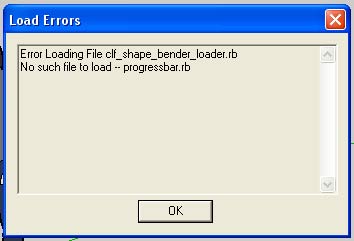

              Load-errors.jpg

              1 條回覆 最後回覆 回覆 引用 0
              • GaieusG 離線
                Gaieus
                最後由 編輯

                The instructions also say that you need this additional plugin as well:
                http://www.smustard.com/script/ProgressBar

                Gai...

                1 條回覆 最後回覆 回覆 引用 0
                • T 離線
                  tsunamile
                  最後由 編輯

                  Thank's Gaieus...

                  1 條回覆 最後回覆 回覆 引用 0
                  • D 離線
                    driven
                    最後由 編輯

                    hi,

                    First time I've needed to use this since V8 M2 and I'm getting this

                    Error: #<NameError: undefined local variable or methodclf_shape_bender' for main:Object>
                    /Library/Application Support/Google SketchUp 8/SketchUp/Plugins/clf_shape_bender.rb:995`

                    which is Toolbar related, I'm seeing it, but get the error on clicking.

                    I haven't changed anything to do with it since it last worked, other then M2...

                    osx 10.5.8

                    john
                    EDIT: fixed it by changing to this Sketchup.active_model.select_tool Clf_shape_bender.new

                    learn from the mistakes of others, you may not live long enough to make them all yourself...

                    1 條回覆 最後回覆 回覆 引用 0
                    • Chris FullmerC 離線
                      Chris Fullmer
                      最後由 編輯

                      Weird, I swear this plugin has a mind of its own.

                      Lately you've been tan, suspicious for the winter.
                      All my Plugins I've written

                      1 條回覆 最後回覆 回覆 引用 0
                      • Rich O BrienR 線上
                        Rich O Brien Moderator
                        最後由 編輯

                        @chris fullmer said:

                        Weird, I swear this plugin has a mind of its own.

                        👍

                        Download the free D'oh Book for SketchUp 📖

                        1 條回覆 最後回覆 回覆 引用 0
                        • K 離線
                          k_drive
                          最後由 編輯

                          Thanks for the Shape Bender and the posts about the Progress Bar.
                          I got the load error message; but, once I read and followed the instructions for the Progress Bar Plug-in, the Shape Bender worked.

                          1 條回覆 最後回覆 回覆 引用 0
                          • mitcorbM 離線
                            mitcorb
                            最後由 編輯

                            Hi.
                            I have not used shape bender in a while, but due to another post on it I was experimenting. Probably somewhere in this thread it is mentioned, but I noticed this: I started with a group as instructed. When I decided to edit this group, only "Edit Component" was available on right click. Probably better that way, but I was not aware of this before.
                            Thanks Chris for a job well done.

                            I take the slow, deliberate approach in my aimless wandering.

                            1 條回覆 最後回覆 回覆 引用 0
                            • TIGT 離線
                              TIG Moderator
                              最後由 編輯

                              ShapeBender's result is always a component, even if the original UNbent object starts its life as a group !

                              TIG

                              1 條回覆 最後回覆 回覆 引用 0
                              • Chris FullmerC 離線
                                Chris Fullmer
                                最後由 編輯

                                Yup, that was "by design" though I'm not sure it is the correct way to do it.

                                Lately you've been tan, suspicious for the winter.
                                All my Plugins I've written

                                1 條回覆 最後回覆 回覆 引用 0
                                • irwanwrI 離線
                                  irwanwr
                                  最後由 編輯

                                  i like it the way it is.
                                  probably because i tend to make components more than groups 😛

                                  1 條回覆 最後回覆 回覆 引用 0
                                  • TIGT 離線
                                    TIG Moderator
                                    最後由 編輯

                                    @chris fullmer said:

                                    Yup, that was "by design" though I'm not sure it is the correct way to do it.
                                    It doesn't really matter... If the user wants a group he simply Selects the new Instance, Explodes it and immediately makes a Group of the still Selected Geometry... Sometimes we authors worry too much about how users will use tools - they always find new ways of using [or breaking] them and some always want them to work differently from the way they do - sometimes they have a good idea and I adopt it - sometimes its pants!
                                    🤓

                                    TIG

                                    1 條回覆 最後回覆 回覆 引用 0
                                    • A 離線
                                      Atena
                                      最後由 編輯

                                      Hi Chris

                                      I've the same problem as other people described. Cannot select line parallel to red axis. In my Ruby console I get Error: #TypeError: No implicit conversion from nil to integer>. Do you know what might be wrong?

                                      1 條回覆 最後回覆 回覆 引用 0
                                      • TIGT 離線
                                        TIG Moderator
                                        最後由 編輯

                                        Atena

                                        Is your red-axis line completely separate from all other geometry, and your curve too? They can't 'touch' anything else...

                                        TIG

                                        1 條回覆 最後回覆 回覆 引用 0
                                        • A 離線
                                          Atena
                                          最後由 編輯

                                          Hi TIG

                                          Yes it is comletely separate.

                                          1 條回覆 最後回覆 回覆 引用 0
                                          • TIGT 離線
                                            TIG Moderator
                                            最後由 編輯

                                            Have you reset your axes ?
                                            Open the Console before starting the tool.
                                            Please post the whole Ruby Console message.
                                            A screenshot would help us too...

                                            TIG

                                            1 條回覆 最後回覆 回覆 引用 0
                                            • 1
                                            • 2
                                            • 3
                                            • 4
                                            • 5
                                            • 63
                                            • 64
                                            • 2 / 64
                                            • 第一個貼文
                                              最後的貼文
                                            Buy SketchPlus
                                            Buy SUbD
                                            Buy WrapR
                                            Buy eBook
                                            Buy Modelur
                                            Buy Vertex Tools
                                            Buy SketchCuisine
                                            Buy FormFonts

                                            Advertisement



