sketchucation logo sketchucation
    • 登入
    Oops, your profile's looking a bit empty! To help us tailor your experience, please fill in key details like your SketchUp version, skill level, operating system, and more. Update and save your info on your profile page today!
    🔌 Smart Spline | Fluid way to handle splines for furniture design and complex structures. Download

    [Plugin] Shape Bender Beta

    已排程 已置頂 已鎖定 已移動 Plugins
    1.3k 貼文 331 Posters 1.8m 瀏覽 329 Watching
    正在載入更多貼文
    • 從舊到新
    • 從新到舊
    • 最多點贊
    回覆
    • 在新貼文中回覆
    登入後回覆
    此主題已被刪除。只有擁有主題管理權限的使用者可以查看。
    • Chris FullmerC 離線
      Chris Fullmer
      最後由 編輯

      I'm going to guess its an installation problem - cursor icons in the wrong spot. That seems to be the main reason people can't select things.

      You can open the Ruby Console and see if it gives any errors while running the script. Then copy and paste them back here for us to read.

      I might just need to update shape bender with a quick fix to have it verify that it was installed correctly - subfolder, and files in the right spot. Maybe it can even move them around they are in the wrong spot. And check that progressbar is installed. And then I suppose it would be easy enough to tell people that their line is not on the red axis.

      I think those couple of fixes would be enough to save ourselves (and TIG and Dave in particular) some serious headaches. I think 56 of the 58 pages all revolve around installation ("copy and paste") issues.

      Chris

      Lately you've been tan, suspicious for the winter.
      All my Plugins I've written

      1 條回覆 最後回覆 回覆 引用 0
      • Dave RD 離線
        Dave R
        最後由 編輯

        Chris, it would be great if you could get the plugin to repair itself. You're right about the installation problems. Of course yours isn't the only plugin that folks don't install correctly.

        Etaoin Shrdlu

        %

        (THERE'S NO PLACE LIKE)

        G28 X0.0 Y0.0 Z0.0

        M30

        %

        1 條回覆 最後回覆 回覆 引用 0
        • N 離線
          nnguyen2288
          最後由 編輯

          Hi guys

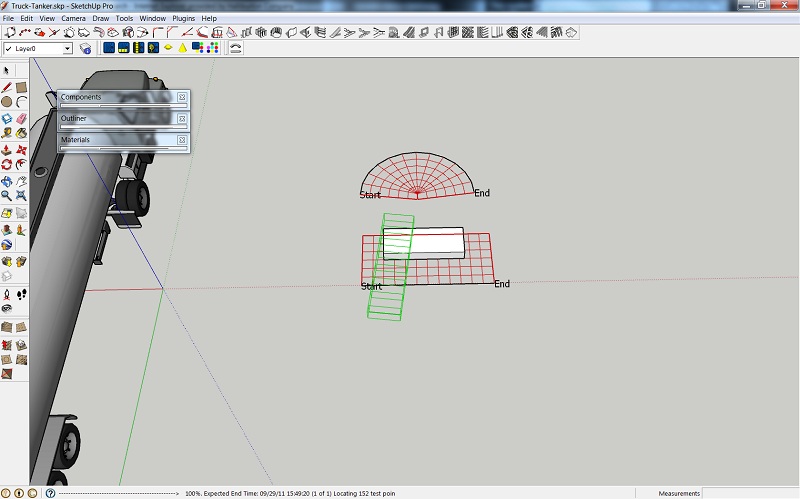
          I'm having a problem with the shape bender plugin and I can't seem to figure out what is going on. I am working with a file I downloaded off the 3d warehouse and whenever I try to use the shape bender plugin it rotates the object rather than bending it. The screenshot shows you what I am talking about. The plugin works fine on other files so it appears to be something about this particular file. I figured it could be something with the axes, but I can't find a solution. Any suggestions???screen.jpg

          1 條回覆 最後回覆 回覆 引用 0
          • TIGT 離線
            TIG Moderator
            最後由 編輯

            Try placing the instance, line and curve in the +ve quadrant = solid red/green.
            And retry...
            Also is the object a reasonable size ??

            TIG

            1 條回覆 最後回覆 回覆 引用 0
            • Chris FullmerC 離線
              Chris Fullmer
              最後由 編輯

              Yeah, I think I agree. Rotate the whole bending setup 180 degrees and move it into the positive red and positive green quadrant. That will probably help.

              Lately you've been tan, suspicious for the winter.
              All my Plugins I've written

              1 條回覆 最後回覆 回覆 引用 0
              • N 離線
                nnguyen2288
                最後由 編輯

                It worked! How foolish of me. In terms of whether the piece is reasonably sized or not... it was just a test. Actually trying to do a coiled wire that runs along an arc. This will help greatly. Thank you for your help

                1 條回覆 最後回覆 回覆 引用 0
                • M 離線
                  markitekt
                  最後由 編輯

                  I'm getting this error from Ruby on this;
                  Error: #<NoMethodError: undefined method `/' for nil:NilClass>
                  I'm no Ruby guy, but this seems to be a method error.
                  Any ideas?
                  Mark P.

                  1 條回覆 最後回覆 回覆 引用 0
                  • Chris FullmerC 離線
                    Chris Fullmer
                    最後由 編輯

                    Interesting, I need a little bit more. The other lines in the error are also helpful as they give the context of the problem - what line of code returned the error, and what method called it. So maybe could you post those extra lines of error code?

                    Also, what are you doing when they error occurs? As soon as you press the icon? or when you try to select the line? Thanks!

                    Chris

                    PS - didn't you used to have a lot more than just 21 posts?

                    Lately you've been tan, suspicious for the winter.
                    All my Plugins I've written

                    1 條回覆 最後回覆 回覆 引用 0
                    • TIGT 離線
                      TIG Moderator
                      最後由 編輯

                      The tool's code only contains a / as an operator in the following five lines...
                      #458 @x_scale_factor = @arc_total_length / @line_total_length
                      #467 @p_fac = (@line_total_length.to_f / @arc_total_length.to_f) #This gets the percentage multiplier for each curve segment length to get scaled for the line
                      #676 @offset = @y_total / 6
                      #830 loop_times = (@preview_poss.length / 2 )
                      #931 first_weight = weight_point /@line_lengths[corresponding_edge]
                      So the reference that's unexpectedly nil has to be one of three
                      @line_total_length @arc_total_length.to_f @line_lengths[corresponding_edge]
                      I suspect faulty line/curve set up ?

                      TIG

                      1 條回覆 最後回覆 回覆 引用 0
                      • Chris FullmerC 離線
                        Chris Fullmer
                        最後由 編輯

                        I think that is a good guess TIG.

                        Lately you've been tan, suspicious for the winter.
                        All my Plugins I've written

                        1 條回覆 最後回覆 回覆 引用 0
                        • C 離線
                          Corb
                          最後由 編輯

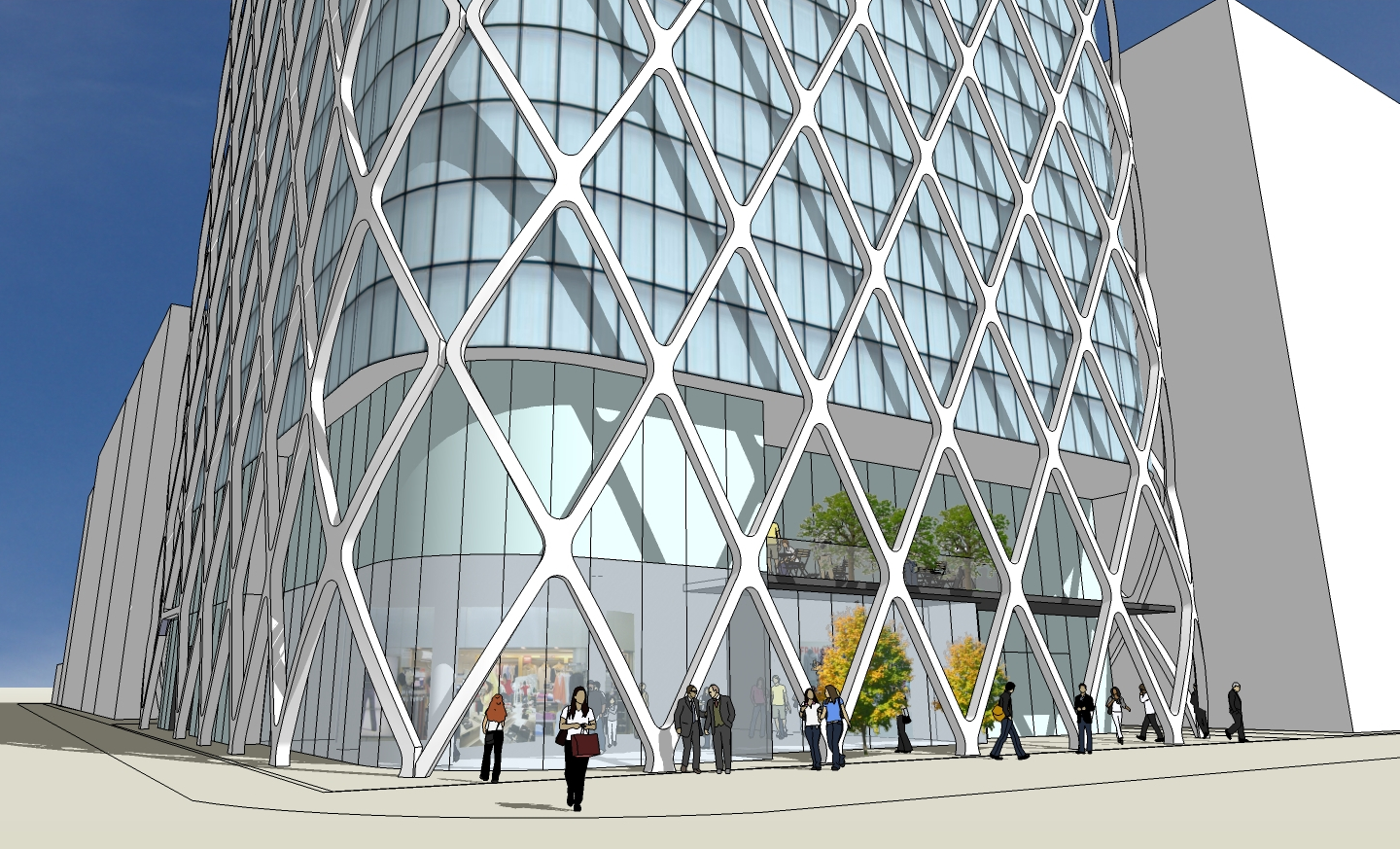
                          This plugin is just great !
                          I am using it to make a curved structural cage in front of a building.
                          A bit like Prada building in Tokyo, by HdeM, but the cage is separated from the facade.
                          It does not work always on very complex shapes but it's incredibly useful !!!
                          Many thanks indeed !
                          cage_07.jpg

                          1 條回覆 最後回覆 回覆 引用 0
                          • Chris FullmerC 離線
                            Chris Fullmer
                            最後由 編輯

                            Woohoo! I love it when it works, thanks for sharing!

                            Chris

                            Lately you've been tan, suspicious for the winter.
                            All my Plugins I've written

                            1 條回覆 最後回覆 回覆 引用 0
                            • K 離線
                              kagazwala
                              最後由 編輯

                              Hello Everyone!!!

                              I have a little problem.

                              1. I select a Group shape then clicked the shape bender icon.
                              2. Selected a straight line along the red axis of the same size as the group.
                              3. Selected the curved path.

                              Wallah !!! it bent the shape as desired.

                              But now when I press Enter Key to commit changes everything goes back to point 0. nothing happens

                              What am I doing wrong.

                              Please help

                              Regards
                              Kagazwala

                              1 條回覆 最後回覆 回覆 引用 0
                              • TIGT 離線
                                TIG Moderator
                                最後由 編輯

                                Press ENTER to confirm the bending.
                                Do you get any errors in the Ruby Console ?

                                TIG

                                1 條回覆 最後回覆 回覆 引用 0
                                • D 離線
                                  davidbone
                                  最後由 編輯

                                  Great plugin, I used it on a couple of my Star Trek models to bend the writing for the saucer 😄

                                  1 條回覆 最後回覆 回覆 引用 0
                                  • M 離線
                                    Maker
                                    最後由 編輯

                                    I have troubles with bolt modeling tutorial.
                                    See the screen shot below:

                                    http://www.bizler.org/archive/ShapeBender.jpg

                                    http://www.bizler.org/archive/ShapeBender1.jpg

                                    1. Distribution occurs with error
                                    2. It does not create all the required surfaces.
                                    1 條回覆 最後回覆 回覆 引用 0
                                    • E 離線
                                      esther_febriana
                                      最後由 編輯

                                      hi,
                                      i want to install, but cant open the .rb file.
                                      please help me how to install it

                                      THannksssS

                                      1 條回覆 最後回覆 回覆 引用 0
                                      • F 離線
                                        fightingfishcustoms
                                        最後由 編輯

                                        it's not working for me, i did the steps but i got stuck in step 2(where you select the straight line), the cursor does not change and i can't click on anything? what am i doing wrong? thanks

                                        1 條回覆 最後回覆 回覆 引用 0
                                        • Dave RD 離線
                                          Dave R
                                          最後由 編輯

                                          @esther_febriana said:

                                          hi,
                                          i want to install, but cant open the .rb file.
                                          please help me how to install it

                                          THannksssS

                                          You don't need to open the .rb file. You need to extrct the ZIP file to the plugins directory. See the sticky post in the Plugins forum on installing zipped plugins.

                                          Etaoin Shrdlu

                                          %

                                          (THERE'S NO PLACE LIKE)

                                          G28 X0.0 Y0.0 Z0.0

                                          M30

                                          %

                                          1 條回覆 最後回覆 回覆 引用 0
                                          • Dave RD 離線
                                            Dave R
                                            最後由 編輯

                                            @fightingfishcustoms said:

                                            it's not working for me, i did the steps but i got stuck in step 2(where you select the straight line), the cursor does not change and i can't click on anything? what am i doing wrong? thanks

                                            It could be pretty much anything. You don't give us enough info to help you. Post the SKP file so we can see what you are trying to do.


                                            Etaoin Shrdlu

                                            %

                                            (THERE'S NO PLACE LIKE)

                                            G28 X0.0 Y0.0 Z0.0

                                            M30

                                            %

                                            1 條回覆 最後回覆 回覆 引用 0
                                            • 1
                                            • 2
                                            • 6
                                            • 7
                                            • 8
                                            • 9
                                            • 10
                                            • 63
                                            • 64
                                            • 8 / 64
                                            • 第一個貼文
                                              最後的貼文
                                            Buy SketchPlus
                                            Buy SUbD
                                            Buy WrapR
                                            Buy eBook
                                            Buy Modelur
                                            Buy Vertex Tools
                                            Buy SketchCuisine
                                            Buy FormFonts

                                            Advertisement