sketchucation logo sketchucation
    • Login
    Oops, your profile's looking a bit empty! To help us tailor your experience, please fill in key details like your SketchUp version, skill level, operating system, and more. Update and save your info on your profile page today!
    ⚠️ Update | Sketchucation Tools 5.0.8 released with licensing improvements and bugfixes Download

    [Plugin][$] FredoScale - v3.7c - 19 Aug 26


    Scheduled Pinned Locked Moved Plugins
    1.2k Posts 347 Posters 3.2m Views 345 Watching
    Loading More Posts
    • Oldest to Newest
    • Newest to Oldest
    • Most Votes
    Reply
    • Reply as topic
    Log in to reply
    This topic has been deleted. Only users with topic management privileges can see it.
    • TIGT
      TIG Moderator
      last edited by

      Assuming you have correctly installed the files/subfolders etc...

      Try these extra steps after your Step 4...

      Step 4a.
      Open Preferences > Extensions... find the entry for the tool and activate it...

      Step 4b. [if desired]
      Activate its toolbar from its View > Toolbar entry...

      Step 5... After activation the tool becomes available in the main 'Tools' menu under the submenu 'Fredo6 Collection', submenu for this specific tool...

      TIG

      1 Reply Last reply
      Reply Quote 0
      • B
        Black_Blade
        last edited by

        Can't seem to unpack the downloaded zip file into the plug in directory. Get errors in winzip telling me destination directory does not exist. It does for I am looking in it now. I have been able to unzip it onto desktop then I copied it all into the plugin directory but sketchup won't load it for tells me there is a missing file..?

        Not sure where to go from here.

        Attached a pic of the contents of the zip file I d/l'd:
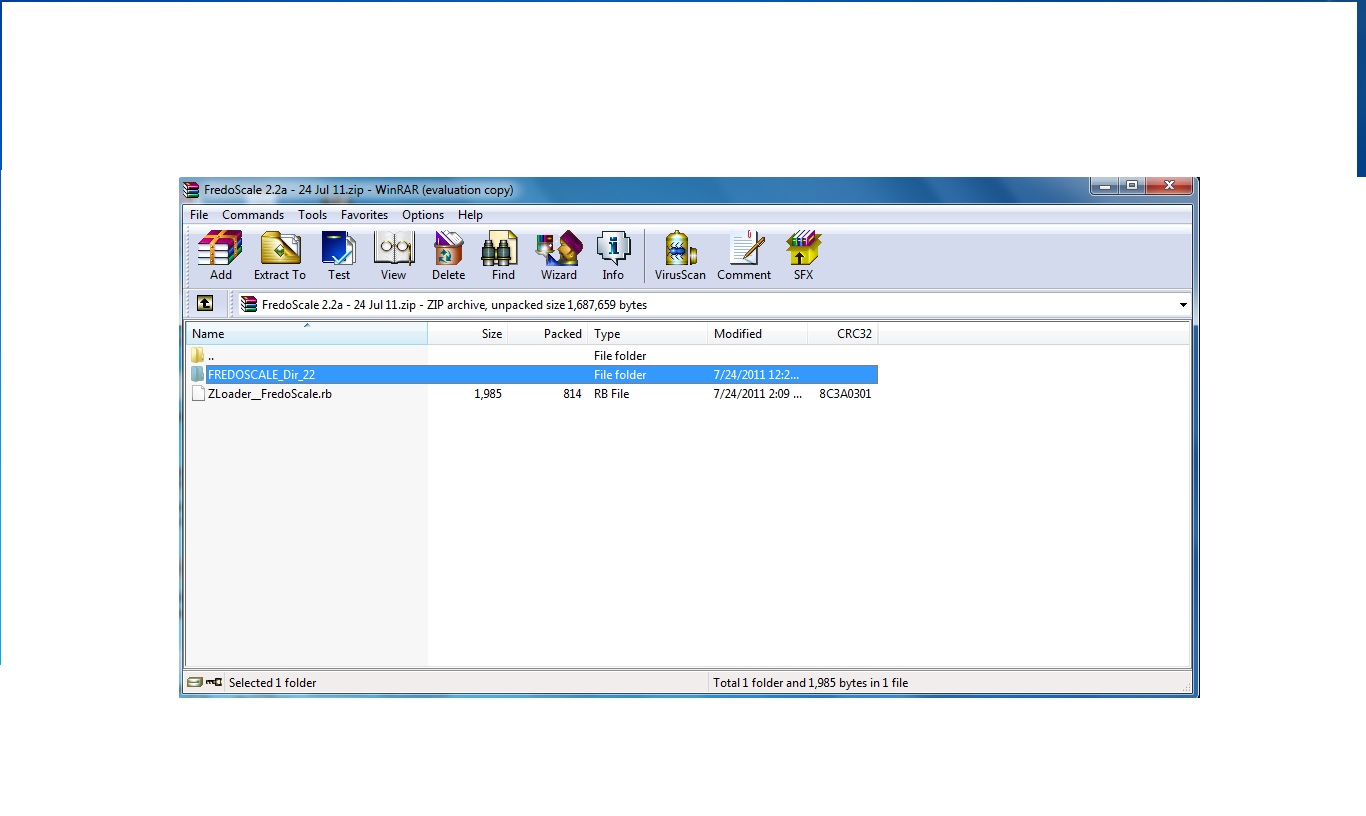

        screen.jpg

        1 Reply Last reply
        Reply Quote 0
        • fredo6F
          fredo6
          last edited by

          Apparently, you are missing LibFredo6 library.

          Go to the main post of FredoScale and follow the instructions.

          Fredo

          1 Reply Last reply
          Reply Quote 0
          • TIGT
            TIG Moderator
            last edited by

            You might also need to fix the Properties > Security setting for the Plugins folder to FULL for yourself...

            TIG

            1 Reply Last reply
            Reply Quote 0
            • S
              suntansue
              last edited by

              Thank you for your excellent work. Much appreciated.

              1 Reply Last reply
              Reply Quote 0
              • gillesG
                gilles
                last edited by

                Just a question about Radial Bender:

                Is there any reason I can't bend more than 180Β°?

                " c'est curieux chez les marins ce besoin de faire des phrases "

                1 Reply Last reply
                Reply Quote 0
                • T
                  thundermatch
                  last edited by

                  πŸ’š Thank you for sharing...

                  1 Reply Last reply
                  Reply Quote 0
                  • T
                    thegoodguy
                    last edited by

                    Amazing work! Thanks so much for this brilliant tool.

                    1 Reply Last reply
                    Reply Quote 0
                    • V
                      Vicky21S
                      last edited by

                      I've downloaded, extracted and put all the necessary files into the Plugin folder but for some reason cannot see the FredoScale options in Sketchup even when I restart. I've checked the preferences folder, tools panel and still nothing. Someone please help me with this, I am beyond frustrated.

                      1 Reply Last reply
                      Reply Quote 0
                      • pbacotP
                        pbacot
                        last edited by

                        Vicky,

                        1. Working backwards, You should get a listing in "Tool palettes" for a toolbar and under the Tools menu, "Fredo Collection >> Fredoscale".
                        2. You say you checked in Preferences? Is Fredoscale listed (and checked) in the Extensions window?
                        3. You've gone back to the SCF topics for Fredoscale and LibFredo and checked the requirements and specifics of file placement.
                        4. You saw the warning on the Fredoscale topic:
                          "IMPORTANT: Requires to download LibFredo6 3.6 or higher if not already installed."
                        5. Everything seems right to you then probably the next thing is to post a screenshot of your plugin folder where it shows all the required files, and see if someone can see something out of place.

                        MacOSX MojaveSketchUp Pro v19 Twilight v2 Thea v3 PowerCADD

                        1 Reply Last reply
                        Reply Quote 0
                        • W
                          willie_0
                          last edited by

                          Thanks Fredo6 your a rockstar..

                          cheers,
                          Willie

                          1 Reply Last reply
                          Reply Quote 0
                          • fredo6F
                            fredo6
                            last edited by

                            FredoScale, and more generally Ruby scripts, have problems to deal with fresh copies of group. Under the hood, these groups share a common definition until they are edited.

                            So in your case, I would suggest that you

                            • either use Make Unique feature of FredoScale
                            • Just double click of the Group A and B instances to make them unique

                            Fredo

                            1 Reply Last reply
                            Reply Quote 0
                            • T
                              Taniouska111
                              last edited by

                              πŸ˜„

                              1 Reply Last reply
                              Reply Quote 0
                              • B
                                bucksbedrooms
                                last edited by

                                Bug [pretty sure anyway].
                                Hi I love this Fredoscale plugin and was going to make a donation but I am getting some buggy results which I hope there is a solution for. Please see attachments.


                                Some whole components move or don't move instead of scale.


                                Top drawer irratic scaling

                                1 Reply Last reply
                                Reply Quote 0
                                • cottyC
                                  cotty
                                  last edited by

                                  I've tried some scaling and everything works as expected. Can you desribe your goal more detailed?

                                  my SketchUp gallery

                                  1 Reply Last reply
                                  Reply Quote 0
                                  • J
                                    jdkarg1989
                                    last edited by

                                    Hi. I have a question. When I twist an object and conferm my sketchup crashes. What could this be?

                                    1 Reply Last reply
                                    Reply Quote 0
                                    • fredo6F
                                      fredo6
                                      last edited by

                                      @jdkarg1989 said:

                                      Hi. I have a question. When I twist an object and conferm my sketchup crashes. What could this be?

                                      Are you working on a Group which has been freshly copied?

                                      Fredo

                                      1 Reply Last reply
                                      Reply Quote 0
                                      • TIGT
                                        TIG Moderator
                                        last edited by

                                        Or is the object very tiny ?
                                        Or very large ??

                                        TIG

                                        1 Reply Last reply
                                        Reply Quote 0
                                        • Dave RD
                                          Dave R
                                          last edited by

                                          What are the dimensions of the original before bending?

                                          Etaoin Shrdlu

                                          %

                                          (THERE'S NO PLACE LIKE)

                                          G28 X0.0 Y0.0 Z0.0

                                          M30

                                          %

                                          1 Reply Last reply
                                          Reply Quote 0
                                          • G
                                            giorgio1979
                                            last edited by

                                            Lovely plugin. πŸ˜„ Another issue: Sometimes when I do a "radial bending by selection of plane" I get some missing faces on the bending side.
                                            PS: I restarted sketchup, and I cannot reproduce this anymore. Perhaps I set something in Fredolib somewhere during an operation.
                                            See image:

                                            http://s11.postimg.org/5vqbc093n/radial_bending_by_selection_of_plane.png

                                            1 Reply Last reply
                                            Reply Quote 0

                                            Hello! It looks like you're interested in this conversation, but you don't have an account yet.

                                            Getting fed up of having to scroll through the same posts each visit? When you register for an account, you'll always come back to exactly where you were before, and choose to be notified of new replies (either via email, or push notification). You'll also be able to save bookmarks and upvote posts to show your appreciation to other community members.

                                            With your input, this post could be even better πŸ’—

                                            Register Login
                                            • 1
                                            • 2
                                            • 37
                                            • 38
                                            • 39
                                            • 40
                                            • 41
                                            • 58
                                            • 59
                                            • 39 / 59
                                            • First post
                                              Last post
                                            Buy SketchPlus
                                            Buy SUbD
                                            Buy WrapR
                                            Buy eBook
                                            Buy Modelur
                                            Buy Vertex Tools
                                            Buy SketchCuisine
                                            Buy FormFonts

                                            Advertisement