sketchucation logo sketchucation
    • Conectarse
    Oops, your profile's looking a bit empty! To help us tailor your experience, please fill in key details like your SketchUp version, skill level, operating system, and more. Update and save your info on your profile page today!
    🔌 Smart Spline | Fluid way to handle splines for furniture design and complex structures. Download

    [Plugin][$] FredoScale - v3.6a - 01 Apr 24


    Programado Fijo Cerrado Movido Plugins
    1.1k Mensajes 345 Posters 2.4m Visitas 342 Watching
    Cargando más mensajes
    • Más antiguo a más nuevo
    • Más nuevo a más antiguo
    • Mayor número de Votos
    Responder
    • Responder como tema
    Accede para responder
    Este tema ha sido borrado. Solo los usuarios que tengan privilegios de administración de temas pueden verlo.
    • M Desconectado
      mac1
      Última edición por

      Su 7.1+ plus here and see the following:

      1. Bug splat for the stretch of the 2 cubed group and can get a bug splat for stretch of just one of them. No bug splat for stretch of one stand alone, before making copy.
      2. Outliner shows the two groups. Report back to 1 by entering edit mode and leaving confirmed ❓
        3)Instead of making groups the cube1 and cube2 were made in nested component then no bug splat. Checking placement of stretching plane shows the tool will change the definition, say of cube2 if plane is thu it and not cube2 in other instance of cubed into differnt instances.
        Ckecking version , may have 2.0
      1 Respuesta Última respuesta Responder Citar 0
      • fredo6F Desconectado
        fredo6
        Última edición por

        These bugsplats may be related to the fact that when you copy a group, it behaves as a component until it is edited or modified. Normally FredoScale makes them unique, but there may be problem for these type of copy-cat groups.
        Also, having the outliner open is usually not recommended, especially with version 6 and 7.

        fredo

        1 Respuesta Última respuesta Responder Citar 0
        • M Desconectado
          mac1
          Última edición por

          Thanks fredo
          I heed the previous warnings and roll it up before doing any thing.
          It appears I am at 2.0i so will update and look for diff
          Update: 2.1a gives same result

          1 Respuesta Última respuesta Responder Citar 0
          • T Desconectado
            tulacong
            Última edición por

            @unknownuser said:

            http://forums.sketchucation.com/download/file.php?id=49290

            With FredoScale 2.1 you can orientate the selection box around a set of objects and interactively apply a number of geometric transformations, such as Scaling, Tapering, Stretching, Plane Shear, Twisting, Bending and Rotation. By extension, some transformation can be done without a selection box.
            [attachment=4:3vnwzr1a]<!-- ia4 -->FredoScale%202.jpg<!-- ia4 -->[/attachment:3vnwzr1a]

            http://forums.sketchucation.com/download/file.php?id=49286

            [attachment=2:3vnwzr1a]<!-- ia2 -->FredoScale User Manual - English - v2.0 - 28 Mar 09.pdf<!-- ia2 -->[/attachment:3vnwzr1a]
            [attachment=3:3vnwzr1a]<!-- ia3 -->FredoScale User Manual - French - v2.0 - 28 Mar 09.pdf<!-- ia3 -->[/attachment:3vnwzr1a]

            • Language: English, French, Spanish, German, Italian, Japanese, Korean, Chinese, German (thanks to all kind translators)
            • Menus: by default, it is installed in Tools > Fredo6 Collection > FredoScale
            • Icon toolbar: by Default ‘FredoScale’. many icons are available, but you can configure which ones to display (menu Default Parameters…)
            • The plugin is free, for private and commercial usage. There is a donation menu however.

            http://forums.sketchucation.com/download/file.php?id=49287

            1. Download and Open the archive
            2. Select All (Ctrl A)
            3. Extract into the Sketchup Plugin Directory
            4. Answer YES to overwrite all existing files if any

            The footprint in the SU Plugin Directory must be:
            [attachment=1:3vnwzr1a]<!-- ia1 -->Fredoscale 2.1 footprint.jpg<!-- ia1 -->[/attachment:3vnwzr1a]
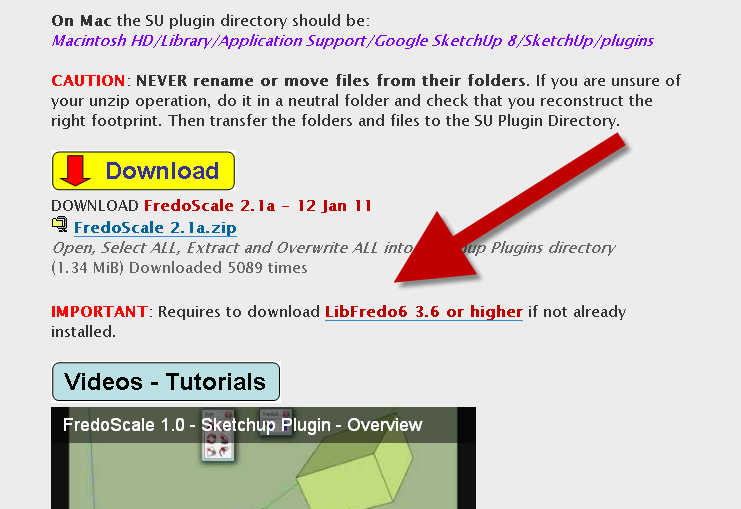
            On Mac the SU plugin directory should be:
            Macintosh HD/Library/Application Support/Google SketchUp 8/SketchUp/plugins

            CAUTION: NEVER rename or move files from their folders. If you are unsure of your unzip operation, do it in a neutral folder and check that you reconstruct the right footprint. Then transfer the folders and files to the SU Plugin Directory.

            http://forums.sketchucation.com/download/file.php?id=49285

            DOWNLOAD FredoScale 2.1a – 12 Jan 11
            [attachment=0:3vnwzr1a]<!-- ia0 -->FredoScale 2.1a.zip<!-- ia0 -->[/attachment:3vnwzr1a]
            IMPORTANT: Requires to download LibFredo6 3.6 or higher if not already installed.

            http://forums.sketchucation.com/download/file.php?id=49284

            [flash=425,344:3vnwzr1a]http://www.youtube.com/v/WN-nV5VsoRY&hl[/flash:3vnwzr1a]
            [flash=425,344:3vnwzr1a]http://www.youtube.com/v/bPbb8PPGtVg&hl[/flash:3vnwzr1a]

            Pour les utilisateurs francais voir aussi l’excellente video de Laurent Brixius
            http://www.arch-image.com/wordpress/2010/04/06/plugin-sketchup-fredoscale/

            http://forums.sketchucation.com/download/file.php?id=49288

            • Select one or several objects (faces, edges, groups or components)

            • Click on the icon of one tool, for instance Scaling

            • You can orientate the selection box:

            • Arrow Upwill align on model axes

            • Arrow Leftand Arrow Rightwill cycle through axes of components at highest level

            • Arrow Downwill restore the initial alignment when selecting

            • Gently click and drag on the handles to perform the deformation. Toggle the CTRL key to perform the deformation from the center.

            • You can type relevant values in the VCB or via a dialog box (TAB key)

            • For Twist and Bend, F4 toggles a Slicer on and off

            • For Stretch, F4 toggles a Divider on and off

            • It is a good idea to check the contextual menu to see available options

            http://forums.sketchucation.com/download/file.php?id=49289

            FredoScale 2.1a - 12 Jan 11: Technical update along with LibFredo6, with two-phase loading. No functional change, but it is advised to upgrade for support.

            FredoScale 2.0i - 08 Apr 10: Same as 2.0h, but includes the Chinese translation.

            FredoScale 2.0h - 26 Nov 09: Stable version

            verygood thanks

            1 Respuesta Última respuesta Responder Citar 0
            • fredo6F Desconectado
              fredo6
              Última edición por

              @mac1 said:

              Thanks fredo
              I heed the previous warnings and roll it up before doing any thing.
              It appears I am at 2.0i so will update and look for diff
              Update: 2.1a gives same result

              I can reproduce the bugsplat.
              This seems definitely related to the question of Groups behaving as components when copied and not edited yet.
              I think I can do something about.

              Just in case, FredoScale includes a commande MakeUnique (icone as a 1) which applies a make unique to groups and components recursively.

              Fredo

              1 Respuesta Última respuesta Responder Citar 0
              • I Desconectado
                ivreich
                Última edición por

                Hi Fredo

                Thanks for this great set of tools.

                One suggestion- would it be possible to add a "uniform deformation" checkbox to the box dimension dialog box so that you can scale uniformly to a specific dimension? I can't seem to get uniform deformation when using "scale to targets" or while using the dimension dialog box, even when toggling the shift key.

                Cheers

                joel

                1 Respuesta Última respuesta Responder Citar 0
                • R Desconectado
                  rock1
                  Última edición por

                  great plugin fredo!. I'm really amazed by this plugin !! I found fredoscale very useful. 👍 👍

                  Signature removed by SCF Admin

                  1 Respuesta Última respuesta Responder Citar 0
                  • D Desconectado
                    dedmin
                    Última edición por

                    1 Respuesta Última respuesta Responder Citar 0
                    • fredo6F Desconectado
                      fredo6
                      Última edición por

                      @dedmin said:

                      Do you have the model.
                      The bugsplat in mirroring seems to be related to the question of unique component (again).

                      Thanks

                      Fredo

                      1 Respuesta Última respuesta Responder Citar 0
                      • D Desconectado
                        dedmin
                        Última edición por

                        BC1D1S1D.skp

                        1 Respuesta Última respuesta Responder Citar 0
                        • K Desconectado
                          karros
                          Última edición por

                          Found this thread (and forum) by chance while looking for some answers on google. Plugin works great, thank you!!!

                          1 Respuesta Última respuesta Responder Citar 0
                          • D Desconectado
                            Designmark
                            Última edición por

                            Thanks Fredo,

                            Downloaded FredoScale today, it's fantastic!!
                            I really appreciate this plugin.

                            Kind regards,

                            Mark.(Newby)

                            1 Respuesta Última respuesta Responder Citar 0
                            • M Desconectado
                              merlin7777777
                              Última edición por

                              I'm getting this error when i start SU (v 8):

                              Error Loading File bootstrap_FredoScale.rb
                              (eval):1: uninitialized constant FredoScale::T6Error Loading File ZLoader__FredoScale.rb
                              no such file to load -- LibFredo6.rbError Loading File __loader.rb
                              uninitialized constant Traductor::Plugin

                              I'm fairly certain the directory structure is as you specify. I extracted the files from the subfolders into their own folders as specified but I also extracted those files to the plugin directory just in case.

                              any thoughts?

                              1 Respuesta Última respuesta Responder Citar 0
                              • J Desconectado
                                Jim
                                Última edición por

                                Did you install LibFredo6, as the instructions say? It's required to run most of Fredo's plugins.

                                Hi

                                1 Respuesta Última respuesta Responder Citar 0
                                • M Desconectado
                                  merlin7777777
                                  Última edición por

                                  ah - no. can't see that info in the OP. can you direct me where to go for it?

                                  1 Respuesta Última respuesta Responder Citar 0
                                  • Dave RD Desconectado
                                    Dave R
                                    Última edición por

                                    Libfredo.png

                                    Etaoin Shrdlu

                                    %

                                    (THERE'S NO PLACE LIKE)

                                    G28 X0.0 Y0.0 Z0.0

                                    M30

                                    %

                                    1 Respuesta Última respuesta Responder Citar 0
                                    • gillesG Desconectado
                                      gilles
                                      Última edición por

                                      I am trying to bend a profile with precision, let say a 4000mm radius bend at 90°.
                                      the only way I found to do this is to first calculate the length of the arc: PI2000, then use the bend tool and type 6283,20 (PI2000) and bend 90°.
                                      Could it be possible to just type the desired radius in VCB ?

                                      " c'est curieux chez les marins ce besoin de faire des phrases "

                                      1 Respuesta Última respuesta Responder Citar 0
                                      • M Desconectado
                                        merlin7777777
                                        Última edición por

                                        OK - added the fredo6, all works ok except still egtting this error on startup:

                                        Error Loading File bootstrap_FredoScale.rb
                                        (eval):1: uninitialized constant FredoScale::T6

                                        Maybe something to do with the double extraction I did?

                                        1 Respuesta Última respuesta Responder Citar 0
                                        • Dave RD Desconectado
                                          Dave R
                                          Última edición por

                                          @merlin7777777 said:

                                          Maybe something to do with the double extraction I did?

                                          To be sure it isn't, why don't you remove anything to do with FredoScale and LibFredo and reinstall them so you know they are installed correctly.

                                          Etaoin Shrdlu

                                          %

                                          (THERE'S NO PLACE LIKE)

                                          G28 X0.0 Y0.0 Z0.0

                                          M30

                                          %

                                          1 Respuesta Última respuesta Responder Citar 0
                                          • fredo6F Desconectado
                                            fredo6
                                            Última edición por

                                            @merlin7777777 said:

                                            OK - added the fredo6, all works ok except still egtting this error on startup:

                                            Error Loading File bootstrap_FredoScale.rb
                                            (eval):1: uninitialized constant FredoScale::T6

                                            Maybe something to do with the double extraction I did?

                                            Do you use Plugin Organizer?
                                            Another user had the same problem, which can be solved by setting Excluded Directories.

                                            Fredo

                                            1 Respuesta Última respuesta Responder Citar 0
                                            • 1
                                            • 2
                                            • 27
                                            • 28
                                            • 29
                                            • 30
                                            • 31
                                            • 56
                                            • 57
                                            • 29 / 57
                                            • First post
                                              Last post
                                            Buy SketchPlus
                                            Buy SUbD
                                            Buy WrapR
                                            Buy eBook
                                            Buy Modelur
                                            Buy Vertex Tools
                                            Buy SketchCuisine
                                            Buy FormFonts

                                            Advertisement