[Plugin][$] FredoScale - v3.6a - 01 Apr 24




-
@lukeclaytonthompson said:
I am using safari and the files are automatically unzipped. I have indeed copied all of those files, LIBFREDO6_dir_47, FREDOSCALE_Dir_22 and LibFredo6.rb to the Plugins folder, but I still cannot view the plugin in SketchUp.
I can't think why its not working.
it's because when you unzip something on mac, it won't unzip it in the same way as windows.. on mac, all of the contents of the .zip will be inside a folder (on windows, all of the contents will be released outside of a folder)
so, you have to open those toplevel folders you're getting in (i assume) your download folder then move THOSE files/folders into your plugins folder..
-
@dave r said:
This was spelled out in the first post. Go back and review that.
yes and no.. it's spelled out clear for windows users and has screenshots of windows installs.. it's different on mac.
which is why i think (like you) that .rbz files should be used to distribute plugins.. sketchup handles these OS differences internally which leaves a single set of install instructions regardless of operating system.
-
Jeff, the file names still look the same (at least on my Mac) when the files are extracted correctly. Yes, I agree the ZIP files ought to be converted to RBZ files to make it possible for a higher percentage of users to install the files without screwing it up.

-
I think there is a specific setting on MAC Safari...
This will either download the ZIP file as it is... OR extract all of it contents into a folder !
Clearly if you have the former setting everything is OK, bit with the latter setting, because everything is already extracted then your subsequent your actions need to be modified.
AND if it extracts everything from the zip-file's subfolders into one 'lump' then you are doomed !So... check your Safari settings and retry.
You should get a lone ZIP file archive that is intact and NOT already 'extracted'
Then process that as instructed... -
@tig said:
I think there is a specific setting on MAC Safari...
This will either download the ZIP file as it is... OR extract all of it contents into a folder !
Clearly if you have the former setting everything is OK, bit with the latter setting, because everything is already extracted then your subsequent your actions need to be modified.
AND if it extracts everything from the zip-file's subfolders into one 'lump' then you are doomed !So... check your Safari settings and retry.
You should get a lone ZIP file archive that is intact and NOT already 'extracted'
Then process that as instructed...nah.. it's not that.. it's system wide behavior.. if i have a .zip on my desktop and expand it, the same thing happens (it's enclosed in a folder)
the logic behind the behavior is good (i think) but i can also see the benefits of the windows way in certain situations..
imagine i send you a zip of 500 photos which you have sitting on your desktop.. would you rather unzip on a mac or pc in this situation? (rhetorical question.. just trying to point out the difference in behavior)
regardless.. i don't think the why it happens is really important.. truth is (i think), more mac users have problems installing rubies than windows users.. <insert jokes here if you like>
in top level [plugin] posts, i've never once seen mention of macs using a different unzip procedure than windows (and some/most/all? of the plugin writers don't even know it exists.. so-- 2 & 2 together = use .rbz files for sketchup plugins..
-
When I want to install a new zipped plugin on my Mac, I download it. Navigate to the ZIP file and double click on it. A new folder with the name of the ZIP file is created and opened in Finder. I copy the contents of that folder which has the exact right structure and paste it in the Plugins folder. Actually I set up the Plugins folder to show in the left pane of finder and I just drag the files over. It ain't rocket science nor brain surgery.
-
@dave r said:
It ain't rocket science nor brain surgery.
i fully agree.. but we've installed a gazillion plugins over the years.. imagine doing it for the first time and reading the instructions.. 'unzip into the plugin folder located at..'
if i do that, it's not going to work.. but those are the instructions i'm being given..
all i'm saying is first time plugin users definitely have more problems on mac than pc.. so there is a problem.. if you can do it with your eyes closed, it doesn't matter.. they can't and aren't being given proper instructions..
-
I've tried. I've made screen shots and described the process repeatedly.
TIG has Tried, Thomthom has tried, You've tried... -
Hello Everyone and greetings.
I have just found this awesome plugin and have read the post on how to download the file but still having problem of it showing up in sketchup. Please helpWhat i have done
- Downloaded (FredoScale 2.2a - 24 Jul 11.zip) - in sketchup plugin folder.
- Downloaded (LibFredo6 4.7a - 28 Nov 12.zip) - in sketchup plugin folder.
- Unzipped the folders
- Loading sketchup
- Look for the plugins under tools tab ( nothing shows up )
Please help and thanks in advance.
-
The most common problem is that you didn't extract the contents of the ZIP files correctly. Post a screenshot of your plugins folder showing these files.
-
Assuming you have correctly installed the files/subfolders etc...
Try these extra steps after your Step 4...
Step 4a.
Open Preferences > Extensions... find the entry for the tool and activate it...Step 4b. [if desired]
Activate its toolbar from its View > Toolbar entry...Step 5... After activation the tool becomes available in the main 'Tools' menu under the submenu 'Fredo6 Collection', submenu for this specific tool...
-
Can't seem to unpack the downloaded zip file into the plug in directory. Get errors in winzip telling me destination directory does not exist. It does for I am looking in it now. I have been able to unzip it onto desktop then I copied it all into the plugin directory but sketchup won't load it for tells me there is a missing file..?
Not sure where to go from here.
Attached a pic of the contents of the zip file I d/l'd:
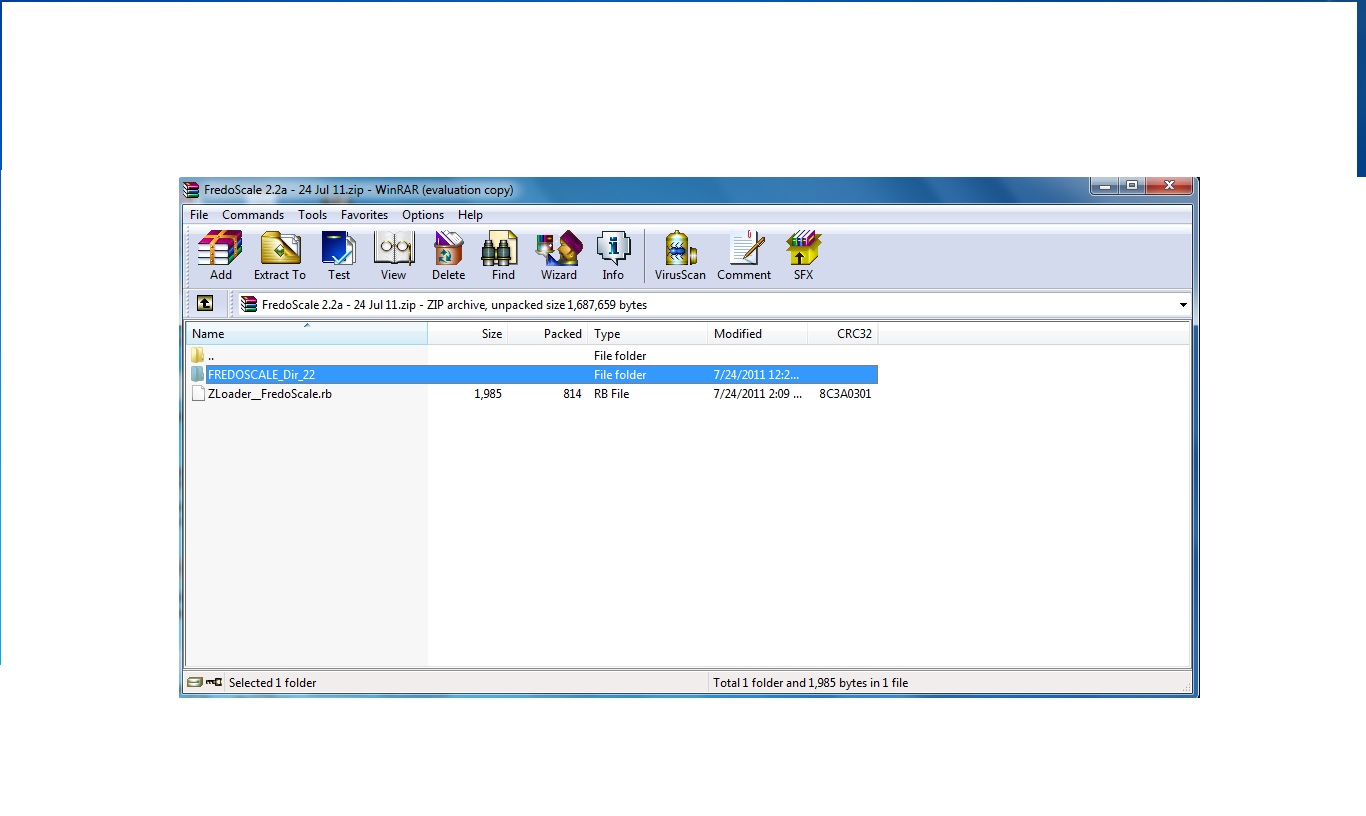
-
Apparently, you are missing LibFredo6 library.
Go to the main post of FredoScale and follow the instructions.
Fredo
-
You might also need to fix the Properties > Security setting for the Plugins folder to FULL for yourself...
-
Thank you for your excellent work. Much appreciated.
-
Just a question about Radial Bender:
Is there any reason I can't bend more than 180°?
-
 Thank you for sharing...
 -
Amazing work! Thanks so much for this brilliant tool.
-
I've downloaded, extracted and put all the necessary files into the Plugin folder but for some reason cannot see the FredoScale options in Sketchup even when I restart. I've checked the preferences folder, tools panel and still nothing. Someone please help me with this, I am beyond frustrated.
-
Vicky,
- Working backwards, You should get a listing in "Tool palettes" for a toolbar and under the Tools menu, "Fredo Collection >> Fredoscale".
- You say you checked in Preferences? Is Fredoscale listed (and checked) in the Extensions window?
- You've gone back to the SCF topics for Fredoscale and LibFredo and checked the requirements and specifics of file placement.
- You saw the warning on the Fredoscale topic:
"IMPORTANT: Requires to download LibFredo6 3.6 or higher if not already installed." - Everything seems right to you then probably the next thing is to post a screenshot of your plugin folder where it shows all the required files, and see if someone can see something out of place.







Advertisement