[Plugin][$] FredoScale - v3.6a - 01 Apr 24




-
@unknownuser said:
Hi fredo, I used your plugins fredoscale, and scale / move the component simultaneously.
Is this normal?elcorto,
you can toggle how the stretching is done.. i use the option key (mac) so i assume you would use the ctrl key on pc..
try clicking on one of the handles then press ctrl.. -
Thanks for responding.
Squeezing the Ctrl key, something similar happens.[flash=425,344:2j62a2lq]http://www.youtube.com/v/7aCFeHoQSS4[/flash:2j62a2lq]
-
[EDIT -- OH WAIT
 .. your second video shows everything i've describe in this post so ignore it.. so that's not what you wanted it to do? what exactly are you trying to accomplish? the stretch tool may be the wrong one to achieve what you want]
try this --
--select the stretching tool
--hover the mouse arrow over one of the handles
--wait for the tool tip to pop up (in your case, it will probably say 'green_ uniform from opposite point'
--press the ctrl key (and let go of it -- you don't have to hold it down during the operation.. it's only a toggle switch)the tool tip should switch to 'green_ uniform from center' at which point one edge of your door will stay locked in place while you stretch.
[* i'm assuming it's the ctrl key on PC.. if that's not doing it, try another key like option, tab, cmmd, alt etc..]
-
sorry, I may not express well.
My English is bad.
If I apply Fredoscale (Stretch) to a component, the malfunctioning plugins
If I apply Fredoscale (Stretch) to exploited component, the plug works fine[flash=425,344:3k3gfsye]http://www.youtube.com/v/DelZcDBzRBg[/flash:3k3gfsye]
-
oh, ok.. i see
i think there are problems with using components and stretch.. if you explode the outer component as you've done in the video and make it a group instead then it should work ok..
i think fredo will be able to give you a much better explanation than me
-
Thanks fredo
-
@unknownuser said:
Hi fredo, I used your plugins fredoscale, and scale / move the component simultaneously.
Is this normal?Thanks for signaling this bug. Apparently it shows up for components that are made of groups and sub-compoennts with no other geometry embedded.
I made a quick fix, but need to give it more attention to make sure there is no collateral effect.
Just drop the attached file in the FREDOSCALE_Dir_20 folder and restart Sketchup.
Fredo
Attachment removed and integrated into FredoScale 2.0h
-
Updated version 2.0h
- Fixed the bug signaled by elCortofor Stretch tool in containers
- incorporated the documentation in French, translated by Jean-Francoand Christophe Plassais.
See main post at http://forums.sketchucation.com/viewtopic.php?f=180&t=17948&p=144180#p144180
-
help Fredo!!!
Fredoscale is freezing when I try to taper my trusser structure!!
I had a previous Fredoscale version, and I tried everything... ungrouping it all till only the loose geometry was left... tried to delete two of the trusser groups, everything... it would sometimes go up to 99%... like 253 of 254... but it would never reach 254!!
Now I downloaded your new version, to see if it would work... but its even worse... it doesnt even START


if its impossible to do it with Fredoscale, is there any other means to do it??
thanks
-
That is an insane amount of geometry to try to deform using a ruby plugin.

The obvious question would be, why don't you just delete two of the trusses, deform/twist the remaining one around the centre point and then rotate/copy it to create the other two?
-
@aceshigh said:
help Fredo!!!
Fredoscale is freezing when I try to taper my trusser structure!!
Sketchup is not really freezing, but computing. Because of the tubing, you have a huge amount of geometry to deform!
So you need to get some coffee before it gets finished.I would suggest also that you do the taper transformation on the edgeframe, before tubing. The reason is that if you taper 'after' tubing, your tubes will also be tapered, whereas if you do it 'before', you can then have regular tubes on your transformed geometry (i.e. with constant diameter). There is a plugin by Didier Bur that can do massive tubing on a selection of edges.
Fredo
PS: the last step 253 to 254 is actually the update of the geometry by Sketchup (the previous phases are just calculation of new positions). The script has no control on this phase, which cannot be interrupted and can take very, very long!
-
@unknownuser said:
There is a plugin by Didier Bur that can do massive tubing on a selection of edges.
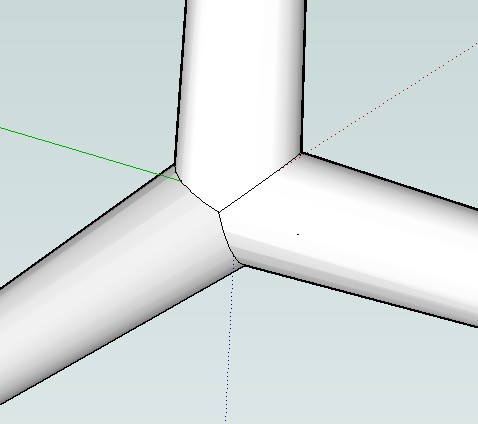
Didier's plugin is really cool. The only problem is on corners. In your opinion It would be possible to have smooth corners joint. Too difficult?
-
@massimo said:
Didier's plugin is really cool. The only problem is on corners. In your opinion It would be possible to have smooth corners joint. Too difficult?
Maybe Whaat's Profile Builder can do clean intersections at vertices.
Fredo
-
@jackson said:
That is an insane amount of geometry to try to deform using a ruby plugin.
The obvious question would be, why don't you just delete two of the trusses, deform/twist the remaining one around the centre point and then rotate/copy it to create the other two?
I tried that. The same thing happen... it would either freeze at 99% or before starting
@unknownuser said:
Sketchup is not really freezing, but computing. Because of the tubing, you have a huge amount of geometry to deform!
So you need to get some coffee before it gets finished.I would suggest also that you do the taper transformation on the edgeframe, before tubing. The reason is that if you taper 'after' tubing, your tubes will also be tapered, whereas if you do it 'before', you can then have regular tubes on your transformed geometry (i.e. with constant diameter). There is a plugin by Didier Bur that can do massive tubing on a selection of edges.
Fredo
PS: the last step 253 to 254 is actually the update of the geometry by Sketchup (the previous phases are just calculation of new positions). The script has no control on this phase, which cannot be interrupted and can take very, very long!
Hi Fredo, I am afraid it really was freezing. As I said, I tried EVERYTHING with the previous version of the script. Everything resulted in freezing. With the new version, I tried several things too (deleting two of the trussers), ungrouping, etc. Still, it would freeze. I left it processing for like ONE HOUR and then I got a bugsplash!!!!
Now the proof it WAS freezing is that ONE thing I hadnt tried with the new script... to ungroup until NO GROUP existed, leaving only the geometry. Guess what? IT WORKED!! And while it takes a while, it was at least ONE ORDER OF MAGNITUDE faster then previous attempts which resulted either in a bugsplash after one hour or with me closing Sketchup because it would not respond and the screen would go blank.
I dont think it took more than 10 minutes to process everything, this time. Im on a Core 2 Quad Q9300 with 4gb ram btw.
-
@unknownuser said:
Maybe Whaat's Profile Builder can do clean intersections at vertices.
Thanks Fredo and sorry for the little off topic.
-
@aceshigh said:
Hi Fredo, I am afraid it really was freezing. As I said, I tried EVERYTHING with the previous version of the script. Everything resulted in freezing. With the new version, I tried several things too (deleting two of the trussers), ungrouping, etc. Still, it would freeze. I left it processing for like ONE HOUR and then I got a bugsplash!!!!
AceHigh,
You may be right. The amount of geometry may cause the problem. The plugin, and maybe even Sketchup was not designed with in mind moving such a huge number of vertices, faces and edges (if you reach the 99%, then the issue is at the Commit by Sketchup). Exploding the group is maybe a group trick, useful for other users in similar situations, but not satisfying intellectually.
Actually I put the progress bar 'just in case'. I should implement a 'non-pre-emptive' mode in a next version, like what I did in RoundCorner, so that you can at least interrupt the calculation.
Still, I think you should do the Taper transformation on the wireframe and then do the tubing. Remember that the transformation applies to the whole geometry and superbly ignores that your tubes have to keep a constant section. In your workflow, this won't be the case.
Fredo
-
Just wanted send out a HUGE THANKS!!! Was working on a project that would have been virtually impossible w/o the Radial Bending feature of your plugin!

THANKS AGAIN!
OSX 10.5.6
Sketchup 7.1.4870 -
hey Fredo.
i'm wondering if scaling to an intersecting plane is possible with fredoscale.. i'm not quite sure i have target mode figured out -or- it's not designed to do what i'm trying to do with it..
see attached skp to see what i'm talking about. basically, i'd like to scale to a plane or line and it will stop at the exact point of intersection (much like the rest of SU's inferencing system)
thanks much![edit] actually, i just figured out if i draw a line from the topright to bottomleft corner that continues on to the plane (and will infer and stop at the correct point) then i can use target mode and scale to the desired point.. this alone is actually much better than i've been dealing with.. it's a few extra steps but at least it's precise which is the main importance.
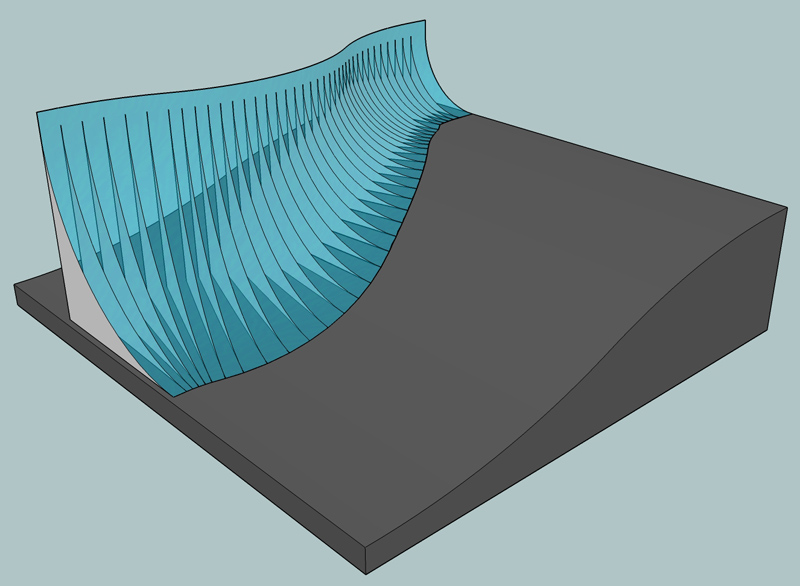
i guess this view sums up what i'm trying to accomplish.. (and i used fredoscale for this.. it's just the intersecting points weren't fully accurate and i was way zoomed in scaling to ratios of 1.069845 then 1.069846 etc
..) ..i could of used the workaround i just found and saved a lot of headache.. still, it'd be sweet if the scale tool can already do this in a way i'm unaware of..
-
Hey people, I'm using sketchup version 7.
But it seems failed to load this plugin.
Does it require any special file to load it?
-
Hi Darren,
from the very first post of this thread:
@unknownuser said:It requires you also upgrade to LibFredo6 3.1b. See that post at http://www.sketchucation.com/forums/scf/viewtopic.php?f=180&t=17947#p144178.
Maybe is this your problem?





Advertisement