[Plugin][$] FredoScale - v3.6a - 01 Apr 24




-
@xrok1 said:
not that this toolset isn't great enough already... but a divider in the scale tool like the stretch tool one would be the icing!

Interesting idea, but of course, only when you scale by the Midle plane. I'll think of it.
-
Thank you so much.
-
As a newbee I have been searching for this plugin.
My first impression was that it had been folded into LibFredo6, but it didn't appear once I had loaded LibFredo6.
My next flash was to search the Extensions Index, but no mention of FredoScale.However, I have found it! (At the beginning of this thread.)
Marvellous!
-
I've been trying the twist and free bend tools from this plugin, but they don't seem to be working quite right. In this example from the visual index, it shows the tools subdividing the geometry as needed for a smooth bend or twist.
But when I try it, I get no subdividing! What am I doing wrong? What are the correct settings to make this work? I've tried reading the documentation, but I haven't found an answer.
Thanks! Awesome plugin by the way -- the scale and taper tools are super duper useful!!
-
there are a couple of ways to get it.. one is to hit F4 to activate the slicing (and since you're on a mac, your f keys are probably set to other things like volume,expose,etc.. you'll have to push the 'fn' key along with F4 in the same manner as using the shift key with 3 to get a #...)
another thing to do is to go Tools/Fredo6 Collection/FredoScale/Default Parameters.. click 'slicing active by default' then save your changes..
and it's a little weird on mac in that you may have to click the box, then unclick it, then click it again.. you want the whole line to be highlighted in yellow with the box clicked before saving.. like this..
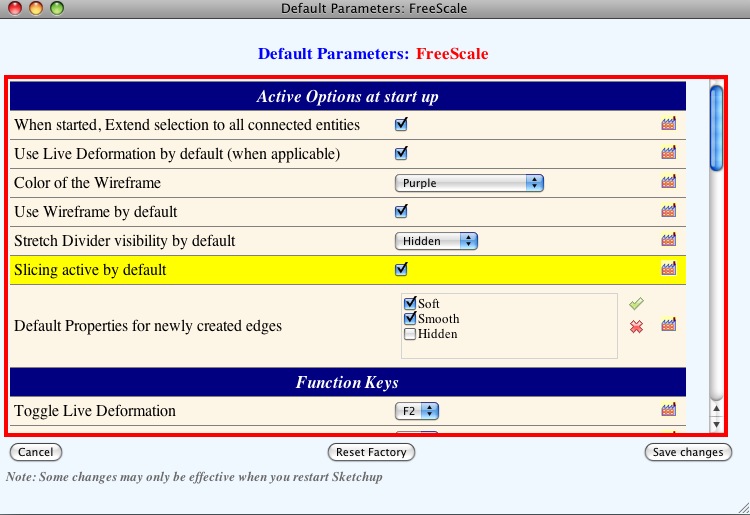
also, once you have the tool activated, you can push the tab key and a little box will pop up... in there, you can change the number of slices you'd like to use (or with the bend tool, use a negative number for auto division) as well as decide if you want the resulting shape to be smoothed, keep edges, etc..
-
Okay! It works from right-clicking too, thanks!! The clicking-unclicking-clicking again was the key!
-
Hi fredo, I used your plugins fredoscale, and scale / move the component simultaneously.
Is this normal?[flash=425,344:31uc4nee]http://www.youtube.com/v/6mxSL5170dE[/flash:31uc4nee]
-
@unknownuser said:
Hi fredo, I used your plugins fredoscale, and scale / move the component simultaneously.
Is this normal?elcorto,
you can toggle how the stretching is done.. i use the option key (mac) so i assume you would use the ctrl key on pc..
try clicking on one of the handles then press ctrl.. -
Thanks for responding.
Squeezing the Ctrl key, something similar happens.[flash=425,344:2j62a2lq]http://www.youtube.com/v/7aCFeHoQSS4[/flash:2j62a2lq]
-
[EDIT -- OH WAIT
 .. your second video shows everything i've describe in this post so ignore it.. so that's not what you wanted it to do? what exactly are you trying to accomplish? the stretch tool may be the wrong one to achieve what you want]
try this --
--select the stretching tool
--hover the mouse arrow over one of the handles
--wait for the tool tip to pop up (in your case, it will probably say 'green_ uniform from opposite point'
--press the ctrl key (and let go of it -- you don't have to hold it down during the operation.. it's only a toggle switch)the tool tip should switch to 'green_ uniform from center' at which point one edge of your door will stay locked in place while you stretch.
[* i'm assuming it's the ctrl key on PC.. if that's not doing it, try another key like option, tab, cmmd, alt etc..]
-
sorry, I may not express well.
My English is bad.
If I apply Fredoscale (Stretch) to a component, the malfunctioning plugins
If I apply Fredoscale (Stretch) to exploited component, the plug works fine[flash=425,344:3k3gfsye]http://www.youtube.com/v/DelZcDBzRBg[/flash:3k3gfsye]
-
oh, ok.. i see
i think there are problems with using components and stretch.. if you explode the outer component as you've done in the video and make it a group instead then it should work ok..
i think fredo will be able to give you a much better explanation than me
-
Thanks fredo
-
@unknownuser said:
Hi fredo, I used your plugins fredoscale, and scale / move the component simultaneously.
Is this normal?Thanks for signaling this bug. Apparently it shows up for components that are made of groups and sub-compoennts with no other geometry embedded.
I made a quick fix, but need to give it more attention to make sure there is no collateral effect.
Just drop the attached file in the FREDOSCALE_Dir_20 folder and restart Sketchup.
Fredo
Attachment removed and integrated into FredoScale 2.0h
-
Updated version 2.0h
- Fixed the bug signaled by elCortofor Stretch tool in containers
- incorporated the documentation in French, translated by Jean-Francoand Christophe Plassais.
See main post at http://forums.sketchucation.com/viewtopic.php?f=180&t=17948&p=144180#p144180
-
help Fredo!!!
Fredoscale is freezing when I try to taper my trusser structure!!
I had a previous Fredoscale version, and I tried everything... ungrouping it all till only the loose geometry was left... tried to delete two of the trusser groups, everything... it would sometimes go up to 99%... like 253 of 254... but it would never reach 254!!
Now I downloaded your new version, to see if it would work... but its even worse... it doesnt even START


if its impossible to do it with Fredoscale, is there any other means to do it??
thanks
-
That is an insane amount of geometry to try to deform using a ruby plugin.

The obvious question would be, why don't you just delete two of the trusses, deform/twist the remaining one around the centre point and then rotate/copy it to create the other two?
-
@aceshigh said:
help Fredo!!!
Fredoscale is freezing when I try to taper my trusser structure!!
Sketchup is not really freezing, but computing. Because of the tubing, you have a huge amount of geometry to deform!
So you need to get some coffee before it gets finished.I would suggest also that you do the taper transformation on the edgeframe, before tubing. The reason is that if you taper 'after' tubing, your tubes will also be tapered, whereas if you do it 'before', you can then have regular tubes on your transformed geometry (i.e. with constant diameter). There is a plugin by Didier Bur that can do massive tubing on a selection of edges.
Fredo
PS: the last step 253 to 254 is actually the update of the geometry by Sketchup (the previous phases are just calculation of new positions). The script has no control on this phase, which cannot be interrupted and can take very, very long!
-
@unknownuser said:
There is a plugin by Didier Bur that can do massive tubing on a selection of edges.
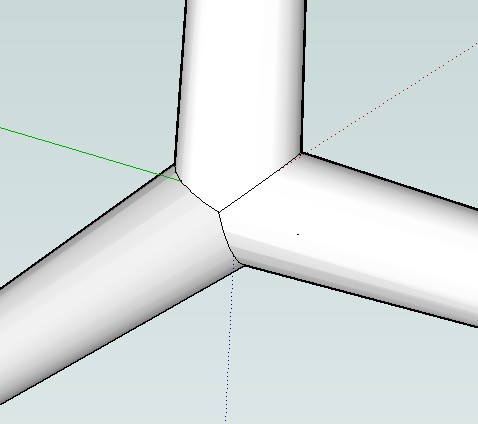
Didier's plugin is really cool. The only problem is on corners. In your opinion It would be possible to have smooth corners joint. Too difficult?
-
@massimo said:
Didier's plugin is really cool. The only problem is on corners. In your opinion It would be possible to have smooth corners joint. Too difficult?
Maybe Whaat's Profile Builder can do clean intersections at vertices.
Fredo






Advertisement