sketchucation logo sketchucation
    • 登入
    Oops, your profile's looking a bit empty! To help us tailor your experience, please fill in key details like your SketchUp version, skill level, operating system, and more. Update and save your info on your profile page today!
    🔌 Smart Spline | Fluid way to handle splines for furniture design and complex structures. Download

    [Plugin][$] FredoScale - v3.6a - 01 Apr 24


    已排程 已置頂 已鎖定 已移動 Plugins
    1.1k 貼文 345 Posters 2.4m 瀏覽 342 Watching
    正在載入更多貼文
    • 從舊到新
    • 從新到舊
    • 最多點贊
    回覆
    • 在新貼文中回覆
    登入後回覆
    此主題已被刪除。只有擁有主題管理權限的使用者可以查看。
    • R 離線
      RDailey
      最後由 編輯

      Fredo,

      I can't seem to download your Fredoscale plugin in its' suppporting files. All I get where the plugin should be is:
      You do not have the required permissions to view the files attached to this post.

      Is there anywhere else I might be able to go to snag this plugin and its' supporting files.

      Thanks

      R Dailey

      1 條回覆 最後回覆 回覆 引用 0
      • Jean-FrancoJ 離線
        Jean-Franco
        最後由 編輯

        Dear R Dailey,
        to see and download any files you must be a register member of this forum first.

        Jean-Franco

        1 條回覆 最後回覆 回覆 引用 0
        • M 離線
          Marla
          最後由 編輯

          Thank you very much Fredo for your plugin.

          You're really a fantastic person ! 😄

          ¬ See Further, Never Give In. Whatever The Number Or The Task. ¬

          1 條回覆 最後回覆 回覆 引用 0
          • K 離線
            kenkan2
            最後由 編輯

            i really want this plugin!! But i can't download the attachment....."You are not authorised to download this attachment"....WHY!!??

            1 條回覆 最後回覆 回覆 引用 0
            • fredo6F 離線
              fredo6
              最後由 編輯

              @kenkan2 said:

              i really want this plugin!! But i can't download the attachment....."You are not authorised to download this attachment"....WHY!!??

              I guess you need to register and sign in to the forum.

              1 條回覆 最後回覆 回覆 引用 0
              • K 離線
                kenkan2
                最後由 編輯

                i have already registered and sign in....otherwise i can't reply.....

                1 條回覆 最後回覆 回覆 引用 0
                • fredo6F 離線
                  fredo6
                  最後由 編輯

                  Then it may be a problem with the forum itself, where unfortunately I cannot help.
                  Fredo

                  1 條回覆 最後回覆 回覆 引用 0
                  • G 離線
                    G DODDS
                    最後由 編輯

                    where can I find a link to thecurrent FredoScale zip? (please!)

                    1 條回覆 最後回覆 回覆 引用 0
                    • chonC 離線
                      chon
                      最後由 編輯

                      @g dodds said:

                      where can I find a link to thecurrent FredoScale zip? (please!)

                      At the end of the first Fredo6's post of this thread i suppose... (2.0g version) 😉

                      SU2019 pro 19.3.253 + VRay 4.00.02 (Next) on Win10-64Bits

                      1 條回覆 最後回覆 回覆 引用 0
                      • M 離線
                        muse
                        最後由 編輯

                        I just wanted to show my respect to "Fredo" like every one. because his job makes using SU more Fun and handy.
                        Thanks Fredo for this 😄
                        Cordially

                        1 條回覆 最後回覆 回覆 引用 0
                        • B 離線
                          bulbucila
                          最後由 編輯

                          Thank you1, this is great.

                          1 條回覆 最後回覆 回覆 引用 0
                          • X 離線
                            xrok1
                            最後由 編輯

                            not that this toolset isn't great enough already... but a divider in the scale tool like the stretch tool one would be the icing! 😍

                            “There are three classes of people: those who see. Those who see when they are shown. Those who do not see.”

                            http://www.Twilightrender.com try it!

                            1 條回覆 最後回覆 回覆 引用 0
                            • fredo6F 離線
                              fredo6
                              最後由 編輯

                              @xrok1 said:

                              not that this toolset isn't great enough already... but a divider in the scale tool like the stretch tool one would be the icing! 😍

                              Interesting idea, but of course, only when you scale by the Midle plane. I'll think of it.

                              1 條回覆 最後回覆 回覆 引用 0
                              • F 離線
                                Foun10Head-X
                                最後由 編輯

                                Thank you so much.

                                1 條回覆 最後回覆 回覆 引用 0
                                • H 離線
                                  Hopit
                                  最後由 編輯

                                  As a newbee I have been searching for this plugin.
                                  My first impression was that it had been folded into LibFredo6, but it didn't appear once I had loaded LibFredo6.
                                  My next flash was to search the Extensions Index, but no mention of FredoScale.

                                  However, I have found it! (At the beginning of this thread.)

                                  Marvellous!

                                  1 條回覆 最後回覆 回覆 引用 0
                                  • jwlyon1J 離線
                                    jwlyon1
                                    最後由 編輯

                                    I've been trying the twist and free bend tools from this plugin, but they don't seem to be working quite right. In this example from the visual index, it shows the tools subdividing the geometry as needed for a smooth bend or twist.

                                    http://forums.sketchucation.com/download/file.php?id=27666

                                    But when I try it, I get no subdividing! What am I doing wrong? What are the correct settings to make this work? I've tried reading the documentation, but I haven't found an answer.

                                    Thanks! Awesome plugin by the way -- the scale and taper tools are super duper useful!!

                                    Macbook Pro/ iMac
                                    OSX 10.7.2 Sketchup 8
                                    rogue-z is here!

                                    1 條回覆 最後回覆 回覆 引用 0
                                    • jeff hammondJ 離線
                                      jeff hammond
                                      最後由 編輯

                                      there are a couple of ways to get it.. one is to hit F4 to activate the slicing (and since you're on a mac, your f keys are probably set to other things like volume,expose,etc.. you'll have to push the 'fn' key along with F4 in the same manner as using the shift key with 3 to get a #...)

                                      another thing to do is to go Tools/Fredo6 Collection/FredoScale/Default Parameters.. click 'slicing active by default' then save your changes..

                                      and it's a little weird on mac in that you may have to click the box, then unclick it, then click it again.. you want the whole line to be highlighted in yellow with the box clicked before saving.. like this..
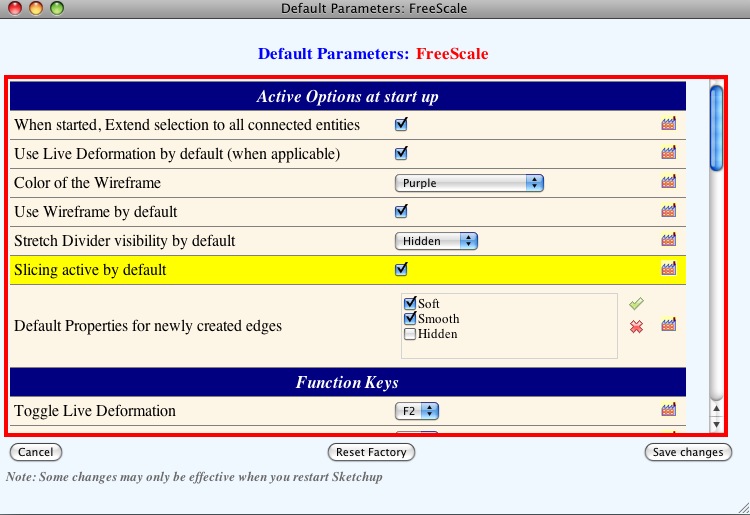
                                      screen 1.jpg

                                      also, once you have the tool activated, you can push the tab key and a little box will pop up... in there, you can change the number of slices you'd like to use (or with the bend tool, use a negative number for auto division) as well as decide if you want the resulting shape to be smoothed, keep edges, etc..

                                      dotdotdot

                                      1 條回覆 最後回覆 回覆 引用 0
                                      • jwlyon1J 離線
                                        jwlyon1
                                        最後由 編輯

                                        Okay! It works from right-clicking too, thanks!! The clicking-unclicking-clicking again was the key!

                                        Macbook Pro/ iMac
                                        OSX 10.7.2 Sketchup 8
                                        rogue-z is here!

                                        1 條回覆 最後回覆 回覆 引用 0
                                        • D 離線
                                          DIEGO-RODRIGUEZ
                                          最後由 編輯

                                          Hi fredo, I used your plugins fredoscale, and scale / move the component simultaneously.
                                          Is this normal?

                                          [flash=425,344:31uc4nee]http://www.youtube.com/v/6mxSL5170dE[/flash:31uc4nee]


                                          fredoscale.rar

                                          1 條回覆 最後回覆 回覆 引用 0
                                          • jeff hammondJ 離線
                                            jeff hammond
                                            最後由 編輯

                                            @unknownuser said:

                                            Hi fredo, I used your plugins fredoscale, and scale / move the component simultaneously.
                                            Is this normal?

                                            elcorto,
                                            you can toggle how the stretching is done.. i use the option key (mac) so i assume you would use the ctrl key on pc..
                                            try clicking on one of the handles then press ctrl..

                                            dotdotdot

                                            1 條回覆 最後回覆 回覆 引用 0
                                            • 1
                                            • 2
                                            • 51
                                            • 52
                                            • 53
                                            • 54
                                            • 55
                                            • 56
                                            • 57
                                            • 53 / 57
                                            • 第一個貼文
                                              最後的貼文
                                            Buy SketchPlus
                                            Buy SUbD
                                            Buy WrapR
                                            Buy eBook
                                            Buy Modelur
                                            Buy Vertex Tools
                                            Buy SketchCuisine
                                            Buy FormFonts

                                            Advertisement