[Plugin][$] FredoScale - v3.6a - 01 Apr 24




-
Hello, Can I use "Stretching with orientation of scaling box" with absolute value? It seems that it works only with scale ratio.
It would be nice to work like SketchUp native scale tool (where is you scale and input 500mm, it will scale the object to have 1000mm on the scaling axis. Or to scale the object adding a certain value more (example: +50mm).Thanks.
-
@unknownuser said:
Hello, Can I use "Stretching with orientation of scaling box" with absolute value? It seems that it works only with scale ratio.
It would be nice to work like SketchUp native scale tool (where is you scale and input 500mm, it will scale the object to have 1000mm on the scaling axis. Or to scale the object adding a certain value more (example: +50mm).Thanks.
If you press TAB, you'll get a dialog box where you can enter absolute values.
Fields in the dialog box support formulas and units, so you can add " + 50mm" to the fields you wish.Fredo
-
I find while using box stretching that sometimes nested components move too far. They seem to move the same scale amount in relation to the component being scaled. So if you stretch a component by 8" nested components on the stretch side move 16". This does not always occur with nested components. I haven't figured out what the difference is. Is this how the tool should work? Peter
-
@pbacot said:
I find while using box stretching that sometimes nested components move too far. They seem to move the same scale amount in relation to the component being scaled. So if you stretch a component by 8" nested components on the stretch side move 16". This does not always occur with nested components. I haven't figured out what the difference is. Is this how the tool should work? Peter
There may be some issues with nested components when small.
Do you have an example?Fred
-
Fred,
Here's an example. When I went to make the example file, I copied the component and made it unique-for before and after.
Interestingly the doorknob in the original component moved as well--as if the move was made INSIDE the doorknob component itself. AND the doorknob was within a latch component--not all of which moved excessively.
I suppose the fix is to explode the components,if feasible?
Regards,
Peter
-
Hi all!
It's my first post here; so pardon me if there are any unintentional lapses.
I am facing a small problem with the FredoScale's toolbar: The buttons require some buffer space on the right. So, if I fold the toolbar in two columns, the width of this toolbar does not match the other two-column toolbars (e.g. the SU's own "Large tool set").
Can this toolbar width be standardized?
Thanks in advance!
-
Hi Narayan,
Could you post a screenshot of it?
-
The screenshot is attached (this is link to my Dropbox account. Please let me know if there is a better way to share images. Thanks in advance!)
As the image shows, the FredoScale toolbar is wider than the other toolbars, such as "Drawing", "Construction", etc.
-
@narayan said:
Hi all!
It's my first post here; so pardon me if there are any unintentional lapses.
I am facing a small problem with the FredoScale's toolbar: The buttons require some buffer space on the right. So, if I fold the toolbar in two columns, the width of this toolbar does not match the other two-column toolbars (e.g. the SU's own "Large tool set").
Can this toolbar width be standardized?
Thanks in advance!
Probably it had in mind?
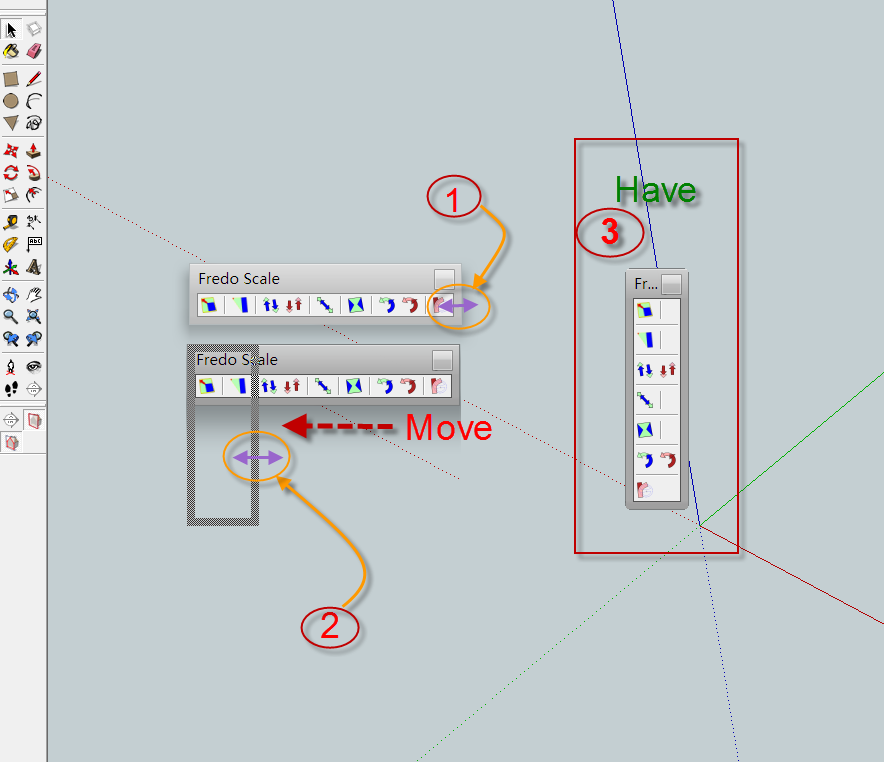
-
Aha, yes, I can see. Those are the toolbar "inner" separators. Those can be removed I am sure (only not sure where in the script...)
-
You can read/edit a .rb script with a plain-text editor [like Notepad[++].exe]... do NOT use a wordprocessor as that can add special characters that will break the script's functions!
There is a file 'FredoScale_Box.rb' [inside the subfolder 'FREDOSCALE_Dir_21' - or a similar name depending on the current version!] - you should make a backup copy of it to use to revert to if you mess up!...
In the file there are 4 lines that add 'separators' - using the code:-
menu.add_separator- you can find these in lines 700, 705, 719 and 732.
If you add a '#' to the start of these lines it will disable them...
Test how the tool works after making these adjustments, saving the file and restarting Sketchup... if it works ... but if it messes up simply remove a '
#'... OR revert to the original saved file...
- you can find these in lines 700, 705, 719 and 732.
-
@gaieus said:
Aha, yes, I can see. Those are the toolbar "inner" separators. Those can be removed I am sure (only not sure where in the script...)
Gaieus,
You are right. There is the option in Default Parameters
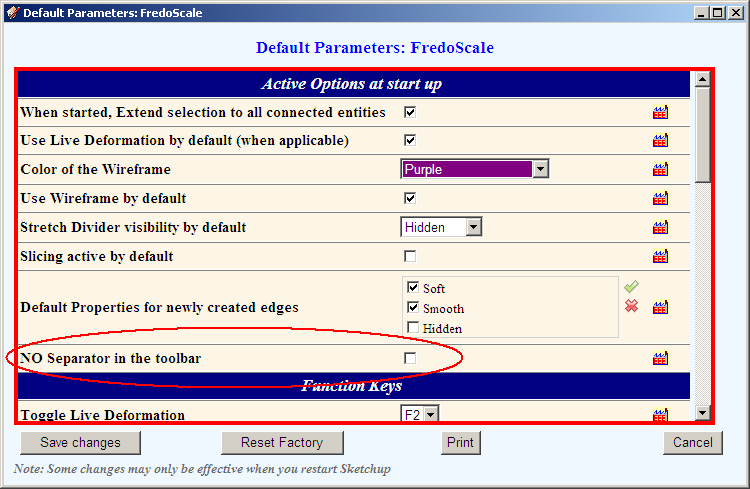
FredoPS @TIG : All menus and toolbars are managed by LibFredo6. So it is not easy to tweak the code locally.
-
Hi all,
Thanks for the replies.
I am using v3.7b (confirmed by using the Window>LibFredo6 settings...>About menu). Yet I do not see the Active options at statup section at all. It only has four sections: Plugin configuration, inference for lines, Check for update and Palette configuration. It does not have the two sections shown in Fredo6's screenshot.
I tried to "Reset factory" button, but it did not change anything.
There is another problem, which may be related: When I restart SletchUp, the FredoScale6 toolbar on its own folds into a 3-column toolbar, as shown here:
This does not happen always, but very often. I have to drag the toolbar in the "canvas" area, fold it into a two-column toolbar and place it back.
%(#0040FF)[I am not sure whether this is a problem in FredoScale toolbar or a problem with SU8; because twice all the toolbars became flat horizontal bars, and escaped their positions, and lined up vertically (one below the other).
While looking for solution, I read that SU has a bug which makes it forget the toolbar positions. While SU8 has improved, the problem is not resolved entirely.]
-
Narayan
You are in charge of the toolbars - not the other way around!
The default for the FredoScale toolbar is perhaps three columns... BUT if you drag it by its top-bar so that it's no longer docked at the side, but now 'floating' you can simply grab a corner with your mouse and resize it by dragging... to be whatever number of columns you want - from one column with multiple rows, up to one row with multiple columns. You want two columns so make it have two columns. Then re-dock it by dragging it back into the side bar by its top-bar - it now has the two columns when docked ??
This is my usual settings for that toolbar - located very near where you have yours... The second is with 'no-separator' set in the options dialog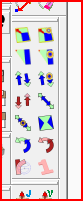
-
@narayan said:
I am using v3.7b (confirmed by using the Window>LibFredo6 settings...>About menu). Yet I do not see the Active options at statup section at all. It only has four sections: Plugin configuration, inference for lines, Check for update and Palette configuration. It does not have the two sections shown in Fredo6's screenshot.
The default parameter is in FredoScale, not LibFredo6. So menu Fredo6 Collection > FredoScale > Default Parameters...
Fredo
-
Fredo, it is excellent! Thanks! I did not even know that (true my toolbars are horizontal).
I know you always build in many customizable parameters - maybe too much sometimes so we cannot always remember (but of course, the "too much" here does not mean any critics - just my own opinion on my own laziness and superficial reading the manuals).
-
@unknownuser said:
Fredo, it is excellent! Thanks! I did not even know that (true my toolbars are horizontal).
Also with horizontal toolbar it takes less space.

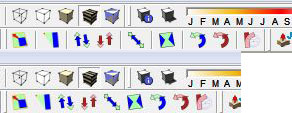
-
@gaieus said:
I know you always build in many customizable parameters - maybe too much sometimes so we cannot always remember (but of course, the "too much" here does not mean any critics - just my own opinion on my own laziness and superficial reading the manuals).
Actually this was a request from a user!
It's always a good idea to have a look at the Default Parameters section, as this is very often how I customize things which are undecidable.Fredo
-
Thanks Fredo!
That solution worked well. I hope SU8 does not let the toolbars escape once again (the Fredo6 collection toolbar seems to play truant often.)
BTW it is confusing to have window settings in two different menus:
- Tools>Fredo6 collection>plugInName>Default parameters and
- Windows>LibFredo6 settings > Default parameters
TIG, thanks for the tip; but I already follow what you described (that is what I posted earlier: I undock the toolbar; fold it in a two-column configuration, and dock it again.)
I actually described three possibly related problems.
One of them is resolved thanks to the settings.The other two problems which are not yet resolved are-
- The Fredo6 toolbar snaps back to a three-column configuration on its own.
- ALL the toolbars escape their docking positions and pile up vertically (each toolbar takes up one line on its own). Then I have to drag each toolbar back to the top or left of the screen. This is a huge time-waster.
In fact, I face the toolbar problem even without restarting SU8 OR restarting the PC: It simply happens even while I am working SU8. All of a sudden the toolbars escape and occupy the top of the screen, leaving very small space for the canvas area.
I mentioned all three problems here because I am not sure whether the problem lies in SU8 or Fredo's plugin system. I somehow feel they are related.
Thanks.
-
Updated version of the Italian Translation









Advertisement