[Plugin Library] LibFredo6 - v15.9b - 21 Apr 26



-
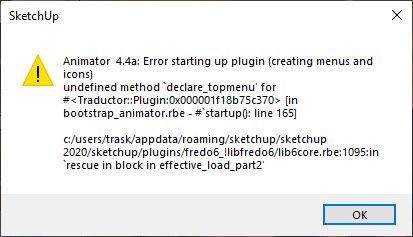
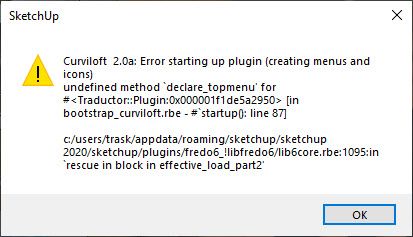
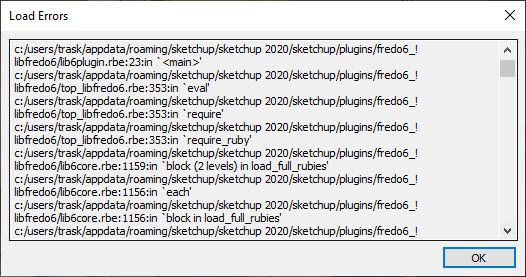
Hello, I'm running sketchup 2020 and all of your plugins have recently started causing sketchup to crash all the time. I keep getting these errors. I have attempted reinstalling etc but no luck. any thoughts?
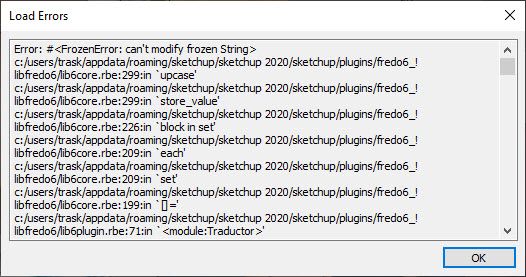
Error: #<FrozenError: can't modify frozen String>
c:/users/trask/appdata/roaming/sketchup/sketchup 2020/sketchup/plugins/fredo6_!libfredo6/lib6core.rbe:299:inupcase' c:/users/trask/appdata/roaming/sketchup/sketchup 2020/sketchup/plugins/fredo6_!libfredo6/lib6core.rbe:299:instore_value'
c:/users/trask/appdata/roaming/sketchup/sketchup 2020/sketchup/plugins/fredo6_!libfredo6/lib6core.rbe:226:inblock in set' c:/users/trask/appdata/roaming/sketchup/sketchup 2020/sketchup/plugins/fredo6_!libfredo6/lib6core.rbe:209:ineach'
c:/users/trask/appdata/roaming/sketchup/sketchup 2020/sketchup/plugins/fredo6_!libfredo6/lib6core.rbe:209:inset' c:/users/trask/appdata/roaming/sketchup/sketchup 2020/sketchup/plugins/fredo6_!libfredo6/lib6core.rbe:199:in[]='
c:/users/trask/appdata/roaming/sketchup/sketchup 2020/sketchup/plugins/fredo6_!libfredo6/lib6plugin.rbe:71:in<module:Traductor>' c:/users/trask/appdata/roaming/sketchup/sketchup 2020/sketchup/plugins/fredo6_!libfredo6/lib6plugin.rbe:23:in<main>'
c:/users/trask/appdata/roaming/sketchup/sketchup 2020/sketchup/plugins/fredo6_!libfredo6/top_libfredo6.rbe:353:ineval' c:/users/trask/appdata/roaming/sketchup/sketchup 2020/sketchup/plugins/fredo6_!libfredo6/top_libfredo6.rbe:353:inrequire'
c:/users/trask/appdata/roaming/sketchup/sketchup 2020/sketchup/plugins/fredo6_!libfredo6/top_libfredo6.rbe:353:inrequire_ruby' c:/users/trask/appdata/roaming/sketchup/sketchup 2020/sketchup/plugins/fredo6_!libfredo6/lib6core.rbe:1159:inblock (2 levels) in load_full_rubies'
c:/users/trask/appdata/roaming/sketchup/sketchup 2020/sketchup/plugins/fredo6_!libfredo6/lib6core.rbe:1156:ineach' c:/users/trask/appdata/roaming/sketchup/sketchup 2020/sketchup/plugins/fredo6_!libfredo6/lib6core.rbe:1156:inblock in load_full_rubies'
c:/users/trask/appdata/roaming/sketchup/sketchup 2020/sketchup/plugins/fredo6_!libfredo6/lib6core.rbe:1154:ineach' c:/users/trask/appdata/roaming/sketchup/sketchup 2020/sketchup/plugins/fredo6_!libfredo6/lib6core.rbe:1154:inload_full_rubies'
c:/users/trask/appdata/roaming/sketchup/sketchup 2020/sketchup/plugins/fredo6_!libfredo6/lib6core.rbe:1081:ineffective_load_part2' c:/users/trask/appdata/roaming/sketchup/sketchup 2020/sketchup/plugins/fredo6_!libfredo6/lib6core.rbe:1040:ineffective_load'
c:/users/trask/appdata/roaming/sketchup/sketchup 2020/sketchup/plugins/fredo6_!libfredo6/loader__libfredo6.rbe:1:in<main>' C:/Users/trask/AppData/Roaming/SketchUp/SketchUp 2020/SketchUp/Plugins/Fredo6_!LibFredo6.rb:47:ineval'
...
Error: #<NoMethodError: undefined method+' for nil:NilClass> c:/users/trask/appdata/roaming/sketchup/sketchup 2020/sketchup/plugins/fredo6_!libfredo6/lib6plugindialogs.rbe:156:inpurge'
c:/users/trask/appdata/roaming/sketchup/sketchup 2020/sketchup/plugins/fredo6!libfredo6/top_libfredo6.rbe:470:inafter_startup' c:/users/trask/appdata/roaming/sketchup/sketchup 2020/sketchup/plugins/fredo6_!libfredo6/top_libfredo6.rbe:605:indetect_startup_of_sketchup'
c:/users/trask/appdata/roaming/sketchup/sketchup 2020/sketchup/plugins/fredo6!libfredo6/top_libfredo6.rbe:600:in `block in detect_startup_of_sketchup'
c:/users/trask/appdata/roaming/sketchup/sketchup 2020/sketchup/plugins/fredo6_!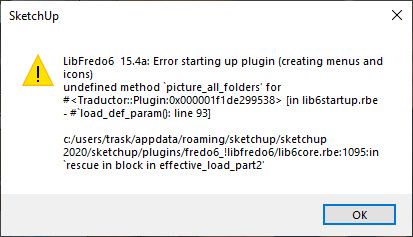
-
Did you do something specific so that these errors occur, like reinstall Sketchup? I mean what you say as 'recently'
-
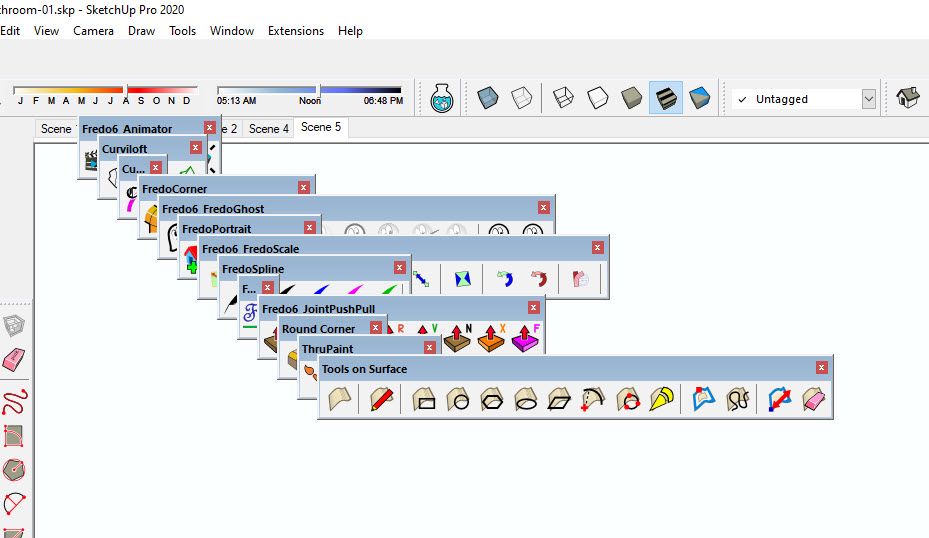
No I was getting these errors and sketchup crashing just this week prior to doing anything. I haven't changed anything with my installs. When I opened sketchup this week it asked me to update fredo6 which I did. I was also having issues with thru paint showing up. So I uninstalled that and reinstalled. It then said my trial expired, so I purchased that. Still was getting these errors and sketchup crashing. Every so often it will crash and then when I reload sketchup all of your fredo toolbars are stacked in the middle of my screen not where I had them. I've had to put them back probably 16 times now. In an attempt to fix things, I did a "repair" install on sketchup, but that did not change anything.
Should I attempt a full uninstall reinstall? anything else I could try before that?
Thank you
-
@simulat
When you did the 'Repair' did you 'Run' the SketchUp installer's exe file by double-clicking it, or by selecting it > right-clicking > context-menu > Run as administrator
The second way is correct, the other way is wrong, and it can lead to all kinds of unpredictable permission related issues, such as settings being unsaved etc... -
It was already set to run as administrator, I had to give permission to repair. I was getting these errors and issues before doing that too.
-
This is what it keeps doing to my tool bars. I was just using Thrupaint and it crashed. This is how my file opens after
-
@simulat that is typical of incorrect installation on Windows which prevents SketchUp being able to write the required file that stores the toolbar locations. . Correct installation requires right clicking on the installer and choosing Run as administrator. That's not the same as running SketchUp as administrator.
Are you running a cracked version of SketchUp 2020?
-
Hi Dave, I am very familiar with how to install programs as an administrator. No where did I say I'm running sketchup as an administrator.
I did a repair install as an administrator. I will say this again, this problem started before I changed or did any repair installs. It happened before and after.This definitely has to do with Thrupaint or other fredo plugins to some degree. I did some tests where I tried to use it and it crashes sketchup every time within 1 to 2 mins. Whatever the recent updates were to the plugin changed something.
-
Ok I did a full uninstall, restart, right clicked run as admin, installed. Everything is still crashing. Here is a video while using Thrupaint.

2025-06-07_11-39-59.mp4 -
Based on your video, the bugsplat may be due to the model, not to the installation of ThruPaint / LibFredo6. ThruPaint seems to work on some surfaces, and then crashes on one particular.
Maybe, the best would be to send me the model and some instructions to reproduce the problem.
-
Here's a link to the file:
https://www.dropbox.com/scl/fi/0xdfoi2n7tw8aqzg8p7j0/Bathroom-01.skp?rlkey=jmtzzwv7m0x6uooq9oczdo4pl&dl=0- I just open the file, open thrupaint, select the brass material on the faucet or the material on the towel and attempt to paint the towel. That was causing me the most crashes. Also messing with the scale rotate feature after painting.
-I had issues with other large sketchup files crashing too, I don't think it was just this file.
I was able to test it with someone that has sketchup 2025 and thrupaint was working fine no crashes. I think it has something to do with 2020 version.
I was also noticing I can't always get the Thrupaint dialog window to load, I have to click around several times sometimes it will open sometimes it won't.Thank you!
-
@simulat I wonder if the issue is with the SketchUp version, maybe your computer's graphics card, and the excessively large size of some of the textures. There's no benefit to having those large textures since SketchUp will down sample them.
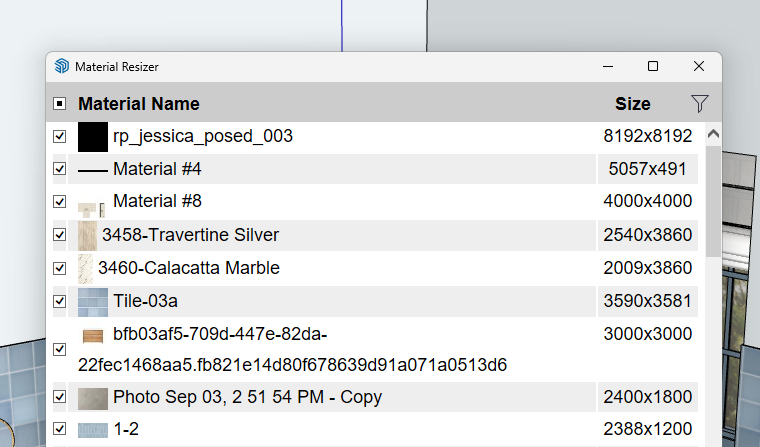
Although I doubt it's involved in your issue with using Thru Paint, It would also be a good thing to fix incorrect tag usage.
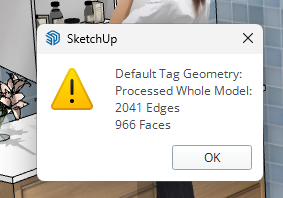
Also purge unused stuff.
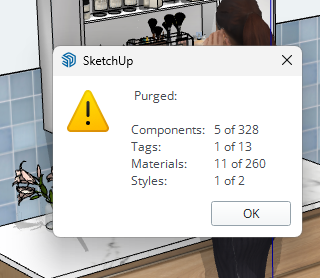
-
I was thinking that, but I'm having issues even with small files, and other fredo plugins. I Created a new 400kb file and attempted to use Fredo Spline, and it crashes almost immediately every time I try to use it.
Link to Video of the crashes:
https://www.dropbox.com/scl/fi/2jmtibsbif2avvn8zp8gy/2025-06-09_20-44-37.mp4?rlkey=qdbmnj4trtr30skarvomc5dt9&dl=0Link to the file:
https://www.dropbox.com/scl/fi/j7na2u0mtmhmr8f9qismx/Folder.skp?rlkey=iqxvlncvnx4taer7hgfih9x6l&dl=0Last Error codes I got:
<module:SolidVolume>' c:/users/trask/appdata/roaming/sketchup/sketchup 2020/sketchup/plugins/fredo6_fredotools/fredotools__solidvolume.rbe:31:inmodule:F6_FredoTools'
c:/users/trask/appdata/roaming/sketchup/sketchup 2020/sketchup/plugins/fredo6_fredotools/fredotools__solidvolume.rbe:23:in<main>' c:/users/trask/appdata/roaming/sketchup/sketchup 2020/sketchup/plugins/fredo6_!libfredo6/top_libfredo6.rbe:353:ineval'
c:/users/trask/appdata/roaming/sketchup/sketchup 2020/sketchup/plugins/fredo6_!libfredo6/top_libfredo6.rbe:353:inrequire' c:/users/trask/appdata/roaming/sketchup/sketchup 2020/sketchup/plugins/fredo6_!libfredo6/top_libfredo6.rbe:353:inrequire_ruby'
c:/users/trask/appdata/roaming/sketchup/sketchup 2020/sketchup/plugins/fredo6_!libfredo6/lib6core.rbe:1159:inblock (2 levels) in load_full_rubies' c:/users/trask/appdata/roaming/sketchup/sketchup 2020/sketchup/plugins/fredo6_!libfredo6/lib6core.rbe:1156:ineach'
c:/users/trask/appdata/roaming/sketchup/sketchup 2020/sketchup/plugins/fredo6_!libfredo6/lib6core.rbe:1156:inblock in load_full_rubies' c:/users/trask/appdata/roaming/sketchup/sketchup 2020/sketchup/plugins/fredo6_!libfredo6/lib6core.rbe:1154:ineach'
c:/users/trask/appdata/roaming/sketchup/sketchup 2020/sketchup/plugins/fredo6_!libfredo6/lib6core.rbe:1154:inload_full_rubies' c:/users/trask/appdata/roaming/sketchup/sketchup 2020/sketchup/plugins/fredo6_!libfredo6/lib6core.rbe:1081:ineffective_load_part2'
c:/users/trask/appdata/roaming/sketchup/sketchup 2020/sketchup/plugins/fredo6_!libfredo6/lib6core.rbe:1040:ineffective_load' c:/users/trask/appdata/roaming/sketchup/sketchup 2020/sketchup/plugins/fredo6_fredotools/__loader__fredotools.rbe:1:in<main>'
...
Error: #<FrozenError: can't modify frozen String>
C:/Program Files/SketchUp/SketchUp 2020/Tools/RubyStdLib/rubygems/core_ext/kernel_require.rb:59:inrequire' C:/Program Files/SketchUp/SketchUp 2020/Tools/RubyStdLib/rubygems/core_ext/kernel_require.rb:59:inrequire'
c:/users/trask/appdata/roaming/sketchup/sketchup 2020/sketchup/plugins/su_dynamiccomponents/ruby/dcobservers.rbe:17:in<main>' c:/users/trask/appdata/roaming/sketchup/sketchup 2020/sketchup/plugins/su_dynamiccomponents/ruby/dcloader.rbe:16:ineval'
c:/users/trask/appdata/roaming/sketchup/sketchup 2020/sketchup/plugins/su_dynamiccomponents/ruby/dcloader.rbe:16:inrequire' c:/users/trask/appdata/roaming/sketchup/sketchup 2020/sketchup/plugins/su_dynamiccomponents/ruby/dcloader.rbe:16:in<main>'
C:/Program Files/SketchUp/SketchUp 2020/Tools/extensions.rb:197:ineval' C:/Program Files/SketchUp/SketchUp 2020/Tools/extensions.rb:197:inrequire'
C:/Program Files/SketchUp/SketchUp 2020/Tools/extensions.rb:197:inload' C:/Users/trask/AppData/Roaming/SketchUp/SketchUp 2020/SketchUp/Plugins/su_dynamiccomponents.rb:49:inregister_extension'
C:/Users/trask/AppData/Roaming/SketchUp/SketchUp 2020/SketchUp/Plugins/su_dynamiccomponents.rb:49:in `<top (required)>' -
Can you display your environment by using menu Window > LibFredo6 Settings > Fredo6 Plugin Informtion for Sketchucation Support.
This will open the Ruby Conole and display the state of your environment. Just send it to me or post it here.
There seems to be an issue in your setup anyway. I don't think this is related to a particular plugin.
For the error you indicate:
- This concerns FredoTools::SolidVolume, not FredoSpline
- The error message is missing (this is the very first line, before the backtrace), so I don't know what it is about.
-
Here is the plugin information from there. I'm not sure what is happening. I did a clean install and then used the sketchucation store to reinstall your plugins.
Fredo6 Plugins Information on 2025-06-10 08:26:28 -0700
- Platform: x64-mingw32 - Ruby: 2.5.5
- Sketchup: 20.0.363
- LibFredo6: v15.4a
- LibFredo6 Binary loaded
- Sketchucation ExtensionStore: 4.4.1
- SCFLicense: v6.4a - 74
- Fredo6 Plugins
- SCFLicense directory present
Signature File: 2021-07-26 12:21:00 -0700
Curviloft: 2022-09-28 16:26:30 -0700
Curvizard: 2022-09-28 09:28:49 -0700
FredoCorner: 2021-07-26 13:49:18 -0700
FredoGhost: 2021-07-26 13:50:07 -0700
FredoScale: 2025-06-07 12:05:50 -0700
FredoSpline: 2021-07-26 13:50:45 -0700
JointPushPull: 2022-11-27 21:10:39 -0800
RoundCorner: 2025-06-05 11:57:20 -0700
ThruPaint: 2025-06-05 10:19:08 -0700
ToolsOnSurface: 2022-11-27 21:21:28 -0800
-
Hi same issue.
LibFredo6
15.4a
13 May 25
Info
UP TO DATEThruPaint
2.8d
14 May 25
Info
UP TO DATE -
Please describe accurately what does not work. Otherwise, it is difficult to help. Possibly, open the Ruby console before launching the plugin to catch potential errors.
-
Hi Fredo,
I need to use an older plugin that requires LibFredo6_v12.9a.rbz.
Could you please share the download link or re-upload it? Thank you very much! -
Which plugin, and for which version of Sketchup.
In general, the version of LibFredo6 indicated is just the minimum version required. The latest version should also work. -
NEW RELEASE: LibFredo6 v15.4b - 21 Jul 25
LibFredo6 15.4b is a minor release. It includes changes related to:
- Animator (bug in renaming positioners)
- Other bug Fixing and technical adjustments
Requirements: SU2017 and above
See plugin home page of LibFredo6 for Download of LibFredo6.



Hello! It looks like you're interested in this conversation, but you don't have an account yet.
Getting fed up of having to scroll through the same posts each visit? When you register for an account, you'll always come back to exactly where you were before, and choose to be notified of new replies (either via email, or push notification). You'll also be able to save bookmarks and upvote posts to show your appreciation to other community members.
With your input, this post could be even better 💗
Register Login


Advertisement