[Plugin Library] LibFredo6 - v15.9a - 25 Mar 26



-
I have problems with the update option too... Every time that I want to go to "Check Plugins for Update" nothing happens. If I have the ruby console open it says:
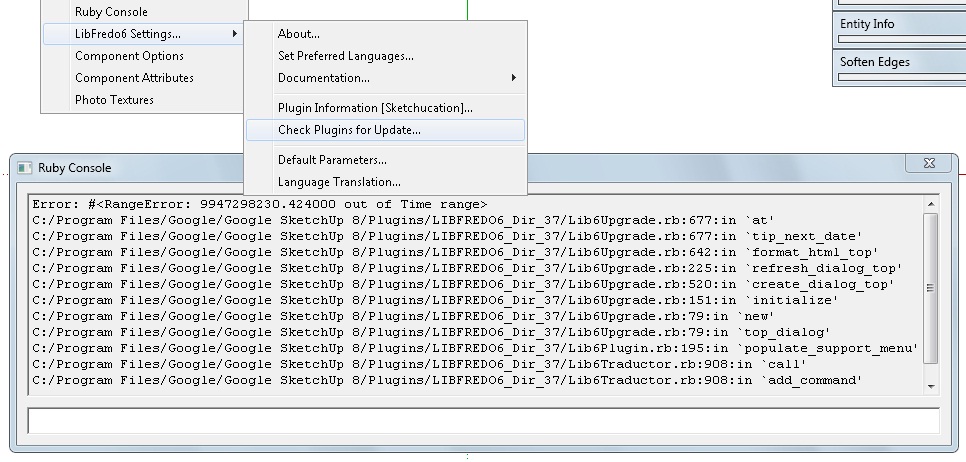
Error; #<RangeError; 9947298230.424000 out of Time range>
C;/Program Files/Google/Google SketchUp 8/Plugins/LIBFREDO6_Dir_37/Lib6Upgrade.rb;677;in `at'
C;/Program Files/Google/Google SketchUp 8/Plugins/LIBFREDO6_Dir_37/Lib6Upgrade.rb;677;in `tip_next_date'
C;/Program Files/Google/Google SketchUp 8/Plugins/LIBFREDO6_Dir_37/Lib6Upgrade.rb;642;in `format_html_top'
C;/Program Files/Google/Google SketchUp 8/Plugins/LIBFREDO6_Dir_37/Lib6Upgrade.rb;225;in `refresh_dialog_top'
C;/Program Files/Google/Google SketchUp 8/Plugins/LIBFREDO6_Dir_37/Lib6Upgrade.rb;520;in `create_dialog_top'
C;/Program Files/Google/Google SketchUp 8/Plugins/LIBFREDO6_Dir_37/Lib6Upgrade.rb;151;in `initialize'
C;/Program Files/Google/Google SketchUp 8/Plugins/LIBFREDO6_Dir_37/Lib6Upgrade.rb;79;in `new'
C;/Program Files/Google/Google SketchUp 8/Plugins/LIBFREDO6_Dir_37/Lib6Upgrade.rb;79;in `top_dialog'
C;/Program Files/Google/Google SketchUp 8/Plugins/LIBFREDO6_Dir_37/Lib6Plugin.rb;195;in `populate_support_menu'
C;/Program Files/Google/Google SketchUp 8/Plugins/LIBFREDO6_Dir_37/Lib6Traductor.rb;908;in `call'
C;/Program Files/Google/Google SketchUp 8/Plugins/LIBFREDO6_Dir_37/Lib6Traductor.rb;908;in `add_command'
Any idea what´s happening?
Daniel S
-
Daniel,
two questions
-
How many days did you set the "next check" in the dialog box
-
Can you type the following command in the Ruby Console:
Upgrade.duration_next_check
Thanks
Fredo
-
-
@unknownuser said:
- How many days did you set the "next check" in the dialog box
I put 999 the first time because I wanted to do a manual check. But then the update option stop working.
I try deleting and reinstalling Libfredo6 but the problem was still there.
Now In default parameters "Next Check in (days)" says 15. But I´m not able to check.@unknownuser said:
- Can you type the following command in the Ruby Console:
Upgrade.duration_next_check
I tried and give different results. It says:
Upgrade.duration_next_check
Error; #<NameError; (eval);157; uninitialized constant Upgrade>
(eval);157
Upgrade.duration_next_check Error; #<NameError; (eval);677; uninitialized constant Upgrade> (eval);677or:
Upgrade.duration_next_check
Error; #<NameError; (eval);54; uninitialized constant Upgrade>
(eval);54
(eval);1; warning; Float 0.0 out of range
Daniel S
-
Daniel,
Sorry I meant
Traductor::Upgrade.duration_next_checkFredo
-
When I put:
Traductor::Upgrade.duration_next_check
it says:Traductor;;Upgrade.duration_next_check 99999.0Daniel S
-
Daniel,
This is where is the problem: 99999 is too big for a number of days.
Can you change it in the default parameters or in the Upgrade dialog box
I'll put a check in a next releaseFredo
-
@unknownuser said:
This is where is the problem: 99999 is too big for a number of days.
Can you change it in the default parameters or in the Upgrade dialog box
I'll put a check in a next release
FredoI can´t change the 99999 because:
- The Upgrade dialog box don´t open
- In default Parameters I can change it but it doesn´t really change.
In the attach video I show what happens.
I tried reinstalling LibFredo6 but still no work.
Daniel S
-
Updated version of the Italian Translation of Fredo6 Library
-
@daniel s said:
@unknownuser said:
This is where is the problem: 99999 is too big for a number of days.
Can you change it in the default parameters or in the Upgrade dialog box
I'll put a check in a next release
FredoI can´t change the 99999 because:
- The Upgrade dialog box don´t open
- In default Parameters I can change it but it doesn´t really change.
In the attach video I show what happens.
I tried reinstalling LibFredo6 but still no work.
Daniel S
If you feel up to adding one line of code into a rb file using a plain text-editor like Notepad[++].exe... find this file
 open it and add this line and save it
 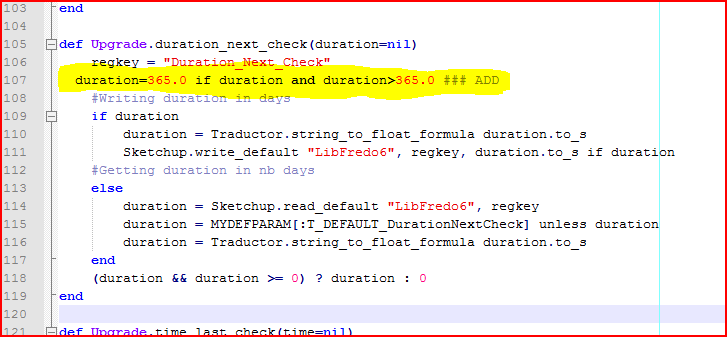 Then you can't wait more than a year [365 days]
 -
@daniel s said:
I can´t change the 99999 because:
- The Upgrade dialog box don´t open
- In default Parameters I can change it but it doesn´t really change.
In the attach video I show what happens.
I tried reinstalling LibFredo6 but still no work.
Daniel S
Daniel,
I published a new release that should fix the issue.
Fredo
-
NEW RELEASELibFredo6 3.7c - 07 Jun 2011
This is a minor maintenance release.
- Fix an issue in CheckForUpdate (next date t check) signaled by Daniel S
- Updated Italian translation by COSEDIMARCO
- Updated Spanish transaltion by Defisto
New release is available for download in the first post of this thread.
Fredo
-
@unknownuser said:
new release that should fix the issue.
Thank you Fredo!!! The update fix it.
I am very good for breaking things.. and you are very good for fixing them. That´s a great team

TIG, Thank you too. You are always there when someone has a problem

Now, time to update some plugins

Thank you again,
Daniel S -
@daniel s said:
Thank you Fredo!!! The update fix it.
I am very good for breaking things.. and you are very good for fixing them. That´s a great team
TIG, Thank you too. You are always there when someone has a problem
I know you have a special bug detector

@TIG: thanks also for your quick support.@daniel s said:
Now, time to update some plugins
The CheckFor Update functions is actually opened to other script writers, not just mine. It does not require that the scripts use LibFredo6 (by the way, JPP an BezierSpline don't use LibFredo6 but are visible in the list).
Fredo
-
To find buggy code in others scripts I start off with Baregrep looking for the particular method or reference by name...
That then lets me open the potentially problematical .rb directly at the line indicated and I can read the code and hopefully see what needs adjustemnt...
I even do it with my own stuff, as it's often awkward to work out what's defined/changed where - especially months after you wrote it...
-
Thank you ~~~~~~~
-
Fredo's plug in looks exactly what I need. Does it work with SU 8? Having installed it as described (I'm OSX 10.5.8) I still get an error. I've read every post over the 19 pages and can't find any clues. My directory is not quite as shown as I have:
Macintosh HD/Library/Application Support/Google SketchUp 8/SketchUp/PluginsAll the files are there as described. Is it simply that it won't work with SU8 or am I doing something wrong?
Thanks in advance to anyone can help.
Wagoneer
-
Kelly, what are you trying to install? (LibFreo will not do anything - it is just a "background" library for a bunch of Fredo's "real" tools)
-
Sorry Gaieus, realised I hadn't said what I was doing as I hit 'submit'.....
I want to use FredoScale. I have installed as per instructions, and have also installed RoundCorner. Enclosed is a picture of my plugins.
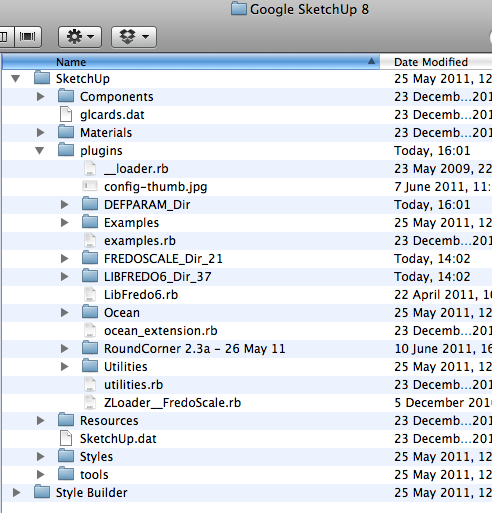
-
Wagoneer
You have a file __loader.rb in the Sketchup Plugin directory.
I don't know how you manage to have it there, but try to remove it and check if it worksFredo
PS: for RoundCorner, you did not do the correct installation too. Please read the main thread and check the footprint. It seems that your unzip method does not create the proper folder and files. I would suggest that you unzip in a neutral place, then check the files and folders and then copy to the Sketchup directory.
-
Fredo, thank you very much. I also downloaded FredoScale to my Mac at home last night where I only use the inbuilt OSX extraction software and it worked fine. Seems the problems were with the Zipeg extraction software. Having just thrown that software away and downloaded your plug-ins again, everything works fine.
Cheers folks.
Kelly




Hello! It looks like you're interested in this conversation, but you don't have an account yet.
Getting fed up of having to scroll through the same posts each visit? When you register for an account, you'll always come back to exactly where you were before, and choose to be notified of new replies (either via email, or push notification). You'll also be able to save bookmarks and upvote posts to show your appreciation to other community members.
With your input, this post could be even better 💗
등록 로그인


Advertisement