[Plugin Library] LibFredo6 - v15.9a - 25 Mar 26



-
Hello fredo, Hope you're fine, I have tried everything in order to make the fredo tools work and it still not workingm the tool bare's aren't even showing up. I even uninstalled and installed sketchup 2019 pro, installed the extensions several times but still no fix, could you or someone please help me out.
Kind regards
A.F -
A few things to consider...
Did you install SketchUp correctly ?
You can repair it and avoid a full re-installation...
While you are logged into Windows as your normal user account, ensure SketchUp is closed.
Find the v2019 installer exe file - usually in your Downloads folder ?
Select its icon, right-click > context-menu > "Run as administrator"
When prompted choose "Repair"...
After it completes restart SketchUp and retest...I assume you are installing from the RBZ using the Extension Manager > Install... button ??
Fredo's extensions [almost all] need his latest LibFredo RBZ installing - available separately from the PluginStrore.
Have you downloaded and installed that too ?
On its own a Lib does nothing - but it adds vital support for his other extensions...
So have you downloaded and installed the latest Fredo Tools from the PluginStore ?Are you aware where the Fredo Tools menu is ? [i.e. under Tools]
The FredoTools toolbar button might need activating in your View > Toolbars... dialog's list ?When clicked that toolbar button opens a second dialog listing many of Fredo's tools - click on the name of one of them and it launches...
Are the two expected Fredo entries listed in the Extension Manager dialog ?
Are they activated in the listing ? -
Just checking, libfredo doesn't do anything on it's own. It is a helper folder for various Fredo extensions.
So installing just LibFredo does nothing. -
Hello TIG, I've been using Fredo for almost all my projects and work and it was working fine, but i had to get a newer version of Sketchup 2019 pro so i got that and yes i've followed the tutorial and everything but still nothing. Also one thing i've noticed is that when i install the extension from the extension manager specially Libfredo 6 and check the version it still says 1.0. I am signed into trimble and stuff and other extensions are working fine except for all the plugin related to Libefredo, like scel corner rounds etc. I've checked under the tools bar and i cannot find the fredo or Lib at all.
If you would like to directly contact me you can. Just let me know what would be suitable.
-
Here's what my current Extension Manager lists in v2019...
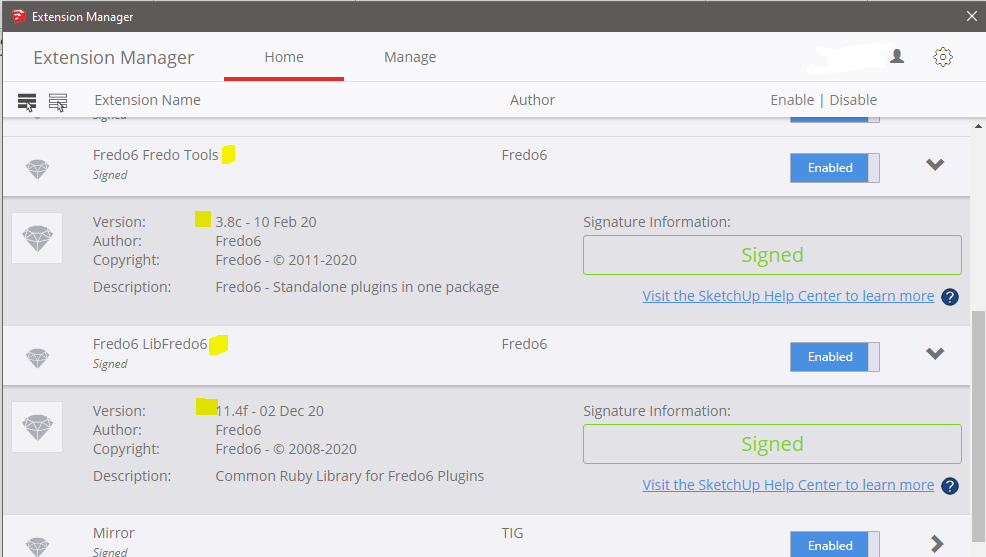
If yours shows something else [and you've installed the latest versions] then it's broken...Have you tried the "Repair" idea ?
The Lib doesn't appear, except as a 'helper' - the FredoTools is in Tools submenu and a Toolbar of the same name... -
Hello TIG,
I've tried repair in administrator mode, Yes i am signed into my windows account as a genuine user. I tried installing the extension again from the beginning by downloading them again and it still not working, Maybe i could be doing something wrong.. It's a suggestion so tell me if it's okay for you. How about you just make a zip file of the Libfredo 6 Rbz file with fredo scale the max and share with me. And i'll let you know if it works by sharing a screenshot. ?
-
Did you download the Fredo extensions/lib from the SketchUcation PluginStore ?
Retry, using these links...
https://sketchucation.com/pluginstore?pln=LibFredo6
https://sketchucation.com/pluginstore?pln=FredoScale
https://sketchucation.com/pluginstore?pln=FredoToolsInstall them all using Extension Manager > Install, restart SketchUp, look at the menus, toolbars and Extension Manager listings... any better ?
-
Before you install the current version of these extensions, go to the Plugins folder and delete all related files.
Also please update your profile. It says you are using SU2016.
-
Hello , I gave it a go and did everything as you said. it still didn't work. I keep on getting the message to install Librefredo 6.9 or higher. Ran the setup and even repaired the file but it still didn't help. Here's is the screen shot of the version that it's showing me

-
Your LibFredo files' installation is obviously FUBAR...
Delete all files and subfolders in your Plugins folder which relate to LibFredo [i.e. Fredo6_!LibFredo6.rb file and Fredo6_!LibFredo6 subfolder and its contents ], then restart SketchUp and install the latest LibFredo RBZ as I linked...
Fredo might be able to advise on very old legacy files messing things up - but you would have to have copied those over from a much older set up...

-
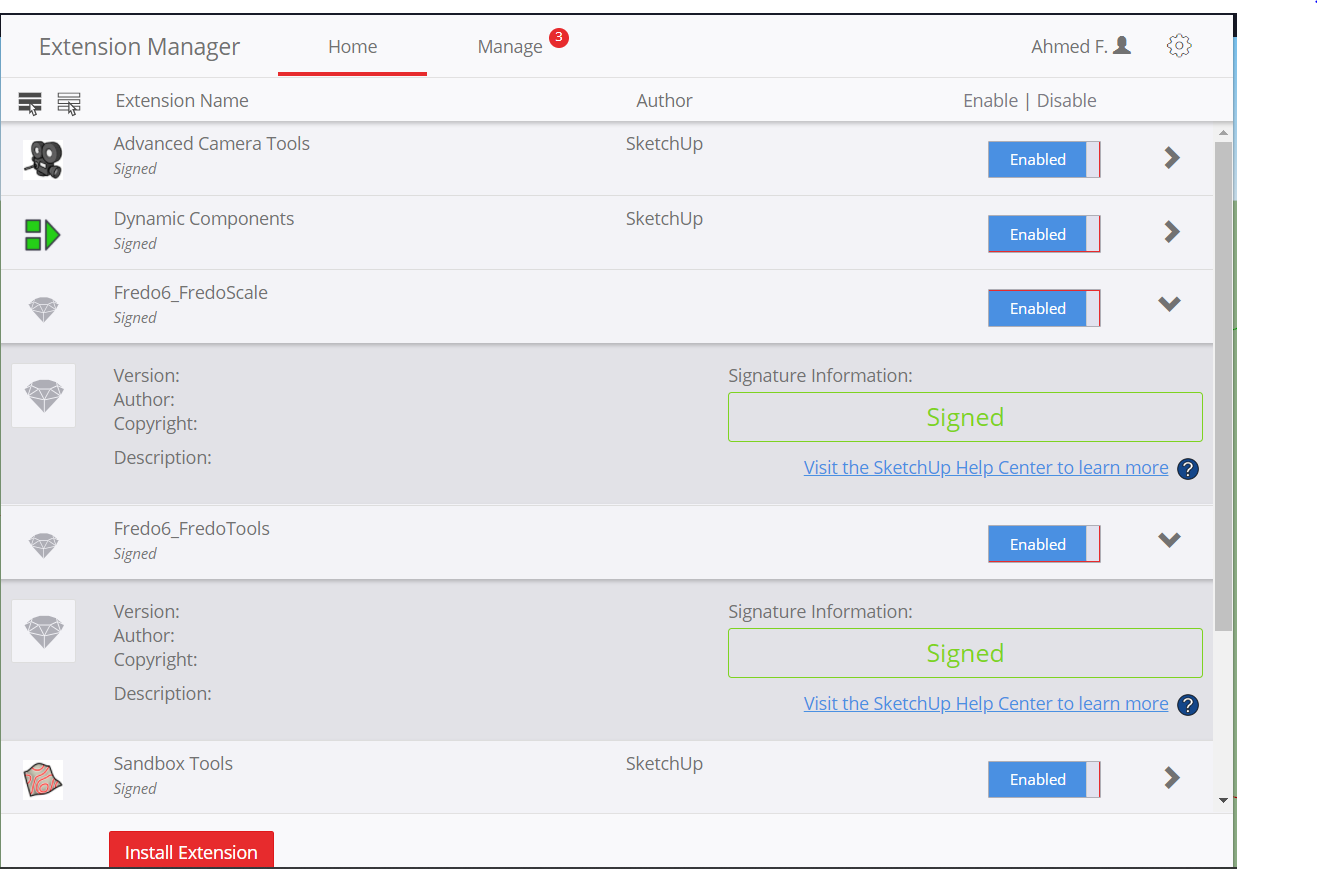
hello, Well i've tried almost everything to fix, all other extensions work. but this is the only extension that's not working at all, it's not appearing in the tools bar neither in the extensions options, i am attaching screenshot just to show you that i have installed the latest version as you linked above.
-
@aiden900 said:
hello, Well i've tried almost everything to fix, all other extensions work. but this is the only extension that's not working at all, it's not appearing in the tools bar neither in the extensions options, i am attaching screenshot just to show you that i have installed the latest version as you linked above.
It is not an extension in itself. It is a library required by Fredo's extensions.
-
Yes sir, I know that but it's not being show in extensions window as well.. it just aint there at all. And i have no idea what to do to fix. I have tried every possible way trying to somehow fix this thing. if someone wants to help me by connecting to team viewer or anything like that please please do. I urgently need it so that i can finish my model for interior. Please PM me or something.
bundle of thanks
Aiden -
@aiden900 said:
Yes sir, I know that but it's not being show in extensions window as well.. it just aint there at all. And i have no idea what to do to fix.
You just need to install LibFredo6 (it seems to be missing in your current setup).
- Download the RBZ at the LibFredo6 Plugin Page
- Go to the Extension Manager of Sketchup
- Install LibFredo6 from the LibFredo6 RBZ (button 'Install Extension')
Once done, the other plugins, FredoScale and FredoTools will work.
-
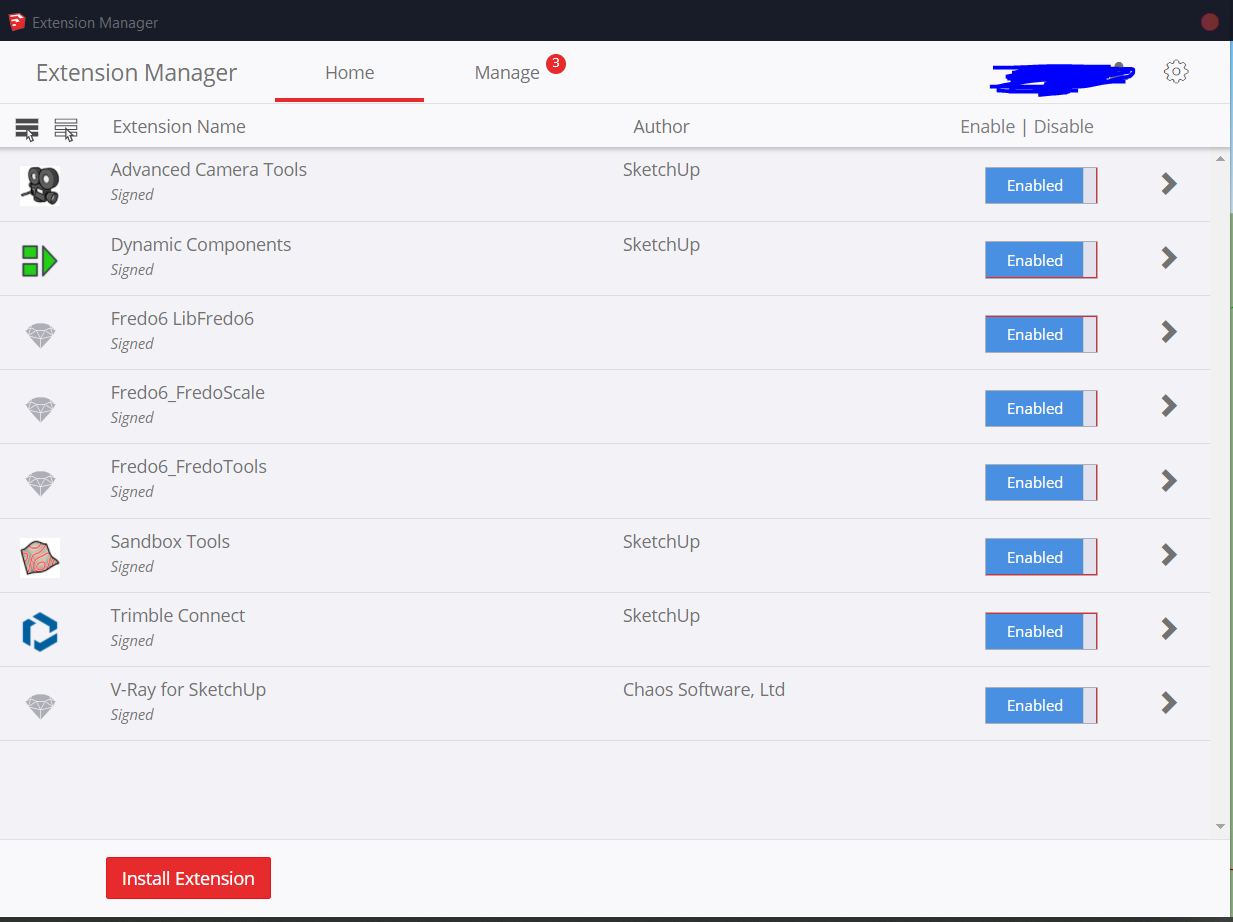
OK, Just to be clear and as i am sort of telling the same thing again and again. I've never had issues installing extensions, i know how easy the process is, but it just ain't seem to be working so guess what, i am actually going to be pasting the error that i am getting maybe that way you'll be able to see what the fault is as i am not that expert. And you shall find the attachment of my extensions manager again.
Error Loading File C:/Users/Afara/AppData/Roaming/SketchUp/SketchUp 2019/SketchUp/Plugins/Fredo6_!LibFredo6/top_LibFredo6.rbe
Failed to read RBE/RBS file.
Error Loading File Fredo6_!LibFredo6.rb
Error: #<NameError: uninitialized constant LibFredo6_Loader::LibFredo6>
C:/Users/Afara/AppData/Roaming/SketchUp/SketchUp 2019/SketchUp/Plugins/Fredo6_!LibFredo6.rb:67:inprocess' C:/Users/Afara/AppData/Roaming/SketchUp/SketchUp 2019/SketchUp/Plugins/Fredo6_!LibFredo6.rb:74:inmodule:LibFredo6_Loader'
C:/Users/Afara/AppData/Roaming/SketchUp/SketchUp 2019/SketchUp/Plugins/Fredo6_!LibFredo6.rb:30:in<top (required)>' Error Loading File Fredo6_FredoScale.rb Error: #<TypeError: can't convert nil into an exact number> C:/Users/Afara/AppData/Roaming/SketchUp/SketchUp 2019/SketchUp/Plugins/Fredo6_!LibFredo6.rb:83:in-'
C:/Users/Afara/AppData/Roaming/SketchUp/SketchUp 2019/SketchUp/Plugins/Fredo6_!LibFredo6.rb:83:in<top (required)>' C:/Program Files/SketchUp/SketchUp 2019/Tools/RubyStdLib/rubygems/core_ext/kernel_require.rb:59:inrequire'
C:/Program Files/SketchUp/SketchUp 2019/Tools/RubyStdLib/rubygems/core_ext/kernel_require.rb:59:inrequire' C:/Users/Afara/AppData/Roaming/SketchUp/SketchUp 2019/SketchUp/Plugins/Fredo6_FredoScale.rb:47:inmodule:Fredo6'
C:/Users/Afara/AppData/Roaming/SketchUp/SketchUp 2019/SketchUp/Plugins/Fredo6_FredoScale.rb:26:in<top (required)>' Error Loading File Fredo6_FredoTools.rb Error: #<TypeError: can't convert nil into an exact number> C:/Users/Afara/AppData/Roaming/SketchUp/SketchUp 2019/SketchUp/Plugins/Fredo6_!LibFredo6.rb:83:in-'
C:/Users/Afara/AppData/Roaming/SketchUp/SketchUp 2019/SketchUp/Plugins/Fredo6_!LibFredo6.rb:83:in<top (required)>' C:/Program Files/SketchUp/SketchUp 2019/Tools/RubyStdLib/rubygems/core_ext/kernel_require.rb:59:inrequire'
C:/Program Files/SketchUp/SketchUp 2019/Tools/RubyStdLib/rubygems/core_ext/kernel_require.rb:59:inrequire' C:/Users/Afara/AppData/Roaming/SketchUp/SketchUp 2019/SketchUp/Plugins/Fredo6_FredoTools.rb:47:inmodule:Fredo6'
C:/Users/Afara/AppData/Roaming/SketchUp/SketchUp 2019/SketchUp/Plugins/Fredo6_FredoTools.rb:26:in `<top (required)>'
Error Loading File C:/Users/Afara/AppData/Roaming/SketchUp/SketchUp 2019/SketchUp/Plugins/su_advancedcameratools/actloader.rbe
Failed to read RBE/RBS file.
Error Loading File C:/Users/Afara/AppData/Roaming/SketchUp/SketchUp 2019/SketchUp/Plugins/su_dynamiccomponents/ruby/dcloader.rbe
Failed to read RBE/RBS file.
Error Loading File C:/Users/Afara/AppData/Roaming/SketchUp/SketchUp 2019/SketchUp/Plugins/su_sandbox/sandboxmenus.rbe
Failed to read RBE/RBS file.
Error Loading File C:/Users/Afara/AppData/Roaming/SketchUp/SketchUp 2019/SketchUp/Plugins/su_trimble_connect/boot.rbe
Failed to read RBE/RBS file.
-
Go back to TIG's post when he wrote the following:
@unknownuser said:
Did you install SketchUp correctly ?
You can repair it and avoid a full re-installation...
While you are logged into Windows as your normal user account, ensure SketchUp is closed.
Find the v2019 installer exe file - usually in your Downloads folder ?
Select its icon, right-click > context-menu > "Run as administrator"
When prompted choose "Repair"...
After it completes restart SketchUp and retest...Do that and repair the installation of SketchUp.
-
Tried that a million times, I even installed sketchup all over again just to see if that would help, still nothing. it's showing me the error. I even deleted my plugin folder, and tried installing only fredo tools still nothing comes up
-
Installing just Fredo's Tools on its own won't work !
Almost all of Fredo's Extensions will also need his latest LibFredo installing.
Download that Lib's RBZ, install it and restart SketchUp...
After that Fredo's Tools and the vital LibFredo should appear in the Extension Manager list ??
-
TIG, If you check the screen shot above, I've install the tools and the Libfredo6 latest version from the website. I've done it. and it's still not appearing and yet it shows me errors.
See i've been struggling with this since i dont know weeks, and i really do appreciate everyone on this page trying to help me out. but it's just not working at all. So If it's possible for anyone of you to help me through teamviwer or skype or anything, please please please let me know.
I've tried all the steps above, everything. even i have tried download the RBZ file again and installing them but it just wouldn't appear or work.
I am dropping my email below, please if any of you would be kind enough to assist me please do.
Kind Regards
A.FEmail : darkcore900@gmail.com
-
@unknownuser said:
I even deleted my plugin folder, and tried installing only fredo tools still nothing comes up
Your statement isn't logical.
If your Plugins folder were empty then the Extension Manager would show only some 'Shipped-Extensions' which always load.
If You install Fredo Tools it does nothing without having LibFredo installed.
You screen shots don't show us this...Your earlier screen shot of the Extension Manager showed LibFredo v1.0 - this is clearly wrong...
Let's step back a bit...
Can you please post the following results...
Use the Ruby Console to type or copy/paste the following, individually...SCF::PLUGINSSketchup.find_support_file('Plugins')Sketchup.temp_dirThese might help us narrow in on some OS issues ??





Hello! It looks like you're interested in this conversation, but you don't have an account yet.
Getting fed up of having to scroll through the same posts each visit? When you register for an account, you'll always come back to exactly where you were before, and choose to be notified of new replies (either via email, or push notification). You'll also be able to save bookmarks and upvote posts to show your appreciation to other community members.
With your input, this post could be even better 💗
등록 로그인


Advertisement