sketchucation logo sketchucation
    • 로그인
    Oops, your profile's looking a bit empty! To help us tailor your experience, please fill in key details like your SketchUp version, skill level, operating system, and more. Update and save your info on your profile page today!
    🚨 Skimp | 25% Off until March 30 Buy Now

    [Plugin Library] LibFredo6 - v15.9a - 25 Mar 26


    예약됨 고정됨 잠김 이동됨 Plugins
    2.2k 게시물 577 작성자 4.3m 조회수 579 Watching
    게시물 더 불러오는 중
    • 오래된 순
    • 최신 순
    • 가장 많은 투표
    답글
    • 토픽으로 답글
    로그인 후 답글 작성
    이 토픽은 삭제되었습니다. 토픽 관리 권한이 있는 사용자만 볼 수 있습니다.
    • M 오프라인
      manoamo
      마지막 수정자:

      I'm having a " invalid byte sequence in UTF-8 error "
      I watched your installation video 4 times, Searched about this error for days.
      I found out that this might be a encoding problem, but I have no idea how to solve this problem.
      please help .. Below is error log(?) when I restart SU after Libfredo6 installation.

      Error Loading File Fredo6_!LibFredo6.rb
      Error: #<ArgumentError: invalid byte sequence in UTF-8>
      c:/users/홍우빈/appdata/roaming/sketchup/sketchup 2020/sketchup/plugins/fredo6_!libfredo6/top_libfredo6.rbe:45:in gsub' c:/users/홍우빈/appdata/roaming/sketchup/sketchup 2020/sketchup/plugins/fredo6_!libfredo6/top_libfredo6.rbe:45:in get_dir_from_ENV'
      c:/users/홍우빈/appdata/roaming/sketchup/sketchup 2020/sketchup/plugins/fredo6_!libfredo6/top_libfredo6.rbe:425:in su_appdata' c:/users/홍우빈/appdata/roaming/sketchup/sketchup 2020/sketchup/plugins/fredo6_!libfredo6/top_libfredo6.rbe:443:in dir_appdata'
      c:/users/홍우빈/appdata/roaming/sketchup/sketchup 2020/sketchup/plugins/fredo6_!libfredo6/top_libfredo6.rbe:206:in startup' C:/Users/홍우빈/AppData/Roaming/SketchUp/SketchUp 2020/SketchUp/Plugins/Fredo6_!LibFredo6.rb:62:in process'
      C:/Users/홍우빈/AppData/Roaming/SketchUp/SketchUp 2020/SketchUp/Plugins/Fredo6_!LibFredo6.rb:69:in <module:LibFredo6_Loader>' C:/Users/홍우빈/AppData/Roaming/SketchUp/SketchUp 2020/SketchUp/Plugins/Fredo6_!LibFredo6.rb:30:in <top (required)>'

      1 답글 마지막 답글 답글 인용 0
      • fredo6F 오프라인
        fredo6
        마지막 수정자:

        @manoamo said:

        I'm having a " invalid byte sequence in UTF-8 error " .

        It's definitely related to your Windows user name not in ascii.

        Difficult to fix as there are so many situations.

        If you agree, we could try to troubleshoot together the problem (I would send you some small lines of Ruby to test).

        In the Ruby console, can you type (just copy / paste the statement and Enter)

        ENV["LOCALAPPDATA"].encoding.inspect

        Then tell me what you see as a response

        Fredo

        1 답글 마지막 답글 답글 인용 0
        • M 오프라인
          manoamo
          마지막 수정자:

          Thank you so much for your kind help! Much appreciated!!

          ENV["LOCALAPPDATA"].encoding.inspect
          #Encoding:CP949

          This is what I got !

          1 답글 마지막 답글 답글 인용 0
          • fredo6F 오프라인
            fredo6
            마지막 수정자:

            @manoamo said:

            ENV["LOCALAPPDATA"].encoding.inspect
            #Encoding:CP949

            This is what I got !

            Could you now execute the following commands in the Ruby console, one after the other

            a = ENV["LOCALAPPDATA"].dup.force_encoding("UTF-8")

            a.encoding.inspect

            Thanks

            1 답글 마지막 답글 답글 인용 0
            • M 오프라인
              manoamo
              마지막 수정자:

              Thank you so much for your kind help!

              ENV["LOCALAPPDATA"].encoding.inspect

              #Encoding:CP949
              a = ENV["LOCALAPPDATA"].dup.force_encoding("UTF-8")
              C:\Users\￈ᆱ﾿↓ᄎ￳\AppData\Local
              a.encoding.inspect
              #Encoding:UTF-8

              This is what I got

              1 답글 마지막 답글 답글 인용 0
              • fredo6F 오프라인
                fredo6
                마지막 수정자:

                @manoamo said:

                Thank you so much for your kind help!

                ENV["LOCALAPPDATA"].encoding.inspect

                #Encoding:CP949
                a = ENV["LOCALAPPDATA"].dup.force_encoding("UTF-8")
                C:\Users\￈ᆱ﾿↓ᄎ￳\AppData\Local
                a.encoding.inspect
                #Encoding:UTF-8

                This is what I got

                Then, can you try the following commands

                a = ENV["LOCALAPPDATA"].dup.force_encoding("UTF-8").gsub(/\\/, "/")

                a = ENV["LOCALAPPDATA"].dup.force_encoding("UTF-8").gsub("\\", "/")

                and then this command

                LibFredo6.get_dir_from_ENV "LOCALAPPDATA"

                1 답글 마지막 답글 답글 인용 0
                • fredo6F 오프라인
                  fredo6
                  마지막 수정자:

                  NEW RELEASE: LibFredo6 v11.4d - 27 Nov 20

                  LibFredo6 11.4d fixes two issues for Animator (VRay5 rendering of apparation and rotation with variable speed)


                  Requirements: SU2017 and above

                  See plugin home page of LibFredo6 for Download of LibFredo6.

                  Main Post of the LibFredo6 thread

                  Fredo

                  1 답글 마지막 답글 답글 인용 0
                  • M 오프라인
                    manoamo
                    마지막 수정자:

                    ENV["LOCALAPPDATA"].encoding.inspect
                    #Encoding:CP949
                    a = ENV["LOCALAPPDATA"].dup.force_encoding("UTF-8")
                    C:\Users\￈ᆱ﾿↓ᄎ￳\AppData\Local
                    a.encoding.inspect
                    #Encoding:UTF-8
                    a = ENV["LOCALAPPDATA"].dup.force_encoding("UTF-8").gsub(/\/, "/")

                    Error: #<ArgumentError: invalid byte sequence in UTF-8>
                    <main>:in gsub' <main>:in <main>'
                    SketchUp:1:in `eval'

                    a = ENV["LOCALAPPDATA"].dup.force_encoding("UTF-8").gsub("\", "/")
                    C:/Users/￈ᆱ﾿↓ᄎ￳/AppData/Local
                    LibFredo6.get_dir_from_ENV "LOCALAPPDATA"
                    Error: #<NameError: uninitialized constant LibFredo6>
                    <main>:in <main>' SketchUp:1:in eval'

                    I followed every step that you told me!
                    but still same errors occur 😢

                    1 답글 마지막 답글 답글 인용 0
                    • fredo6F 오프라인
                      fredo6
                      마지막 수정자:

                      @manoamo

                      Thank you. Very useful.

                      I think this is a bug in the core ruby engine.

                      I'll see what I can do in order to overcome the problem.

                      Fredo

                      1 답글 마지막 답글 답글 인용 0
                      • fredo6F 오프라인
                        fredo6
                        마지막 수정자:

                        @manoamo

                        Could you try

                        ENV["LOCALAPPDATA"].dup.encode("UTF-8").gsub(/\\/, "/")

                        Thanks

                        Fredo

                        1 답글 마지막 답글 답글 인용 0
                        • M 오프라인
                          manoamo
                          마지막 수정자:

                          I tried the last typing but I failed again
                          I typed the codes in this sequence

                          1. ENV["LOCALAPPDATA"].encoding.inspect
                          2. a = ENV["LOCALAPPDATA"].dup.force_encoding("UTF-8")
                          3. a.encoding.inspect
                          1. a = ENV["LOCALAPPDATA"].dup.force_encoding("UTF-8").gsub(/\/, "/")
                          2. a = ENV["LOCALAPPDATA"].dup.force_encoding("UTF-8").gsub("\", "/")
                          3. ENV["LOCALAPPDATA"].dup.encode("UTF-8").gsub(/\/, "/")
                          1. LibFredo6.get_dir_from_ENV "LOCALAPPDATA"

                          Thanks

                          1 답글 마지막 답글 답글 인용 0
                          • fredo6F 오프라인
                            fredo6
                            마지막 수정자:

                            @manoamo

                            Could you tell me what is the erroryou get with this statement

                            ENV["LOCALAPPDATA"].dup.encode("UTF-8").gsub(/\\/, "/")

                            1 답글 마지막 답글 답글 인용 0
                            • M 오프라인
                              manoamo
                              마지막 수정자:

                              This is my ruby console

                              ENV["LOCALAPPDATA"].encoding.inspect
                              #Encoding:CP949
                              a = ENV["LOCALAPPDATA"].dup.force_encoding("UTF-8")

                              C:\Users\￈ᆱ﾿↓ᄎ￳\AppData\Local
                              a.encoding.inspect

                              #Encoding:UTF-8
                              ENV["LOCALAPPDATA"].dup.encode("UTF-8").gsub(/\/, "/")
                              C:/Users/■ルヘ↓レᄚ→ᄍネ/AppData/Local
                              LibFredo6.get_dir_from_ENV "LOCALAPPDATA"
                              Error: #<ArgumentError: invalid byte sequence in UTF-8>
                              c:/users/홍우빈/appdata/roaming/sketchup/sketchup 2020/sketchup/plugins/fredo6_!libfredo6/top_libfredo6.rbe:45:in gsub' c:/users/홍우빈/appdata/roaming/sketchup/sketchup 2020/sketchup/plugins/fredo6_!libfredo6/top_libfredo6.rbe:45:in get_dir_from_ENV'
                              <main>:in <main>' SketchUp:1:in eval'


                              This is what I get after restart

                              Error Loading File Fredo6_!LibFredo6.rb
                              Error: #<ArgumentError: invalid byte sequence in UTF-8>
                              c:/users/홍우빈/appdata/roaming/sketchup/sketchup 2020/sketchup/plugins/fredo6_!libfredo6/top_libfredo6.rbe:45:in gsub' c:/users/홍우빈/appdata/roaming/sketchup/sketchup 2020/sketchup/plugins/fredo6_!libfredo6/top_libfredo6.rbe:45:in get_dir_from_ENV'
                              c:/users/홍우빈/appdata/roaming/sketchup/sketchup 2020/sketchup/plugins/fredo6_!libfredo6/top_libfredo6.rbe:425:in su_appdata' c:/users/홍우빈/appdata/roaming/sketchup/sketchup 2020/sketchup/plugins/fredo6_!libfredo6/top_libfredo6.rbe:443:in dir_appdata'
                              c:/users/홍우빈/appdata/roaming/sketchup/sketchup 2020/sketchup/plugins/fredo6_!libfredo6/top_libfredo6.rbe:206:in startup' C:/Users/홍우빈/AppData/Roaming/SketchUp/SketchUp 2020/SketchUp/Plugins/Fredo6_!LibFredo6.rb:62:in process'
                              C:/Users/홍우빈/AppData/Roaming/SketchUp/SketchUp 2020/SketchUp/Plugins/Fredo6_!LibFredo6.rb:69:in <module:LibFredo6_Loader>' C:/Users/홍우빈/AppData/Roaming/SketchUp/SketchUp 2020/SketchUp/Plugins/Fredo6_!LibFredo6.rb:30:in <top (required)>'

                              1 답글 마지막 답글 답글 인용 0
                              • fredo6F 오프라인
                                fredo6
                                마지막 수정자:

                                Ok. Thanks I think we progress.

                                Can you try this statement (only this one)

                                File.directory? ENV["LOCALAPPDATA"].dup.encode("UTF-8").gsub(/\\/, "/")

                                if there is an error, can you try this one

                                File.directory? ENV["LOCALAPPDATA"].dup.encode("UTF-8").gsub("\\", "/")

                                Many thanks

                                Fredo

                                1 답글 마지막 답글 답글 인용 0
                                • M 오프라인
                                  manoamo
                                  마지막 수정자:

                                  Good to hear!

                                  These are what I got back

                                  First,

                                  File.directory? ENV["LOCALAPPDATA"].dup.encode("UTF-8").gsub(/\/, "/")

                                  true

                                  Second,

                                  File.directory? ENV["LOCALAPPDATA"].dup.encode("UTF-8").gsub("\", "/")
                                  true

                                  1 답글 마지막 답글 답글 인용 0
                                  • fredo6F 오프라인
                                    fredo6
                                    마지막 수정자:

                                    OK. Thanks.

                                    I will publish a fix and it should hopefully work for you.

                                    Fredo

                                    1 답글 마지막 답글 답글 인용 0
                                    • M 오프라인
                                      manoamo
                                      마지막 수정자:

                                      Thank you so much for your kind help 😢

                                      1 답글 마지막 답글 답글 인용 0
                                      • fredo6F 오프라인
                                        fredo6
                                        마지막 수정자:

                                        NEW RELEASE: LibFredo6 v11.4f - 02 Dec 20

                                        LibFredo6 11.4d provides fixes

                                        • for handling some cases of non-ascii Windows username
                                        • for a bug in some tools (MoveAlong and a few others)

                                        Requirements: SU2017 and above

                                        See plugin home page of LibFredo6 for Download of LibFredo6.

                                        Main Post of the LibFredo6 thread

                                        Fredo

                                        1 답글 마지막 답글 답글 인용 0
                                        • 1 오프라인
                                          1409 douglas
                                          마지막 수정자:

                                          I have your latest version as of 02 december 2020 of libFredo6. I have SketchupPRO 2021.
                                          I believe I have followed your instructions to load libFredo6 and Curvizard v2.4b.
                                          There is libFredo6 under Window, but no Curvizard under Extensions. I have restarted (several times).
                                          Any Ideas?
                                          Thank you
                                          rj

                                          1 답글 마지막 답글 답글 인용 0
                                          • Dave RD 오프라인
                                            Dave R
                                            마지막 수정자:

                                            @1409 douglas said:

                                            but no Curvizard under Extensions. I have restarted (several times).

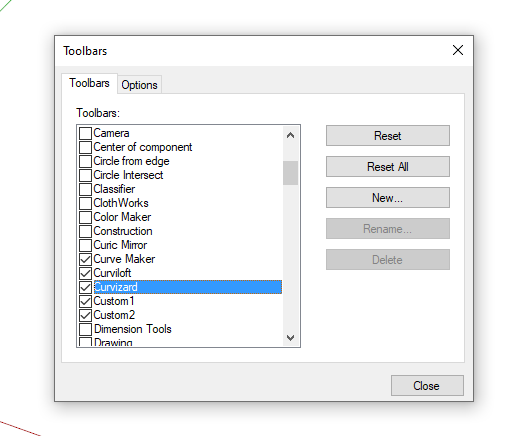
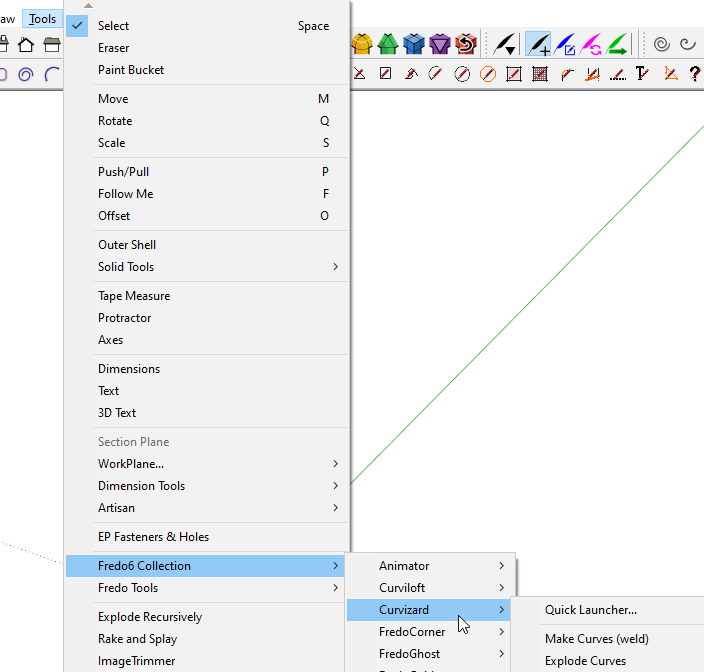
                                            No matter how many times you restart SketchUp, Curvizard isn't supposed to show up under Extensions. It shows up in Tools>Fredo6 Collection. Or you can turn on its toolbar button under View>Toolbars.
                                            Screenshot - 12_29_2020 , 1_35_32 PM.png

                                            Screenshot - 12_29_2020 , 1_38_35 PM.png

                                            Etaoin Shrdlu

                                            %

                                            (THERE'S NO PLACE LIKE)

                                            G28 X0.0 Y0.0 Z0.0

                                            M30

                                            %

                                            1 답글 마지막 답글 답글 인용 0

                                            Hello! It looks like you're interested in this conversation, but you don't have an account yet.

                                            Getting fed up of having to scroll through the same posts each visit? When you register for an account, you'll always come back to exactly where you were before, and choose to be notified of new replies (either via email, or push notification). You'll also be able to save bookmarks and upvote posts to show your appreciation to other community members.

                                            With your input, this post could be even better 💗

                                            등록 로그인
                                            • 1
                                            • 2
                                            • 82
                                            • 83
                                            • 84
                                            • 85
                                            • 86
                                            • 110
                                            • 111
                                            • 84 / 111
                                            • 첫 게시물
                                              마지막 게시물
                                            Buy SketchPlus
                                            Buy SUbD
                                            Buy WrapR
                                            Buy eBook
                                            Buy Modelur
                                            Buy Vertex Tools
                                            Buy SketchCuisine
                                            Buy FormFonts

                                            Advertisement