[Plugin Library] LibFredo6 - v15.9a - 25 Mar 26



-
iv come up against a really confusing issue, ALL fredo tools have stopped working, (scale, round corner, pushpull, curviloft, tool on surface) none of them do anything when i press the icons... they stopped working on 2015, uninstalled and cleaned everything out of old plugin folders (appdata loc), reinstalled and nonthing, try 2016 and the exact same thing happens, why on earth do they now no longer work?!
-
Have you installed the latest version of Fredo's Lib AND ALL of his plugins...
They were all updated in one go...
If not, then something might break.
If you try any of them with the Ruby Console open, then are there any relevant error messages ? -
i had installed all latest plugins and lib files, none worked, no errors on console, its like they just didnt work... ended up getting an older version of everything to work... good thing i had an out of date back up.
-
How did you install them. Clearly not correctly or they would have worked.
-
@coasterinc said:
i had installed all latest plugins and lib files, none worked, no errors on console, its like they just didnt work... ended up getting an older version of everything to work... good thing i had an out of date back up.
Did you get all the icons in the toolbar and menus?
Fredo
-
yes i had all the icons, they were shown as installed in the plugins manager, they all said to be up to date.... as for installing correctly, its not hard to install an rbz now is it so dont be so arrogant or ignorant of the situation, i came here looking for help... but iv sorted it now either way, just old versions, what ever i ended up with the newer ones from either here or the plugin that downloads them automatically just caused them to fail but there was never anything wrong with the old ones anyway... unless i want to get a newer plug in for something but for now its ok
-
Bonjour Frédo, un grand merci pour le travail que vous faite pour rendre Sketchup très agréable à utiliser
J'ai une requête à vous demander sur l'un de vos plug "Angle inspector", serait-il possible d'avoir un sélecteur dans la barre d'outil qui donnerait le choix d'une base de calcule des angles entre 180° et 90° sur les sélections des faces rouge et verte ?
L'information sur le mode actuel de 180° un angle inférieur de 30° donne 150° en angle supérieur...
Sur un mode 90° un angle inférieur de 30° donne 60° en angle supérieur...Cette information est très utile et directement utilisable pour le réglage des fraises inclinables sur machine à bois. La cerise sur le gateau serait un labellé automatique de l'angle choisi en cliquant dessus... mais je rêve trop...
Merci encore pour vos travaux,
Patrick
-
wondering if someone can let me know what might be wrong with my installation or something missing - I followed the specific installation instructions from this thread - here is my folder architecture and the error messages - thanks for any help you can give
running SketchUp 2016 on OSX 10.11.1
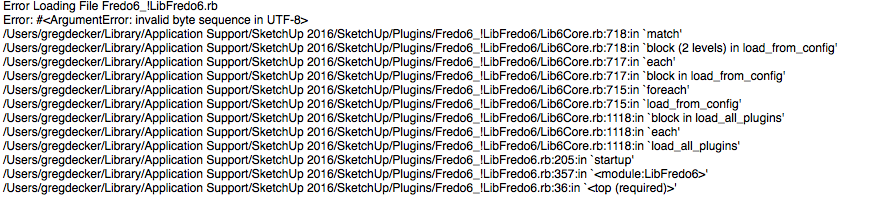
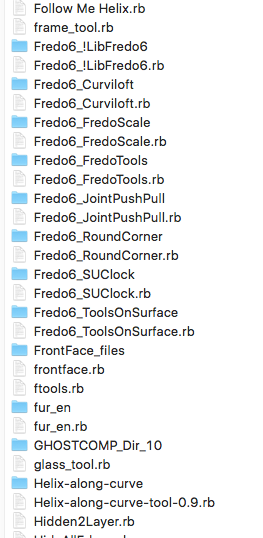
-
Most likely, this should be solved by removing GHOSTCOMP_Dir_10 subfolder.
It's an old version, which contains files which are not encoded in UTF.If you need GhostComp, please install the latest version 1.3a from the PluginStore
Fredo
-
Bonjour,
je viens de m'inscrire au forum en mode "Free", je ne vois pas le bouton Download pour un de vos script .... ni pour "LibFredo6"
Il est possible de télécharger en mode Free ??Merci pour votre réponse
Cordialement -
Le mieux est de télécharger le PluginStore tool et l'installer en extension de Sketchup. Voici le mode d'emploi.
Apres, il suffit d'un clic pour installer tous les plugins, inclus LibFredo6.
Fredo
In English
The best is to download and install the PluginStore Tool as an extension of Sketchup. Here is the process to follow
Then, you can install all plugins, including LibFredo6, in one click. -
Fredo says the best way, BUT.
If you now have an SCF membership.
Now you need to login.
Then you can use the PluginsStore link in the menu [above].
Search for Author == Fredo6
The list should show all of Fredo's entries.
Click on any of them to download their plugin's RBZ...Fredo dit la meilleure façon, MAIS.
Si vous avez maintenant une adhésion de SCF.
Maintenant, vous devez vous identifier.
Ensuite, vous pouvez utiliser le lien de PluginStore dans le menu ci-dessus.
Rechercher Auteur [Author] == Fredo6
La liste devrait avoir toutes les entrées de Fredo.
Cliquez sur l'un d'eux pour télécharger de leur Plug-in RBZ... -
Merci pour votre rapide réponse.
Je vais essayer.
A bientôt -
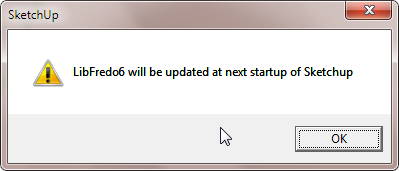
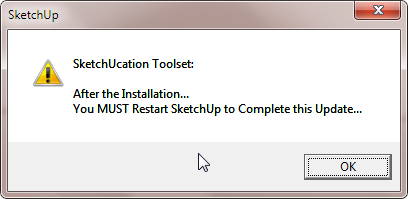
Having this pop-up message every time SketchUp 8 starting lately
-
I responded to your similar question in another thread.
The fact that both installations expect to update [repeatedly] suggests that you don't have FULL [read/write/modify] Security permissions set up for ALL possible users listed under the Plugins folder's Properties [right-click context-menu] > Edit dialog...
What is your Windows version ?
Are you installing the RBZ successfully ?? -
@tig said:
I responded to your similar question in another thread.
The fact that both installations expect to update [repeatedly] suggests that you don't have FULL [read/write/modify] Security permissions set up for ALL possible users listed under the Plugins folder's Properties [right-click context-menu] > Edit dialog...
What is your Windows version ?
Are you installing the RBZ successfully ??Yes, thank you for the quick reply Sir.
Just checked the folder properties and changed the permission moment ago.
Have full permission on my own PC. Didn't thought it would be different here.
Thank you very much again, Sir. -
By default, Windows limits the permissions to all folders/subfolders/files within the 'Program Files' folder tree - including SketchUp's.
Even if you are an admin you still get these permissions, preset.
They can be changed manually to FULL [provided you have admin-powers].
These changes should trickle down to all subfolders/files within the re-permissioned subfolder.
[On Pc, but the older MAC versions there's a optional 'toggle' setting to do that trickle-down]To avoid this, since v2014 the Plugins folder was relocated into the User's AppData folder tree.
Here you automatically have FULL rights.If you want to add/change ANY files in ANY other subfolders which are in ANY of the SketchUp 'Program Files' folder tree, then you'll need to fix their subfolder's permissions too [ typically these might be the Components, Materials or Styles subfolders ? ]
-
@unclex said:
@tig said:
@unclex said:
Error Loading File Fredo6_!LibFredo6.rb
Error: #<ArgumentError: invalid byte sequence in UTF-8>
C:/Users/Administrator/AppData/Roaming/SketchUp/SketchUp 2014/SketchUp/Plugins/Fredo6_!LibFredo6/Lib6PluginDialogs.rb:689:in[]' C:/Users/Administrator/AppData/Roaming/SketchUp/SketchUp 2014/SketchUp/Plugins/Fredo6_!LibFredo6/Lib6PluginDialogs.rb:689:inlist_log_files'
C:/Users/Administrator/AppData/Roaming/SketchUp/SketchUp 2014/SketchUp/Plugins/Fredo6_!LibFredo6/Lib6PluginDialogs.rb:708:inpurge' C:/Users/Administrator/AppData/Roaming/SketchUp/SketchUp 2014/SketchUp/Plugins/Fredo6_!LibFredo6.rb:224:inafter_startup'
C:/Users/Administrator/AppData/Roaming/SketchUp/SketchUp 2014/SketchUp/Plugins/Fredo6_!LibFredo6.rb:184:instartup' C:/Users/Administrator/AppData/Roaming/SketchUp/SketchUp 2014/SketchUp/Plugins/Fredo6_!LibFredo6.rb:299:inmodule:LibFredo6'
C:/Users/Administrator/AppData/Roaming/SketchUp/SketchUp 2014/SketchUp/Plugins/Fredo6_!LibFredo6.rb:31:in `<top (required)>'2014 Just Like This
2013 OK
Have you installed a fresh [latest] copy of this Lib ?
Perhaps from the PluginStore...
IF you have ill-advisedly copied an older version into v2014 it probably WILL break everything...
Authors have just spent the last three months working with Trimble to discreetly update their plugins to ensure that they also work in v2014, so please ensure you get the latest versions... and NEVER blindly copy things across - some of them will just NOT work !
Get the latest version of every Plugin and then winge if that one doesn't work...thanks for TIG
of course I install the newest fredo's Plugins, and before that I have cleaned the elder fredos
Perhaps because I have some old plugins using @ 2014
but, even I delete all the elder plugins, the libfredo6 still like that.....Hi, I see you solved the problem, but for the latest version your solution is not valid anymore, thus I share the requried files need to be replaced to overcome this problem.
[mod=:32e482lk]Edited to remove unauthorized files.[/mod:32e482lk]
-
@mimarilker said:
Hi, I see you solved the problem, but for the latest version your solution is not valid anymore, thus I share the requried files need to be replaced to overcome this problem.
Dear mimarilker,
Please do not publish files from my plugin, especially without explanation.
I don't think there is a problem of UTF8 encoding with the latest version of LibFredo6 which is published on SCF and EWH.
The errors comes from the presence of old files / subfolders.
Thanks
Fredo
[mod=:1nmf4338]Hi Fredo, I removed the files from his post.
Cheers,
Dave[/mod:1nmf4338]
-
It seems that 'LIBFREDO06_DATA_Dir' and 'SCF' folder always shows up under my
 instead of my users folder. is this expected behavior?
kinda annoying as I would expect
drive to not fill up like that.





Hello! It looks like you're interested in this conversation, but you don't have an account yet.
Getting fed up of having to scroll through the same posts each visit? When you register for an account, you'll always come back to exactly where you were before, and choose to be notified of new replies (either via email, or push notification). You'll also be able to save bookmarks and upvote posts to show your appreciation to other community members.
With your input, this post could be even better 💗
등록 로그인


Advertisement