sketchucation logo sketchucation
    • 登入
    Oops, your profile's looking a bit empty! To help us tailor your experience, please fill in key details like your SketchUp version, skill level, operating system, and more. Update and save your info on your profile page today!
    🔌 Smart Spline | Fluid way to handle splines for furniture design and complex structures. Download

    [Plugin Library] LibFredo6 - v15.8e - 15 Feb 26


    已排程 已置頂 已鎖定 已移動 Plugins
    2.2k 貼文 573 Posters 4.2m 瀏覽 575 Watching
    正在載入更多貼文
    • 從舊到新
    • 從新到舊
    • 最多點贊
    回覆
    • 在新貼文中回覆
    登入後回覆
    此主題已被刪除。只有擁有主題管理權限的使用者可以查看。
    • OxerO 離線
      Oxer
      最後由 編輯

      Thanks for the update!!
      New Spanish (Spain) Language File:

      Spanish (Spain) Language File

      "The result is the end what is important is the process" by Oxer
      http://www.oxervision.blogspot.com/

      1 條回覆 最後回覆 回覆 引用 0
      • LAGRARI2012L 離線
        LAGRARI2012
        最後由 編輯

        Thanks you very much!!

        1 條回覆 最後回覆 回覆 引用 0
        • D 離線
          detcharles
          最後由 編輯

          Help,

          I installed the plugin and the tools work great, but the menu display looks very strange. The message box at the top left corner is all all scrambled and digitized. Here is a screen shot, take a look at the upper corner. Does anyone know whats going on?

          I am running SU8 Pro on a Macbook Pro Retina and just upgraded to Mavrick operating system
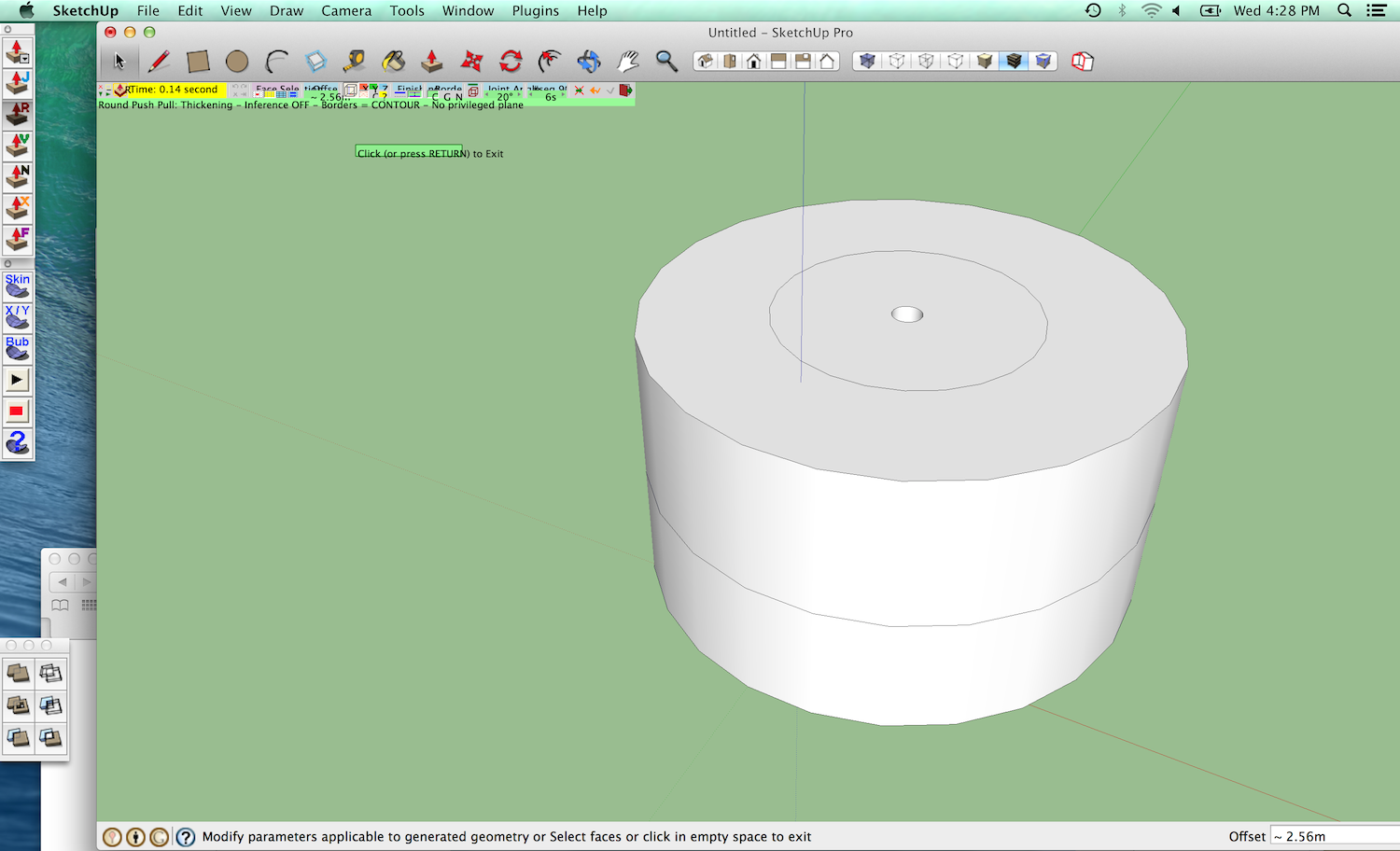

          Screen Shot 2013-10-30 at 4.28.21 PM.png

          1 條回覆 最後回覆 回覆 引用 0
          • fredo6F 離線
            fredo6
            最後由 編輯

            There are know problem about drawing texts on Mac with Retina.

            Curiously, many users have the font too small, but you seem to have it too big.

            So there must be a parameter to adjust the size of texts drawn (in OpenGL).

            Fredo

            1 條回覆 最後回覆 回覆 引用 0
            • D 離線
              detcharles
              最後由 編輯

              What Should I do to fix it?

              1 條回覆 最後回覆 回覆 引用 0
              • K 離線
                KevB
                最後由 編輯

                can somebody tell me where you put the shared library file ie the round corners

                Kevin

                1 條回覆 最後回覆 回覆 引用 0
                • Dave RD 離線
                  Dave R
                  最後由 編輯

                  @kevb said:

                  can somebody tell me where you put the shared library file ie the round corners

                  Kevin

                  Go to the first post of the thread and read it. It tells you where to put the files. Why don't you install the Sketchucation Plugin Store? Then you can just let it auto install your plugins.

                  Etaoin Shrdlu

                  %

                  (THERE'S NO PLACE LIKE)

                  G28 X0.0 Y0.0 Z0.0

                  M30

                  %

                  1 條回覆 最後回覆 回覆 引用 0
                  • D 離線
                    detcharles
                    最後由 編輯

                    Hello,

                    I am reposting from earlier concerning a problem with the way the text is displayed in joint push pull. I included a photo [see attached].

                    Fredo mentioned its an issue with Open GL text sizing. Does anyone know how to adjust that?

                    Thank You

                    I am running SU8 PRO on a Macbook Pro Retina, OS Maverick
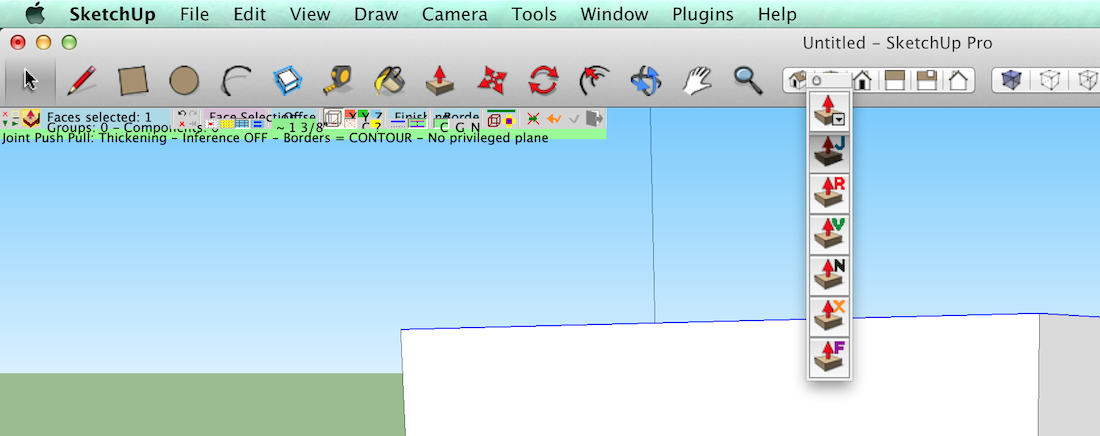

                    Screen Shot 2013-11-06 at 8.31.54 AM.png

                    1 條回覆 最後回覆 回覆 引用 0
                    • fredo6F 離線
                      fredo6
                      最後由 編輯

                      NEW RELEASE: LibFredo6 v5.4a - 07 Nov 13

                      LibFredo6 5.4a is a pivot release for future Sketchup compatibility. It is also necessary for TopoShaper 1.1 (which includes an Altitude Editor)

                      Note: I will re-release all my scripts in the coming days, hopefully based on LibFredo6 5.4

                      See main post of this thread for Download.

                      Fredo

                      1 條回覆 最後回覆 回覆 引用 0
                      • guanjinG 離線
                        guanjin
                        最後由 編輯

                        @fredo6 said:

                        NEW RELEASE: LibFredo6 v5.4a - 07 Nov 13

                        LibFredo6 5.4a is a pivot release for future Sketchup compatibility. It is also necessary for TopoShaper 1.1 (which includes an Altitude Editor)

                        Note: I will re-release all my scripts in the coming days, hopefully based on LibFredo6 5.4

                        See main post of this thread for Download.

                        Fredo

                        I installed Fredo6_% 21LibFredo6 - v5.4a, tips or display version 5.3, you need 5.4

                        guanjin

                        I come from China, is to learn

                        1 條回覆 最後回覆 回覆 引用 0
                        • OxerO 離線
                          Oxer
                          最後由 編輯

                          @guanjin said:

                          I installed Fredo6_% 21LibFredo6 - v5.4a, tips or display version 5.3, you need 5.4

                          For me the same when I run SU.

                          "The result is the end what is important is the process" by Oxer
                          http://www.oxervision.blogspot.com/

                          1 條回覆 最後回覆 回覆 引用 0
                          • fredo6F 離線
                            fredo6
                            最後由 編輯

                            NEW RELEASE: LibFredo6 v5.4b - 08 Nov 13

                            Note: LibFredo6 5.4a was an incorrect release on the forum (it was OK on Plugin Store). So please move to 5.4b for avoidance of doubt

                            LibFredo6 5.4b is a pivot release for future Sketchup compatibility. It is also necessary for TopoShaper 1.1 (which includes an Altitude Editor)

                            Note: I will re-release all my scripts in the coming days, hopefully based on LibFredo6 5.4

                            See main post of this thread for Download.

                            Fredo

                            1 條回覆 最後回覆 回覆 引用 0
                            • guanjinG 離線
                              guanjin
                              最後由 編輯

                              @fredo6 said:

                              NEW RELEASE: LibFredo6 v5.4b - 08 Nov 13

                              Note: LibFredo6 5.4a was an incorrect release on the forum (it was OK on Plugin Store). So please move to 5.4b for avoidance of doubt

                              LibFredo6 5.4b is a pivot release for future Sketchup compatibility. It is also necessary for TopoShaper 1.1 (which includes an Altitude Editor)

                              Note: I will re-release all my scripts in the coming days, hopefully based on LibFredo6 5.4

                              See main post of this thread for Download.

                              Fredo

                              Thank updates, operating normally, thank you!

                              I come from China, is to learn

                              1 條回覆 最後回覆 回覆 引用 0
                              • M 離線
                                Merdox
                                最後由 編輯

                                thaaaankss

                                1 條回覆 最後回覆 回覆 引用 0
                                • A 離線
                                  Aldob
                                  最後由 編輯

                                  Hi Fredo,
                                  Thanks for you awsome plugin. However I have difficulties install it to alternative file location using additional plugin folder. I installed latest version library and plugins from plugin store and when launch SketchUP I have messages about errors and have no plugins in sketchup after opening. The only I have BZ_toolbar with no icones on it. I'd be appreciate if you could help me to solve a problem.
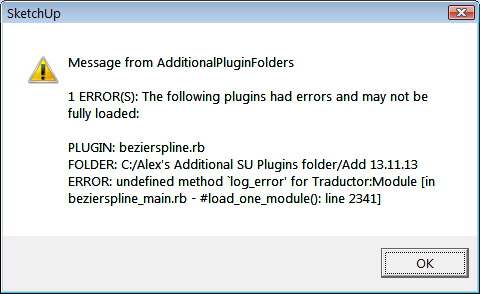

                                  error message


                                  Error Loading File C.txt

                                  1 條回覆 最後回覆 回覆 引用 0
                                  • M 離線
                                    metamachine
                                    最後由 編輯

                                    first off, a massive thank you for your hard work.
                                    I have recently upgraded to 2013 but the installation of fredocore has been less than smooth for me . I have installed it via the extension warehouse but run into this error in my ruby console|

                                    rror; #<NoMethodError; undefined method `each' for nil;NilClass>
                                    /Library/Application Support/SketchUp 2013/SketchUp/Plugins/Lib6Core.rb;191;in `get'
                                    /Library/Application Support/SketchUp 2013/SketchUp/Plugins/Lib6Core.rb;154;in `[]'
                                    /Library/Application Support/SketchUp 2013/SketchUp/Plugins/Lib6Core.rb;667;in `load_second_phase_rubies'
                                    /Library/Application Support/SketchUp 2013/SketchUp/Plugins/Lib6Plugin.rb;124;in `launch_action'
                                    /Library/Application Support/SketchUp 2013/SketchUp/Plugins/bootstrap_FredoScale.rb;381;in `launch_action_p'
                                    /Users/DJ/Library/Application Support/SketchUp 2013/SketchUp/Plugins/Fredo6_FredoScale/bootstrap_FredoScale.rb;322;in `configure'
                                    /Users/DJ/Library/Application Support/SketchUp 2013/SketchUp/Plugins/Fredo6_!LibFredo6/Lib6Plugin.rb;1111;in `call'
                                    /Users/DJ/Library/Application Support/SketchUp 2013/SketchUp/Plugins/Fredo6_!LibFredo6/Lib6Plugin.rb;1111;in `build_config_handlers'
                                    /Library/Application Support/SketchUp 2013/SketchUp/Plugins/Lib6Core.rb;191;in `call'
                                    /Library/Application Support/SketchUp 2013/SketchUp/Plugins/Lib6Core.rb;191


                                    In this instance i tried to use the box scaling but nothing happens or shows. Ive done a ton of googling but I have not seen a similar error message. I hope anyone can help me

                                    thnx,

                                    -D

                                    1 條回覆 最後回覆 回覆 引用 0
                                    • TIGT 離線
                                      TIG Moderator
                                      最後由 編輯

                                      @metamachine

                                      Please add your OS and SketchUp version to your SketchUcation User profile...
                                      And then expand their details in a post as needed...
                                      That will often help us understand your issues more readily...

                                      I guess you are on a MAC with v2013 [Make?]...

                                      Have you restarted SketchUp after the updates - some of Fredo's tools require this to complete the changes...*
                                      Have you installed the very latest versions of the Lib itself AND each of the Tools.
                                      Many have been updated to suit v2013 and so they cannot be 'copied over' from your v8 folders.
                                      All of the latest Lib and Tool files should be available at the EW... OR they are download-able as RBZ archives from the easy to use SketchUcation PluginStore page [these can then be installed from the SketchUp > Preferences > Extensions > Install... button in v8/v2013], or using SketchUcation's Plugin Store dialog from within SketchUp itself, which AutoInstalls etc...*

                                      TIG

                                      1 條回覆 最後回覆 回覆 引用 0
                                      • M 離線
                                        metamachine
                                        最後由 編輯

                                        Yea, i should have added my profile and system specs.
                                        Anyway, Im running a retina macbook pro late 2013 osx mavericks and sketchup 13. I have installed the plugins via the EW so I have no idea what is going on exactly. I have noticed this mavericks update is very picky with granting apps and software permission to write etc. to the point of claiming the software "is broken and should me moved to thrash" if it comes from a source apple does not recognise.

                                        Yesterday i died a complete reinstall of sketchup 2013 but to no avail. I guess Ill have to mess about a bit more

                                        -D

                                        1 條回覆 最後回覆 回覆 引用 0
                                        • M 離線
                                          metamachine
                                          最後由 編輯

                                          fixed!

                                          so apparently having the plugins in both user/library/sketchup/plugins and hd/library/sketchup/plugins causes a conflict and stops the extension from working. after some hours of frustration I can finally work again.

                                          thank you again
                                          -D

                                          1 條回覆 最後回覆 回覆 引用 0
                                          • Dave RD 離線
                                            Dave R
                                            最後由 編輯

                                            @metamachine said:

                                            Yea, i should have added my profile and system specs.
                                            Anyway, Im running a retina macbook pro late 2013 osx mavericks and sketchup 13. I have installed the plugins via the EW so I have no idea what is going on exactly.

                                            Please do update your profile, then.

                                            Etaoin Shrdlu

                                            %

                                            (THERE'S NO PLACE LIKE)

                                            G28 X0.0 Y0.0 Z0.0

                                            M30

                                            %

                                            1 條回覆 最後回覆 回覆 引用 0
                                            • 1
                                            • 2
                                            • 36
                                            • 37
                                            • 38
                                            • 39
                                            • 40
                                            • 109
                                            • 110
                                            • 38 / 110
                                            • 第一個貼文
                                              最後的貼文
                                            Buy SketchPlus
                                            Buy SUbD
                                            Buy WrapR
                                            Buy eBook
                                            Buy Modelur
                                            Buy Vertex Tools
                                            Buy SketchCuisine
                                            Buy FormFonts

                                            Advertisement



