[Plugin Library] LibFredo6 - v15.8e - 15 Feb 26



-
Do you have the newest versions of LibFredo and the SketchUcation toolset installed and SketchUp restarted ?
Other extensions loading seem to be having issues, so they could be causing problems with Fredo's files loading subsequently...
Have you tried disabling the other extensions named, and restarting SketchUp to see if that helps ? -
@tig said:
Do you have the newest versions of LibFredo and the SketchUcation toolset installed and SketchUp restarted ?
Other extensions loading seem to be having issues, so they could be causing problems with Fredo's files loading subsequently...
Have you tried disabling the other extensions named, and restarting SketchUp to see if that helps ?it worked, thanks
-
Bonjour,
Les plugins de Fredo6 n’affiches plus les icônes puis j'ai remarqué que ExtensionStore V.429 n’ été plus branché à internet avec mes identifiants, Cela est résolu mais c'est étonnant.Autre soucis depuis la mise à jour de FredoLib V3.5a l'utilisation de Curviloft provoque un Plantage systématique de Sketchup.
Avez vous des explications ?
Cordialement
Hello,
The Fredo6 plugins no longer display the icons then I noticed that ExtensionStore V.429 was no longer connected to the internet with my credentials, This is resolved but it's surprising.Another concern since the update of FredoLib V3.5a the use of Curviloft causes a systematic crash of Sketchup.
Do you have any explanations?
Cordially
-
NEW RELEASE: LibFredo6 v13.6a - 29 Nov 22
LibFredo6 13.6a includes:
- bug fixing for potential problems at startup
- Bug fixing about selection contextual menu (for LOTT and FredoSpline)
- support for future compatibility
It is strongly advised to upgrade to this version
Requirements: SU2017 and above
See plugin home page of LibFredo6 for Download of LibFredo6.
Main Post of the LibFredo6 thread
Fredo
-
Hello,
PayPal is forbidden in our country, Turkey. How can I buy these plugins with another payment method?
Thank you.
-
@bilinmez said:
PayPal is forbidden in our country, Turkey.
See https://sketchucation.com/forums/viewtopic.php?f=323&t=75165
-
If we now have to PAY for the extensions could we at least get Automatic Updates to the Extensions so I Do Not have to keep logging in and updating Lib Fredo manually every time I turn around !!!!!
-
@rhelton said:
If we now have to PAY for the extensions could we at least get Automatic Updates to the Extensions so I Do Not have to keep logging in and updating Lib Fredo manually every time I turn around !!!!!

You turn around once every ~2 weeks?
-
Hi,
Thanks for the update of LibFredo6- v13.6a, but I got a problem with the update, or maybe because of my new laptop -> macbook 16" M1 2021.
I use a Sketchup Pro 2019 licence.
Sketchup 2019 + Uptodate Libfredo plugins are installed on my old macbook pro 2010 Intel i7 and my new macbook 2021 M1 both.
Only my old macbook is able to launch Libfredo plugins
In my new macbook : Libfredo window is not showing, and plugin button are not clickable.
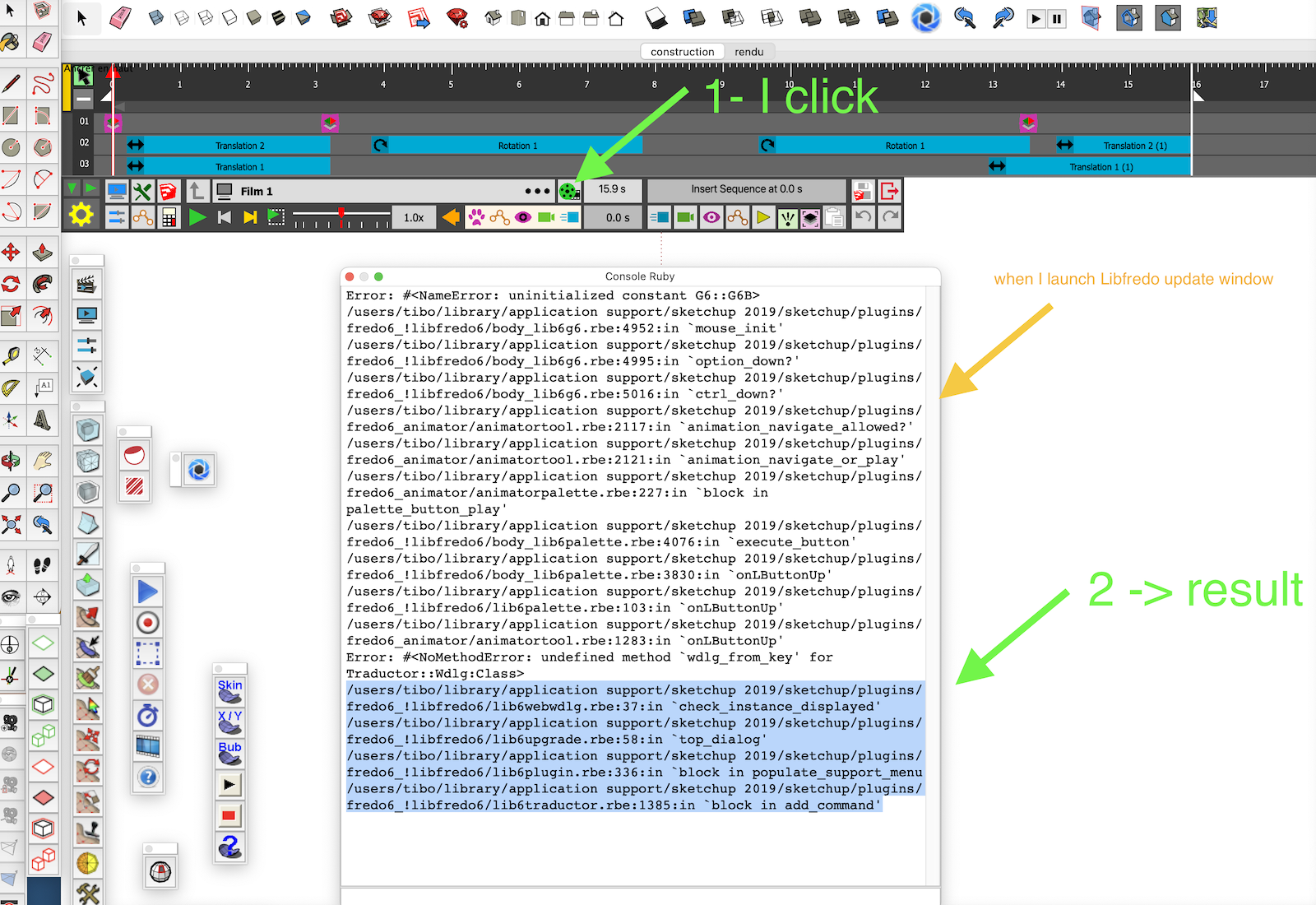
[attachment=0:1g7i275x]<!-- ia0 -->Capture d’écran 2023-01-09 à 10.57.25.png<!-- ia0 -->[/attachment:1g7i275x]
I really like LibFredo Plugin (animator, round corner, push pull...). Do you think that a futur update will resolve the problem ?Ruby console (when I launch Libfredo window) on M1 macbook :
Error: #<NameError: uninitialized constant G6::G6B>
/users/tibo/library/application support/sketchup 2019/sketchup/plugins/fredo6_!libfredo6/body_lib6g6.rbe:4952:inmouse_init' /users/tibo/library/application support/sketchup 2019/sketchup/plugins/fredo6_!libfredo6/body_lib6g6.rbe:4995:inoption_down?'
/users/tibo/library/application support/sketchup 2019/sketchup/plugins/fredo6_!libfredo6/body_lib6g6.rbe:5016:inctrl_down?' /users/tibo/library/application support/sketchup 2019/sketchup/plugins/fredo6_animator/animatortool.rbe:2117:inanimation_navigate_allowed?'
/users/tibo/library/application support/sketchup 2019/sketchup/plugins/fredo6_animator/animatortool.rbe:2121:inanimation_navigate_or_play' /users/tibo/library/application support/sketchup 2019/sketchup/plugins/fredo6_animator/animatorpalette.rbe:227:inblock in palette_button_play'
/users/tibo/library/application support/sketchup 2019/sketchup/plugins/fredo6_!libfredo6/body_lib6palette.rbe:4076:inexecute_button' /users/tibo/library/application support/sketchup 2019/sketchup/plugins/fredo6_!libfredo6/body_lib6palette.rbe:3830:inonLButtonUp'
/users/tibo/library/application support/sketchup 2019/sketchup/plugins/fredo6_!libfredo6/lib6palette.rbe:103:inonLButtonUp' /users/tibo/library/application support/sketchup 2019/sketchup/plugins/fredo6_animator/animatortool.rbe:1283:inonLButtonUp'
Error: #<NoMethodError: undefined method `wdlg_from_key' for Traductor::Wdlg:Class>Thanks for your answer !
Tibo
-
@tibooobit said:
I use a Sketchup Pro 2019 licence.
Sketchup 2019 + Uptodate Libfredo plugins are installed on my old macbook pro 2010 Intel i7 and my new macbook 2021 M1 both.Do you have the current version of the Sketchucation Tool installed?
Keep in mind that SketchUp 2019 will never be updated to support the newer Mac OS or M1. It seems like many users of older versions of SketchUp are reporting problems.
BTW, your profile indicates you are still using SketchUp 2013 Make. Please update your profile.
-
@tibooobit said:
Sketchup 2019 + Uptodate Libfredo plugins are installed on my old macbook pro 2010 Intel i7 and my new macbook 2021 M1 both.
Only my old macbook is able to launch Libfredo plugins
In my new macbook : Libfredo window is not showing, and plugin button are not clickable.LibFredo6 normally supports Mac M1.
The problem you have is that the binary part of LibFredo6 does not load correctly.What I would suggest is that you delete the LibFredo6 folder from the Plugins directory, reboot your Mac, reinstall LibFredo6 v13.6a (a restart of Sketchup afterward).
Fredo
-
Thanks for your answer.
Sketchucation tool : nice, I didn't know the plugin.
I installed it, but no better result
I installed last sketchup pro trying version on the M1 mac : Lifredo plugins work.
But I would like to keep my perpetual licence of sketchup pro 2019 (= the last perpetual licence version !). I am not interested in paying every year the same price of my SKP 2019 perpetual licence...I will delete Libfredo6 folder and reinstall the plugin as suggest.
Other, I update my profil, thanks.
-
I delete all my plugin in the plugin folder.
I reinstall Lifredo6, restart computer, relaunch SKP...
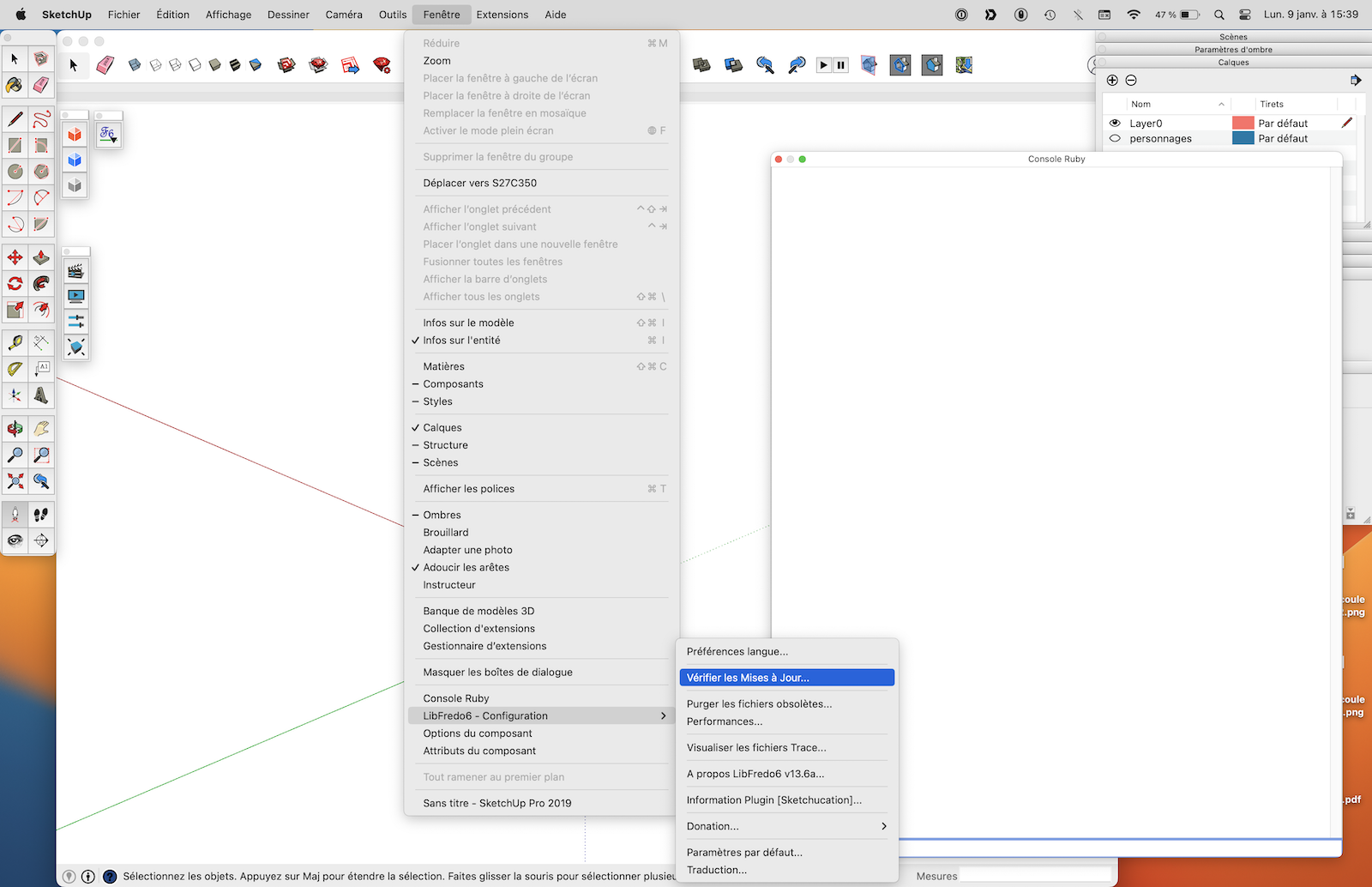
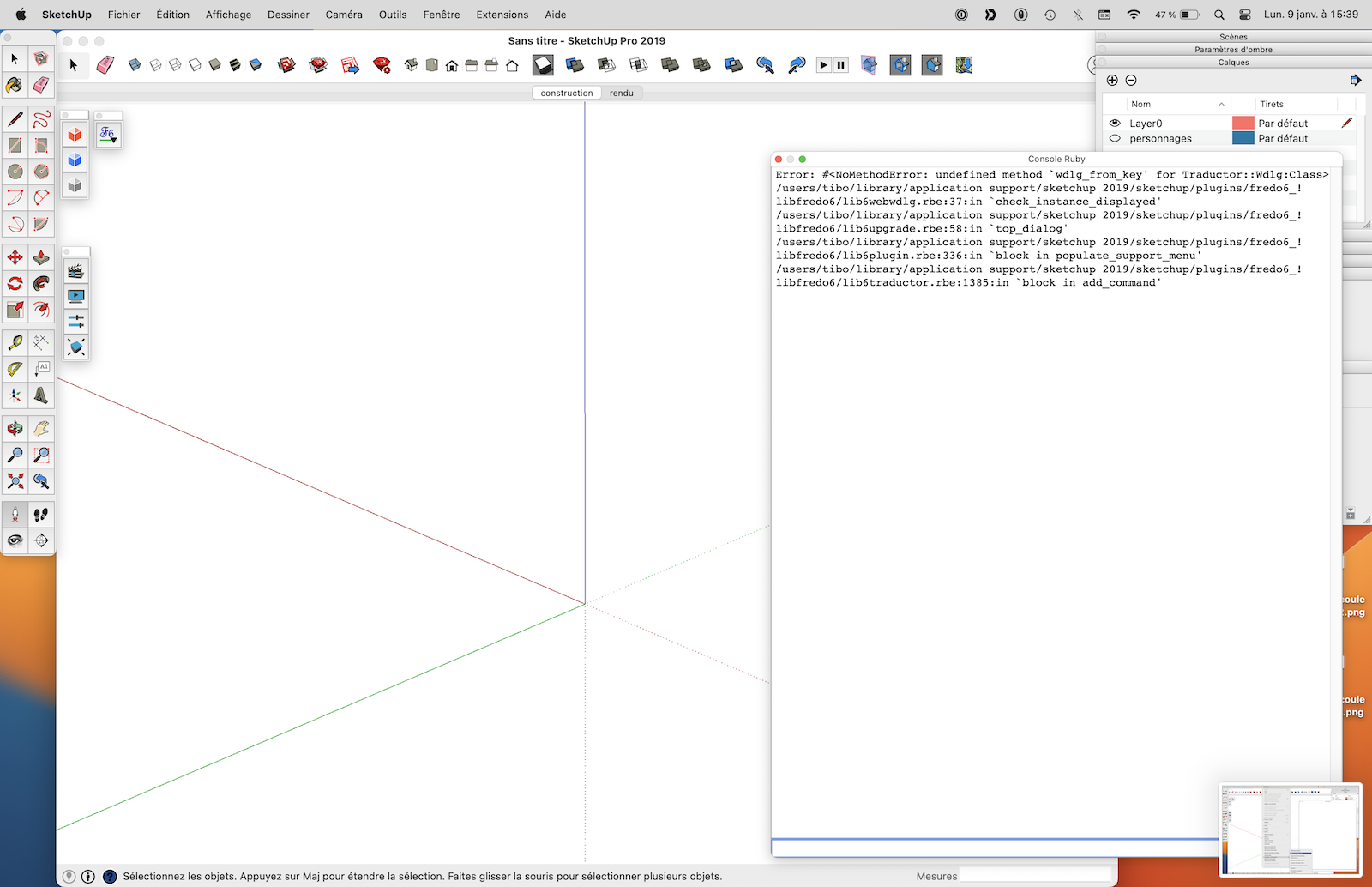
But the bug is still here (images in attachment): when I click on "Libfredo6 - configuration" -> look for update, nothing appened (error ruby).
-
@tibooobit said:
Sketchucation tool : nice, I didn't know the plugin.
It is a requirement for many of Fredo's extensions. You should be using it to install extensions from Sketchucation.
@tibooobit said:
I installed last sketchup pro trying version on the M1 mac : Lifredo plugins work.
But I would like to keep my perpetual licence of sketchup pro 2019 (= the last perpetual licence version !). I am not interested in paying every year the same price of my SKP 2019 perpetual licence...Understood. You just have to accept that the Mac OS and hardware are evolving out from under SketchUp 2019. The kinds of reports that we're seeing regarding older versions of SketchUp with newer Mac operating systems and hardware makes it evident that at some point you can expect older applications to at least become very unreliable. Eventually web-based features like the 3D Warehouse and Geo-Location services will stop supporting SketchUp 2019, as well.
You can continue to use SU 2019 but if it's part of your business, you should be aware of the implications so you aren't caught short later on.
@tibooobit said:
Other, I update my profil, thanks.
Thank you. With that information being correct and complete it makes it easier for us to help you. BTW, could you add the Mac OS version number?
-
I looked at my code and the explanation is actually very simple
Mac M1 is only supported for extensions for SU2021 and above, for which Trimble has published a binary library of Ruby for Mac M1 (Ruby 2.7).
Therefore my plugins (and probably others using binary code) do NOT work on SU2019.
Fredo
-
@fredo6 said:
Mac M1 is only supported for extensions for SU2021 and above, for which Trimble has published a binary library of Ruby for Mac M1 (Ruby 2.7).
This is good information to know. Thank you.
@tibooobit, this is further confirmation of what I had already described wherein the Mac hardware and OS have evolved beyond what SU2019 supports.
-
NEW RELEASE: LibFredo6 v13.7a - 18 Jan 23
LibFredo6 13.7a includes:
- Support for FredoSketch v1.1a
- Bug fixing
- Support for future compatibility
It is strongly advised to upgrade to this version
Requirements: SU2017 and above
See plugin home page of LibFredo6 for Download of LibFredo6.
Main Post of the LibFredo6 thread
Fredo
-
Hi Fredo6,
I updated Libfredo6 yesterday because of your new FredoSketch extension. First tried with window-Libfredo settings-check for fredo6 plugin updates and was surprised that it said that everything was up to date. Libfredo6 version was 13.6..
When checking with the sketchucation tool it said there was an update for Libfredo6.
Just wanted to give you a heads up..
Thanks for all your work and fantastic extensions!
Herman. -
@hairman said:
Hi Fredo6,
I updated Libfredo6 yesterday because of your new FredoSketch extension. First tried with window-Libfredo settings-check for fredo6 plugin updates and was surprised that it said that everything was up to date. Libfredo6 version was 13.6..
The mechanism for the CheckForUpdate is slightly different current. It relies on me setting the information on the server. So, there may a slight delay.
-
NEW RELEASE: LibFredo6 v13.7b - 20 Jan 23
LibFredo6 13.7b includes:
- Fix for FredoScale Radial Bend (wrong base direction of protractor)
It is strongly advised to upgrade to this version
Requirements: SU2017 and above
See plugin home page of LibFredo6 for Download of LibFredo6.
Main Post of the LibFredo6 thread
Fredo







Advertisement