sketchucation logo sketchucation
    • 登入
    Oops, your profile's looking a bit empty! To help us tailor your experience, please fill in key details like your SketchUp version, skill level, operating system, and more. Update and save your info on your profile page today!
    🔌 Smart Spline | Fluid way to handle splines for furniture design and complex structures. Download

    [Plugin Library] LibFredo6 - v15.8e - 15 Feb 26


    已排程 已置頂 已鎖定 已移動 Plugins
    2.2k 貼文 573 Posters 4.2m 瀏覽 575 Watching
    正在載入更多貼文
    • 從舊到新
    • 從新到舊
    • 最多點贊
    回覆
    • 在新貼文中回覆
    登入後回覆
    此主題已被刪除。只有擁有主題管理權限的使用者可以查看。
    • M 離線
      manoamo
      最後由 編輯

      Thank you so much for your kind help! Much appreciated!!

      ENV["LOCALAPPDATA"].encoding.inspect
      #Encoding:CP949

      This is what I got !

      1 條回覆 最後回覆 回覆 引用 0
      • fredo6F 離線
        fredo6
        最後由 編輯

        @manoamo said:

        ENV["LOCALAPPDATA"].encoding.inspect
        #Encoding:CP949

        This is what I got !

        Could you now execute the following commands in the Ruby console, one after the other

        a = ENV["LOCALAPPDATA"].dup.force_encoding("UTF-8")

        a.encoding.inspect

        Thanks

        1 條回覆 最後回覆 回覆 引用 0
        • M 離線
          manoamo
          最後由 編輯

          Thank you so much for your kind help!

          ENV["LOCALAPPDATA"].encoding.inspect

          #Encoding:CP949
          a = ENV["LOCALAPPDATA"].dup.force_encoding("UTF-8")
          C:\Users\￈ᆱ﾿↓ᄎ￳\AppData\Local
          a.encoding.inspect
          #Encoding:UTF-8

          This is what I got

          1 條回覆 最後回覆 回覆 引用 0
          • fredo6F 離線
            fredo6
            最後由 編輯

            @manoamo said:

            Thank you so much for your kind help!

            ENV["LOCALAPPDATA"].encoding.inspect

            #Encoding:CP949
            a = ENV["LOCALAPPDATA"].dup.force_encoding("UTF-8")
            C:\Users\￈ᆱ﾿↓ᄎ￳\AppData\Local
            a.encoding.inspect
            #Encoding:UTF-8

            This is what I got

            Then, can you try the following commands

            a = ENV["LOCALAPPDATA"].dup.force_encoding("UTF-8").gsub(/\\/, "/")

            a = ENV["LOCALAPPDATA"].dup.force_encoding("UTF-8").gsub("\\", "/")

            and then this command

            LibFredo6.get_dir_from_ENV "LOCALAPPDATA"

            1 條回覆 最後回覆 回覆 引用 0
            • fredo6F 離線
              fredo6
              最後由 編輯

              NEW RELEASE: LibFredo6 v11.4d - 27 Nov 20

              LibFredo6 11.4d fixes two issues for Animator (VRay5 rendering of apparation and rotation with variable speed)


              Requirements: SU2017 and above

              See plugin home page of LibFredo6 for Download of LibFredo6.

              Main Post of the LibFredo6 thread

              Fredo

              1 條回覆 最後回覆 回覆 引用 0
              • M 離線
                manoamo
                最後由 編輯

                ENV["LOCALAPPDATA"].encoding.inspect
                #Encoding:CP949
                a = ENV["LOCALAPPDATA"].dup.force_encoding("UTF-8")
                C:\Users\￈ᆱ﾿↓ᄎ￳\AppData\Local
                a.encoding.inspect
                #Encoding:UTF-8
                a = ENV["LOCALAPPDATA"].dup.force_encoding("UTF-8").gsub(/\/, "/")

                Error: #<ArgumentError: invalid byte sequence in UTF-8>
                <main>:in gsub' <main>:in <main>'
                SketchUp:1:in `eval'

                a = ENV["LOCALAPPDATA"].dup.force_encoding("UTF-8").gsub("\", "/")
                C:/Users/￈ᆱ﾿↓ᄎ￳/AppData/Local
                LibFredo6.get_dir_from_ENV "LOCALAPPDATA"
                Error: #<NameError: uninitialized constant LibFredo6>
                <main>:in <main>' SketchUp:1:in eval'

                I followed every step that you told me!
                but still same errors occur 😢

                1 條回覆 最後回覆 回覆 引用 0
                • fredo6F 離線
                  fredo6
                  最後由 編輯

                  @manoamo

                  Thank you. Very useful.

                  I think this is a bug in the core ruby engine.

                  I'll see what I can do in order to overcome the problem.

                  Fredo

                  1 條回覆 最後回覆 回覆 引用 0
                  • fredo6F 離線
                    fredo6
                    最後由 編輯

                    @manoamo

                    Could you try

                    ENV["LOCALAPPDATA"].dup.encode("UTF-8").gsub(/\\/, "/")

                    Thanks

                    Fredo

                    1 條回覆 最後回覆 回覆 引用 0
                    • M 離線
                      manoamo
                      最後由 編輯

                      I tried the last typing but I failed again
                      I typed the codes in this sequence

                      1. ENV["LOCALAPPDATA"].encoding.inspect
                      2. a = ENV["LOCALAPPDATA"].dup.force_encoding("UTF-8")
                      3. a.encoding.inspect
                      1. a = ENV["LOCALAPPDATA"].dup.force_encoding("UTF-8").gsub(/\/, "/")
                      2. a = ENV["LOCALAPPDATA"].dup.force_encoding("UTF-8").gsub("\", "/")
                      3. ENV["LOCALAPPDATA"].dup.encode("UTF-8").gsub(/\/, "/")
                      1. LibFredo6.get_dir_from_ENV "LOCALAPPDATA"

                      Thanks

                      1 條回覆 最後回覆 回覆 引用 0
                      • fredo6F 離線
                        fredo6
                        最後由 編輯

                        @manoamo

                        Could you tell me what is the erroryou get with this statement

                        ENV["LOCALAPPDATA"].dup.encode("UTF-8").gsub(/\\/, "/")

                        1 條回覆 最後回覆 回覆 引用 0
                        • M 離線
                          manoamo
                          最後由 編輯

                          This is my ruby console

                          ENV["LOCALAPPDATA"].encoding.inspect
                          #Encoding:CP949
                          a = ENV["LOCALAPPDATA"].dup.force_encoding("UTF-8")

                          C:\Users\￈ᆱ﾿↓ᄎ￳\AppData\Local
                          a.encoding.inspect

                          #Encoding:UTF-8
                          ENV["LOCALAPPDATA"].dup.encode("UTF-8").gsub(/\/, "/")
                          C:/Users/■ルヘ↓レᄚ→ᄍネ/AppData/Local
                          LibFredo6.get_dir_from_ENV "LOCALAPPDATA"
                          Error: #<ArgumentError: invalid byte sequence in UTF-8>
                          c:/users/홍우빈/appdata/roaming/sketchup/sketchup 2020/sketchup/plugins/fredo6_!libfredo6/top_libfredo6.rbe:45:in gsub' c:/users/홍우빈/appdata/roaming/sketchup/sketchup 2020/sketchup/plugins/fredo6_!libfredo6/top_libfredo6.rbe:45:in get_dir_from_ENV'
                          <main>:in <main>' SketchUp:1:in eval'


                          This is what I get after restart

                          Error Loading File Fredo6_!LibFredo6.rb
                          Error: #<ArgumentError: invalid byte sequence in UTF-8>
                          c:/users/홍우빈/appdata/roaming/sketchup/sketchup 2020/sketchup/plugins/fredo6_!libfredo6/top_libfredo6.rbe:45:in gsub' c:/users/홍우빈/appdata/roaming/sketchup/sketchup 2020/sketchup/plugins/fredo6_!libfredo6/top_libfredo6.rbe:45:in get_dir_from_ENV'
                          c:/users/홍우빈/appdata/roaming/sketchup/sketchup 2020/sketchup/plugins/fredo6_!libfredo6/top_libfredo6.rbe:425:in su_appdata' c:/users/홍우빈/appdata/roaming/sketchup/sketchup 2020/sketchup/plugins/fredo6_!libfredo6/top_libfredo6.rbe:443:in dir_appdata'
                          c:/users/홍우빈/appdata/roaming/sketchup/sketchup 2020/sketchup/plugins/fredo6_!libfredo6/top_libfredo6.rbe:206:in startup' C:/Users/홍우빈/AppData/Roaming/SketchUp/SketchUp 2020/SketchUp/Plugins/Fredo6_!LibFredo6.rb:62:in process'
                          C:/Users/홍우빈/AppData/Roaming/SketchUp/SketchUp 2020/SketchUp/Plugins/Fredo6_!LibFredo6.rb:69:in <module:LibFredo6_Loader>' C:/Users/홍우빈/AppData/Roaming/SketchUp/SketchUp 2020/SketchUp/Plugins/Fredo6_!LibFredo6.rb:30:in <top (required)>'

                          1 條回覆 最後回覆 回覆 引用 0
                          • fredo6F 離線
                            fredo6
                            最後由 編輯

                            Ok. Thanks I think we progress.

                            Can you try this statement (only this one)

                            File.directory? ENV["LOCALAPPDATA"].dup.encode("UTF-8").gsub(/\\/, "/")

                            if there is an error, can you try this one

                            File.directory? ENV["LOCALAPPDATA"].dup.encode("UTF-8").gsub("\\", "/")

                            Many thanks

                            Fredo

                            1 條回覆 最後回覆 回覆 引用 0
                            • M 離線
                              manoamo
                              最後由 編輯

                              Good to hear!

                              These are what I got back

                              First,

                              File.directory? ENV["LOCALAPPDATA"].dup.encode("UTF-8").gsub(/\/, "/")

                              true

                              Second,

                              File.directory? ENV["LOCALAPPDATA"].dup.encode("UTF-8").gsub("\", "/")
                              true

                              1 條回覆 最後回覆 回覆 引用 0
                              • fredo6F 離線
                                fredo6
                                最後由 編輯

                                OK. Thanks.

                                I will publish a fix and it should hopefully work for you.

                                Fredo

                                1 條回覆 最後回覆 回覆 引用 0
                                • M 離線
                                  manoamo
                                  最後由 編輯

                                  Thank you so much for your kind help 😢

                                  1 條回覆 最後回覆 回覆 引用 0
                                  • fredo6F 離線
                                    fredo6
                                    最後由 編輯

                                    NEW RELEASE: LibFredo6 v11.4f - 02 Dec 20

                                    LibFredo6 11.4d provides fixes

                                    • for handling some cases of non-ascii Windows username
                                    • for a bug in some tools (MoveAlong and a few others)

                                    Requirements: SU2017 and above

                                    See plugin home page of LibFredo6 for Download of LibFredo6.

                                    Main Post of the LibFredo6 thread

                                    Fredo

                                    1 條回覆 最後回覆 回覆 引用 0
                                    • 1 離線
                                      1409 douglas
                                      最後由 編輯

                                      I have your latest version as of 02 december 2020 of libFredo6. I have SketchupPRO 2021.
                                      I believe I have followed your instructions to load libFredo6 and Curvizard v2.4b.
                                      There is libFredo6 under Window, but no Curvizard under Extensions. I have restarted (several times).
                                      Any Ideas?
                                      Thank you
                                      rj

                                      1 條回覆 最後回覆 回覆 引用 0
                                      • Dave RD 離線
                                        Dave R
                                        最後由 編輯

                                        @1409 douglas said:

                                        but no Curvizard under Extensions. I have restarted (several times).

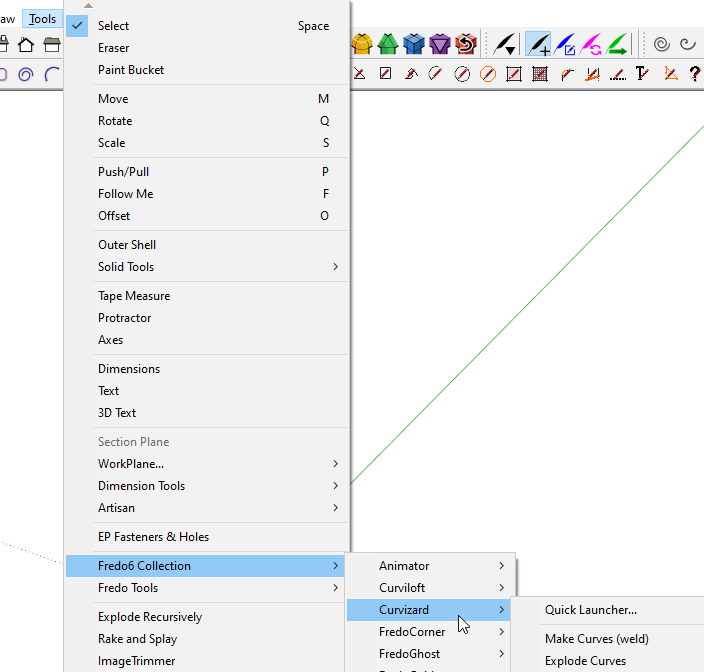
                                        No matter how many times you restart SketchUp, Curvizard isn't supposed to show up under Extensions. It shows up in Tools>Fredo6 Collection. Or you can turn on its toolbar button under View>Toolbars.
                                        Screenshot - 12_29_2020 , 1_35_32 PM.png

                                        Screenshot - 12_29_2020 , 1_38_35 PM.png

                                        Etaoin Shrdlu

                                        %

                                        (THERE'S NO PLACE LIKE)

                                        G28 X0.0 Y0.0 Z0.0

                                        M30

                                        %

                                        1 條回覆 最後回覆 回覆 引用 0
                                        • A 離線
                                          Aiden900
                                          最後由 編輯

                                          Hello fredo, Hope you're fine, I have tried everything in order to make the fredo tools work and it still not workingm the tool bare's aren't even showing up. I even uninstalled and installed sketchup 2019 pro, installed the extensions several times but still no fix, could you or someone please help me out.

                                          Kind regards
                                          A.F

                                          1 條回覆 最後回覆 回覆 引用 0
                                          • TIGT 離線
                                            TIG Moderator
                                            最後由 編輯

                                            @Aiden900

                                            A few things to consider...

                                            Did you install SketchUp correctly ?
                                            You can repair it and avoid a full re-installation...
                                            While you are logged into Windows as your normal user account, ensure SketchUp is closed.
                                            Find the v2019 installer exe file - usually in your Downloads folder ?
                                            Select its icon, right-click > context-menu > "Run as administrator"
                                            When prompted choose "Repair"...
                                            After it completes restart SketchUp and retest...

                                            I assume you are installing from the RBZ using the Extension Manager > Install... button ??

                                            Fredo's extensions [almost all] need his latest LibFredo RBZ installing - available separately from the PluginStrore.
                                            Have you downloaded and installed that too ?
                                            On its own a Lib does nothing - but it adds vital support for his other extensions...
                                            So have you downloaded and installed the latest Fredo Tools from the PluginStore ?

                                            Are you aware where the Fredo Tools menu is ? [i.e. under Tools]
                                            The FredoTools toolbar button might need activating in your View > Toolbars... dialog's list ?

                                            When clicked that toolbar button opens a second dialog listing many of Fredo's tools - click on the name of one of them and it launches...
                                            Are the two expected Fredo entries listed in the Extension Manager dialog ?
                                            Are they activated in the listing ?

                                            TIG

                                            1 條回覆 最後回覆 回覆 引用 0
                                            • 1
                                            • 2
                                            • 8
                                            • 9
                                            • 10
                                            • 11
                                            • 12
                                            • 109
                                            • 110
                                            • 10 / 110
                                            • 第一個貼文
                                              最後的貼文
                                            Buy SketchPlus
                                            Buy SUbD
                                            Buy WrapR
                                            Buy eBook
                                            Buy Modelur
                                            Buy Vertex Tools
                                            Buy SketchCuisine
                                            Buy FormFonts

                                            Advertisement