sketchucation logo sketchucation
    • 登入
    Oops, your profile's looking a bit empty! To help us tailor your experience, please fill in key details like your SketchUp version, skill level, operating system, and more. Update and save your info on your profile page today!
    🔌 Smart Spline | Fluid way to handle splines for furniture design and complex structures. Download

    [Plugin Library] LibFredo6 - v15.8e - 15 Feb 26


    已排程 已置頂 已鎖定 已移動 Plugins
    2.2k 貼文 573 Posters 4.2m 瀏覽 575 Watching
    正在載入更多貼文
    • 從舊到新
    • 從新到舊
    • 最多點贊
    回覆
    • 在新貼文中回覆
    登入後回覆
    此主題已被刪除。只有擁有主題管理權限的使用者可以查看。
    • C 離線
      cgarchitekt
      最後由 編輯

      To all dear FreoTools users,

      I've a problem with FredoTools or LibFredo (i can't determine exactly what is causing the problem) because in my Sketchup 2018 installation the Fredo tools are not running. I get the Fredotools Icon in the program but when I click on it to select a tool only a window opens with the Javascript that comes with the LibFredo6.
      The computer is only equipped with onboard Intel UHD 630 graphics, but the Sketchup 2018 version runs well and stable.

      Can any of you out there tell me what the problem is or is it really the Intel UHD 630 graphics?

      Thanks in advance for you appreciated help.
      Horst
      cgArchitekt

      1 條回覆 最後回覆 回覆 引用 0
      • Dave RD 離線
        Dave R
        最後由 編輯

        What version of SketchUp are you actually using? Your profile says you are using 2018 Free/Make which does not exist.

        If you are using SketchUp 2018 Pro, did you install it correctly by right clicking on the downloaded installer and selecting Run as administrator?

        Etaoin Shrdlu

        %

        (THERE'S NO PLACE LIKE)

        G28 X0.0 Y0.0 Z0.0

        M30

        %

        1 條回覆 最後回覆 回覆 引用 0
        • fredo6F 離線
          fredo6
          最後由 編輯

          @cgarchitekt said:

          I've a problem with FredoTools or LibFredo (i can't determine exactly what is causing the problem) because in my Sketchup 2018 installation the Fredo tools are not running. I get the Fredotools Icon in the program but when I click on it to select a tool only a window opens with the Javascript that comes with the LibFredo6.

          @cgarchitekt

          Could you confirm you have installed the latest versions of LibFredo6 and FredoTools.

          Could you also post or send me a screenshot of the "Javascript".

          Fredo

          1 條回覆 最後回覆 回覆 引用 0
          • C 離線
            cgarchitekt
            最後由 編輯

            @dave r said:

            What version of SketchUp are you actually using? Your profile says you are using 2018 Free/Make which does not exist.

            If you are using SketchUp 2018 Pro, did you install it correctly by right clicking on the downloaded installer and selecting Run as administrator?

            Thanks for your answer.

            I installed everything with the Extension Manager inside of the program. And it is shown correctly in the installed plugins. I've got no error message during installation process.

            1 條回覆 最後回覆 回覆 引用 0
            • Dave RD 離線
              Dave R
              最後由 編輯

              That doesn't answer the question about having installed SketchUp correctly. If you didn't install it correctly you could have issues such as you describe. It also doesn't answer the question about which version of SketchUp you are actually using.

              Etaoin Shrdlu

              %

              (THERE'S NO PLACE LIKE)

              G28 X0.0 Y0.0 Z0.0

              M30

              %

              1 條回覆 最後回覆 回覆 引用 0
              • C 離線
                cgarchitekt
                最後由 編輯

                @dave r said:

                That doesn't answer the question about having installed SketchUp correctly. If you didn't install it correctly you could have issues such as you describe. It also doesn't answer the question about which version of SketchUp you are actually using.

                everything is fine. Installed it completely new as administrator. Seems this was the problem.Thought an installation is not possible if you are not logged in as administrator. Apparently I was wrong.

                Thank you all for your appreciated help to solve my problem.
                Regards
                cgArchitekt

                1 條回覆 最後回覆 回覆 引用 0
                • Dave RD 離線
                  Dave R
                  最後由 編輯

                  Happy that fixed it. FWIW, you should be logged into Windows as your normal user but when you install programs, right click on the installer and choose Run as administrator. That is actually different from being the system admin anyway. If you don't use the Run as administrator option, Windows security features prevent some needed program stuff from being installed correctly and this results in various strange behaviors. Some of those behaviors don't become obvious right away.

                  Etaoin Shrdlu

                  %

                  (THERE'S NO PLACE LIKE)

                  G28 X0.0 Y0.0 Z0.0

                  M30

                  %

                  1 條回覆 最後回覆 回覆 引用 0
                  • TIGT 離線
                    TIG Moderator
                    最後由 編輯

                    As DaveR says [beat me to the post!]
                    SketchUp should always be installed on PC thus:

                    For a new installation...
                    Log into Windows as your normal user-account [whether or not this has admin=powers is irrelevant]/
                    Find the installer's exe file - usually in your Downloads folder...
                    Select that installer's exe file.
                    Right-click > Context-menu > "Run as administrator"
                    When prompted choose to "Install"...
                    Permissions etc are set up properly.

                    If it's already installed...
                    Close SketchUp.
                    Run as above
                    When prompted choose "Repair"...
                    Permissions etc are set up properly.

                    Never 'Run' an installer's exe file by double-clicking it - even if that user has admin powers it is not the same.
                    Running SketchUp as 'the admin' [i.e. NOT a normal user (who might also have some admin-powers)] will result in SketchUp behaving oddly - e.g. drag-n-drop will not work because SketchUp is operating at an elevated permissions level compared to Windows-Explorer...

                    TIG

                    1 條回覆 最後回覆 回覆 引用 0
                    • fredo6F 離線
                      fredo6
                      最後由 編輯

                      NEW RELEASE: LibFredo6 v10.7a - 12 Jun 20

                      LibFredo6 10.7a is a maintenance release, with bug fixing, adjustments for Mac (dialogs) and better support of imperail units in VCB


                      Requirements: SU2017 and above

                      See plugin home page of LibFredo6 for Download of LibFredo6.

                      Main Post of the LibFredo6 thread

                      Fredo

                      1 條回覆 最後回覆 回覆 引用 0
                      • V 離線
                        vmddelrosario
                        最後由 編輯

                        Tried installing libfredo6 v10.7a to no avail.. extension manager says the plugin is unsigned and sketchup keeps saying C:\Users"user_name"\AppData\Roaming\SketchUp\SketchUp 2017\SketchUp\Plugins\Fredo6_!LibFredo6 is missing after I restart the software and even when the said directory actually exists.

                        1 條回覆 最後回覆 回覆 引用 0
                        • W 離線
                          William_Wang
                          最後由 編輯

                          @fredo6 said:

                          I actually forgot about the feature '/', and its dual '*'.

                          I found the problem, and it will go into LibFredo6 v10.4c.

                          Thanks for signaling.

                          Fredo

                          Intall LibFredo6 v10.7a but plugins not running

                          1 條回覆 最後回覆 回覆 引用 0
                          • fredo6F 離線
                            fredo6
                            最後由 編輯

                            @vmddelrosario said:

                            Tried installing libfredo6 v10.7a to no avail.. extension manager says the plugin is unsigned and sketchup keeps saying C:\Users"user_name"\AppData\Roaming\SketchUp\SketchUp 2017\SketchUp\Plugins\Fredo6_!LibFredo6 is missing after I restart the software and even when the said directory actually exists.

                            Is it the first time you install LibFredo6?

                            If so, this may be related to the installation of Sketchup, which you must do with "Run as Administrator".

                            1 條回覆 最後回覆 回覆 引用 0
                            • fredo6F 離線
                              fredo6
                              最後由 編輯

                              @william_wang said:

                              Intall LibFredo6 v10.7a but plugins not running

                              Do you have a menu entry Window > LibFredo6 settings...?

                              1 條回覆 最後回覆 回覆 引用 0
                              • Gus RG 離線
                                Gus R
                                最後由 編輯

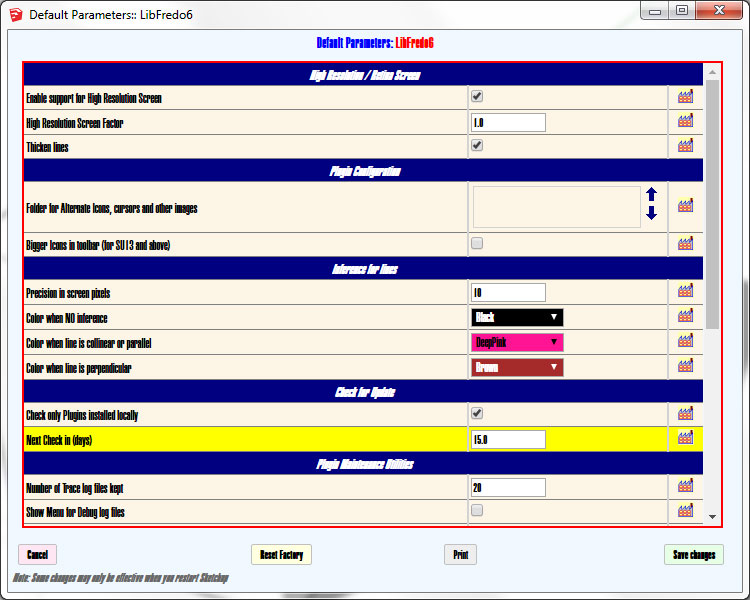
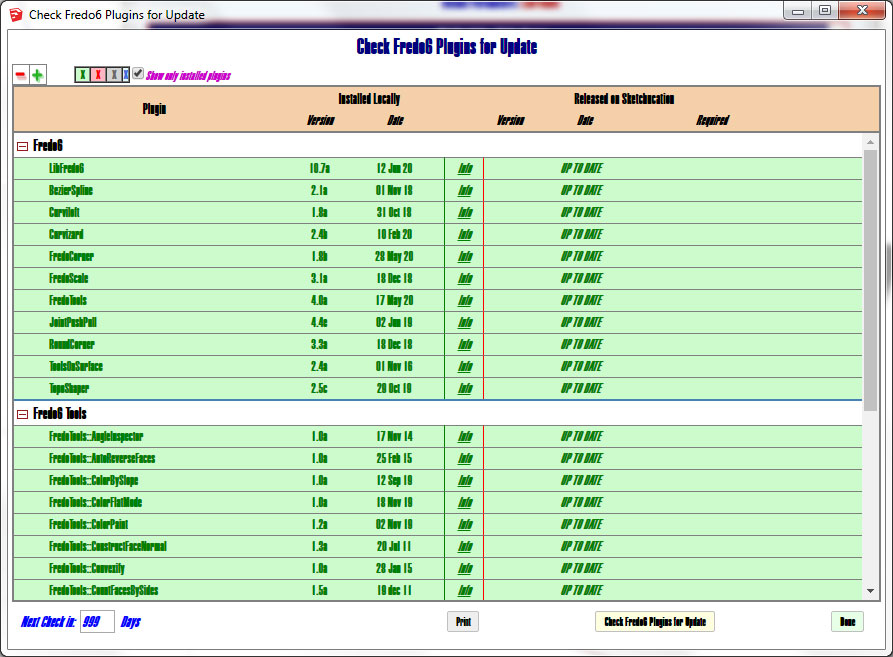
                                Not a critical issue but is there any way to tweak the font sizes for the interface windows? Seems like I was able to do that using standard Windows zoom keyboard commands. Here's some examples. Hard to read.
                                LF1.jpg


                                LF2.jpg

                                www.instagram.com/gusrobatto/

                                www.facebook.com/gusrobatto

                                www.flickr.com/photos/gusrobatto

                                1 條回覆 最後回覆 回覆 引用 0
                                • fredo6F 離線
                                  fredo6
                                  最後由 編輯

                                  @GusR

                                  Strange. It seems you don't have some fonts installed and default to Arial Narrow Black.

                                  Did this happen with v10.7a only ?

                                  What do you get for dialog boxes used by other plugins than mine?

                                  1 條回覆 最後回覆 回覆 引用 0
                                  • Gus RG 離線
                                    Gus R
                                    最後由 編輯

                                    @fredo6 said:

                                    @GusR

                                    Strange. It seems you don't have some fonts installed and default to Arial Narrow Black.

                                    Did this happen with v10.7a only ?

                                    What do you get for dialog boxes used by other plugins than mine?

                                    I have Arial Narrow. It's Windows 7 Pro if that matters. Was fine before v10.7a.

                                    Other dialog boxes are fine.

                                    www.instagram.com/gusrobatto/

                                    www.facebook.com/gusrobatto

                                    www.flickr.com/photos/gusrobatto

                                    1 條回覆 最後回覆 回覆 引用 0
                                    • fredo6F 離線
                                      fredo6
                                      最後由 編輯

                                      Best would be Tahoma or Helvetica.

                                      With Windows 7, there may be many problems. This one is related to the change I made for some dialog boxes (like Check Plugins for Update) to rely on the recent API (HtmlDialog), because the old one (WebDialog) is being deprecated.

                                      So, there is little I can do with this.

                                      Fredo

                                      1 條回覆 最後回覆 回覆 引用 0
                                      • OxerO 離線
                                        Oxer
                                        最後由 編輯

                                        Hi Fredo,
                                        I installed LibFredo 10.7a on SU2017 & macOS 10.13.6 and when I try to 'Check Fredo6 Plugins for Update', SketchUp crash.
                                        The rest of functions work fine and the Tools too.

                                        "The result is the end what is important is the process" by Oxer
                                        http://www.oxervision.blogspot.com/

                                        1 條回覆 最後回覆 回覆 引用 0
                                        • fredo6F 離線
                                          fredo6
                                          最後由 編輯

                                          @oxer said:

                                          Hi Fredo,
                                          I installed LibFredo 10.7a on SU2017 & macOS 10.13.6 and when I try to 'Check Fredo6 Plugins for Update', SketchUp crash.
                                          The rest of functions work fine and the Tools too.

                                          Thanks for advising. Actually I get it on Catalina too. I will investigate.

                                          I converted some of the LibFredo6 dialogs to HtmlDialog (instead of WebDialog), which is the 'new' framework for web dialogs since SU2017 (and recommended). There are plenty of problems and this could be one more.

                                          1 條回覆 最後回覆 回覆 引用 0
                                          • OxerO 離線
                                            Oxer
                                            最後由 編輯

                                            Ok, thanks for the info.

                                            "The result is the end what is important is the process" by Oxer
                                            http://www.oxervision.blogspot.com/

                                            1 條回覆 最後回覆 回覆 引用 0
                                            • 1
                                            • 2
                                            • 83
                                            • 84
                                            • 85
                                            • 86
                                            • 87
                                            • 109
                                            • 110
                                            • 85 / 110
                                            • 第一個貼文
                                              最後的貼文
                                            Buy SketchPlus
                                            Buy SUbD
                                            Buy WrapR
                                            Buy eBook
                                            Buy Modelur
                                            Buy Vertex Tools
                                            Buy SketchCuisine
                                            Buy FormFonts

                                            Advertisement





