[Plugin Library] LibFredo6 - v15.8e - 15 Feb 26



-
That's what TIG was telling you.
To make RoundCorner work, you need to install the Library LibFredo6, which apparently you did not.
See this post for how to install LibFredo6>
Note that LibFredo6 is common to most of my plugins, and therefore you need to install it (and update it) once.
Fredo
-
Hi everyone : thank you Fredo for your great tools. I have tried to install them some time ago and watched Fredo's video a few times. I get plenty of error messages on start-up like
Error Loading File C:/Users/AppData/Roaming/SketchUp/SketchUp 2017/SketchUp/Plugins/Fredo6_!LibFredo6/top_LibFredo6.rbe
Failed to read RBE/RBS file.
Error Loading File Fredo6_!LibFredo6.rb
Error: #<NameError: uninitialized constant LibFredo6_Loader::LibFredo6>
C:/Users//AppData/Roaming/SketchUp/SketchUp 2017/SketchUp/Plugins/Fredo6_!LibFredo6.rb:63:inprocess' C:/Users//AppData/Roaming/SketchUp/SketchUp 2017/SketchUp/Plugins/Fredo6_!LibFredo6.rb:70:inmodule:LibFredo6_Loader'
C:/Users//AppData/Roaming/SketchUp/SketchUp 2017/SketchUp/Plugins/Fredo6_!LibFredo6.rb:28:in `<top (required)>
In his video, Fredo opens a menu called extensions under Preferences. This does not exist in my version of Sketchup Make 2017. I see that Fredo 6 Lib Tools are installed and enabled in the extensions manager, but they dont show up as menu. What am I doing wrong ? Thanks for any help - Marc -
In v2017 the 'Extensions Manager' is now accessed from the SketchUp 'Window' menu - this is now common between PC and MAC.
That resultant dialog has a red button which is used to install extensions [much as previously]...Let's assume you messed you when attempting an unnecessary manual installation...
Try again...
Remember that most of Fredo's tools also need his 'LibFredo' installing [first].If errors persist you might have previously failed to install SketchUp correctly.
The only proper way to install SketchUp is to close it if its already running, then find its installer's exe file [probably in your downloads folder ?], select its icon, right-click > context-menu > "Run as administrator"
If SketchUp is already installed, when prompted choose 'Repair'...
If it's actually a fresh installation, then accept that option...SketchUp should now be properly installed...
-
NEW RELEASE: LibFredo6 v7.7a - 09 Jul 17
LibFredo6 7.7a is a major release dedicated to the support of high-resolution and Retina screens and Retina.
Basically, the button palettes, progressions bars, the text font, the line thickness and the dimension of some visual marks are grown by the factor of resolution.
- Sketchup < 2016: Font size cannot be changed and characters may thus still appear small. you have also to set up manually the scale factor
- Sketchup 2016: you have to set up manually the scale factor (usually 2), because it cannot be detected by the API.
- Sketchup >= 2017: the configuration is activated automatically. Still, you can manually disable the option.
The settings are in the LibFredo6 Default Parameters:
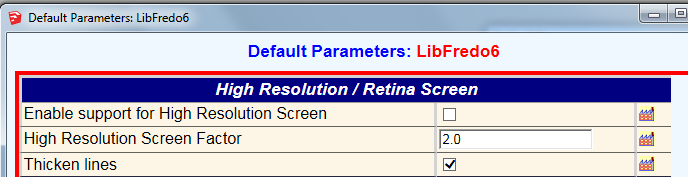
Because most of plugins uses LibFredo6, the support of hi-res screens should apply to all my plugins. However, there may be changes required in each individual plugin, which will be rolled out progressively.
IMPORTANT:
- HoverSelectis NOT supported for hi-res screens
- Animatormust be upgraded to v1.7a or above
Please report all issues and suggestions in this dedicated thread on the Sketchucation forum
See plugin home page of LibFredo6 for Download of LibFredo6.
Fredo
-
Almost 300000 downloads... Blockbuster! Is it only last version or cumulative?
-
Frodo,
I am using sketchup pro 2016, and I dont find extension manager menu in my windows bar. Can you guide me how to get it?
-
@ajiprihastono said:
Frodo,
I am using sketchup pro 2016, and I dont find extension manager menu in my windows bar. Can you guide me how to get it?
Look in Preferences>Extensions for Install Extension. Best to install the Sketchucation Extension Store from Resources at the top of the page and use it to install LibFredo6 and other extensions.
-
Good day Fredo, I'm VERY new to SketchUp so please bear with me. I have watched the video wrt installing plug-ins/extensions and am happy that I'm doing it correctly. When I start SketchUp I get this error message for both v7.6 and 7.7:
Error Loading File Fredo6_!LibFredo6.rb
Error: #<NameError: uninitialized constant LibFredo6_Loader::LibFredo6>
C:/Users/Main/AppData/Roaming/SketchUp/SketchUp 2016/SketchUp/Plugins/Fredo6_!LibFredo6.rb:63:inprocess' C:/Users/Main/AppData/Roaming/SketchUp/SketchUp 2016/SketchUp/Plugins/Fredo6_!LibFredo6.rb:70:inmodule:LibFredo6_Loader'
C:/Users/Main/AppData/Roaming/SketchUp/SketchUp 2016/SketchUp/Plugins/Fredo6_!LibFredo6.rb:28:in `<top (required)>'
"Aidez moi s'il vous plait"
Kind Regards,
Joe J -
Joe,
Looks like you have a wrong installation.
Could you please show the footprint (i.e. files and folders) in your Sketchup Plugin directories, that is:
C:/Users/Main/AppData/Roaming/SketchUp/SketchUp 2016/SketchUp/PluginsThanks
Fredo
-
NEW RELEASE: LibFredo6 v7.7c - 16 Aug 17
LibFredo6 7.7c is a minor release dedicated to
- some adjustments for high-resolution and Retina screens and Retina.
- The support of VRay in Animator.
See plugin home page of LibFredo6 for Download of LibFredo6.
Main Post of the LibFredo6 thread
Fredo
-
-
How to uninstall Libfredo6 and round corner? pls...
-
@thantunoo said:
How to uninstall Libfredo6 and round corner? pls...
In the Sketchup PluginDirectory, you should have 2 folders and 2 ruby files; just remove them!
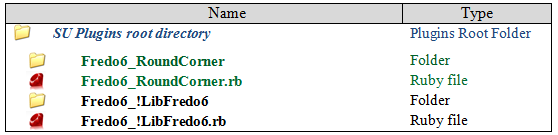
You have two other methods, in case this is just for deactivation:
- In the Sketchup Extension Manager, just uncheck LibFredo6 and RoundCorner
- The Sketchucation Extension Store plugin also allows to disable / enable plugin.
Fredo
-
NEW RELEASE: LibFredo6 v7.7d - 13 Sep 17
LibFredo6 7.7d is a maintenance release fixing bugs, in particular one that may affect Animator and some FredoTools plugins (DrawAlong, MoveAlong among others)
See plugin home page of LibFredo6 for Download of LibFredo6.
Main Post of the LibFredo6 thread
Fredo
-
NEW RELEASE: LibFredo6 v7.7e - 19 Sep 17
LibFredo6 7.7e is a maintenance release fixing bugs, in particular one that may affect Animator and some FredoTools plugins (DrawAlong, MoveAlong among others). V7.7e also correct a bug that was introduced in v7.7d affecting TopoShaper.
See plugin home page of LibFredo6 for Download of LibFredo6.
Main Post of the LibFredo6 thread
Fredo
-
Bonjour,
Quand je fais de tout petits modèle (des composant électroniques), l'outil arrondi me fait des trous aux angles. Par exemple si je dessine une brique de 8 x 14 x 10 mm et que je fais des arrondis de 0,3 mm ça me fait des trous dans tous les coins.
J'ai mis sur le modèle une précision à 4 chiffres après la virgule, et 2 pour les angles et j'ai démarré avec le modèle "Documentation de construction en mm" Sous la dernière version de sketchup make (17.2.2555 64 bit).
Merci
Frank -
@fks4466 said:
Bonjour,
Quand je fais de tout petits modèle (des composant électroniques), l'outil arrondi me fait des trous aux angles. Par exemple si je dessine une brique de 8 x 14 x 10 mm et que je fais des arrondis de 0,3 mm ça me fait des trous dans tous les coins.
J'ai mis sur le modèle une précision à 4 chiffres après la virgule, et 2 pour les angles et j'ai démarré avec le modèle "Documentation de construction en mm" Sous la dernière version de sketchup make (17.2.2555 64 bit).
Merci
FrankWith these very small dimensions, Sketchup is not always able to create faces.
So the trick is to scale up the model by a factor like 10, perform the RoundCorner rounding and then scale back down.
Fredo
-
NEW RELEASE: LibFredo6 v7.7f - 01 Oct 17
LibFredo6 7.7f is a maintenance release for OSX High Sierra. With previous versions you get dialog boxes popping up at startup time of Sketchup.
Note that you also need to upgrade FredoTools v3.1e; previous versions simply won't load under High Sierra.
See plugin home page of LibFredo6 for Download of LibFredo6.
Main Post of the LibFredo6 thread
Fredo
-
just downloaded libfredo6 in sketchup pro 2017, but cannot see any of the icons from the toolbar
-
@tchiddick said:
just downloaded libfredo6 in sketchup pro 2017, but cannot see any of the icons from the toolbar
LibFredo doesn't have a toolbar so you wouldn't see any icons. LibFredo is a collection of helper files used with a number of Fredo's other extensions.






Advertisement