[Plugin Library] LibFredo6 - v15.8e - 15 Feb 26



-
I'm not sure if LibFredo6 v7.2d and FredoTools were aimed at just @topbobster or not, but I tried them anyway, reasoning that I could revert to my older versions if required. I'm not sure what's been changed in v7.2d, but I can confirm that it installs and functions for me on (Win8, 64 Bit, SU8Free). A few messages popped up from Curviloft/RoundCorner/FredoScale, but once those plugins were updated to their latest versions, the plugins all worked fine, no error messages popping up. The auto-update functionality still means an error message pops up saying that a script has failed (has been that way for me since v4.7a, so this is probably just me). Not a huge issue, reinstalling manually worked fine. Just an interesting quirk. I've yet to test on Win10.
Regardless, thanks for the quick updates, so glad it's working now. Whatever black magic was used, was definitely worth it.

-
@fredo6 said:
There is a weird problem for versions < SU2014, in relation with the loading of encrypted files (.rbs).
I think I found a fix, and will republish soon.In the meantime, if you have time to install the two new versions attached (my other plugins should be OK).
[attachment=1:19c6une5]<!-- ia1 -->Fredo6_!LibFredo6 - v7.2d - 31 Oct 16 - certified - encrypted.rbz<!-- ia1 -->[/attachment:19c6une5][attachment=0:19c6une5]<!-- ia0 -->Fredo6_FredoTools - v3.0b - 31 Oct 16 - certified - encrypted.rbz<!-- ia0 -->[/attachment:19c6une5]
Thanks
Fredo
Thanks for the help Fredo but I still get the 'You must load >=v6.9' message after installing 7.2d, and no plugins are available. I deleted all files/folder relating to your plugins. I am ignoring v8 now (this was a imsunderstanding by me previously - no plugins were ever used in this old version). Plugins are installed to 'C:\Users\User\AppData\Roaming\SketchUp\SketchUp 2016\SketchUp\Plugins'
I also get the code error (I include again, I have not checked if different from before, but it might be pertinent):
Error Loading File C:/Users/User/AppData/Roaming/SketchUp/SketchUp 2016/SketchUp/Plugins/Fredo6_!LibFredo6/top_LibFredo6.rbe
Failed to read RBE/RBS file.
Error Loading File Fredo6_!LibFredo6.rb
Error: #<NameError: uninitialized constant LibFredo6_Loader::LibFredo6>
C:/Users/User/AppData/Roaming/SketchUp/SketchUp 2016/SketchUp/Plugins/Fredo6_!LibFredo6.rb:61:inprocess' C:/Users/User/AppData/Roaming/SketchUp/SketchUp 2016/SketchUp/Plugins/Fredo6_!LibFredo6.rb:68:inmodule:LibFredo6_Loader'
C:/Users/User/AppData/Roaming/SketchUp/SketchUp 2016/SketchUp/Plugins/Fredo6_!LibFredo6.rb:28:in<top (required)>' Error Loading File Fredo6_FredoTools.rb Error: #<TypeError: can't convert nil into an exact number> C:/Users/User/AppData/Roaming/SketchUp/SketchUp 2016/SketchUp/Plugins/Fredo6_!LibFredo6.rb:77:in-'
C:/Users/User/AppData/Roaming/SketchUp/SketchUp 2016/SketchUp/Plugins/Fredo6_!LibFredo6.rb:77:in<top (required)>' C:/Program Files/SketchUp/SketchUp 2016/Tools/RubyStdLib/rubygems/core_ext/kernel_require.rb:45:inrequire'
C:/Program Files/SketchUp/SketchUp 2016/Tools/RubyStdLib/rubygems/core_ext/kernel_require.rb:45:inrequire' C:/Users/User/AppData/Roaming/SketchUp/SketchUp 2016/SketchUp/Plugins/Fredo6_FredoTools.rb:25:in<top (required)>' -
@dave r said:
@topbobster, I expect you copied an old version of LibFredo6 from your ancient SU8 Plugins folder to the SU2016 Plugins folder when you "installed it manually" and at least some of those old files are still resident in the Plugins folder. Go to that folder and delete anything and everything related to LibFredo6. Then reinstall it using the ExtensionStore.
Did you copy Round Corner, too? If so, delete it and reinstall it fresh.
It's unwise to copy plugins from an old SketchUp version to a new one. Changes to the Ruby code are common and installing old versions creates problems.
Hello Dave, thanks for your help but the whole Sketchup8 part was a misunderstanding by me. Whilst trawling the forums for help I saw references to both Google Sketchup8 and '2016' got muself in a bit of a twist, thinking I had not had a version 8, so installed into both they were all new installs to both rather than old files so please ignore that part. Fredo did reply with a 7.2d download but still no luck so have replied to Fredo regarding that. Appreciate your interest. Rob
-
NEW RELEASE: LibFredo6 v7.2d - 31 Oct 16
LibFredo6 7.2d fixes a major bug preventing its loading for SU versions < 2014. So if you run SU6, SU7, SU8 or SU2013, it is mandatory to upgrade to v7.2d.
See main post of this thread for Download of LibFredo6.
Fredo
-
@treadshot A1 (only)
Could you try this version[file deleted]
Fredo
-
There is a weird problem for versions < SU2014, in relation with the loading of encrypted files (.rbs).
I think I found a fix, and will republish soon.[version now published as v7.2d]
In the meantime, if you have time to install the two new versions attached (my other plugins should be OK).
Thanks
Fredo
-
@topbobster said:
Hello Dave, thanks for your help but the whole Sketchup8 part was a misunderstanding by me. Whilst trawling the forums for help I saw references to both Google Sketchup8 and '2016' got muself in a bit of a twist, thinking I had not had a version 8, so installed into both they were all new installs to both rather than old files so please ignore that part. Fredo did reply with a 7.2d download but still no luck so have replied to Fredo regarding that. Appreciate your interest. Rob
From the trace you showed in a previous post, it seems you get a problem loading the top RBE file ("Failed to read RBE/RBS file."), which is something strange, because it is related to the un-scrambling (on which I have no control), not to the Ruby loading. In SU2016, this should not happen (v7.2d was for Sketchup versions < 2014).
In the Ruby console, could you type the following one-line command:
Sketchup.require "C:/Users/**User**/AppData/Roaming/SketchUp/SketchUp 2016/SketchUp/Plugins/Fredo6_!LibFredo6/top_LibFredo6.rbe"Note: do not forget to replace <
**User**> by your actual username.This will try to load the top RBE file. So We can see if you get the message "Failed to read RBE/RBS file.".
Also, it would help if you could tell me which Windows version you run, and if in 32 or 64 bits.
Thanks
Fredo
-
@fredo6 said:
@topbobster said:
Hello Dave, thanks for your help but the whole Sketchup8 part was a misunderstanding by me. Whilst trawling the forums for help I saw references to both Google Sketchup8 and '2016' got muself in a bit of a twist, thinking I had not had a version 8, so installed into both they were all new installs to both rather than old files so please ignore that part. Fredo did reply with a 7.2d download but still no luck so have replied to Fredo regarding that. Appreciate your interest. Rob
From the trace you showed in a previous post, it seems you get a problem loading the top RBE file ("Failed to read RBE/RBS file."), which is something strange, because it is related to the un-scrambling (on which I have no control), not to the Ruby loading. In SU2016, this should not happen (v7.2d was for Sketchup versions < 2014).
In the Ruby console, could you type the following one-line command:
Sketchup.require "C:/Users/**User**/AppData/Roaming/SketchUp/SketchUp 2016/SketchUp/Plugins/Fredo6_!LibFredo6/top_LibFredo6.rbe"Note: do not forget to replace <
**User**> by your actual username.This will try to load the top RBE file. So We can see if you get the message "Failed to read RBE/RBS file.".
Also, it would help if you could tell me which Windows version you run, and if in 32 or 64 bits.
Thanks
Fredo
Hello Fredo, I did as you asked, in the Ruby console, and got the following message back:
Sketchup.require "C:/Users/User/AppData/Roaming/SketchUp/SketchUp 2016/SketchUp/Plugins/Fredo6_!LibFredo6/top_LibFredo6.rbe"
File load error (C:/Users/User/AppData/Roaming/SketchUp/SketchUp 2016/SketchUp/Plugins/Fredo6_!LibFredo6/top_LibFredo6.rbe): Failed to read RBE/RBS file.
falseMy user name is 'user'. Windows 7, 64 bit.
Thanks for your help. Rob
-
I suggest you re-install LibFredo6 after cleanup.
This is strange that you cannot read the RBEFredo
-
What version of SU2016 are you using? Do you have the latest update? There was a bug in the original version that caused some loading errors for some users: https://help.sketchup.com/en/article/141303
-
@fredo6 said:
I suggest you re-install LibFredo6 after cleanup.
This is strange that you cannot read the RBEFredo
Hello Fredo, Can you please confirm if 'clean up' means more than deleting the files/folders from 'plugins' folder because I have done this and re-installed approx 7 times now. thanks. Rob
-
@thomthom said:
What version of SU2016 are you using? Do you have the latest update? There was a bug in the original version that caused some loading errors for some users: https://help.sketchup.com/en/article/141303
Thanks Thom but I only purchased recently and have 16.1.1449 64bit
Rob -
@topbobster said:
@fredo6 said:
I suggest you re-install LibFredo6 after cleanup.
This is strange that you cannot read the RBEFredo
Hello Fredo, Can you please confirm if 'clean up' means more than deleting the files/folders from 'plugins' folder because I have done this and re-installed approx 7 times now. thanks. Rob
Rob,
Cleanup means remove both the top file Fredo6_!LibFredo6.rb and folder Fredo6_!LibFredo6.
Can you verify that the file top_LibFredo6.rbe is 16.6 KB.The issue you have is very strange because many users have downloaded v7.2d and I guess installed it with no problem.
Fredo
-
@fredo6 said:
@topbobster said:
@fredo6 said:
I suggest you re-install LibFredo6 after cleanup.
This is strange that you cannot read the RBEFredo
Hello Fredo, Can you please confirm if 'clean up' means more than deleting the files/folders from 'plugins' folder because I have done this and re-installed approx 7 times now. thanks. Rob
Rob,
Cleanup means remove both the top file Fredo6_!LibFredo6.rb and folder Fredo6_!LibFredo6.
Can you verify that the file top_LibFredo6.rbe is 16.6 KB.The issue you have is very strange because many users have downloaded v7.2d and I guess installed it with no problem.
Fredo
Hello Fredo, Once again I deleted all LibFredo files and folders and re-installed, same error. The size of top_LibFredo6.rbe is 16.9 KB (17,398 bytes).
Rob
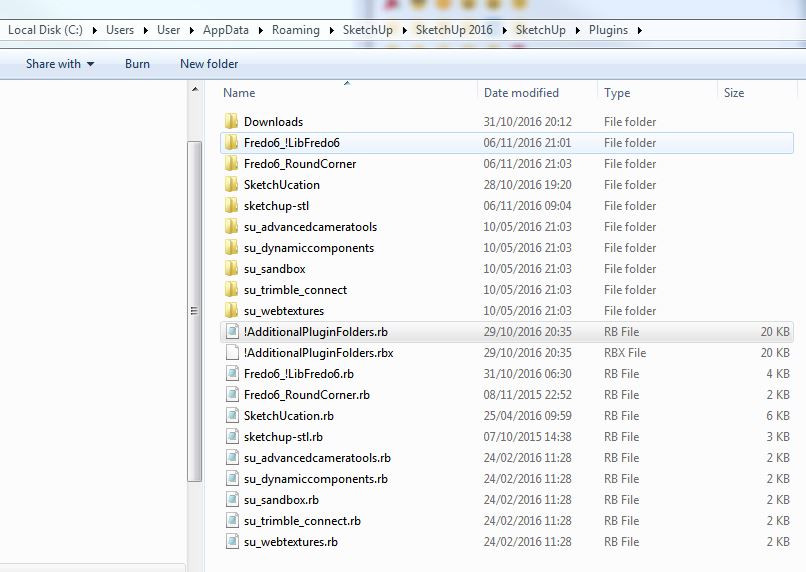
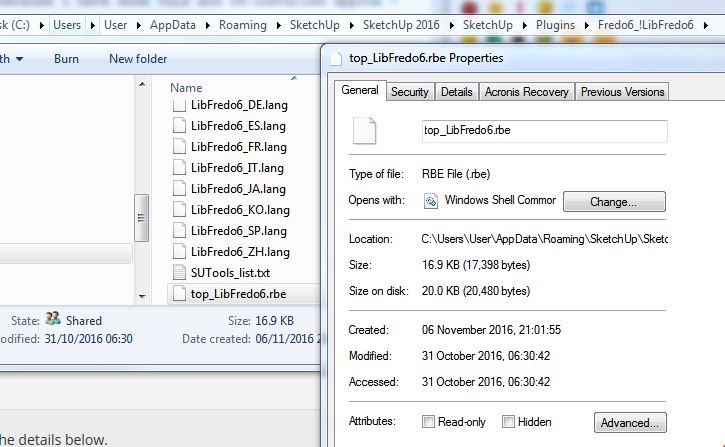
-
Rob,
Something strange.
You have AdditionalPluginFolders.rb, but not the subfolder.
Is it an old version.
Anyway, this is not a correct installation.
If you don't use the AdditionalPluginFolders features, then I suggest you delete the file.Fredo
-
Also the
.RBXversion of that particular file [which seems to be missing its subfolder] is an 'uninstalled' file [i.e. processed using the SketchUcation Toolset's Uninstaller], so something is adrift here, because that should have replaced the original.RBone when processed...PS:
@Fredo
Should there be aLibTraductor.rbfile in the Plugins folder ? -
@tig said:
@Fredo
Should there be aLibTraductor.rbfile in the Plugins folder ?NO, LibTraductor.rb is no longer used and should be removed, though LibFredo6 arrange to ignore it if present.
Fredo
-
@tig said:
Also the
.RBXversion of that particular file [which seems to be missing its subfolder] is an 'uninstalled' file [i.e. processed using the SketchUcation Toolset's Uninstaller], so something is adrift here, because that should have replaced the original.RBone when processed...PS:
@Fredo
Should there be aLibTraductor.rbfile in the Plugins folder ?Hello Tig, all files/folders have been deleted each time I have re-installed. Does deleteing them have a different impact to uninstalling?
Regards, Rob -
@fredo6 said:
Rob,
Something strange.
You have AdditionalPluginFolders.rb, but not the subfolder.
Is it an old version.
Anyway, this is not a correct installation.
If you don't use the AdditionalPluginFolders features, then I suggest you delete the file.Fredo
Hello Fredo, I tried again. Here's my start point:
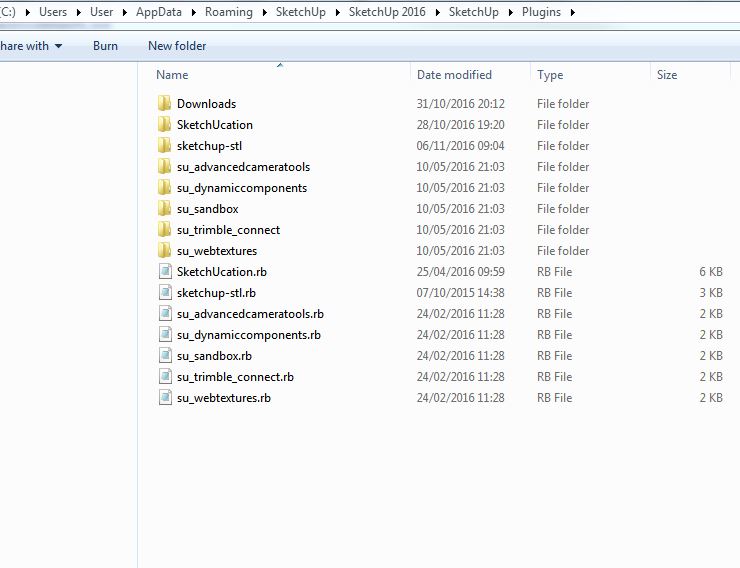
Then I installed '7.2d' and restarted and got the following message:
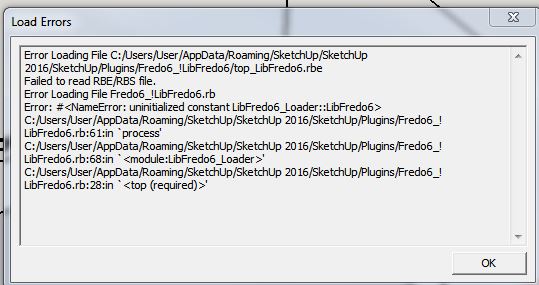
and checked the plugins folder:
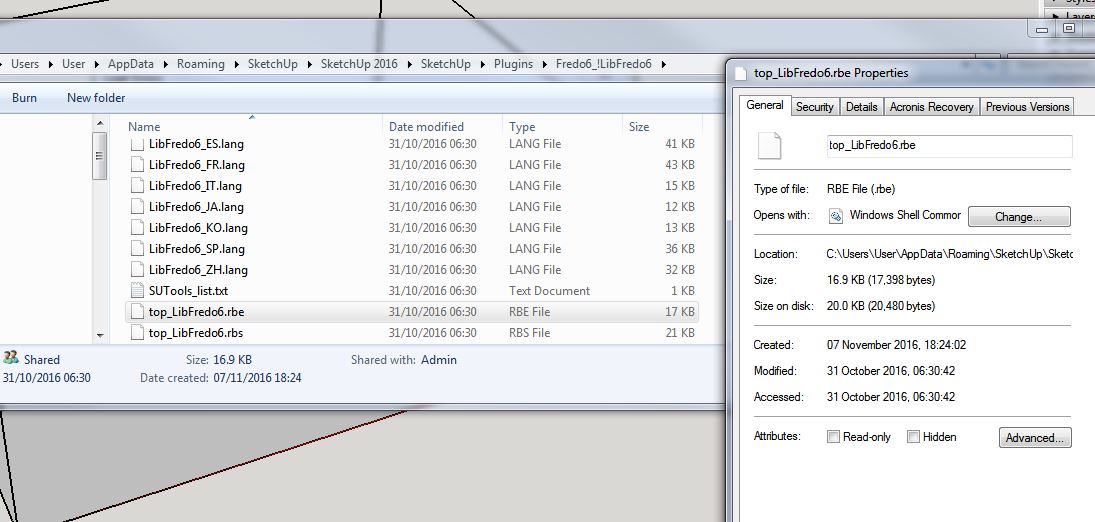
I also tried un-installing as TIG mentioned and found the .rbx files. Deleted them and re-installed gain, same error.
Regards, Rob
-
Rob,
I don't know what you can do more. This looks clean, but for whatever reason, the rbe file cannot be read.
So, teh only next steps now are:
- If you can, install Sketchup 2015. in SU2015, this will be the rbs file which will be read
- re-install SU2016 from the original source on Sketchup.com.
Fredo





Advertisement