sketchucation logo sketchucation
    • 登入
    Oops, your profile's looking a bit empty! To help us tailor your experience, please fill in key details like your SketchUp version, skill level, operating system, and more. Update and save your info on your profile page today!
    🔌 Smart Spline | Fluid way to handle splines for furniture design and complex structures. Download

    [Plugin Library] LibFredo6 - v15.8e - 15 Feb 26


    已排程 已置頂 已鎖定 已移動 Plugins
    2.2k 貼文 573 Posters 4.2m 瀏覽 575 Watching
    正在載入更多貼文
    • 從舊到新
    • 從新到舊
    • 最多點贊
    回覆
    • 在新貼文中回覆
    登入後回覆
    此主題已被刪除。只有擁有主題管理權限的使用者可以查看。
    • T 離線
      teulerguimaraes
      最後由 編輯

      I use SU2014. Install automatic from SketchupUcation plugin. Help please.

      http://i59.tinypic.com/2z74y02.jpg

      1 條回覆 最後回覆 回覆 引用 0
      • E 離線
        eozel
        最後由 編輯

        It gives me same msg, LibFredo6:Folder Libfredo6 not found in directory....

        I install it, folders (Fredo6_!LibFredo6.rb and Fredo6_!LibFredo6 directory) are seen in plugging directory.(C:\Users****\AppData\Roaming\SketchUp\SketchUp 2014\SketchUp\Plugins)

        1 條回覆 最後回覆 回覆 引用 0
        • fredo6F 離線
          fredo6
          最後由 編輯

          Might be related to the username if it includes non-ascii characters.
          This is a known problem with SU, which I hope will be fixed.

          Fredo

          1 條回覆 最後回覆 回覆 引用 0
          • E 離線
            eozel
            最後由 編輯

            It is probably bucause of username, my pc's username has a character "ö". When i try this plugin on the other pc of mine, it worrked which doesnt contains no asci character. It is difficult change 😄 username directory name.
            Thanks.

            1 條回覆 最後回覆 回覆 引用 0
            • fredo6F 離線
              fredo6
              最後由 編輯

              @eozel,

              Thanks for the feedback.

              2 questions:

              1. Are you able to run LibFredo6 alone. I mean does it load normally and do you see the menu Windows > LibFredo6 Settings

              2. Which of my plugins do you use.

              If it is RoundCorner or Curviloft, and keeping your username, could you try to substitute the following files instead
              Fredo6_!LibFredo6.rbFredo6_Curviloft.rbFredo6_RoundCorner.rb

              Fredo

              1 條回覆 最後回覆 回覆 引用 0
              • fredo6F 離線
                fredo6
                最後由 編輯

                NEW RELEASE: LibFredo6 v6.2a - 12 Oct 14

                LibFredo6 6.2a is a release mainly for EdgeInspector 1.2.

                It also fixes the issue of installation on SU14 when the username includes non-ascii characters

                See main post of this thread for Download of LibFredo6.

                Fredo

                1 條回覆 最後回覆 回覆 引用 0
                • E 離線
                  eozel
                  最後由 編輯

                  Hi, i installed libfredo 6.2a on my pc which inclued as a username "ö" chracter. Libfredo 6 settings now can be seen in window menu, but when i open skethup it gives an error msg: "you must install Libfredo 6 version 5.2 ....".

                  1 條回覆 最後回覆 回覆 引用 0
                  • fredo6F 離線
                    fredo6
                    最後由 編輯

                    @eozel,

                    I think I have also to change the top rb file for all plugins (i.e. Fredo6_xxx.rb).

                    I did it already for the new version of FredoTools (2.1a). Can you check that FredoTools does load correctly.

                    If so, then I will republish for the other plugins.

                    Thanks

                    Fredo

                    1 條回覆 最後回覆 回覆 引用 0
                    • B 離線
                      Ben Ritter
                      最後由 編輯

                      The download link does not work for me for either one of the plugins.

                      1 條回覆 最後回覆 回覆 引用 0
                      • fredo6F 離線
                        fredo6
                        最後由 編輯

                        @ben ritter said:

                        The download link does not work for me for either one of the plugins.

                        Which download link? I only publish via the SCF PLugin Store.

                        Fredo

                        1 條回覆 最後回覆 回覆 引用 0
                        • B 離線
                          Ben Ritter
                          最後由 編輯

                          @fredo6 said:

                          @ben ritter said:

                          The download link does not work for me for either one of the plugins.

                          Which download link? I only publish via the SCF PLugin Store.

                          Fredo

                          OK, thanks. I just thought the yellow "Download" button in your post downloaded the .rb files on some of your other plugins.

                          Thanks again for sharing.

                          1 條回覆 最後回覆 回覆 引用 0
                          • E 離線
                            eozel
                            最後由 編輯

                            As you said, i installed fredotools. It said that "selected extension has been succesfully installed...". When i open skecthup software again it doesnt give an error for "you must install Libfredo 6 version 5.2..." but fredotools doesnt seen anywhere (tools menu, etc.).

                            Thanks four your supports.

                            1 條回覆 最後回覆 回覆 引用 0
                            • fredo6F 離線
                              fredo6
                              最後由 編輯

                              @eozel said:

                              As you said, i installed fredotools. It said that "selected extension has been succesfully installed...". When i open skecthup software again it doesnt give an error for "you must install Libfredo 6 version 5.2..." but fredotools doesnt seen anywhere (tools menu, etc.).

                              Thanks four your supports.

                              Do you see the menu Windows > LibFredo6 Settings after installing LibFredo6 6.2a.
                              At least this shows that LibFredo6 is correctly installed

                              Maybe a snapshot of your Plugin directory would also help.

                              Fredo

                              1 條回覆 最後回覆 回覆 引用 0
                              • E 離線
                                eozel
                                最後由 編輯

                                @fredo6 said:

                                @eozel said:

                                As you said, i installed fredotools. It said that "selected extension has been succesfully installed...". When i open skecthup software again it doesnt give an error for "you must install Libfredo 6 version 5.2..." but fredotools doesnt seen anywhere (tools menu, etc.).

                                Thanks four your supports.

                                Do you see the menu Windows > LibFredo6 Settings after installing LibFredo6 6.2a.
                                At least this shows that LibFredo6 is correctly installed

                                Maybe a snapshot of your Plugin directory would also help.

                                Fredo

                                I see menu Windows > LibFredo6 Settings after installing LibFredo6 6.2a. But after i install extensions like curviloft, roundcornet, it give error msg ""you must install Libfredo 6 version 5.2..". I installed fredotools too as you said me, it doesnt give an error for "you must install Libfredo 6 version 5.2..." but fredotools doesnt seen anywhere (tools menu, etc.

                                thanks.

                                1 條回覆 最後回覆 回覆 引用 0
                                • Dave RD 離線
                                  Dave R
                                  最後由 編輯

                                  I've seen the same sort of message in the past. The solution that worked for me was to go to the Plugins folder and delete the LibFredo6 files including the folders. Then reinstall the fresh version from the Pluginstore.

                                  Evidently, some file wasn't getting overwritten when the newer version was installed over the old.

                                  Etaoin Shrdlu

                                  %

                                  (THERE'S NO PLACE LIKE)

                                  G28 X0.0 Y0.0 Z0.0

                                  M30

                                  %

                                  1 條回覆 最後回覆 回覆 引用 0
                                  • E 離線
                                    eozel
                                    最後由 編輯

                                    @dave r said:

                                    I've seen the same sort of message in the past. The solution that worked for me was to go to the Plugins folder and delete the LibFredo6 files including the folders. Then reinstall the fresh version from the Pluginstore.

                                    Evidently, some file wasn't getting overwritten when the newer version was installed over the old.

                                    Thanks but I try to it more than 2 times, additionally i uninstalled sketchup and delete all files related with it. My problem comes from asci chracter of computer username. With new update of libfredo 6, libfredo 6 settings has been seen under windows menu. But plugings gives error whicg i said before msg.

                                    Additionally, another computer of mine (which hasn't got asci chracter of username) which i use libfredo 6 and most of plugins. But when i install shapes pluging, it start to give load error msg:
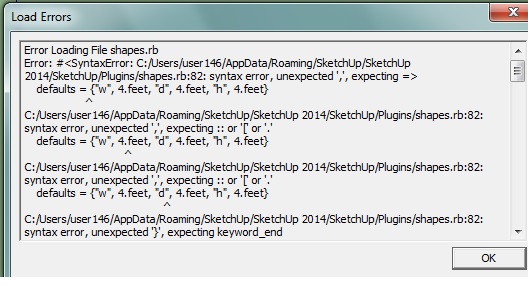

                                    Adsız.jpg

                                    1 條回覆 最後回覆 回覆 引用 0
                                    • Dave RD 離線
                                      Dave R
                                      最後由 編輯

                                      Uninstalling and reinstalling sketchUp was an unneeded step.

                                      As for the Shapes plugin, where did you get it?

                                      Etaoin Shrdlu

                                      %

                                      (THERE'S NO PLACE LIKE)

                                      G28 X0.0 Y0.0 Z0.0

                                      M30

                                      %

                                      1 條回覆 最後回覆 回覆 引用 0
                                      • E 離線
                                        eozel
                                        最後由 編輯

                                        @dave r said:

                                        Uninstalling and reinstalling sketchUp was an unneeded step.

                                        As for the Shapes plugin, where did you get it?

                                        While other plugings works well for the shapes plugin, it gives load error msg another computer of mine when sketchup is opennig.

                                        1 條回覆 最後回覆 回覆 引用 0
                                        • Dave RD 離線
                                          Dave R
                                          最後由 編輯

                                          That didn't answer my question. 😒

                                          Just forget I asked about it.

                                          Etaoin Shrdlu

                                          %

                                          (THERE'S NO PLACE LIKE)

                                          G28 X0.0 Y0.0 Z0.0

                                          M30

                                          %

                                          1 條回覆 最後回覆 回覆 引用 0
                                          • E 離線
                                            eozel
                                            最後由 編輯

                                            @dave r said:

                                            That didn't answer my question. 😒

                                            Just forget I asked about it.

                                            Link Preview Image
                                            SketchUp Plugins | PluginStore | SketchUcation

                                            SketchUp Plugin and Extension Store by SketchUcation provides free downloads of hundreds of SketchUp extensions and plugins

                                            favicon

                                            (sketchucation.com)

                                            1 條回覆 最後回覆 回覆 引用 0
                                            • 1
                                            • 2
                                            • 45
                                            • 46
                                            • 47
                                            • 48
                                            • 49
                                            • 109
                                            • 110
                                            • 47 / 110
                                            • 第一個貼文
                                              最後的貼文
                                            Buy SketchPlus
                                            Buy SUbD
                                            Buy WrapR
                                            Buy eBook
                                            Buy Modelur
                                            Buy Vertex Tools
                                            Buy SketchCuisine
                                            Buy FormFonts

                                            Advertisement


