sketchucation logo sketchucation
    • 登入
    Oops, your profile's looking a bit empty! To help us tailor your experience, please fill in key details like your SketchUp version, skill level, operating system, and more. Update and save your info on your profile page today!
    🔌 Smart Spline | Fluid way to handle splines for furniture design and complex structures. Download

    The "Duh!" thread (aka the Doh! thread)

    已排程 已置頂 已鎖定 已移動 SketchUp Discussions
    sketchup
    696 貼文 135 Posters 316.5k 瀏覽 135 Watching
    正在載入更多貼文
    • 從舊到新
    • 從新到舊
    • 最多點贊
    回覆
    • 在新貼文中回覆
    登入後回覆
    此主題已被刪除。只有擁有主題管理權限的使用者可以查看。
    • dereiD 離線
      derei
      最後由 編輯

      I totally agree with the fact that Duh moments get lost between posts and is really hard to follow them now.

      DESIGNER AND ARTIST DEREI.UK

      1 條回覆 最後回覆 回覆 引用 0
      • GaieusG 離線
        Gaieus
        最後由 編輯

        @oganocali said:

        I usually remember there was a trick as someone's doh! moment to do what I want, I just can not remember who or where the trick was.

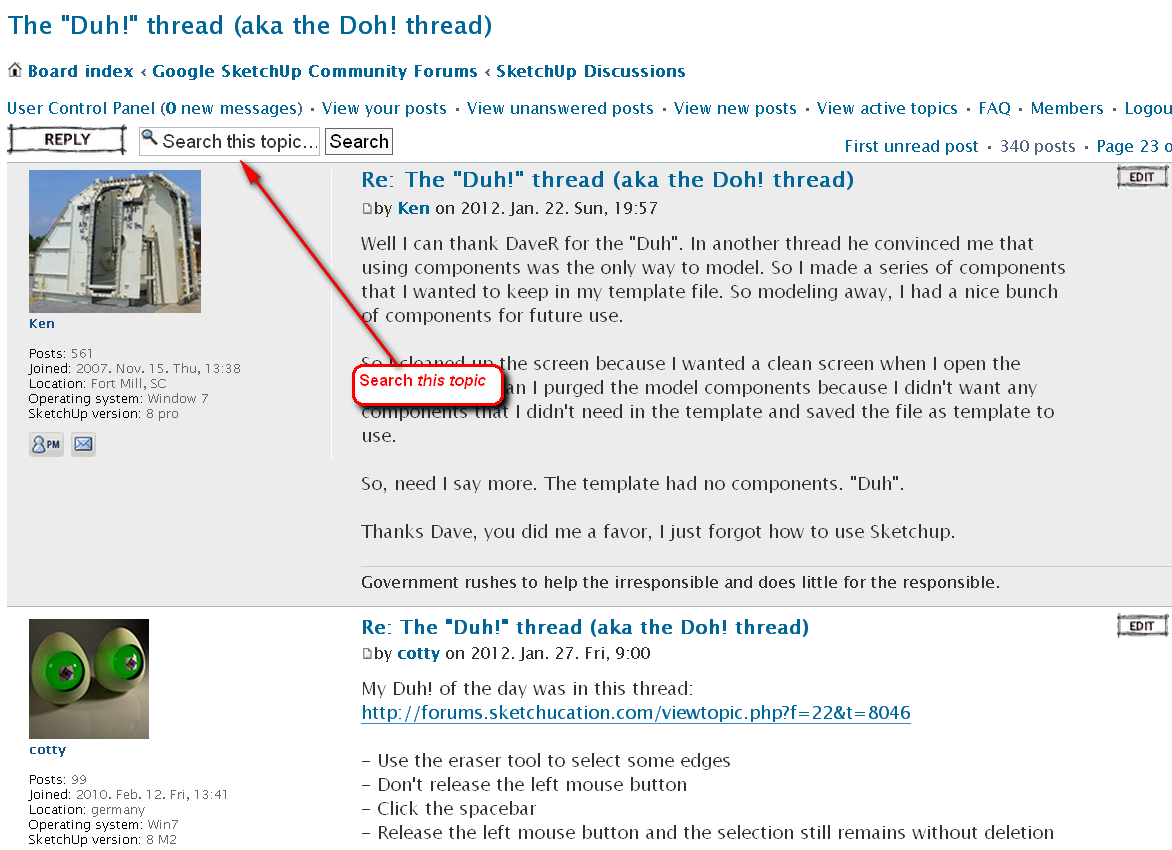
        I had one of those DUH moments regarding the forums as well... 😒


        searchthistopic.png

        Gai...

        1 條回覆 最後回覆 回覆 引用 0
        • dereiD 離線
          derei
          最後由 編輯

          Usually searching works when you know exactly what you want... if I want to find "something that was somehow... I don't know exactly, but I can recognize if I see it", I'm sure that search box won't help 💚

          DESIGNER AND ARTIST DEREI.UK

          1 條回覆 最後回覆 回覆 引用 0
          • pilouP 離線
            pilou
            最後由 編輯

            Maybe this is yet known but I just discover that today 😳 (Thx Chri)

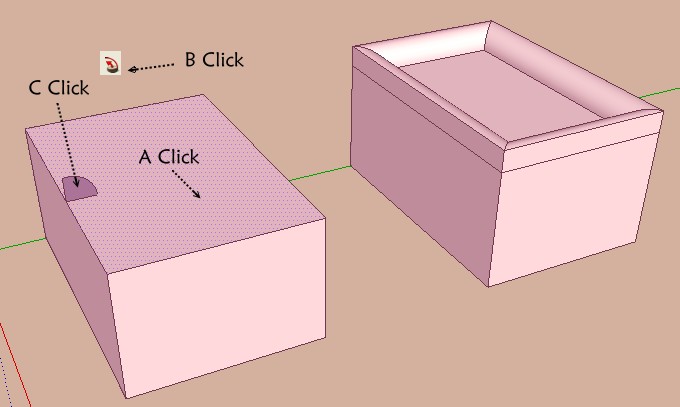
            With the follow-me, no need to select only the path, before call the Follow-me!
            Click the surface is sufficient ! 😲

            I made Double clicks on the surface then Shift + Ctrl for deselect it for have only the path 💚
            (Double click Without deselection works also but... 😳

            Here just 3 simple clicks 😎

            click_3.jpg

            Frenchy Pilou
            Is beautiful that please without concept!
            My Little site :)

            1 條回覆 最後回覆 回覆 引用 0
            • thomthomT 離線
              thomthom
              最後由 編輯

              That's a new Duh! moment for me!!

              Thomas Thomassen — SketchUp Monkey & Coding addict
              List of my plugins and link to the CookieWare fund

              1 條回覆 最後回覆 回覆 引用 0
              • GaieusG 離線
                Gaieus
                最後由 編輯

                Is it? 😄

                Interesting although admittedly I also have duh moments on trivia sometimes.

                Note however that is there is a soften edge (say a diagonal) in the face, the follow me will not go completely around - not even when simply double clicking. In this case Pilou's "original" method: Double clicking then deselecting the inner (sur)face will do the job though.

                So basically it only woks with single faces. Not even with coplanar but subdivided faces.

                Gai...

                1 條回覆 最後回覆 回覆 引用 0
                • jgbJ 離線
                  jgb
                  最後由 編輯

                  Another thing with Follow-Me I discovered a while back (and reported) is when you are defining a path that has curves, place the template face somewhere on a straight portion of any line segment, NOT at an endpoint. 😮

                  If follow-me starts on an endpoint, the face template follows one of the subtended angles and royally screws up at the end, with an end face out of alignment. This is especially a major factor with closed loops. 👎

                  However, if started on a straight section, it will end perpendicular to the last line of the path, and if the path is a closed loop, it will join properly. 👍


                  jgb

                  1 條回覆 最後回覆 回覆 引用 0
                  • pilouP 離線
                    pilou
                    最後由 編輯

                    Useful to know! 👍

                    Frenchy Pilou
                    Is beautiful that please without concept!
                    My Little site :)

                    1 條回覆 最後回覆 回覆 引用 0
                    • broomstickB 離線
                      broomstick
                      最後由 編輯

                      I've seen this pointed out before, but I just discovered that while orbiting with the middle mouse pressed, if you press the left button, orbit becomes pan.

                      It's a useful way to orbit/pan without using two hands 😄

                      1 條回覆 最後回覆 回覆 引用 0
                      • pilouP 離線
                        pilou
                        最後由 編輯

                        Mini Doh 😳 (due forgotten function) 😒

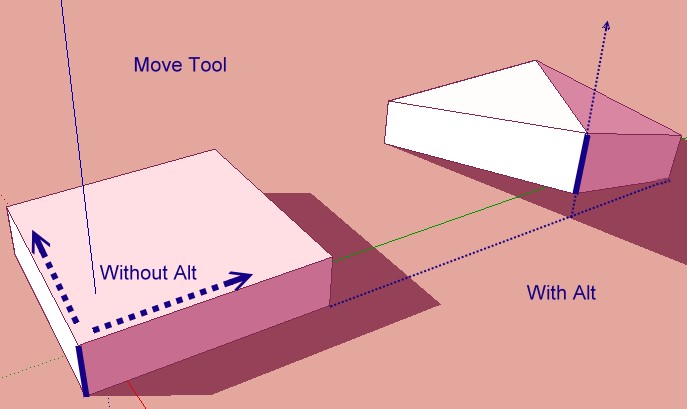
                        • Alt gives you the possibility to Move a segment escaping at the X Y plan 😉

                        Frenchy Pilou
                        Is beautiful that please without concept!
                        My Little site :)

                        1 條回覆 最後回覆 回覆 引用 0
                        • thomthomT 離線
                          thomthom
                          最後由 編輯

                          @broomstick said:

                          I've seen this pointed out before, but I just discovered that while orbiting with the middle mouse pressed, if you press the left button, orbit becomes pan.

                          !!! 😲 OMF-DUH!!!

                          Thomas Thomassen — SketchUp Monkey & Coding addict
                          List of my plugins and link to the CookieWare fund

                          1 條回覆 最後回覆 回覆 引用 0
                          • thomthomT 離線
                            thomthom
                            最後由 編輯

                            A bit awkward though, as I use my index finger usually to press the middle mouse button, so I need to shift to my middle finger to free up my index for the left mouse button. ...which it was the right button that did that...

                            Thomas Thomassen — SketchUp Monkey & Coding addict
                            List of my plugins and link to the CookieWare fund

                            1 條回覆 最後回覆 回覆 引用 0
                            • GaieusG 離線
                              Gaieus
                              最後由 編輯

                              @thomthom said:

                              A bit awkward though, as I use my index finger usually to press the middle mouse button, so I need to shift to my middle finger to free up my index for the left mouse button. ...which it was the right button that did that...

                              Ditto. I have known this "feature" but could never adapt myself to it.

                              Gai...

                              1 條回覆 最後回覆 回覆 引用 0
                              • pilouP 離線
                                pilou
                                最後由 編輯

                                @unknownuser said:

                                I use my index finger usually to press the middle mouse button

                                That is very curious, because with the medium you can rotate many more the Mouse wheel than with index! 😲
                                So more speedy scolling! 😎
                                For the simple reason that the Medium is biggest than the index! ☀
                                So the medium is always on the whell, so click it is a formality! 😄
                                Try it! 😉

                                Frenchy Pilou
                                Is beautiful that please without concept!
                                My Little site :)

                                1 條回覆 最後回覆 回覆 引用 0
                                • jgbJ 離線
                                  jgb
                                  最後由 編輯

                                  @unknownuser said:

                                  @unknownuser said:

                                  I use my index finger usually to press the middle mouse button

                                  That is very curious, because with the medium you can rotate many more the Mouse wheel than with index! 😲
                                  So more speedy scolling! 😎
                                  For the simple reason that the Medium is biggest than the index! ☀
                                  So the medium is always on the whell, so click it is a formality! 😄
                                  Try it! 😉

                                  I have always used my mid finger on the wheel, with index on the left button. I also move my mid to the right button when needed as the ring finger has less control (which is why it is the "ring" finger 😆 ).

                                  It shouldn't take long to adjust to that finger position.

                                  And now I know why my "orbiting" suddenly goes into "panning" when my index finger twitches downward sometimes. Now that I know, I can exploit that feature. Thank you Broomstick.

                                  And Pilou, I fail to see what you mean with Move+Alt. ❓ Could you please explain a bit more?


                                  jgb

                                  1 條回覆 最後回覆 回覆 引用 0
                                  • Jean LemireJ 離線
                                    Jean Lemire
                                    最後由 編輯

                                    Hi Pilou, hi folks.

                                    Yes, pressing the ALT key enables Autofold.

                                    Just ideas.

                                    Jean (Johnny) Lemire from Repentigny, Quebec, Canada.

                                    1 條回覆 最後回覆 回覆 引用 0
                                    • pilouP 離線
                                      pilou
                                      最後由 編輯

                                      Is that more clear ? 😳
                                      Without Alt Z axis is locked!
                                      You can make some prisms or no coplanar faces with Move + Alt! 😉
                                      The Z axis become free with Move + Alt 😄

                                      Movetool.jpg

                                      Frenchy Pilou
                                      Is beautiful that please without concept!
                                      My Little site :)

                                      1 條回覆 最後回覆 回覆 引用 0
                                      • GaieusG 離線
                                        Gaieus
                                        最後由 編輯

                                        And here is the autofold description:
                                        http://support.google.com/sketchup/bin/answer.py?hl=en&answer=94865

                                        Gai...

                                        1 條回覆 最後回覆 回覆 引用 0
                                        • thomthomT 離線
                                          thomthom
                                          最後由 編輯

                                          I wish there was an option to make SketchUp Smooth+Soft auto-folded edges.

                                          Thomas Thomassen — SketchUp Monkey & Coding addict
                                          List of my plugins and link to the CookieWare fund

                                          1 條回覆 最後回覆 回覆 引用 0
                                          • jeff hammondJ 離線
                                            jeff hammond
                                            最後由 編輯

                                            I've been harping on this for years now but I don't think anyone ever tries it.. oh well

                                            orbit with a thumb button (if your mouse has one).. not only is it more comfortable, it also gets rid of the double duty zoom/orbit mmb... AND- makes panning with the LMB much easier.

                                            dotdotdot

                                            1 條回覆 最後回覆 回覆 引用 0
                                            • 1
                                            • 2
                                            • 31
                                            • 32
                                            • 33
                                            • 34
                                            • 35
                                            • 35 / 35
                                            • 第一個貼文
                                              最後的貼文
                                            Buy SketchPlus
                                            Buy SUbD
                                            Buy WrapR
                                            Buy eBook
                                            Buy Modelur
                                            Buy Vertex Tools
                                            Buy SketchCuisine
                                            Buy FormFonts

                                            Advertisement