sketchucation logo sketchucation
    • Login
    Oops, your profile's looking a bit empty! To help us tailor your experience, please fill in key details like your SketchUp version, skill level, operating system, and more. Update and save your info on your profile page today!
    ⚠️ Update | Sketchucation Tools 5.0.8 released with licensing improvements and bugfixes Download

    The "Duh!" thread (aka the Doh! thread)

    Scheduled Pinned Locked Moved SketchUp Discussions
    sketchup
    696 Posts 135 Posters 579.7k Views 135 Watching
    Loading More Posts
    • Oldest to Newest
    • Newest to Oldest
    • Most Votes
    Reply
    • Reply as topic
    Log in to reply
    This topic has been deleted. Only users with topic management privileges can see it.
    • plot-parisP
      plot-paris
      last edited by

      another one, only outside SketchUp...

      did you ever try to explode a folder somewhere to copy it's content to the next higher folder?
      I have a shortcut applied to exploding in SkechUp. and I hit it repeatedly, wondering, why the folder was still there.

      actually, that would be a great thing to implement in an operating system: selecting a folder and exploding it, being left with the files within all selected. or the other way around, grouping things (select several files and hit the 'group shortcut' to put them into a new folder...

      1 Reply Last reply
      Reply Quote 0
      • K
        kwistenbiebel
        last edited by

        @plot-paris said:

        another one, only outside SketchUp...

        did you ever try to explode a folder somewhere to copy it's content to the next higher folder?
        I have a shortcut applied to exploding in SkechUp. and I hit it repeatedly, wondering, why the folder was still there.

        actually, that would be a great thing to implement in an operating system: selecting a folder and exploding it, being left with the files within all selected. or the other way around, grouping things (select several files and hit the 'group shortcut' to put them into a new folder...

        Yeah 😄
        SketchupOS 1.0 !

        1 Reply Last reply
        Reply Quote 0
        • M
          MartinRinehart
          last edited by

          @arail1 said:

          My Spacebar doesn't deselect - disappointed.

          There are glitches, here. On a PC for example, Move tool selected, press spacebar. You are still looking at a Move cursor, but the least mouse movement corrects the cursor.

          Author, Edges to Rubies - The Complete SketchUp Tutorial at http://www.MartinRinehart.com/models/tutorial.

          1 Reply Last reply
          Reply Quote 0
          • G
            Gruff
            last edited by

            One more Duh!

            When viewing a model in XRay mode.

            If you hold down shift whilst using the 2D drawing tools the new 2D geometry is forced onto the nearest face (closest to your eye.). Even snap points to (Behind) geometry is projected to the nearest face.

            The sort of meets my needs for construction planes that I am comfortable using in other solid modelers.

            The only painful part of it is that you have to continuously hold down the shift key. It would be nice if Caps lock toggled the feature.

            Resistance is .... Character Forming. Grin

            1 Reply Last reply
            Reply Quote 0
            • plot-parisP
              plot-paris
              last edited by

              @gruff said:

              The only painful part of it is that you have to continuously hold down the shift key. It would be nice if Caps lock toggled the feature.

              true, some sort of permanently locking a movement direction would be awesome at times (appart from locking it to the three main axes via the arrow keys)...

              1 Reply Last reply
              Reply Quote 0
              • G
                GoldenFrog
                last edited by

                My DUH moment was when i realised there was an arc tool. Needles to say, that was my first day using SU. Hehe...My other one was when i learned about the follow me tool. Great DUH there! But, I've greatly improved since then ☀

                Remember, great minds think alike, and fools never differ.

                1 Reply Last reply
                Reply Quote 0
                • X
                  xrok1
                  last edited by

                  @plot-paris said:

                  @gruff said:

                  The only painful part of it is that you have to continuously hold down the shift key. It would be nice if Caps lock toggled the feature.

                  true, some sort of permanently locking a movement direction would be awesome at times (appart from locking it to the three main axes via the arrow keys)...

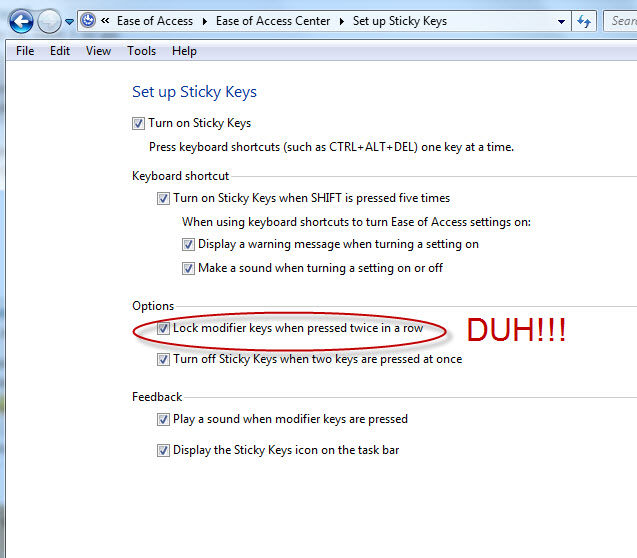
                  Wish granted! 🤣
                  Capture.JPG
                  my duh moment just happened, i forgot to attached the jpg to this post the first time. 🤣

                  “There are three classes of people: those who see. Those who see when they are shown. Those who do not see.”

                  http://www.Twilightrender.com try it!

                  1 Reply Last reply
                  Reply Quote 0
                  • G
                    Gruff
                    last edited by

                    @unknownuser said:

                    <!-- ia0 -->Capture.JPG<!-- ia0 -->[/attachment:1ouv5aid]

                    I do not see that dialog anywhere in my 7.1 std SketchUp.
                    Is that a Pro feature?

                    Resistance is .... Character Forming. Grin

                    1 Reply Last reply
                    Reply Quote 0
                    • E
                      Ecuadorian
                      last edited by

                      @gruff said:

                      I do not see that dialog anywhere in my 7.1 std SketchUp.
                      Is that a Pro feature?

                      You set up that in Windows, not in SketchUp, in "Accesibility" options in the Control Panel of XP. But I'm not sure about its usefulness in SU.

                      -Miguel Lescano
                      Subscribe to my house plans YouTube channel! (30K+ subs)

                      1 Reply Last reply
                      Reply Quote 0
                      • pilouP
                        pilou
                        last edited by

                        Wanted to now all plugs by Tig ☀
                        Just today thinking to use the search Advanced engine 😳
                        [PLUGIN] + TIG + Title ONLY + Ruby Discussion 👍
                        = 3 pages of true gem ! Something like 75 brains storming 😮 😉
                        Of course you can make that for any other Ruby Gurus: TBD, Fredo6, Chris Fullmer, Didier Bur, Jim Foltz, Thomthom, Matt666, Whaat, Wikii, Gohch, CPhillips, Kyrill2008, Morisdov, AdamB, Todd Burch, Rick Wilson... sorry for the forgotten 😳
                        I must find an another tricky method for find all Gurus 😉
                        (and will be added at the list as soon as) ❗

                        Frenchy Pilou
                        Is beautiful that please without concept!
                        My Little site :)

                        1 Reply Last reply
                        Reply Quote 0
                        • X
                          xrok1
                          last edited by

                          @ecuadorian said:

                          @gruff said:

                          I do not see that dialog anywhere in my 7.1 std SketchUp.
                          Is that a Pro feature?

                          You set up that in Windows, not in SketchUp, in "Accesibility" options in the Control Panel of XP. But I'm not sure about its usefulness in SU.

                          you can lock the shift key for inferencing, which is what Gruff wished for 😛

                          “There are three classes of people: those who see. Those who see when they are shown. Those who do not see.”

                          http://www.Twilightrender.com try it!

                          1 Reply Last reply
                          Reply Quote 0
                          • jeff hammondJ
                            jeff hammond
                            last edited by

                            @gruff said:

                            When viewing a model in XRay mode.

                            If you hold down shift whilst using the 2D drawing tools the new 2D geometry is forced onto the nearest face (closest to your eye.). Even snap points to (Behind) geometry is projected to the nearest face.

                            good one!
                            i didn't know that

                            dotdotdot

                            1 Reply Last reply
                            Reply Quote 0
                            • G
                              Gruff
                              last edited by

                              New Duh. (Sort of)

                              Select a face then right mouse and select Align Axis. (Let's call it AA2F) We've all seen it but did you know that what it creates depends on how your face happens to be oriented to the screen?

                              In a nut shell AA2F aligns the Axis to the lower left most edge.

                              Draw a hexagonal face. Choose the top view and use AA2F. Rotate the view of the hexagon
                              reselect AA2F. Your Axis will shift position around the hexagon vertices.

                              This can actually be used to your advantage when dealing with a face that has different features dependent on different edges. As a case in point see the attached Guitar head where I needed to align and create features parallel to either outside edge as well as the center line of the whole thing.


                              Guitar Neck Test

                              Resistance is .... Character Forming. Grin

                              1 Reply Last reply
                              Reply Quote 0
                              • olisheaO
                                olishea
                                last edited by

                                I've only just realized you can click alt/ctrl when push/pulling.......duh! 😳

                                oli

                                1 Reply Last reply
                                Reply Quote 0
                                • A
                                  Align
                                  last edited by

                                  @thomthom said:

                                  A more recent Duh I had:

                                  Being able to select only a few edges from a face and offset them instead of the whole face.

                                  how do you do this?

                                  1 Reply Last reply
                                  Reply Quote 0
                                  • thomthomT
                                    thomthom
                                    last edited by

                                    Select the edges and and activate offset...

                                    Thomas Thomassen — SketchUp Monkey & Coding addict
                                    List of my plugins and link to the CookieWare fund

                                    1 Reply Last reply
                                    Reply Quote 0
                                    • EscapeArtistE
                                      EscapeArtist
                                      last edited by

                                      @plot-paris said:

                                      wow, cool. didn't know about that eihter. but what I would even more like to see is a push/pull like this:
                                      [attachment=0:37plearv]<!-- ia0 -->strange_pushpull.jpg<!-- ia0 -->[/attachment:37plearv]

                                      It exists! Here: http://forums.sketchucation.com/viewtopic.php?f=180&t=23341

                                      1 Reply Last reply
                                      Reply Quote 0
                                      • E
                                        Ecuadorian
                                        last edited by

                                        I was working in a "mysterious" file that did not allow me to pushpull anything, and I was about to post the mysterious file here. After checking, "Snap to length" was set to a very high value. Duh!

                                        -Miguel Lescano
                                        Subscribe to my house plans YouTube channel! (30K+ subs)

                                        1 Reply Last reply
                                        Reply Quote 0
                                        • Chris FullmerC
                                          Chris Fullmer
                                          last edited by

                                          I just found one for me tonight. I change the model axis pretty often when I work. But I never noticed that you can activate the axis tool (or change axis inside of a component tool) and click twice somewhere and it will move the axis to that point without changing its orientation. Normally I would have clicked once, then lined up the the axes and click and line up and click. So a double click (not too fast though!) is much faster for moving the axis.

                                          Chris

                                          Lately you've been tan, suspicious for the winter.
                                          All my Plugins I've written

                                          1 Reply Last reply
                                          Reply Quote 0
                                          • pilouP
                                            pilou
                                            last edited by

                                            Select an element (lines, surface)
                                            Open Entity Info yes 😉
                                            Then when you select with Shift , Shift + Ctrl or Ctrl
                                            all surfaces or length lines are added , subbstracted, modified, visible and updated in the Entity info! 😄 😒

                                            Frenchy Pilou
                                            Is beautiful that please without concept!
                                            My Little site :)

                                            1 Reply Last reply
                                            Reply Quote 0

                                            Hello! It looks like you're interested in this conversation, but you don't have an account yet.

                                            Getting fed up of having to scroll through the same posts each visit? When you register for an account, you'll always come back to exactly where you were before, and choose to be notified of new replies (either via email, or push notification). You'll also be able to save bookmarks and upvote posts to show your appreciation to other community members.

                                            With your input, this post could be even better 💗

                                            Register Login
                                            • 1
                                            • 2
                                            • 6
                                            • 7
                                            • 8
                                            • 9
                                            • 10
                                            • 34
                                            • 35
                                            • 8 / 35
                                            • First post
                                              Last post
                                            Buy SketchPlus
                                            Buy SUbD
                                            Buy WrapR
                                            Buy eBook
                                            Buy Modelur
                                            Buy Vertex Tools
                                            Buy SketchCuisine
                                            Buy FormFonts

                                            Advertisement