sketchucation logo sketchucation
    • 登入
    Oops, your profile's looking a bit empty! To help us tailor your experience, please fill in key details like your SketchUp version, skill level, operating system, and more. Update and save your info on your profile page today!
    ⚠️ Important | Libfredo 15.6b introduces important bugfixes for Fredo's Extensions Update

    [Plugin] Three Line Tools (Updated March 9th, 2009)

    已排程 已置頂 已鎖定 已移動 Plugins
    117 貼文 43 Posters 76.3k 瀏覽 43 Watching
    正在載入更多貼文
    • 從舊到新
    • 從新到舊
    • 最多點贊
    回覆
    • 在新貼文中回覆
    登入後回覆
    此主題已被刪除。只有擁有主題管理權限的使用者可以查看。
    • E 離線
      ElCarlos
      最後由 編輯

      Does this work on v 8 with Mac OS?

      1 條回覆 最後回覆 回覆 引用 0
      • EdsonE 離線
        Edson
        最後由 編輯

        @elcarlos said:

        Does this work on v 8 with Mac OS?

        yes, it does.

        edson mahfuz, architect| porto alegre • brasil
        http://www.mahfuz.arq.br

        1 條回覆 最後回覆 回覆 引用 0
        • O 離線
          oisin.higgins
          最後由 編輯

          Hi Chris,
          Would it be possible to modify the code for 2-D use? ie to bisect and angle?

          1 條回覆 最後回覆 回覆 引用 0
          • S 離線
            shawnkelly
            最後由 編輯

            This does not seem to work in V2013 pro. I was able to activate the toolbar and even interact with it, as well as enter a value but no line appears when a position for one is clicked on a model. Thought you would like to know.
            Take care.

            1 條回覆 最後回覆 回覆 引用 0
            • thomthomT 離線
              thomthom
              最後由 編輯

              There is no difference in the API between SU8 and SU2013 - it should be working. If you open the Ruby Console (under the Windows menu) when you use the plugin, are there any errors?

              Thomas Thomassen — SketchUp Monkey & Coding addict
              List of my plugins and link to the CookieWare fund

              1 條回覆 最後回覆 回覆 引用 0
              • cottyC 離線
                cotty
                最後由 編輯

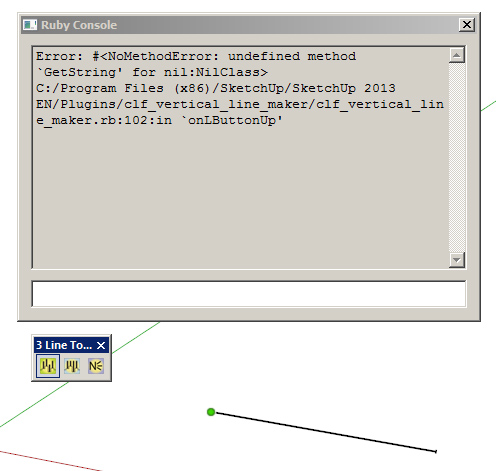
                I've got this error...


                clf.jpg

                my SketchUp gallery

                1 條回覆 最後回覆 回覆 引用 0
                • J 離線
                  johnnygitarr
                  最後由 編輯

                  hi there,

                  same for me!
                  three lines tool used with sketchup pro v2013 (mac) doesn't work.
                  i installed the plugin via sketchucation plugin store.

                  can someone helo?

                  1 條回覆 最後回覆 回覆 引用 0
                  • gillesG 離線
                    gilles
                    最後由 編輯

                    Same thing with the 3 tools:

                    Error; #<NoMethodError; undefined method `GetString' for nil;NilClass>
                    /Library/Application Support/Google SketchUp 8/SketchUp/Plugins/clf_vertical_line_maker/clf_vertical_line_maker.rb;102;in `onLButtonUp'
                    /Library/Application Support/Google SketchUp 8/SketchUp/Plugins/clf_vertical_line_maker/clf_vertical_line_maker.rb;286
                    Error; #<NoMethodError; undefined method `GetString' for nil;NilClass>
                    /Library/Application Support/Google SketchUp 8/SketchUp/Plugins/clf_vertical_line_maker/clf_vertical_line_maker.rb;182;in `onLButtonUp'
                    /Library/Application Support/Google SketchUp 8/SketchUp/Plugins/clf_vertical_line_maker/clf_vertical_line_maker.rb;102
                    Error; #<NoMethodError; undefined method `GetString' for nil;NilClass>
                    /Library/Application Support/Google SketchUp 8/SketchUp/Plugins/clf_vertical_line_maker/clf_vertical_line_maker.rb;286;in `onLButtonUp'
                    /Library/Application Support/Google SketchUp 8/SketchUp/Plugins/clf_vertical_line_maker/clf_vertical_line_maker.rb;182
                    

                    " c'est curieux chez les marins ce besoin de faire des phrases "

                    1 條回覆 最後回覆 回覆 引用 0
                    • B 離線
                      bjornkn
                      最後由 編輯

                      Any news on this problem with it not working in SU 2013 (and probably 2014 too?) ?

                      It is a really useful plugin, which I'm really missing..

                      1 條回覆 最後回覆 回覆 引用 0
                      • Dave RD 離線
                        Dave R
                        最後由 編輯

                        @bjornkn said:

                        Any news on this problem with it not working in SU 2013 (and probably 2014 too?) ?

                        It is a really useful plugin, which I'm really missing..

                        I just installed it and it works just fine for me on SU2014. Did you try getting the current version via the Extension Warehouse?

                        Etaoin Shrdlu

                        %

                        (THERE'S NO PLACE LIKE)

                        G28 X0.0 Y0.0 Z0.0

                        M30

                        %

                        1 條回覆 最後回覆 回覆 引用 0
                        • B 離線
                          bjornkn
                          最後由 編輯

                          @dave r said:

                          @bjornkn said:

                          Any news on this problem with it not working in SU 2013 (and probably 2014 too?) ?

                          It is a really useful plugin, which I'm really missing..

                          I just installed it and it works just fine for me on SU2014. Did you try getting the current version via the Extension Warehouse?

                          I re-installed using the rbz file, which caused no lines to be drawn.
                          When installing via Extension warehouse it works fine in both 2013 and 2014 - to my big surprise.
                          Would that be a newer version than the one available here for download then?

                          1 條回覆 最後回覆 回覆 引用 0
                          • Dave RD 離線
                            Dave R
                            最後由 編輯

                            Yes. It is a newer version. In fact I would expect all of Chris Fullmer's plugins to be newer in the Extension Warehouse. You can see that the version uploaded here is 2.1 while the version in the EW is 2.2.

                            Etaoin Shrdlu

                            %

                            (THERE'S NO PLACE LIKE)

                            G28 X0.0 Y0.0 Z0.0

                            M30

                            %

                            1 條回覆 最後回覆 回覆 引用 0
                            • B 離線
                              bjornkn
                              最後由 編輯

                              @dave r said:

                              Yes. It is a newer version. In fact I would expect all of Chris Fullmer's plugins to be newer in the Extension Warehouse. You can see that the version uploaded here is 2.1 while the version in the EW is 2.2.

                              I guess one shouldn't complain when you get such great tools for free, but it is a bit confusing when there are different versions around. I have used the Extension warehouse very little, as it seems to often be the other way around; the old version on EW and the newer one posted here. ?

                              1 條回覆 最後回覆 回覆 引用 0
                              • Dave RD 離線
                                Dave R
                                最後由 編輯

                                That's strange. The plugins shown in the EW have to go through quality testing by someone to ensure they meet standards before they are made available. Your first stops for plugins should be the Sketchucation Plugin Store and the Extension Warehouse. And both show the date and version number of the latest version of the plugin.

                                Etaoin Shrdlu

                                %

                                (THERE'S NO PLACE LIKE)

                                G28 X0.0 Y0.0 Z0.0

                                M30

                                %

                                1 條回覆 最後回覆 回覆 引用 0
                                • B 離線
                                  bjornkn
                                  最後由 編輯

                                  @dave r said:

                                  That's strange. The plugins shown in the EW have to go through quality testing by someone to ensure they meet standards before they are made available. Your first stops for plugins should be the Sketchucation Plugin Store and the Extension Warehouse. And both show the date and version number of the latest version of the plugin.
                                  Well, you know when you try a new tool and it doesn't work like expected right away you tend to shy away from it until the tool starts getting some applause (like now 😉 ...

                                  1 條回覆 最後回覆 回覆 引用 0
                                  • greenskpG 離線
                                    greenskp
                                    最後由 編輯

                                    Hey guys!

                                    I use 2014 version and found the solution. Thanks for Didier Bur on the following link:
                                    http://sketchucation.com/forums/viewtopic.php?f=323%26amp;t=27019#p311954

                                    Open clf_vertical_line_maker.rb with Notepad++ and add the code below at line 46:

                                    require 'LangHandler.rb'
                                    $uStrings = LanguageHandler.new("clf_menu_loader")

                                    Now works like a charm.

                                    1 條回覆 最後回覆 回覆 引用 0
                                    • Dave RD 離線
                                      Dave R
                                      最後由 編輯

                                      @greenskp said:

                                      Hey guys!

                                      I use 2014 version and found the solution. Thanks for Didier Bur on the following link:
                                      http://sketchucation.com/forums/viewtopic.php?f=323%26amp;t=27019#p311954

                                      Open clf_vertical_line_maker.rb with Notepad++ and add the code below at line 46:

                                      require 'LangHandler.rb'
                                      $uStrings = LanguageHandler.new("clf_menu_loader")

                                      Now works like a charm.

                                      Or, if you want to take the easy path, just download and install it automatically through Window>Extension Warehouse. It's called CLF Vertical Line Tools. 😉

                                      Etaoin Shrdlu

                                      %

                                      (THERE'S NO PLACE LIKE)

                                      G28 X0.0 Y0.0 Z0.0

                                      M30

                                      %

                                      1 條回覆 最後回覆 回覆 引用 0
                                      • 1
                                      • 2
                                      • 3
                                      • 4
                                      • 5
                                      • 6
                                      • 6 / 6
                                      • 第一個貼文
                                        最後的貼文
                                      Buy SketchPlus
                                      Buy SUbD
                                      Buy WrapR
                                      Buy eBook
                                      Buy Modelur
                                      Buy Vertex Tools
                                      Buy SketchCuisine
                                      Buy FormFonts

                                      Advertisement