sketchucation logo sketchucation
    • Login
    Oops, your profile's looking a bit empty! To help us tailor your experience, please fill in key details like your SketchUp version, skill level, operating system, and more. Update and save your info on your profile page today!
    ⚠️ Update | Sketchucation Tools 5.0.8 released with licensing improvements and bugfixes Download

    [Plugin] FollowMe and keep (v0.04 update 20090210)

    Scheduled Pinned Locked Moved Plugins
    223 Posts 79 Posters 220.5k Views 79 Watching
    Loading More Posts
    • Oldest to Newest
    • Newest to Oldest
    • Most Votes
    Reply
    • Reply as topic
    Log in to reply
    This topic has been deleted. Only users with topic management privileges can see it.
    • S
      Sir.Swaffel
      last edited by

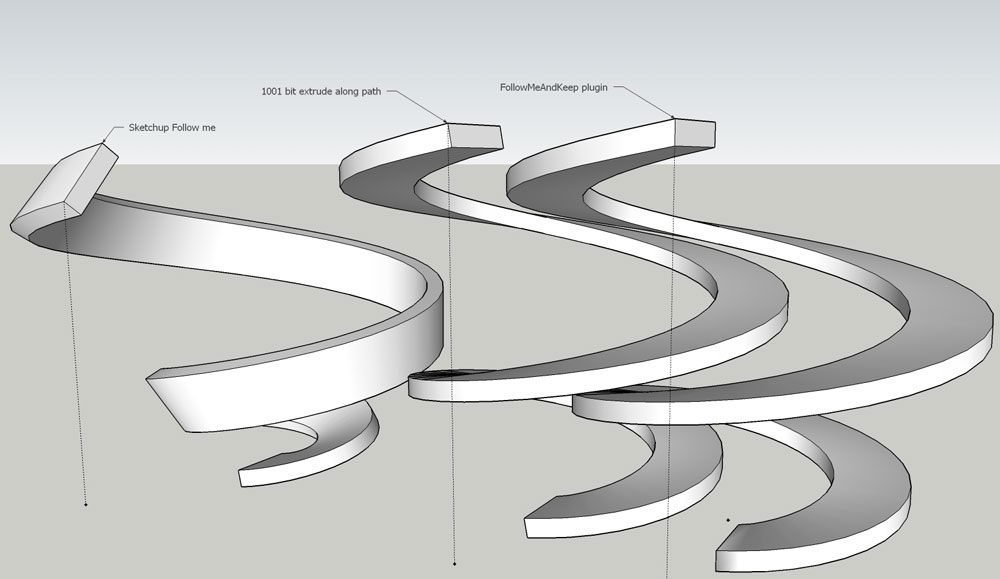
      haha, yes, unfortunately 1001bit lacks a feature that FollowMeAndKeep does have, it doesn't lock the z orientation. So basically both of them lacks an essential feature of the other... and I don't know a way to combine them πŸ˜„.
      comparison

      1 Reply Last reply
      Reply Quote 0
      • Dave RD
        Dave R
        last edited by

        I suppose for FaK you could add some temporary geometry to get the bottom left corner to be the center. Not idea but it could work.

        Etaoin Shrdlu

        %

        (THERE'S NO PLACE LIKE)

        G28 X0.0 Y0.0 Z0.0

        M30

        %

        1 Reply Last reply
        Reply Quote 0
        • W
          wikii
          last edited by

          @sir.swaffel said:

          I like this tool, but it is lacking a basic feature that 1001bit's version does have: a reference point.

          FollowMeAndKeep automatically uses the center of the face that it wants to extrude as the reference point for the path. When using a more complex face that needs to be extruded along a path relative to let's say the bottom left corner, you're out of luck πŸ˜•

          Reference point?
          select a cpoint ,curve and face,then run fak.
          the cpoint will be treat as reference poing.
          try it.

          wikii

          1 Reply Last reply
          Reply Quote 0
          • S
            Sir.Swaffel
            last edited by

            ah thanks, it never worked when I tried it, so I thought it was broken. But apparently my SU has some trouble making correct faces with FAK and complex curves and precise helixes. Got it working now though, so thx πŸ˜„.

            1 Reply Last reply
            Reply Quote 0
            • dereiD
              derei
              last edited by

              I'm trying to run FAK on a face + path but it doesn't o anything.
              Can anyone point me where I'm wrong? I tried with a simpler shape (arc + rectangle) and it worked. Is it something wrong with this particular model?

              Model attached. Thank you.


              no_FAK.skp

              DESIGNER AND ARTIST DEREI.UK

              1 Reply Last reply
              Reply Quote 0
              • pilouP
                pilou
                last edited by

                The extrude edges familly by Tig must make the trick πŸ˜‰

                Frenchy Pilou
                Is beautiful that please without concept!
                My Little site :)

                1 Reply Last reply
                Reply Quote 0
                • gillesG
                  gilles
                  last edited by

                  @ dereei, rotate the whole model so the face isn't horizontal and it works.
                  I suggest to separate your path in two parts to avoid strange results.

                  " c'est curieux chez les marins ce besoin de faire des phrases "

                  1 Reply Last reply
                  Reply Quote 0
                  • D
                    destroyer1095
                    last edited by

                    ITS NOT WORKING FOR SKETCH UP 8!!!!! 😑 πŸ‘Ž

                    1 Reply Last reply
                    Reply Quote 0
                    • GaieusG
                      Gaieus
                      last edited by

                      Yes it is - and please, do not use ALL CAPS on the forums.


                      A "not working" remark will never help trouble shooting what you are doing wrong. First of all, did you install it correctly?

                      Gai...

                      1 Reply Last reply
                      Reply Quote 0
                      • dereiD
                        derei
                        last edited by

                        @destroyer1095 said:

                        ITS NOT WORKING FOR SKETCH UP 8!!!!! 😑 πŸ‘Ž

                        is working ! read the previous post! I'm sure you used a path that was vertically aligned.

                        DESIGNER AND ARTIST DEREI.UK

                        1 Reply Last reply
                        Reply Quote 0
                        • thomthomT
                          thomthom
                          last edited by

                          How ironic is his nickname...? πŸ˜’

                          Thomas Thomassen β€” SketchUp Monkey & Coding addict
                          List of my plugins and link to the CookieWare fund

                          1 Reply Last reply
                          Reply Quote 0
                          • Dave RD
                            Dave R
                            last edited by

                            @destroyer1095 said:

                            ITS NOT WORKING FOR SKETCH UP 8!!!!! 😑 πŸ‘Ž

                            Nice entrance to the forum. πŸ˜’

                            Etaoin Shrdlu

                            %

                            (THERE'S NO PLACE LIKE)

                            G28 X0.0 Y0.0 Z0.0

                            M30

                            %

                            1 Reply Last reply
                            Reply Quote 0
                            • M
                              MartinK
                              last edited by

                              @destroyer1095 said:

                              ITS NOT WORKING FOR SKETCH UP 8!!!!! 😑 πŸ‘Ž

                              ASS

                              1 Reply Last reply
                              Reply Quote 0
                              • J
                                JMdesigns
                                last edited by

                                cant get this to work sor SU8 ?...any updates

                                1 Reply Last reply
                                Reply Quote 0
                                • Dave RD
                                  Dave R
                                  last edited by

                                  Works fine on SU8 for me.

                                  If you want help, why not help us help you and give us some information about what's happening? Post an example SKP or something. πŸ˜’

                                  Etaoin Shrdlu

                                  %

                                  (THERE'S NO PLACE LIKE)

                                  G28 X0.0 Y0.0 Z0.0

                                  M30

                                  %

                                  1 Reply Last reply
                                  Reply Quote 0
                                  • J
                                    jjshannon
                                    last edited by

                                    Greeting. This is my first post here. I have been trying to model a roller coaster type object and the "follow me" tool in sketchup was twisting my shape. I think found the "follow me and keep" tool here which is great. My only problem now is that my shape is not symetrical and the follow me and keep tool is flipping my shape as it makes turns. It is one shape I am extruding by somehow it doesn't quite work. I tried this shape with the native follow me in sketchup and it does maintain the general shape but, as mentioned before it twists the shape. Is there something I am doing wrong, or is there any way to fix this? I have attached my sketchup file.

                                    Thanks!


                                    rollar coaster test 2.skp

                                    1 Reply Last reply
                                    Reply Quote 0
                                    • B
                                      blajnov
                                      last edited by

                                      @jjshannon said:

                                      Greeting. This is my first post here. I have been trying to model a roller coaster type object and the "follow me" tool in sketchup was twisting my shape. I think found the "follow me and keep" tool here which is great. My only problem now is that my shape is not symetrical and the follow me and keep tool is flipping my shape as it makes turns. It is one shape I am extruding by somehow it doesn't quite work. I tried this shape with the native follow me in sketchup and it does maintain the general shape but, as mentioned before it twists the shape. Is there something I am doing wrong, or is there any way to fix this? I have attached my sketchup file.

                                      Thanks!

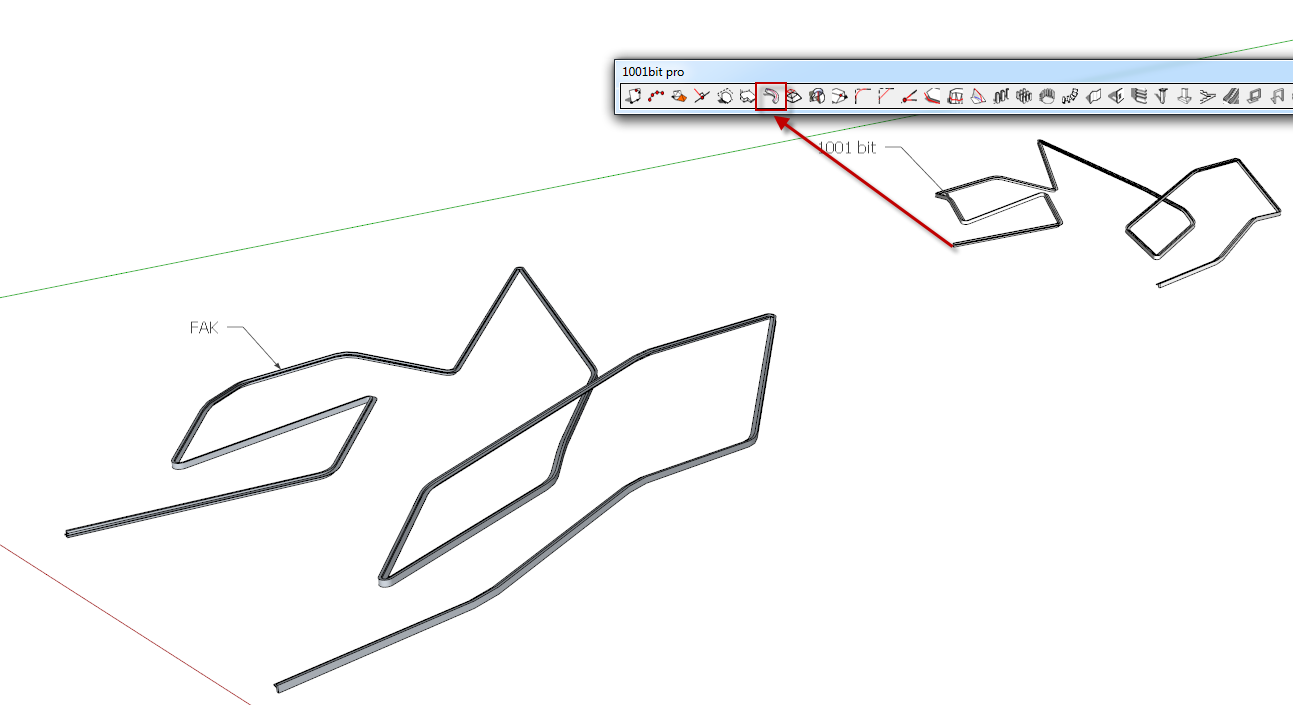
                                      All works, simply draw again a structure...

                                      07-03-2012 8-19-44.png


                                      rollar coaster test 2.skp

                                      1 Reply Last reply
                                      Reply Quote 0
                                      • T
                                        tspco
                                        last edited by

                                        I hate drawing railings on staircases, that said this plugin works fine, but it would be better if it didn't have auto-smoothing, or an option that would allow the user to turn it off. I have to explode the group the plugin created to make the railing look right. I also have to add lines between segments of railing, to make the railing look sharper. Any thoughts?

                                        SU make 2017, /Twilight Render Hobby
                                        Windows 10,64 bit,16GB ram, quad core Athlon 3.6 gHz proc. Anything else you want to know, ask me.

                                        1 Reply Last reply
                                        Reply Quote 0
                                        • Dave RD
                                          Dave R
                                          last edited by

                                          I have just one thought. Well, two but one of them isn't related. πŸ˜›

                                          Open the railing group for editing and then select all of the geometry. Right click Smooth/Soften and adjust the slider down slightly. That should give you the lines you're looking for at the turns.

                                          Etaoin Shrdlu

                                          %

                                          (THERE'S NO PLACE LIKE)

                                          G28 X0.0 Y0.0 Z0.0

                                          M30

                                          %

                                          1 Reply Last reply
                                          Reply Quote 0
                                          • brookefoxB
                                            brookefox
                                            last edited by

                                            Thank you for FAK. Sometimes the path is repeated in the result, sometimes not. In my case, with a road centerline, I do not want it, or if it is there, I'd like it grouped or left as a curve and not exploded as this requires cleaning up.


                                            ~ Brooke

                                            1 Reply Last reply
                                            Reply Quote 0

                                            Hello! It looks like you're interested in this conversation, but you don't have an account yet.

                                            Getting fed up of having to scroll through the same posts each visit? When you register for an account, you'll always come back to exactly where you were before, and choose to be notified of new replies (either via email, or push notification). You'll also be able to save bookmarks and upvote posts to show your appreciation to other community members.

                                            With your input, this post could be even better πŸ’—

                                            Register Login
                                            • 1
                                            • 2
                                            • 6
                                            • 7
                                            • 8
                                            • 9
                                            • 10
                                            • 11
                                            • 12
                                            • 8 / 12
                                            • First post
                                              Last post
                                            Buy SketchPlus
                                            Buy SUbD
                                            Buy WrapR
                                            Buy eBook
                                            Buy Modelur
                                            Buy Vertex Tools
                                            Buy SketchCuisine
                                            Buy FormFonts

                                            Advertisement