sketchucation logo sketchucation
    • 登入
    Oops, your profile's looking a bit empty! To help us tailor your experience, please fill in key details like your SketchUp version, skill level, operating system, and more. Update and save your info on your profile page today!
    🔌 Smart Spline | Fluid way to handle splines for furniture design and complex structures. Download

    [Obsolete] FredoScale 1.0e (Free Scaling, Taper Scaling)

    已排程 已置頂 已鎖定 已移動 Developers' Forum
    140 貼文 61 Posters 40.3k 瀏覽 61 Watching
    正在載入更多貼文
    • 從舊到新
    • 從新到舊
    • 最多點贊
    回覆
    • 在新貼文中回覆
    登入後回覆
    此主題已被刪除。只有擁有主題管理權限的使用者可以查看。
    • fredo6F 離線
      fredo6
      最後由 編輯

      @watkins said:

      Dear Fredo6,

      One little known option of the native SU Scale tool is the ability to input final dimensions via the VCB (example: 100mm,100mm,100mm). The scale box is then scaled to those dimensions. Is this something that could be include in your script?

      Kind regards,
      Bob

      Bob,

      Just press TABwhen the scaling handle is highlighted (or use the contextual menu). You should have the Dimension box appearing. For teh time being, I preferred to reserve the VCB to scale values.

      Fredo

      PS: Daniel S. has found some issues with this dialog box. Maybe you can report if found any.

      1 條回覆 最後回覆 回覆 引用 0
      • fredo6F 離線
        fredo6
        最後由 編輯

        @unknownuser said:

        The taper scale tool, however, isn't working at all.

        It displays the bounding box and shows the results of all of the tool manipulations, but it never actually changes the object geometry. Picture attached. Hitting return or clicking outside the box erases the bounding box and the cube remains as is.

        Let me know what I can do to assist diagnosis.

        Thanks again.

        It is clear that there is an error in the execution of the deformation, as shown on your image.
        The best would be to turn on the Ruby console and see what it says. I don't know if it could be related to Mac.
        Also can you tell me if your run SU 7 or 6.

        Fredo

        1 條回覆 最後回覆 回覆 引用 0
        • R 離線
          roadkill
          最後由 編輯

          many thanks dude... that is special!

          1 條回覆 最後回覆 回覆 引用 0
          • O 離線
            otb designworks
            最後由 編輯

            Hi Fredo!

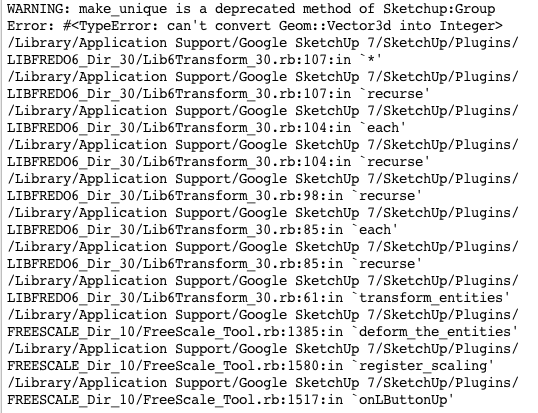
            Here is the Ruby Console result from attempting to taper scale.

            I am using SU7, OS 10.5.6.

            Thanks!

            Picture 1.png

            Cheers, Chuck

            OTB Designworks is on Youtube

            6 core nMP, 32 gig RAM, (2) D700 GPU's, dual monitors

            1 條回覆 最後回覆 回覆 引用 0
            • D 離線
              Daniel S
              最後由 編輯

              Fredo:

              When i put in the ruby console

              Traductor.string_to_length_formula "20"
              

              It returns:

              Traductor.string_to_length_formula "20"
              nil

              When i have open the ruby console and try to use the dialog box don`t report anything.
              I have the same problem with the taper.. it dosen´t accept what i put on the dialog box.

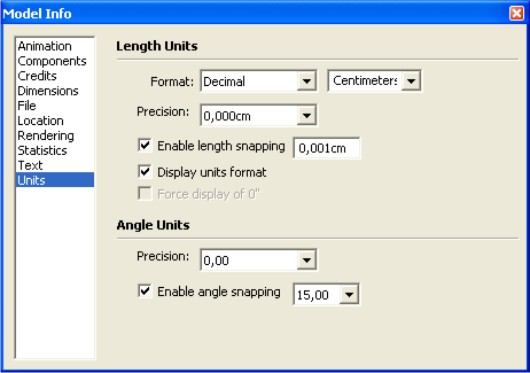
              I attach a screenshoot of my units.

              Daniel S

              myunits.jpg

              1 條回覆 最後回覆 回覆 引用 0
              • T 離線
                TeKnoel
                最後由 編輯

                this looks great! thanks for your hard work

                1 條回覆 最後回覆 回覆 引用 0
                • EarthMoverE 離線
                  EarthMover
                  最後由 編輯

                  Holy Sh!t! Just what I was thinking of asking for the other day. I love the taper. Reminds me of the Falloff function in Modo. Thanks Fredo!

                  3D Artist at Clearstory 3D Imaging
                  Guide Tool at Winning With Sketchup
                  Content Creator at Skapeup

                  1 條回覆 最後回覆 回覆 引用 0
                  • G 離線
                    gaganraj
                    最後由 編輯

                    phenomenal tool. works perfectly on my windows machine. same issue as kannonbal on my mac.

                    i'm amazed at how intuitive and simple such a great tool can me made. I absolutely love the little green check mark!! such a great idea. This will make SDS proxies so much easier! thanks!

                    1 條回覆 最後回覆 回覆 引用 0
                    • fredo6F 離線
                      fredo6
                      最後由 編輯

                      To Daniel S(on problem of dimension dialog box)

                      I don't understand what is happening.
                      Can you then try the 3 commands below, one by one

                      
                      Traductor.string_to_length "20"


                      "20".to_l


                      Traductor.string_to_float_formula "20"


                      Apparently other users have not reported the problem (yet). So it may be something specific to your environment.

                      Fredo

                      1 條回覆 最後回覆 回覆 引用 0
                      • fredo6F 離線
                        fredo6
                        最後由 編輯

                        To Chuck (Kannonbal) on issues with Taper Scale

                        I made an update to LibFredo6 in relation with the issues you signaled.
                        Could you download and install again LibFredo6 and advise if you still have the problem

                        Thanks

                        Fredo

                        1 條回覆 最後回覆 回覆 引用 0
                        • fredo6F 離線
                          fredo6
                          最後由 編輯

                          @unknownuser said:

                          Did anybody see my jaw? I lost it somewhere...

                          Fredo, the Taper function looks killer! If it does the job on Nested Components and Groups as well, then people don't have to explode the geometry anymore to perform a Free Form Deformation on it.

                          The only thing I didn't understand about the YouTube video was when you scaled that ship. What were you demonstrating there?

                          Coen,

                          Thanks for your encouragements.

                          Taper Scale should work on nested components and groups, but it has to make all components unique and explode all curves. So it's a little bit destructive. No mystery, Tapering is not a transformation that can preserve the unicity of a single definition for components (same rule as for Sketchy FFD).

                          For my ship, the purpose was just to show that Free Scale can handle large models full of components and groups, because it is actually just based on regular Scaling. Free Scale is not destructive at all, in contrast with TaperScale. Otherwise nothing special.

                          Fredo

                          1 條回覆 最後回覆 回覆 引用 0
                          • D 離線
                            Daniel S
                            最後由 編輯

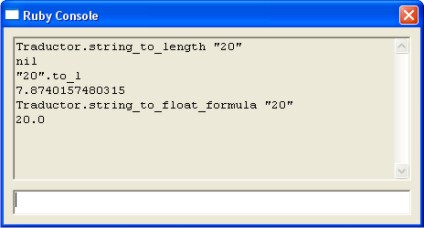
                            Fredo: This is the ruby console result when I enter the commands:

                            Traductor.string_to_length "20"
                            nil
                            "20".to_l
                            7.8740157480315
                            Traductor.string_to_float_formula "20"
                            20.0

                            I attach a screenshot too.

                            Daniel S


                            console.jpg

                            1 條回覆 最後回覆 回覆 引用 0
                            • fredo6F 離線
                              fredo6
                              最後由 編輯

                              Daniel,

                              I still don't see what it could be, and why you have it specifically in your environment.

                              Just in case, I made a slight change in LibFredo6. So you have to re-install it again and check if it improves. Can you try?

                              Fredo

                              1 條回覆 最後回覆 回覆 引用 0
                              • D 離線
                                Daniel S
                                最後由 編輯

                                I tried with the new version of LibFredo6 but have no luck... still can`t use the dimension dialog box.
                                But i find something strange in my Plugins directory: there is a new folder called "DEFPARAM_Dir" and is empty. I delete this folder, but every time that I open a new SketchUp it creates the folder again.
                                I never had this folder before.

                                Daniel S

                                1 條回覆 最後回覆 回覆 引用 0
                                • W 離線
                                  Whaat
                                  最後由 編輯

                                  Wow! Another brilliant plugin, Fredo6!

                                  SketchUp Plugins for Professionals

                                  1 條回覆 最後回覆 回覆 引用 0
                                  • fredo6F 離線
                                    fredo6
                                    最後由 編輯

                                    @daniel s said:

                                    I tried with the new version of LibFredo6 but have no luck... still can`t use the dimension dialog box.
                                    But i find something strange in my Plugins directory: there is a new folder called "DEFPARAM_Dir" and is empty. I delete this folder, but every time that I open a new SketchUp it creates the folder again.
                                    I never had this folder before.

                                    Daniel S

                                    Daniel,

                                    I think I know what it could be. I guess you have a set up where you should use the comma as the decimal separator.
                                    I made a change in LibFredo6. Maybe it will clear the issue.
                                    Thanks for your patience.

                                    PS: DEFPARAM_Dir is just the place where my scripts (today only FreeScale) stores the default parameter. It is a separate folder so that the parameters are not lost when upgrading.

                                    1 條回覆 最後回覆 回覆 引用 0
                                    • fredo6F 離線
                                      fredo6
                                      最後由 編輯

                                      @whaat said:

                                      Wow! Another brilliant plugin, Fredo6!

                                      Dale,

                                      You can be sure that I appreciate the compliment, coming from you.

                                      Fredo

                                      1 條回覆 最後回覆 回覆 引用 0
                                      • D 離線
                                        Daniel S
                                        最後由 編輯

                                        Now works!!!... but not well!! 😆
                                        I don`t know how to explain it in english but i attach a video showing that it dosen´t scale well (i put 30 and the result is 76,200cm). But now works!!

                                        Thank you for looking into this,
                                        Daniel S.

                                        PS. It must be only my problem because I remeber in the past I had problems with TIG`s slicer... was working for everyone but not for me and then he fixes the problem and said that was a problem about the comma.


                                        Video Showing the problem

                                        1 條回覆 最後回覆 回覆 引用 0
                                        • fredo6F 離線
                                          fredo6
                                          最後由 編輯

                                          @daniel s said:

                                          Now works!!!... but not well!! 😆
                                          I don`t know how to explain it in english but i attach a video showing that it dosen´t scale well (i put 30 and the result is 76,200cm). But now works!!

                                          Thank you for looking into this,
                                          Daniel S.

                                          Daniel,

                                          My fault in the update.
                                          Can you make a last try for today with the update I made in LibFredo6.

                                          Thanks again for your patience.

                                          Fredo

                                          1 條回覆 最後回覆 回覆 引用 0
                                          • D 離線
                                            Daniel S
                                            最後由 編輯

                                            Now is working right!
                                            Amazing Plugin!!

                                            Thank you Fredo!!!

                                            Daniel S

                                            1 條回覆 最後回覆 回覆 引用 0
                                            • 1
                                            • 2
                                            • 3
                                            • 4
                                            • 5
                                            • 6
                                            • 7
                                            • 2 / 7
                                            • 第一個貼文
                                              最後的貼文
                                            Buy SketchPlus
                                            Buy SUbD
                                            Buy WrapR
                                            Buy eBook
                                            Buy Modelur
                                            Buy Vertex Tools
                                            Buy SketchCuisine
                                            Buy FormFonts

                                            Advertisement