sketchucation logo sketchucation
    • 登入
    Oops, your profile's looking a bit empty! To help us tailor your experience, please fill in key details like your SketchUp version, skill level, operating system, and more. Update and save your info on your profile page today!
    🔌 Smart Spline | Fluid way to handle splines for furniture design and complex structures. Download

    [Plugin] 1001bit Tools - Architectural tools for SketchUp

    已排程 已置頂 已鎖定 已移動 Plugins
    243 貼文 65 Posters 234.4k 瀏覽 65 Watching
    正在載入更多貼文
    • 從舊到新
    • 從新到舊
    • 最多點贊
    回覆
    • 在新貼文中回覆
    登入後回覆
    此主題已被刪除。只有擁有主題管理權限的使用者可以查看。
    • G 離線
      gohch
      最後由 編輯

      @dizain said:

      Error:
      No such file to load -- C:/Program Files/Google/Google SketchUp 7/Plugins/1001bit/1001bit_loader.rb

      hi dizain,
      can you double check whether you have moved the 1001bit_loader.rb file to the Plugins folder?
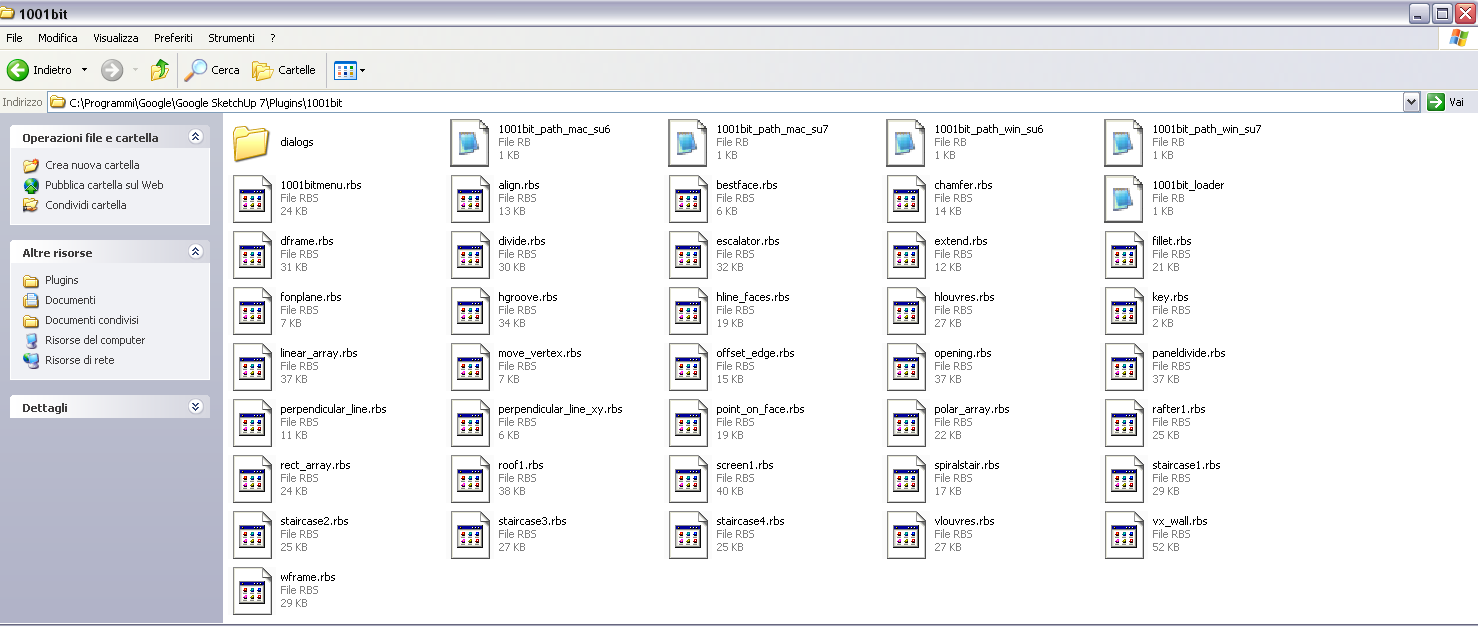
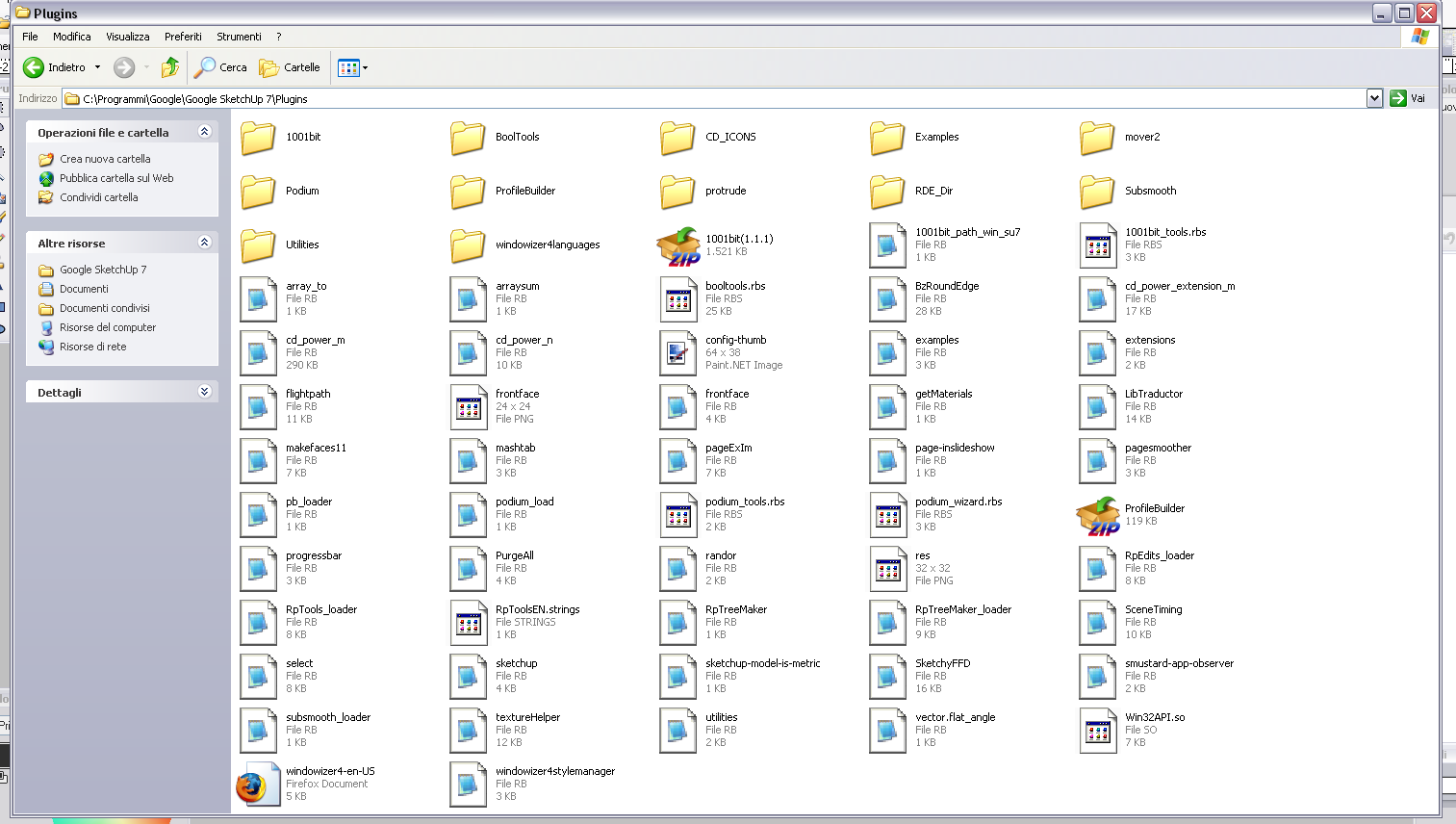
      1001bit_loader.rb file should be in 1001bit folder while
      1001bit_tools.rbs file should be in Plugins folder.
      thanks

      1 條回覆 最後回覆 回覆 引用 0
      • A 離線
        Aidus
        最後由 編輯

        Well I rather do all work by myself organized like I want it 😄

        CPU: Intel Core i7 Extreme Edition 965
        RAM: OCZ Gold DDR3 1600MHz 12Gb
        Video: Asus Radeon HD4870 X2 2Gb
        Mobo: Asus P6T Deluxe 1366 Intel X58

        1 條回覆 最後回覆 回覆 引用 0
        • D 離線
          dizain
          最後由 編輯

          Hi GOHCH,
          the files are in the folders as specified but the error continues ...
          the file 1001bit_tools.rbs must be in both folders, 1001bit and Plugins folder?
          Thanks

          1 條回覆 最後回覆 回覆 引用 0
          • D 離線
            dizain
            最後由 編輯

            For GOHCH
            My folders...


            1001bit folder.png


            Plugins folder.png

            1 條回覆 最後回覆 回覆 引用 0
            • F 離線
              fakircho
              最後由 編輯

              Some questions about the stair components. Will it be possible to have some attribute options
              on a stair so that you can select different handrails for example and also give it some parametric options
              or would one always have to make a new stair if changes are needed ?

              1 條回覆 最後回覆 回覆 引用 0
              • G 離線
                gohch
                最後由 編輯

                @dizain said:

                For GOHCH
                My folders...

                hi dizain,
                i believe it's the path/language:
                please use notepad to edit the 1001bit_path_win_su7.rb file in Sketchup's plugins folder.
                change the path
                $GH1001bit_path="C:/Program Files/Google/Google SketchUp 7/Plugins/1001bit"
                to
                $GH1001bit_path="C:/Programmi/Google/Google SketchUp 7/Plugins/1001bit"

                cheers!

                1 條回覆 最後回覆 回覆 引用 0
                • G 離線
                  gohch
                  最後由 編輯

                  @fakircho said:

                  Some questions about the stair components. Will it be possible to have some attribute options
                  on a stair so that you can select different handrails for example and also give it some parametric options
                  or would one always have to make a new stair if changes are needed ?

                  hi fakircho,

                  Current tools creates a new set of staircase and doesn't allow for real time editing of parameters.

                  As for handrails, you can use the vertical wall tool to create handrails. (the vertical wall tool can allow for selection of custom drawn profile)
                  meanwhile, i am working on a handrail tool that can extrude along curve-twist path correctly.

                  cheers!

                  1 條回覆 最後回覆 回覆 引用 0
                  • D 離線
                    dizain
                    最後由 編輯

                    Everything works ok ...
                    For the cost of the plugins?
                    Thanks Gohch.

                    1 條回覆 最後回覆 回覆 引用 0
                    • G 離線
                      gohch
                      最後由 編輯

                      @dizain said:

                      Everything works ok ...
                      For the cost of the plugins?
                      Thanks Gohch.

                      hi dizain,

                      Don't want to charge anything until i've sorted out the Mac version, and make sure that it is stable.
                      after that we'll have to put a stop to the free license.

                      The current beta test license is valid without time limit for this version of 1001bit tools.
                      Mac users can register for beta test license now and keep it for the Mac version later.
                      (sorry guys, still waiting for may macbook.... no stock, i hope they can deliver soon...)

                      As for retail price of 1001bit... 😐 😐 😐 please let me keep it secret for a little while longer. 😒 😒 😒
                      cheers! 😄

                      1 條回覆 最後回覆 回覆 引用 0
                      • BurkhardB 離線
                        Burkhard
                        最後由 編輯

                        Hope with the same license or should I register again?
                        I've had registered earlier but I'm a Mac user.

                        http://www.ia-plus.de

                        1 條回覆 最後回覆 回覆 引用 0
                        • G 離線
                          gohch
                          最後由 編輯

                          @burkhard said:

                          Hope with the same license or should I register again?
                          I've had registered earlier but I'm a Mac user.

                          hi Burkhard,
                          No need to register again. The activation key for windows and mac will be the same.
                          cheers!

                          1 條回覆 最後回覆 回覆 引用 0
                          • G 離線
                            gohch
                            最後由 編輯

                            hi everyone,
                            The Mac compatible version of 1001bit tools is finally ready for download!
                            (version 1.1.2)
                            http://www.1001bit.com/freedownload.html

                            Following are the updates in this version:
                            1)Works on both Mac and Windows
                            2)Toolbars included
                            3)Inference added to vertical wall tool
                            4)Bug fix on roof tool

                            For those who has the previous version, just unzip into same location and overwrite the files.
                            No need to register again.

                            Cheers and Have fun!

                            1 條回覆 最後回覆 回覆 引用 0
                            • BurkhardB 離線
                              Burkhard
                              最後由 編輯

                              Hi Gohch, thanks for the fast update. Have a nice time on Mac.

                              How to install on Mac ? ( The folder contains no 1001bit_loader.rbs just the 1001bit_loader.rb ) You mentioned before that the .rbs should go under Plugins while the .rb go into the 1001bit folder )

                              Burkhard

                              Sorry, I just noted you're faq has been updated, thanks

                              http://www.ia-plus.de

                              1 條回覆 最後回覆 回覆 引用 0
                              • utilerU 離線
                                utiler
                                最後由 編輯

                                Hi Goh Chun Hee,
                                Firstly, pardon my asking but can you tell me your first name? Or is it Goh or Goh Chun? I don’t want to be rude and get it wrong….

                                I have been playing with the 1001bits tools quite a bit and find them fantastic!!! I’m glad I stumbled across them, I guess you are being inundated with requested and comments via the pushpullbar and SCF forums….
                                I have a few questions about a couple of the tools.

                                Selection method…
                                I note that for some functions you need to select the face first then select the function whereas others require the function to be set up first then select the face. This would be much easier if the process was consistent across the board. Eg: select face first or set up function first.

                                Edits and Modify tools
                                I know you have an extend tool for lines but what I would like to see is a tool for lines and or faces to extend to a plane. Eg: say you have a roof of 5 degrees and you want the walls to extend and trim to the underside of the roof plane.
                                • Select faces and or edges of the top of wall
                                • Select face to extend to [whether in the group or not]
                                • Walls extend and clean up to the cut plane…..

                                Horizontal / Vertical Louvres
                                I think these need to have the option of a ‘zero’ thickness as the window and door functions do. This allows for painting a translucent material to a plane rather than having to paint both front and back…

                                Roof
                                I love this tool!!!! However, have you thought about creating a setup tool to create the selection face to define the roof? I know there is a ‘roof.rb’ tool created by TIG http://www.sketchucation.com/forums/scf/viewtopic.php?f=153&t=3470 which creates the whole roof profile. All you would need is to write a script that asks for
                                • Roof pitch
                                • Overhang length[vertical or sloping fascia]
                                • Skillion, Gable or hip roof

                                Also, give the option in the dialogue box to toggle on or off rafters or purlins. This would make the tool more flexible for use with structural steel buildings…..

                                And another idea; I note that the screens and grills tool allows for a profile to be selected. This would be fantastic to integrate into the rafters or purlins tool for such members as ‘I’ beams, ‘C’ and ‘Z’ purlins…. In the case of purlins, the ultimate would be for a line profile to be selected as they are generally 1.2mm thick and it makes not sense to create additional faces than needed.

                                BTW, as for the version, can you advise what version is current? I have 1.1.0 registered to utiler. [Windows]
                                Thanks again, I look forward to hearing from you soon….

                                Just Curious...

                                1 條回覆 最後回覆 回覆 引用 0
                                • G 離線
                                  gohch
                                  最後由 編輯

                                  hi Andrew,
                                  Thanks for the detailed suggestions.
                                  Most ppl call me Goh (which is actually family name) i'm perfectly happy to be called by that, easier to remember.

                                  version 1.1.2 works both for Windows and Mac. in fact. i'll be putting up version 1.1.3 in the weekend (after i've finished with some minor touchups)

                                  version 1.1.3 will include an extrude tool, which will extrude selected face profile through curved and sloping path(edges).
                                  SU's standard followme has the problem of twisting the profile along the way,
                                  this extrude tool will fix that.
                                  Meant for extruding handrails for spiral staircases and curved car park ramps.

                                  also the louvres in v1.1.3 will have the option of 0 thickness, single face louvres.

                                  there's also a newly added slope edges tool which is creates or modify selected edges to a fixed gradient.

                                  I hope to put it up for download by Sunday.
                                  The activation keys for version 1.1.0 is still valid (will remain valid for all version 1.1.x).

                                  cheers!
                                  Goh C H

                                  1 條回覆 最後回覆 回覆 引用 0
                                  • utilerU 離線
                                    utiler
                                    最後由 編輯

                                    Goh,
                                    Having a problem with Dividing panels..... [see attached]

                                    Each time I set my parameters then select the face, the panel is placed at the axis origin. What am I doing wrong!!!

                                    Cheers


                                    1001bit-divingPanel-issue.swf

                                    Just Curious...

                                    1 條回覆 最後回覆 回覆 引用 0
                                    • G 離線
                                      gohch
                                      最後由 編輯

                                      @utiler said:

                                      Goh,
                                      Having a problem with Dividing panels..... [see attached]

                                      Each time I set my parameters then select the face, the panel is placed at the axis origin. What am I doing wrong!!!

                                      Cheers

                                      hi utiler,
                                      can you send me the skp file? (if the file is big, just a skp file containing the problematic face will do.)
                                      Thanks & cheers!

                                      1 條回覆 最後回覆 回覆 引用 0
                                      • thomthomT 離線
                                        thomthom
                                        最後由 編輯

                                        @utiler said:

                                        Goh,
                                        Having a problem with Dividing panels..... [see attached]

                                        Each time I set my parameters then select the face, the panel is placed at the axis origin. What am I doing wrong!!!

                                        Cheers

                                        That's the same problem I had with horizontal louvres. vertical works fine oddly enough. Open the Ruby Console and see if you get any messages.

                                        Thomas Thomassen — SketchUp Monkey & Coding addict
                                        List of my plugins and link to the CookieWare fund

                                        1 條回覆 最後回覆 回覆 引用 0
                                        • G 離線
                                          gohch
                                          最後由 編輯

                                          @utiler said:

                                          Goh,
                                          Having a problem with Dividing panels..... [see attached]

                                          Each time I set my parameters then select the face, the panel is placed at the axis origin. What am I doing wrong!!!

                                          Cheers

                                          hi utiler,
                                          The panel divider is meant for dividing a face into a few segments;
                                          1 row and 1 column will be the minimum.
                                          1 row and 0 column doesn't really make sense, hence the failure.
                                          I'll put in checking mechanisms in the dialog boxes in future so that undesired entry are either corrected or highlighted to the user.
                                          cheers!

                                          1 條回覆 最後回覆 回覆 引用 0
                                          • G 離線
                                            gohch
                                            最後由 編輯

                                            @thomthom said:

                                            That's the same problem I had with horizontal louvres. vertical works fine oddly enough. Open the Ruby Console and see if you get any messages.

                                            hi thomthom,
                                            you're right, there's a bug there. just emailed you the patched hlouvres.rbs file.
                                            I'll put this in the version 1.1.3 release, hopefully tomorrow or day after.
                                            cheers!

                                            1 條回覆 最後回覆 回覆 引用 0
                                            • 1
                                            • 2
                                            • 9
                                            • 10
                                            • 11
                                            • 12
                                            • 13
                                            • 11 / 13
                                            • 第一個貼文
                                              最後的貼文
                                            Buy SketchPlus
                                            Buy SUbD
                                            Buy WrapR
                                            Buy eBook
                                            Buy Modelur
                                            Buy Vertex Tools
                                            Buy SketchCuisine
                                            Buy FormFonts

                                            Advertisement