sketchucation logo sketchucation
    • 登入
    Oops, your profile's looking a bit empty! To help us tailor your experience, please fill in key details like your SketchUp version, skill level, operating system, and more. Update and save your info on your profile page today!
    🔌 Smart Spline | Fluid way to handle splines for furniture design and complex structures. Download

    Construction & Working Drawings - Discussion

    已排程 已置頂 已鎖定 已移動 LayOut Discussions
    layout
    453 貼文 114 Posters 406.1k 瀏覽 114 Watching
    正在載入更多貼文
    • 從舊到新
    • 從新到舊
    • 最多點贊
    回覆
    • 在新貼文中回覆
    登入後回覆
    此主題已被刪除。只有擁有主題管理權限的使用者可以查看。
    • TandemT 離線
      Tandem
      最後由 編輯

      You are right, plus the goal of the OP was to see/show examples of drawings. Sorry, the title throw me off. 😳

      1 條回覆 最後回覆 回覆 引用 0
      • ashscottA 離線
        ashscott
        最後由 編輯

        I'm currently working on a project for a kitset company doing some assembly instructions. They have previously just used jpegs from SU to show the parts of the kitset apart so that the user can understand how they fit together but this seems like a frustratingly slow way of doing things. Has anyone managed to do this kind of thing in layout showing parts in different positions based on SU scenes etc?

        I tried this a long time ago with proper animation but layout couldn't recognize the animated part positions.

        Any clever ideas are much appreciated

        Just some stuff I do with Sketchup.

        1 條回覆 最後回覆 回覆 引用 0
        • KrisidiousK 離線
          Krisidious
          最後由 編輯

          there are a few exploded view type plugins... I forget the names.

          By: Kristoff Rand
          Home DesignerUnique House Plans

          1 條回覆 最後回覆 回覆 引用 0
          • ashscottA 離線
            ashscott
            最後由 編輯

            @unknownuser said:

            there are a few exploded view type plugins... I forget the names.

            Yeah I have used them, my problem is that layout doesn't seem to recognize their geometry positions unless I save a scene for every single position (like tweens from Keyframe Animation) which is super slow and confusing.

            I just wondered if anyone had a more efficient hack for this

            Just some stuff I do with Sketchup.

            1 條回覆 最後回覆 回覆 引用 0
            • KrisidiousK 離線
              Krisidious
              最後由 編輯

              None of them make the scene for you? I thought they did. made the blown up version and done version.

              By: Kristoff Rand
              Home DesignerUnique House Plans

              1 條回覆 最後回覆 回覆 引用 0
              • ashscottA 離線
                ashscott
                最後由 編輯

                Oh perhaps they do. I just haven't seen one that translates those positions to layout - layout seems to only be able to read on position of the geometry for each sketchup file.

                Can you remember which plugins you had seen?

                Just some stuff I do with Sketchup.

                1 條回覆 最後回覆 回覆 引用 0
                • KrisidiousK 離線
                  Krisidious
                  最後由 編輯

                  A have a few ...

                  favicon

                  (www.smustard.com)

                  http://sketchucation.com/forums/viewtopic.php?t=24390

                  Dave has a tut on it.

                  favicon

                  (www.finewoodworking.com)

                  By: Kristoff Rand
                  Home DesignerUnique House Plans

                  1 條回覆 最後回覆 回覆 引用 0
                  • ashscottA 離線
                    ashscott
                    最後由 編輯

                    Both great tools, but layout doesn't recognize the geometry positions

                    Just some stuff I do with Sketchup.

                    1 條回覆 最後回覆 回覆 引用 0
                    • KrisidiousK 離線
                      Krisidious
                      最後由 編輯

                      what? it doesn't? you're saying you have a scene with the geometry blown up with the plugin and ;layout won't show it as blown up? share the model?

                      By: Kristoff Rand
                      Home DesignerUnique House Plans

                      1 條回覆 最後回覆 回覆 引用 0
                      • bmikeB 離線
                        bmike
                        最後由 編輯

                        no plugins, but I use my model and then either pull it apart and save scenes, or if i need multiple views use scenes and layers, to keep the camera in the same location. the problem i had with the plugin(s?) i tried was that i always needed to tweak the 'explode' distance depending on the view and the part... if i had to manually adjust them anyways it made sense just to do it by hand.

                        but that could be tedious if you have lots of products to illustrate.

                        mike beganyi design + consulting llc

                        1 條回覆 最後回覆 回覆 引用 0
                        • ashscottA 離線
                          ashscott
                          最後由 編輯

                          @unknownuser said:

                          what? it doesn't? you're saying you have a scene with the geometry blown up with the plugin and ;layout won't show it as blown up? share the model?

                          I think we might be missing each other's points. If I have geometry in unexploded position and create scene 1, it will register the geometry in the position. If I then explode that geometry and create scene 2 the geometry will now be registered in the exploded position. If I go back to scene 1 my geometry can switch back (if I've used the right plugins). But when I send that file to layout the geometry is in the same position for both scenes.

                          @unknownuser said:

                          but I use my model and then either pull it apart and save scenes

                          Yeah, I was hoping to avoid this 😕

                          Just some stuff I do with Sketchup.

                          1 條回覆 最後回覆 回覆 引用 0
                          • S 離線
                            sonder
                            最後由 編輯

                            In case anyone is interested, Trimble came to my office and did an in depth series that will be highlighted in much more detail in the upcoming book I'm co-authoring with Matt Donley.
                            http://www.youtube.com/playlist?list=PL-bndkJaV8A6tVUVIlqFHMAcodO8aATrh

                            1 條回覆 最後回覆 回覆 引用 0
                            • ashscottA 離線
                              ashscott
                              最後由 編輯

                              This is great work Nick. Thanks very much.

                              I've been working my way through a set of mechanical engineering working drawings and have been surprised how few plugins I really need once I get a good process organized.

                              I recently heard someone referring to the programming language PHP as "messy" and someone replied that PHP isn't messy but is accessible which means that learners can use it fast and as a result can make a mess but once you know how to use it properly you can do amazing things with it (Facebook runs on PHP).

                              I feel that Sketchup falls into this category - there is a lot of messy stuff done with SU because it is so accessible (which is great because the barrier to entry is so low) but once you really know how to use it you can create attractive, tidy, practical work.

                              Nick, you have demonstrated this last point to me many times - thanks.

                              EDIT: Added the first video for to get people started.

                              Just some stuff I do with Sketchup.

                              1 條回覆 最後回覆 回覆 引用 0
                              • jujuJ 離線
                                juju
                                最後由 編輯

                                @unknownuser said:

                                In case anyone is interested, Trimble came to my office and did an in depth series that will be highlighted in much more detail in the upcoming book I'm co-authoring with Matt Donley.
                                http://www.youtube.com/playlist?list=PL-bndkJaV8A6tVUVIlqFHMAcodO8aATrh

                                excellent! Thanks for the video link...

                                now stop wasting time on the internet and finish the book already, take my money dammit!

                                Save the Earth, it's the only planet with chocolate.

                                1 條回覆 最後回覆 回覆 引用 0
                                • JasonWDJ 離線
                                  JasonWD
                                  最後由 編輯

                                  @ashscott said:

                                  @unknownuser said:

                                  but I use my model and then either pull it apart and save scenes

                                  Yeah, I was hoping to avoid this 😕

                                  I would be super interested to know if you find a solution to this...

                                  I have always been in a position that I need to get drawings out so fast that I just do it the manual way!

                                  Normally my furniture drawings have a Furniture_exploded.skp file next to them that I pull all the elements of the model out (for instance) 500mm to get the right look.

                                  Explode example

                                  Also this kind of thing (can't find the layout file it is attached to). Odd that it has notes in SU for me!
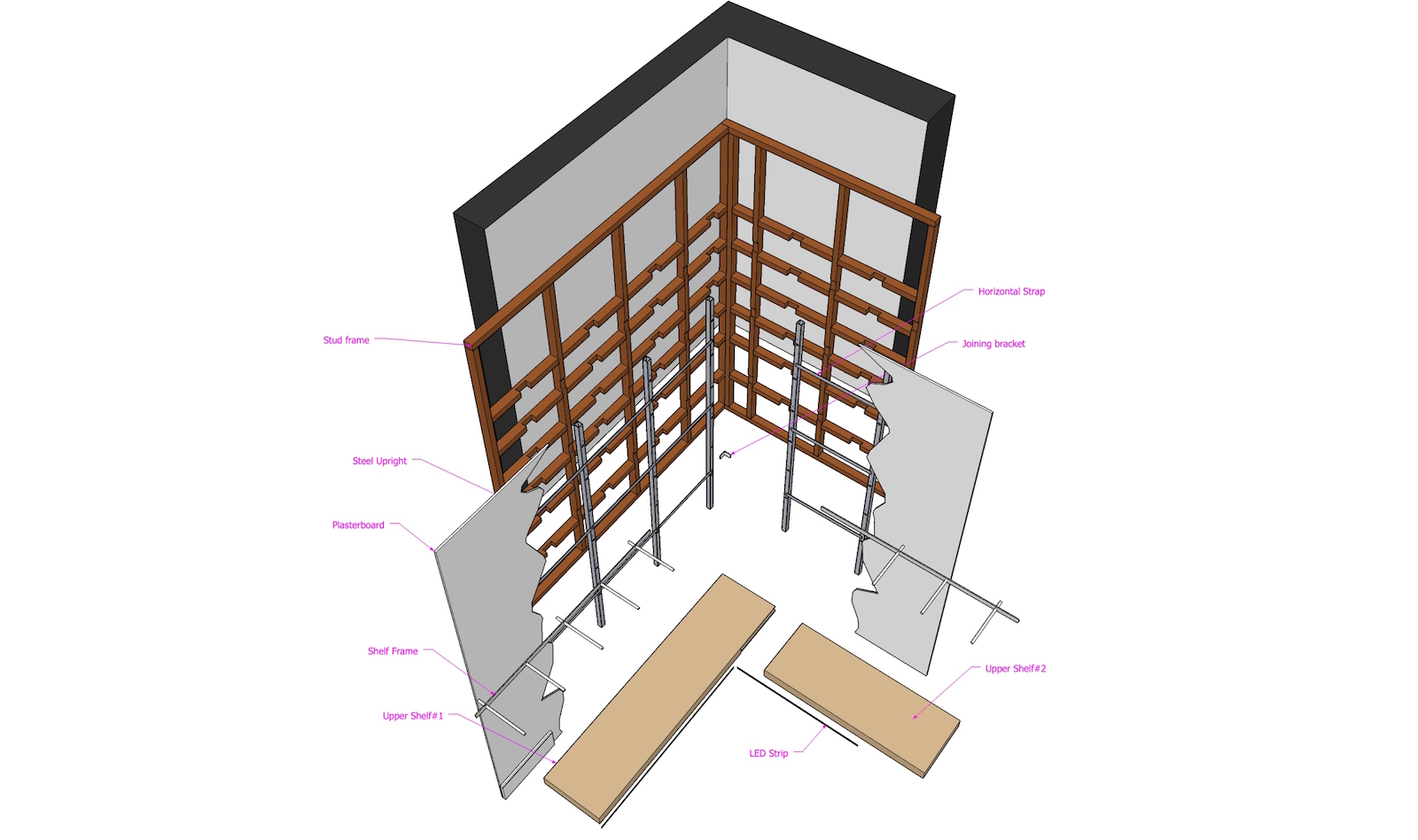
                                  Shelf Supports01 explode.jpg

                                  SketchUp, Thea Render, Vectorworks PC and Mac - Full LayOut workflow Concept>Production

                                  1 條回覆 最後回覆 回覆 引用 0
                                  • D 離線
                                    driven
                                    最後由 編輯

                                    Link Preview Image
                                    SketchUp Plugins | PluginStore | SketchUcation

                                    SketchUp Plugin and Extension Store by SketchUcation provides free downloads of hundreds of SketchUp extensions and plugins

                                    favicon

                                    (sketchucation.com)

                                    hi jason, have you tried this one...

                                    learn from the mistakes of others, you may not live long enough to make them all yourself...

                                    1 條回覆 最後回覆 回覆 引用 0
                                    • JasonWDJ 離線
                                      JasonWD
                                      最後由 編輯

                                      @driven said:

                                      Link Preview Image
                                      SketchUp Plugins | PluginStore | SketchUcation

                                      SketchUp Plugin and Extension Store by SketchUcation provides free downloads of hundreds of SketchUp extensions and plugins

                                      favicon

                                      (sketchucation.com)

                                      hi jason, have you tried this one...

                                      I havn't for a while, but yes!

                                      I think the problem is I like to show exploded stuff in Perspective and that creates challenges for seeing everything nicely in the explosion.

                                      The most annoying thing is that it interrupts my workflow because it makes you have another copy of the SU geometry in a separate file just for the explosion

                                      SketchUp, Thea Render, Vectorworks PC and Mac - Full LayOut workflow Concept>Production

                                      1 條回覆 最後回覆 回覆 引用 0
                                      • S 離線
                                        sonder
                                        最後由 編輯

                                        @jasonwd said:

                                        @driven said:

                                        Link Preview Image
                                        SketchUp Plugins | PluginStore | SketchUcation

                                        SketchUp Plugin and Extension Store by SketchUcation provides free downloads of hundreds of SketchUp extensions and plugins

                                        favicon

                                        (sketchucation.com)

                                        hi jason, have you tried this one...

                                        I havn't for a while, but yes!

                                        I think the problem is I like to show exploded stuff in Perspective and that creates challenges for seeing everything nicely in the explosion.

                                        The most annoying thing is that it interrupts my workflow because it makes you have another copy of the SU geometry in a separate file just for the explosion

                                        Rather than creating a separate file, why not just copy and create a separate group for the expoded view and set that on its own layer; then create the "exploded scene". That way, if each element is a component, you only have to modify once, in a single file.

                                        1 條回覆 最後回覆 回覆 引用 0
                                        • JasonWDJ 離線
                                          JasonWD
                                          最後由 編輯

                                          @unknownuser said:

                                          @jasonwd said:

                                          The most annoying thing is that it interrupts my workflow because it makes you have another copy of the SU geometry in a separate file just for the explosion

                                          Rather than creating a separate file, why not just copy and create a separate group for the expoded view and set that on its own layer; then create the "exploded scene". That way, if each element is a component, you only have to modify once, in a single file.

                                          I think this came about because there were so many LayOut critical scenes in the SU file that if I created a new layer I would have to Update all the scenes with that new layer off. That's my excuse anyway!

                                          SketchUp, Thea Render, Vectorworks PC and Mac - Full LayOut workflow Concept>Production

                                          1 條回覆 最後回覆 回覆 引用 0
                                          • pbacotP 離線
                                            pbacot
                                            最後由 編輯

                                            @jasonwd said:

                                            @unknownuser said:

                                            @jasonwd said:

                                            The most annoying thing is that it interrupts my workflow because it makes you have another copy of the SU geometry in a separate file just for the explosion

                                            Rather than creating a separate file, why not just copy and create a separate group for the expoded view and set that on its own layer; then create the "exploded scene". That way, if each element is a component, you only have to modify once, in a single file.

                                            I think this came about because there were so many LayOut critical scenes in the SU file that if I created a new layer I would have to Update all the scenes with that new layer off. That's my excuse anyway!

                                            Yeah that's tough, but now you can use the addlayer plugin for those situations.

                                            MacOSX MojaveSketchUp Pro v19 Twilight v2 Thea v3 PowerCADD

                                            1 條回覆 最後回覆 回覆 引用 0
                                            • 1
                                            • 2
                                            • 19
                                            • 20
                                            • 21
                                            • 22
                                            • 23
                                            • 22 / 23
                                            • 第一個貼文
                                              最後的貼文
                                            Buy SketchPlus
                                            Buy SUbD
                                            Buy WrapR
                                            Buy eBook
                                            Buy Modelur
                                            Buy Vertex Tools
                                            Buy SketchCuisine
                                            Buy FormFonts

                                            Advertisement