Profile Builder released!
-
-
@unknownuser said:
here's another little glitch i am running into . . .I trace a path for a door casing and it seems to follow the path fine, but then when I finish the command. .there's nothing there!
Not to be "yutz" or anything about this--but I am still having this problem. I pick out a baseboard profile, start drawing around the base of the wall and then about 2 or 3 lines into it. . .zap! it's gone. The tool remains active, it just gives up during the process. I am doing this on a fairly complex model, but the task I am asking it to do is fairly simple. Does that have anything to do with it? Could it be the combnation of Inside and outside corners? on a fresh model . .. say a simple cube, it works fine. I just don't know . . .
-
i don't mean to be rude, (well maybe a little) but there seems to be better customer support for the free scripts than the pay ones.
 has anyone noticed this?
if profilebuilder & SDS weren't so F!@##$g amazing i'd be terribly pissed! -
@xrok1 said:
i don't mean to be rude, (well maybe a little) but there seems to be better customer support for the free scripts than the pay ones.
has anyone noticed this?
Ouch! Sorry xrok! I thought I had answered your question but then when I reviewed the posts again, I noticed you posted the kitchen.skp file which I don't think I ever tested. (I will check tonight...)David_H: Are you using SU6? Is it possible for you to try the same file using SU7? I believe this issue is only present in SU6. However, I have not been able to determine the cause or a solution to it yet.
-

-
@xrok1 said:
clicking the text doesn't work for me, try editing the the profile on the left side of the door. most of the time the floor get selected instead. further more if your in edit profile mode and you select something else by accident there doesn't seem to be a way to tell profilebuilder to cancel or forget the operation, which leaves your profile hidden.
try the attached file please, let me know how you make out selecting the profile on the left of the door?
I had no trouble at all double-clicking the text to enter 'path-edit' mode. It was a bit easier then I orbited the view below the floor first but it was not necessary.
If you select something else by accident, just keep hitting 'undo' until the profile member reappears.
-
dale,
what about my ages old problem with custom libraries (custom profiles disappear from it when you open PB again)? i sent you a PM on this and opened a topic at the smustard forum too but even so the problem did not seem to call your attention.
-
edson,
your problem might stem from a bad podium install. (and i'm guessing you have profilebuilder in your user library?)
http://www.sketchucation.com/forums/scf/viewtopic.php?p=146352#p146352
http://www.sketchucation.com/forums/scf/viewtopic.php?p=146640#p146640seriously, i suggest you follow the steps in those threads and fix the installation..
if you don't want to though, you can at least try to change the permissions on the plugin folder that podium creates.
go:
user/library/application support/google sketchup 7/sketchupin there, you'll see a folder called 'plugins'... that's the one created by the podium install.. right click that folder and choose 'Get Info'
at the bottom of the info window, you'll see the permissions are set like:
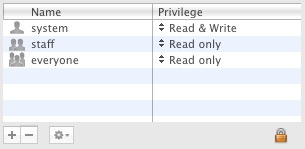
that's saying that you can't write anything in the folder which is where the profile builder library is located.
click the lock at the bottom right, type in your password, then click the '+' sign at bottom left.
you should now see a users&groups list which will have 'Administrators' and any user accounts you have on the system..
select Administrators and the permissions will change to:
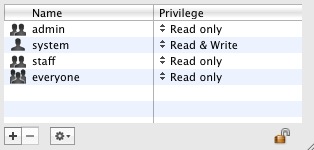
click on 'read only' next to 'admin' and change that to 'Read & Write'.
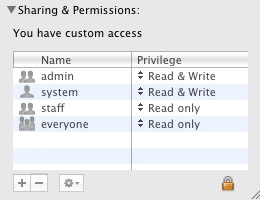
you can now freely add files to the folder (if you're using the mac from an admin account)i'm not even sure if this is the problem with ProfileBuilder not saving your custom libraries but it's the first thing i thought of.. fwiw, i have PB placed in the standard plugin folder and it works fine.
-
Thanks Jeff,
Let me know if that works for you Edson.
-
thanks Whaat, i actually started doing it through the outliner instead and found that much less finicky.
otherwise the only way it works for me is to single click to highlight the text then double click it ???
-
@unknownuser said:
edson,
your problem might stem from a bad podium install. (and i'm guessing you have profilebuilder in your user library?)
http://www.sketchucation.com/forums/scf/viewtopic.php?p=146352#p146352jeff and dale,
the method posted above worked fine, thanks. it was probably a permissions problem.as for the other fix suggested by jeff, it did not work for me even though i did it twice exactly as described. after doing it i had no podium in my plugins menu. so i reverted to the old way in this respect.
regards
-
@unknownuser said:
otherwise the only way it works for me is to single click to highlight the text then double click it ???
hmmm, would it be possible for you to have the text preselected when it appears? i think that would solve the problem

-
@edson said:
as for the other fix suggested by jeff, it did not work for me even though i did it twice exactly as described. after doing it i had no podium in my plugins menu. so i reverted to the old way in this respect.
regards
hmm,that's strange because it works on my end.. i only have the evaluation version on my macs but it shouldn't make a difference. (?)
just to be a little more clear on that.. did you remove the actual plugin folder in the user library? (not just the contents).. a fresh install of SU will only have 2 items items in: user/library/application support/google sketchup 7
they are a folder named 'Layout' and one named 'SketchUp' both of which contain autosave, shortcut prefs, old colors, and templates.. the license file will also be placed in there once it's registered. the plugin folder installed with sketchup is in the boot drive's app support.
fwiw, i contacted TBD about 2 weeks ago on this issue and linked him to these threads here.. he responded saying he wasn't the writer of the installer and he'd pass the info along.. i haven't heard back yet.
if they do in fact deem the install locations a mistake (which i truly believe is), it's going to be a little nightmare to get everyone straightened out again.. probably the easiest way to do it would be to have everyone reinstall SU and their rubies.
-
@unknownuser said:
just to be a little more clear on that.. did you remove the actual plugin folder in the user library? (not just the contents).. a fresh install of SU will only have 2 items items in: user/library/application support/google sketchup 7
jeff,
what i did was:
moved the 2 podium files from user/library/application support/podium
moved everything except the two aliases from user/library/application support/google sketchup 7/plugins to the normal plugins folder
deleted the folder user/library/application support/google sketchup 7/pluginsis there anything else i should have done?
-
@edson said:
jeff,
what i did was:
moved the 2 podium files from user/library/application support/podium
moved everything except the two aliases from user/library/application support/google sketchup 7/plugins to the normal plugins folder
deleted the folder user/library/application support/google sketchup 7/pluginsis there anything else i should have done?
that sounds about right.
when you say you moved the 2 podium files, did you move them into the regular SUplugin folder?basically, the podium plugin works like many of the others.. there's a loader (podium_load.rb) and the package containing all the scripting, UI, prefs, etc. (Podium.bundle)..
those two files go into the plugin folder in the same way as all the others.. if you ask me, i'd rather just receive the two files with instructions on where to put them instead of what the installer does now with creating new folders and a few aliases scattered around the system..
[and just to make sure you're moving the proper Podium.bundle file into the plugin folder and not one of it's aliases, you can right click on it and it will have an option to 'show package contents'.. if that option isn't available then it's not the right file]
-
The best plugin ever!
Simple as that.
Everyone go and buy it! Worth every penny!
-
great plugin, going to save me a lot of time.
is it possible to edit a profile which has already been extruded along a load of paths, and have the paths update to the new profile? or do i just have to make the edited one a new profile and re-extrude it?
edit
also the bug that you mention about a profile dissaperaring when reversing direction affects me, but more recently im getting it never apprearing in the first place. (SKP pro 6) any fix for this yet?
edit 2
this bug only seems to affect paths with more than one change of direction. it can be gotten round sometimes by deselecting and reselecting one of the paths, but this only seems to work on simple profiles.
3
sometimes it works tho. weird!
4
it'd be nice to have manual selection of the placement point too, maybe in another version


and to be able to make the profile builder popup dissapear into its title bar, like materials popup. but i guess ruby doesnt control that eh?5
is there a limit to the complexity of the profile? cos it refuses to do anything with my more complex ones

-
also its now started dropping faces after sending a profile along a path, which i then have to manually add...bit strange?
-
@sir said:
is it possible to edit a profile which has already been extruded along a load of paths, and have the paths update to the new profile? or do i just have to make the edited one a new profile and re-extrude it?
Well, if you first select all the profile members that you want to change, then click the 'Edit Member Properties' button. If you check the 'Profile' box, then all of the selected members will switch to whatever profile is currently shown in the dialog box. There is no need to re-extrude anything.
@unknownuser said:
also the bug that you mention about a profile dissaperaring when reversing direction affects me, but more recently im getting it never apprearing in the first place. (SKP pro 6) any fix for this yet?
Sorry, there is no fix for this. It seems to only happen in SU6, so it seems like it is a SketchUp bug in version 6.@unknownuser said:
sometimes it works tho. weird!
yes it is very baffling for me...@unknownuser said:
it'd be nice to have manual selection of the placement point too, maybe in another version
You have full control over placement point by using the x and y offset values. I am not sure what you mean here.
@unknownuser said:
and to be able to make the profile builder popup dissapear into its title bar, like materials popup. but i guess ruby doesnt control that eh?
Sorry, not possible@unknownuser said:
is there a limit to the complexity of the profile? cos it refuses to do anything with my more complex ones
I have tried some pretty complex profiles and never had any problems. Can you upload the SKP showing the profile you are trying to use? Maybe you found a bug. Thanks!
Let me know if you need any more help!
Dale -
thanks for the replies. ive got a pressing deadlin on monday, should be able to uplaod the profiles that are causing problems after.





Advertisement