sketchucation logo sketchucation
    • 登入
    Oops, your profile's looking a bit empty! To help us tailor your experience, please fill in key details like your SketchUp version, skill level, operating system, and more. Update and save your info on your profile page today!
    🔌 Smart Spline | Fluid way to handle splines for furniture design and complex structures. Download

    [Plugin] Selection Toys

    已排程 已置頂 已鎖定 已移動 Plugins
    594 貼文 121 Posters 398.5k 瀏覽 121 Watching
    正在載入更多貼文
    • 從舊到新
    • 從新到舊
    • 最多點贊
    回覆
    • 在新貼文中回覆
    登入後回覆
    此主題已被刪除。只有擁有主題管理權限的使用者可以查看。
    • GaieusG 離線
      Gaieus
      最後由 編輯

      OK, if this is how it is then I leave it. I could get around in other ways (elect active does what I needed for instance) so not a biggie.

      Gai...

      1 條回覆 最後回覆 回覆 引用 0
      • thomthomT 離線
        thomthom
        最後由 編輯

        Even funnier - try rotating. 😄

        What a beautiful ballet!

        Thomas Thomassen — SketchUp Monkey & Coding addict
        List of my plugins and link to the CookieWare fund

        1 條回覆 最後回覆 回覆 引用 0
        • thomthomT 離線
          thomthom
          最後由 編輯

          Make an even deeper nested model and you can make a funky movie "exploding" the model to display it's structure - only to return to normal after a full rotation. 😄 😄

          Thomas Thomassen — SketchUp Monkey & Coding addict
          List of my plugins and link to the CookieWare fund

          1 條回覆 最後回覆 回覆 引用 0
          • GaieusG 離線
            Gaieus
            最後由 編輯

            I'll play around!
            😄


            Yes, rotting is something you could only see in 18th century Paris or Vienna!
            😆

            Gai...

            1 條回覆 最後回覆 回覆 引用 0
            • M 離線
              Mra
              最後由 編輯

              @thomthom said:

              @unknownuser said:

              Can't seem to turn off the "Edge loop" button, it is stuck!?

              It's a tool, the button stays down for as long as you use the tool. Activate another tool and the button goes back to its original state.

              Sorry for the late respsonse, but thanks for the reply!

              1 條回覆 最後回覆 回覆 引用 0
              • J 離線
                JPMays
                最後由 編輯

                I'm really having trouble figuring out to use this tool, but please forgive my ineptitude. I first downloaded and installed this in order to select all faces that are at a certain orientation (as Thom lists in his initial post). However, I can't figure out how to actually do that. Additionally, even attempting to use the tool that selects all faces doesn't appear to work. what am I doing wrong/how do i select faces with a particular orientation?

                Hofstadter's Law: It always takes longer than you expect, even when you take into account Hofstadter's Law.

                1 條回覆 最後回覆 回覆 引用 0
                • thomthomT 離線
                  thomthom
                  最後由 編輯

                  @jpmays said:

                  I'm really having trouble figuring out to use this tool, but please forgive my ineptitude. I first downloaded and installed this in order to select all faces that are at a certain orientation (as Thom lists in his initial post). However, I can't figure out how to actually do that

                  • Select a face
                  • Right-click the face
                  • Select > Coplanar Faces

                  @jpmays said:

                  Additionally, even attempting to use the tool that selects all faces doesn't appear to work.

                  There is no function to select all faces. There is a function that filters out the current selection to include only the selected faces.

                  Thomas Thomassen — SketchUp Monkey & Coding addict
                  List of my plugins and link to the CookieWare fund

                  1 條回覆 最後回覆 回覆 引用 0
                  • J 離線
                    JPMays
                    最後由 編輯

                    That's not exactly what I meant. See this thread http://forums.sketchucation.com/viewtopic.php?f=79&t=35393 that resolved the issue.

                    Hofstadter's Law: It always takes longer than you expect, even when you take into account Hofstadter's Law.

                    1 條回覆 最後回覆 回覆 引用 0
                    • T 離線
                      TheButtersShow
                      最後由 編輯

                      👍

                      Thanks! A Great Plugin.

                      For my purposes most useful for digging through nested Components and groups and selecting only the particular entities I need without the time consuming process of having to explode or enter the context of every single one.

                      👍

                      1 條回覆 最後回覆 回覆 引用 0
                      • 66searcher6 離線
                        66searcher
                        最後由 編輯

                        @ thomthom:
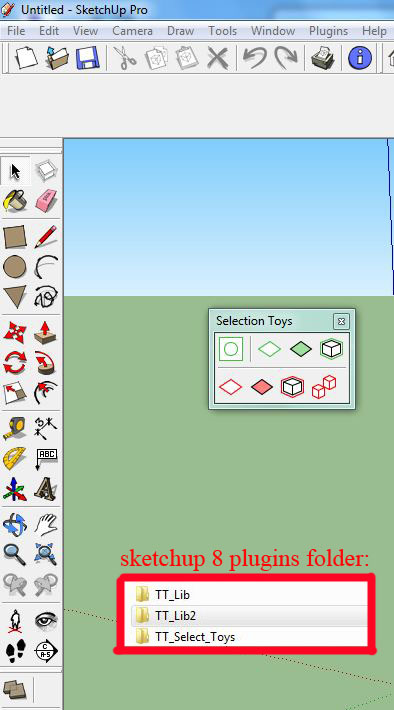
                        thanks for your great plugins.recently I've installed Sketchup 8 pro .and i have some kinds of problem with using selection toys ! many tools in toolbar are not loaded?!
                        would u help!?

                        03.jpg

                        http://hamidtoliat.deviantart.com/

                        1 條回覆 最後回覆 回覆 引用 0
                        • thomthomT 離線
                          thomthom
                          最後由 編輯

                          Do you get any error messages?

                          Thomas Thomassen — SketchUp Monkey & Coding addict
                          List of my plugins and link to the CookieWare fund

                          1 條回覆 最後回覆 回覆 引用 0
                          • 66searcher6 離線
                            66searcher
                            最後由 編輯

                            😉 i found it out !
                            i haven't checked tools in UI ! 😄
                            thank u anyway 👍


                            011.JPG

                            http://hamidtoliat.deviantart.com/

                            1 條回覆 最後回覆 回覆 引用 0
                            • Al HartA 離線
                              Al Hart
                              最後由 編輯

                              I have a suggestion for carrying over the name of the group as the name of the component definition as well:

                              The last three lines in this snippet:

                              		# Iterate through the rest of the copies
                              		protodef = proto.definition
                              		if (group_name != "")
                              			protodef.name = group_name
                              		end#if


                              It seems to work pretty well, and SketchUp adds #'s as needed to make the name unique.

                              Al Hart

                              http:wiki.renderplus.comimageseefRender_plus_colored30x30%29.PNG
                              IRender nXt from Render Plus

                              1 條回覆 最後回覆 回覆 引用 0
                              • thomthomT 離線
                                thomthom
                                最後由 編輯

                                I'll make a note of that. 👍

                                Thomas Thomassen — SketchUp Monkey & Coding addict
                                List of my plugins and link to the CookieWare fund

                                1 條回覆 最後回覆 回覆 引用 0
                                • D 離線
                                  danbig
                                  最後由 編輯

                                  I think I'm still missing something simple on how to operate this incredibly helpful plugin.

                                  I have a model with hundreds of instances of multiple components. I want to select all the instances of a single component definition. I cannot seem to get the plugin to do this; can someone go through the steps to perform this function?

                                  1 條回覆 最後回覆 回覆 引用 0
                                  • Dave RD 離線
                                    Dave R
                                    最後由 編輯

                                    Dan, this doesn't help you with the plugin I know but for something like what you want to do, couldn't you just right click on the component's thumbnail in the In Model component library and and choose Select Instances?

                                    Etaoin Shrdlu

                                    %

                                    (THERE'S NO PLACE LIKE)

                                    G28 X0.0 Y0.0 Z0.0

                                    M30

                                    %

                                    1 條回覆 最後回覆 回覆 引用 0
                                    • GaieusG 離線
                                      Gaieus
                                      最後由 編輯

                                      With the plugin, you should just right click on one instance and go to Instances > Select all or active (it can select instances even inside other components/groups)

                                      Gai...

                                      1 條回覆 最後回覆 回覆 引用 0
                                      • D 離線
                                        danbig
                                        最後由 編輯

                                        Hi Dave -

                                        Yes, that would work. Thanks for the tip. I haven't used the component library to browse components in my model very much, so I wasn't aware of that function.

                                        Gai - that's exactly how I'm trying to use the plugin, to no avail. I'm stumped.

                                        1 條回覆 最後回覆 回覆 引用 0
                                        • Dave RD 離線
                                          Dave R
                                          最後由 編輯

                                          FWIW, Csaba's directions work for me but using the Components tool on the Selection Toys toolbar doesn't seem to do anything.

                                          Etaoin Shrdlu

                                          %

                                          (THERE'S NO PLACE LIKE)

                                          G28 X0.0 Y0.0 Z0.0

                                          M30

                                          %

                                          1 條回覆 最後回覆 回覆 引用 0
                                          • thomthomT 離線
                                            thomthom
                                            最後由 編輯

                                            @dave r said:

                                            FWIW, Csaba's directions work for me but using the Components tool on the Selection Toys toolbar doesn't seem to do anything.

                                            Can you provide a sammple model and/or video?
                                            Any errors in the Ruby Console?

                                            Thomas Thomassen — SketchUp Monkey & Coding addict
                                            List of my plugins and link to the CookieWare fund

                                            1 條回覆 最後回覆 回覆 引用 0
                                            • 1
                                            • 2
                                            • 6
                                            • 7
                                            • 8
                                            • 9
                                            • 10
                                            • 29
                                            • 30
                                            • 8 / 30
                                            • 第一個貼文
                                              最後的貼文
                                            Buy SketchPlus
                                            Buy SUbD
                                            Buy WrapR
                                            Buy eBook
                                            Buy Modelur
                                            Buy Vertex Tools
                                            Buy SketchCuisine
                                            Buy FormFonts

                                            Advertisement