sketchucation logo sketchucation
    • 登入
    Oops, your profile's looking a bit empty! To help us tailor your experience, please fill in key details like your SketchUp version, skill level, operating system, and more. Update and save your info on your profile page today!
    🔌 Smart Spline | Fluid way to handle splines for furniture design and complex structures. Download

    [Plugin] Selection Toys

    已排程 已置頂 已鎖定 已移動 Plugins
    594 貼文 121 Posters 398.8k 瀏覽 121 Watching
    正在載入更多貼文
    • 從舊到新
    • 從新到舊
    • 最多點贊
    回覆
    • 在新貼文中回覆
    登入後回覆
    此主題已被刪除。只有擁有主題管理權限的使用者可以查看。
    • thomthomT 離線
      thomthom
      最後由 編輯

      Sorry - I forgot to include a file. Redownload.

      Thomas Thomassen — SketchUp Monkey & Coding addict
      List of my plugins and link to the CookieWare fund

      1 條回覆 最後回覆 回覆 引用 0
      • brookefoxB 離線
        brookefox
        最後由 編輯

        It was working in V7, but I can't get Sel Toys working in V8. Feeling stupid for a number of reasons.

        My configurtion of Sel Toys:

        C:\Program Files (x86)\Google\Google SketchUp 8\Plugins\TT_Lib
        C:\Program Files (x86)\Google\Google SketchUp 8\Tools\TT_Select_Toys

        After SU8 re-start:

        no context picks for Sel Toys
        no pick for Sel Toys in Tools menu drop down

        ~ Brooke

        1 條回覆 最後回覆 回覆 引用 0
        • thomthomT 離線
          thomthom
          最後由 編輯

          @brookefox said:

          C:\Program Files (x86)\Google\Google SketchUp 8\Plugins\TT_Lib
          C:\Program Files (x86)\Google\Google SketchUp 8\Tools\TT_Select_Toys

          Don't put plugins in the Tools folder.

          There should be

          C:\Program Files (x86)\Google\Google SketchUp 8\Plugins\TT_Lib\ - (inside, lots of .rb files)

          C:\Program Files (x86)\Google\Google SketchUp 8\Plugins\tt_selection_toys.rb
          C:\Program Files (x86)\Google\Google SketchUp 8\Plugins\TT_Select_Toys\

          Thomas Thomassen — SketchUp Monkey & Coding addict
          List of my plugins and link to the CookieWare fund

          1 條回覆 最後回覆 回覆 引用 0
          • brookefoxB 離線
            brookefox
            最後由 編輯

            OK. Thank you. I thought that since it is accessed by the tools menu..., but thinking is not my strong suite.

            @unknownuser said:

            You must enable it from Tools->Selection Toys->Enable Toolbar before it appears under View->Toolbars->Selection Toys.

            While the install didn't seem that clear to me, I didn't notice many install problems in the thread, so likely I am being thick. Perhaps because I assumed it was different than the norm when it is not. (Is the download count related to this, only 141 for such a useful tool? Or is that count only since the last update or somehow not reliable?)

            Thanks, again.

            ~ Brooke

            1 條回覆 最後回覆 回覆 引用 0
            • thomthomT 離線
              thomthom
              最後由 編輯

              Since last update - there's been thousands of downloads all together of the previous versions.

              With my more recent plugins I've started to add more detailed descriptions of how they should be installed.

              Thomas Thomassen — SketchUp Monkey & Coding addict
              List of my plugins and link to the CookieWare fund

              1 條回覆 最後回覆 回覆 引用 0
              • brookefoxB 離線
                brookefox
                最後由 編輯

                I will remove and try to re-install as now for me under Tools, there is no 'Selection Toys'; and so not surprisingly, under View->Toolbars there is no 'Selection Toys'. After entity pick, context menu does not show sel toy choices.

                Folders TT_Lib and TT_Select_Toys are both in Plugins, as is file tt_selection_toys.rb.


                sel toys.JPG

                ~ Brooke

                1 條回覆 最後回覆 回覆 引用 0
                • thomthomT 離線
                  thomthom
                  最後由 編輯

                  @brookefox said:

                  and so not surprisingly, under View->Toolbars there is no 'Selection Toys'.

                  You need to enable the toolbar under Tools -> Selection Toys -> Enable Toolbar

                  Thomas Thomassen — SketchUp Monkey & Coding addict
                  List of my plugins and link to the CookieWare fund

                  1 條回覆 最後回覆 回覆 引用 0
                  • brookefoxB 離線
                    brookefox
                    最後由 編輯

                    Thank you, but under Tools there is no 'Selection Toys.'

                    ~ Brooke

                    1 條回覆 最後回覆 回覆 引用 0
                    • thomthomT 離線
                      thomthom
                      最後由 編輯

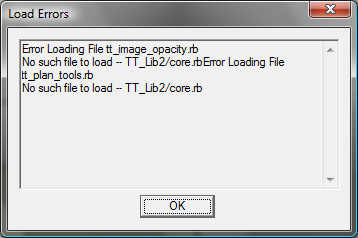
                      hmm.... no errors upon startup?

                      Thomas Thomassen — SketchUp Monkey & Coding addict
                      List of my plugins and link to the CookieWare fund

                      1 條回覆 最後回覆 回覆 引用 0
                      • brookefoxB 離線
                        brookefox
                        最後由 編輯

                        Yes, a few. This is not current; I will update it soon.

                        @unknownuser said:

                        (eval):6094: compile error
                        (eval):4921: syntax error, unexpected ',', expecting ')'
                        if (n1.between? (n2 - interval), (n2 + interval))

                                                    ^Error Loading File cd_power_extension_m.rb
                        

                        (eval):6094: compile error
                        (eval):4921: syntax error, unexpected ',', expecting ')'
                        if (n1.between? (n2 - interval), (n2 + interval))

                                                    ^Error Loading File cd_power_m.rb
                        

                        (eval):6094: compile error
                        (eval):4921: syntax error, unexpected ',', expecting ')'
                        if (n1.between? (n2 - interval), (n2 + interval))

                                                    ^no such file to load -- Projection/projection.rbError Loading File projection_extension.rb
                        

                        no such file to load -- Projection/projection.rbError Loading File protrude.rb
                        no such file to load -- protrude/protrude.rbError Loading File vismap2_menu.rb
                        can't convert nil into String

                        ~ Brooke

                        1 條回覆 最後回覆 回覆 引用 0
                        • thomthomT 離線
                          thomthom
                          最後由 編輯

                          They refer to other plugins. You seem to have multiple issues though. You might want to consider starting from scratch..

                          Thomas Thomassen — SketchUp Monkey & Coding addict
                          List of my plugins and link to the CookieWare fund

                          1 條回覆 最後回覆 回覆 引用 0
                          • brookefoxB 離線
                            brookefox
                            最後由 編輯

                            Yes, I thought they referred to other plugins, but you were kind enough to ask. I think I would much rather try to ferret out the problems with a few than mess with the score(s) that seem to be OK. After addressing the apparent issues, the current load error msg. is:

                            @unknownuser said:

                            Error Loading File tt_selection_toys.rb
                            undefined method `require_version' for TT_Lib:Module

                            ~ Brooke

                            1 條回覆 最後回覆 回覆 引用 0
                            • thomthomT 離線
                              thomthom
                              最後由 編輯

                              hm... and you have the latest TT_Lib (version 1.x) ?
                              Can you post a screen of the content of your TT_Lib folder?

                              Thomas Thomassen — SketchUp Monkey & Coding addict
                              List of my plugins and link to the CookieWare fund

                              1 條回覆 最後回覆 回覆 引用 0
                              • brookefoxB 離線
                                brookefox
                                最後由 編輯

                                Well, certainly, but I feel I have taken enough of your time and will try to re-DL and re-install in the likely event that I boobied somehow along the way...

                                Either way I will be back.

                                Thank you.


                                sel toys-tt_lib.JPG

                                ~ Brooke

                                1 條回覆 最後回覆 回覆 引用 0
                                • thomthomT 離線
                                  thomthom
                                  最後由 編輯

                                  It looks like you have an old version of TT_Lib installed. The dates of the files, and the lack of many of the files from the latest version would suggest this. You can confirm by typing TT_Lib::Version into the Ruby Console and see what it returns.

                                  If you recently did download TT_Lib but did not get 1.2.0 then maybe you're getting a cached version.

                                  Thomas Thomassen — SketchUp Monkey & Coding addict
                                  List of my plugins and link to the CookieWare fund

                                  1 條回覆 最後回覆 回覆 引用 0
                                  • brookefoxB 離線
                                    brookefox
                                    最後由 編輯

                                    @thomthom said:

                                    TT_Lib::Version into the Ruby Console returns.

                                    Results:

                                    @unknownuser said:

                                    TT_Lib::Version
                                    Error: #<NameError: (eval):2537: uninitialized constant TT_Lib::Version>
                                    (eval):2537

                                    Perhaps a cached version: that may let me off the stick a little for screwing things up.

                                    I re-DLd and installed and will advise if fix fails.

                                    Many thanks.

                                    ~ Brooke

                                    1 條回覆 最後回覆 回覆 引用 0
                                    • A 離線
                                      arjunmax09
                                      最後由 編輯

                                      I have sketchup pro 8 ..I've removed my old version of selection toys and downloaded the new one.I already have this 1.2.0 version of TT_lib. But everytime i start sketchup i get a dialog box saying ...Selection Toys requires a new version, 1.2.0, of TT_Lib. Sketchup pauses for a moment...then all the toolbars come in place and selection toys plugin works fine...what should i do to get rid of the dialog box??


                                      mesg.JPG

                                      when you fail at something....you haven't really failed...you've found one way the thing will not work out

                                      1 條回覆 最後回覆 回覆 引用 0
                                      • thomthomT 離線
                                        thomthom
                                        最後由 編輯

                                        What do you get when you enter TT_Lib::Version into the Ruby Console?

                                        Thomas Thomassen — SketchUp Monkey & Coding addict
                                        List of my plugins and link to the CookieWare fund

                                        1 條回覆 最後回覆 回覆 引用 0
                                        • A 離線
                                          arjunmax09
                                          最後由 編輯

                                          @thomthom said:

                                          What do you get when you enter TT_Lib::Version into the Ruby Console?

                                          I get this...

                                          TT_Lib::Version
                                          Error: #<NameError: (eval):2307: uninitialized constant TT_Lib::Version>
                                          (eval):2307

                                          wonder why i'm getting an error when selection toys plugin is working fine... 😒

                                          when you fail at something....you haven't really failed...you've found one way the thing will not work out

                                          1 條回覆 最後回覆 回覆 引用 0
                                          • thomthomT 離線
                                            thomthom
                                            最後由 編輯

                                            what? you get that error but Selection Toys is still loaded?

                                            Something is messed up here. Can you post a screenshot of your plugins folder?

                                            Thomas Thomassen — SketchUp Monkey & Coding addict
                                            List of my plugins and link to the CookieWare fund

                                            1 條回覆 最後回覆 回覆 引用 0
                                            • 1
                                            • 2
                                            • 11
                                            • 12
                                            • 13
                                            • 14
                                            • 15
                                            • 29
                                            • 30
                                            • 13 / 30
                                            • 第一個貼文
                                              最後的貼文
                                            Buy SketchPlus
                                            Buy SUbD
                                            Buy WrapR
                                            Buy eBook
                                            Buy Modelur
                                            Buy Vertex Tools
                                            Buy SketchCuisine
                                            Buy FormFonts

                                            Advertisement