SU8 - WISHLIST
-
@tfdesign said:
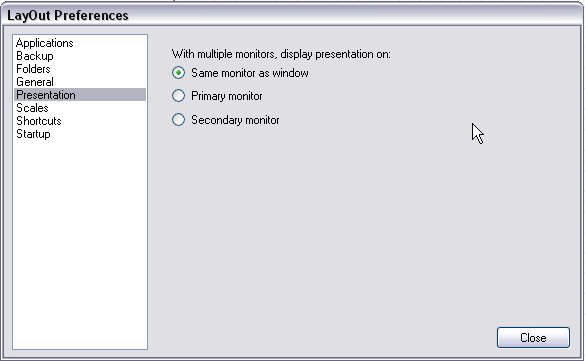
With the ability to split off the full screen to another monitor (if your PC supports that). This would be great for presentations (as I found out yesterday!).
LayOut can do full screen presentation and you can even set which monitor it should do it (surely you need the pro version for LayOut)
@plot-paris said:
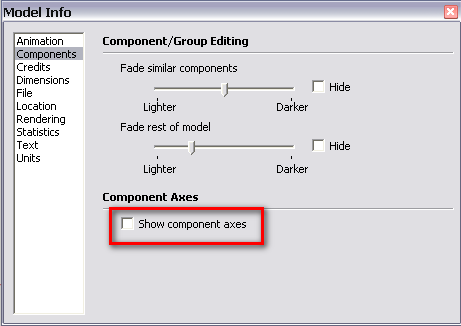
I would appreciate the option to show/hide a transformation gizmo at the origin of groups/components. at the moment you can change the axes of a component (not of a group though). and you can see the axes - and therefore the origin of the component - when editing it. if you move groups/components around however, you don't know where the origin is.
Hi Jakob, have you tried to make the Component axes visible in the Model info > Components dialog? You could even assign a toggle on/off shortcut.
@ken28875 said:
Selecting vertices and merging them. Right now Sketchup allows us to select only one vertex. I would love to be able to select as many as needed to move, rotate, or merge. For example, if two vertices are 10 m apart, selecting them and clicking on the merging tool will merge them at the middle point (5m); or slecting many vetices and merging them to a point/center of the group.
How about the "Point Merger Tool" by BTM?
-
cool, thanks Gaieus. didn't know about that option...
-
How about the "Point Merger Tool" by BTM?[/quote]
Hi Gaieus,
Yes, that's the idea. But it is still very hard to control what to merge. I wish I can select which points to merge. I guess the merger will work better only when Sketchup allows us to select vertices.
Thanks for the link, though.
-
UV Texture - I don't know if anyone has mentioned about UV yet. But that would be awesome to be able to UV texture the model the way Maya or Max does.
-
SU's native texturing tools are indeed rather primitive. Have you seen Whaat's UV Tools?
http://forums.sketchucation.com/viewtopic.php?f=323&t=10404
and
http://forums.sketchucation.com/viewtopic.php?f=323&t=23725 -
@gaieus said:
SU's native texturing tools are indeed rather primitive. Have you seen Whaat's UV Tools?
http://forums.sketchucation.com/viewtopic.php?f=323&t=10404
and
http://forums.sketchucation.com/viewtopic.php?f=323&t=23725Awesome. Thanks, Gaius for the link and Whaat for the plugin!

-
For Sketchup 8 "Free", I like to have the ability to lighten or darken shading of models especially ones that have curves.
-
If youve got shadows on it's already possible, just go to the shadows dialog->expand it->twiddle the light and dark sliders.
-
@remus said:
If youve got shadows on it's already possible, just go to the shadows dialog->expand it->twiddle the light and dark sliders.
Cool, thanks.
-
Looks like I need to put in my wishlist, so here it is:
- high poly support
- Object animation (would be awesome with rendering as well, but if it's a sketchy style then even more awesome! )
unlikely to be in su 8 though, most like su 24..
-
Well, what I can say is that at least with rendering (some renderers for the time being - but hopefully sooner or later more and more will be capable) and SketchyPhysics, object animation and animation export is at least not impossible...
http://www.youtube.com/results?search_query=sketchy+physics+twilight+render&search_type=&aq=f -
Google NEED to BUY Sketchyphysics, and build it right into SketchUp!!!
I've been playing with Sketcher's Studio, which I think is really ace. I think physics is going to be added sometime, in the not too distant future
-
Give me an adjustable eraser tool!!! NO, I'll buy it..
-
is possible to have (in the next version)a "color by layer" options for each layers?
could be very important when you have to highligth something in your drawing.thank you
-
Already available: open the layers panel, click the details button (top right corner) then click 'colour by layer'.
-
As suggested by user "jgb" recently, could extra mouse buttons be assigned for shortcuts in Sketchup?
-
thank you
but i mean just for a single or few layers!layer
@remus said:Already available: open the layers panel, click the details button (top right corner) then click 'colour by layer'.
-
I find that to be an interesting idea, darospa.
especially if you could access this information via scene tabs. so in one scene you only highlight one layer (by it's colour). in the next scene you highlight another... would be a great tool for presentations -
Well I know most "wishlists" are fantasy anyway and rarely do any wishes get implemented in next versions of software... So I will engage in a bit of wishful thinking.
1- For me the only thing I would ever buy the PRO version for would be the exporters, I don't need style builder or layout, so it would be truly, truly awesome if Google would consider giving POORER(non-professionals) the ability to purchase the exporters as separate plugins... $100...$150? I don't make any money off my models(I convert them for Poser and give them away) so $500 to continue sharing... is a little much for me... (till my lottery tickets kick in). I think if more people could export their models to other programs affordably it might entice more users to SU... This is a good thing if I'm not mistaken... Right?
2-Doing something about how big models bog down SU would be a blast.... I bring my bigger models(the ones that almost give SU an aneurysm) over to programs like DAZ Studio or Carrara and they are like "so what"... no big deal for them really. It would be nice to not worry so much about how big my model is getting or will become.... then again I'd probably just keep making them ridiculously bigger anyway... Still it would be nice to be able to get a little bigger things done without worries.
3-Some easier way or making organic shapes would be cool.... very cool. There are plug ins that do this(like BTM Sculpt tools) but perhaps if there was something more like what Bonzai 3D has that would be really cool.
4-A UV mapping feature would be super cool....(I know about Whaat's plug in... I just can't get it to do what I think it should be doing... probably because I'm stupid or because I've got a Mac... or both)... one that works like most 3d modeling programs where you can assign seams,see it as a flat pattern,move bits around to get it all to fit good and export the map to work on in photoshop would be great.... then again would SU be able to handle higher rez textures?
5-Make SU work better with higher rez textures.
6-A toolbar icon that I could click on to enable World Peace and general goodwill amongst Mankind.....I figure 6 is just as possible as all the rest... after all this is a "WISH" list.... anywho, this all being said I want to stress this point: I LOVE SKETCHUP! EVERY program I use I keep saying to myself I wish it could do this like SketchUp does or I wish this was as easy as SketchUp. What makes SketchUp great is the fact that it is intuitive and EASY to learn and despite some simple flaws and shortcomings it is a mindset that most other programs should consider when being developed.
-
Record the meaning of each menu selection and let me play it back when I need it, like a macro.
Things like Texture/Position/rotate/270 gets really, really tedious when you have to do it over and over and over again.
Even better -- come up with some keyboard codes to match your menu functions and let me setup that macro in one of my keyboard function keys ... pop! a one press solution to a tedious issue.







Advertisement