[Plugin] Archiland Toolbar
-
have you unzipped all the contents in plugins?
-
I did unzip the file, but i still get the same error, don't know what is the problem.
-
-
Dear CadFather, It's working perfectly well now, THANKS A WHOLE LOT!
-
Hi CadFather
Many thanks, good ideia,
But
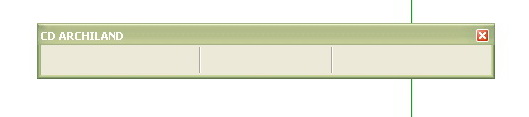
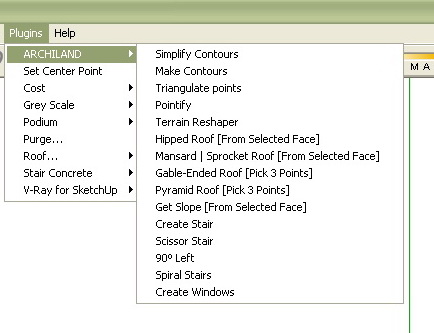
I have a problem. Installed and appeared all the items on the menu but Plugins to open the window of the icons they do not appear. The folder - Archiland Toolbar are in the plugins folder and the 4 files. RB were copied to the plugins folder of Sketchup. It could help me.
-
make sure the folder cd_icons is in the plugins folder
-
Very cool. Thanks.
-
Thanks
small detail.
There are tutorials on how to use the plugins...
I do not understand the use of Spiral Stairs, Simplify Contours, Make Contourns, Triangulate points, Pontify and Terrain Reshaper... -
i'm working on a new set of toolbars and also planning some tutorials - it's just a matter of squeezing it all in 24 hour cycles
but in short they are easy to start with - try and see
draw a jagged curve with the freehand tool - simplify contours will reduce the jagginess (and segmentation)
draw a cone or any 3d shape (not cube), group it - make contours will create new contour lines around the 3d shape
on the same shape (explode the group) run pointify - the result is c-points on every vertex (corner)
trangulate points does the reverse - delete the 3d shape, select all c-points - run the script
you will also find many tutorials in pdf on Didier Bur's site
http://www.crai.archi.fr/RubyLibraryDepot/Ruby/RUBY_Library_Depot.htm
.
-
thanks
-
thanks
this will be very good -
Thanks CADfather, I've already download your ruby in another 4r & it's really really useful. But I wonder why you don't more develop it more, like could I change the style of stair tread like Sketchup?
-
..now that we have dynamic components, the stairs might be less important - in any case i'm working on an update..
also remember the rubies have been created by the ruby masters - all i did was integrate them into the toolbar with command and icons
-
thanks a lot Cadfather!!!
that's great!!! -
your welcome Lorenzo

-
Max - you truly are the CadFather! Your tool bar is a great addition to the neighborhood.
I have one little problem relating to the roof tools. On my toolbar the mansard & gable roof buttons are transposed. Clicking the gable produces the mansard etc. -- The tooltips are correct so it seems its just the images are referenced wrong.
Regards, Ross
-
Max, as Ross just pointed out, the icons representing the gable, mansard and hipped roof designs are mixed up. The pyramid roof icon is correct. I have renamed the icon (.png) files appropriately and am attaching a new CD_ICON folder here so others can replace the old folder with this one. I hope this is a permissable act on my part.
EDIT: Ohhh...and thank you very much for a wonderful tool!!
-
Thanks CF. What does Pointify do?
-
I think pointify converts vertexes into construction points. Do a search and you'll find plenty of posts on the subject.
-
Hi, just back from italy where i had little or no connection - can't believe i did live just the same
 - i knew there were a couple of icons out of place but they eventually slipped by.. thanks all for your feedback.. and Ron, i will change the package with the updated icons.. (done)
Cheers!





Hello! It looks like you're interested in this conversation, but you don't have an account yet.
Getting fed up of having to scroll through the same posts each visit? When you register for an account, you'll always come back to exactly where you were before, and choose to be notified of new replies (either via email, or push notification). You'll also be able to save bookmarks and upvote posts to show your appreciation to other community members.
With your input, this post could be even better 💗
Register Login


Advertisement