sketchucation logo sketchucation
    • 登入
    Oops, your profile's looking a bit empty! To help us tailor your experience, please fill in key details like your SketchUp version, skill level, operating system, and more. Update and save your info on your profile page today!
    🔌 Smart Spline | Fluid way to handle splines for furniture design and complex structures. Download

    [Plugin] BezierSpline - v2.2a - 22 Apr 21

    已排程 已置頂 已鎖定 已移動 Plugins
    460 貼文 183 Posters 2.0m 瀏覽 183 Watching
    正在載入更多貼文
    • 從舊到新
    • 從新到舊
    • 最多點贊
    回覆
    • 在新貼文中回覆
    登入後回覆
    此主題已被刪除。只有擁有主題管理權限的使用者可以查看。
    • V 離線
      vojo
      最後由 編輯

      It turns out its not your pluggin but the other guys issue.....apologies

      1 條回覆 最後回覆 回覆 引用 0
      • T 離線
        Toni
        最後由 編輯

        Hi!

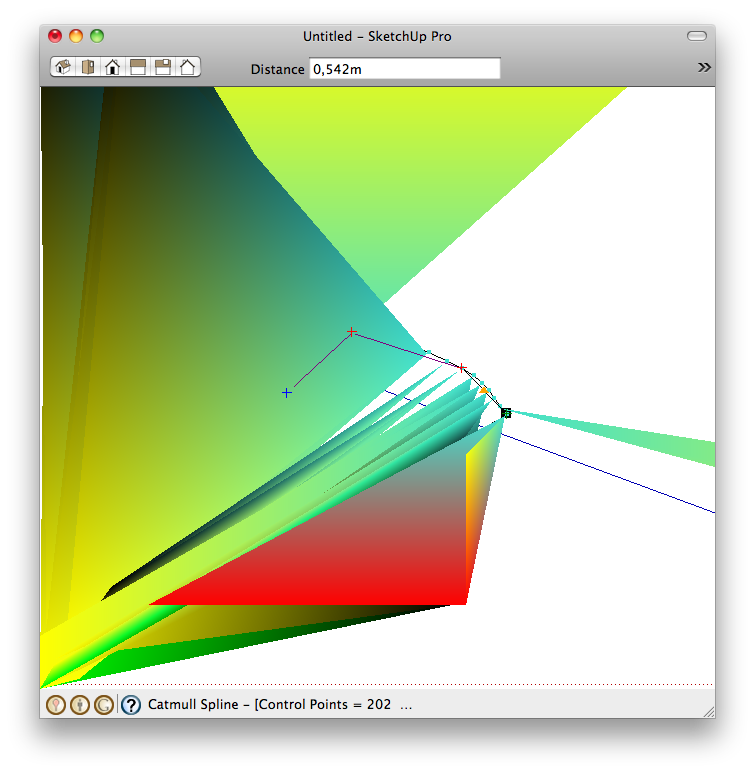
        I recently switched to Mac and I encountered quite a nasty problem. I have the latest plugin and I'm running SU Pro 8.0.something. I flipped back a couple pages but couldn't find anything on this.
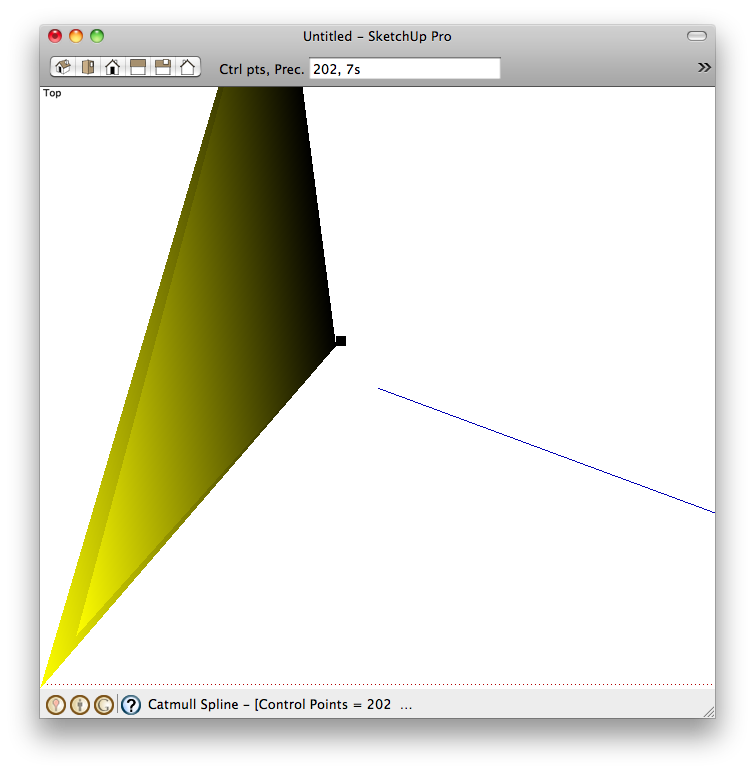
        Beginning to draw a curve (the odd triangle flickers around and points the cursor)

        Drawing a line, getting lot's of visual stimuli, but the actual drawing part is getting pretty hard.

        1 條回覆 最後回覆 回覆 引用 0
        • thomthomT 離線
          thomthom
          最後由 編輯

          @toni said:

          I'm running SU Pro 8.0.something.

          Could you update your profile to reflect this please?

          What are your system specs?
          What OSX version?
          What graphic card do you have?
          Have you applied all updates?
          Does it occur if you disable hardware acceleration?

          Thomas Thomassen — SketchUp Monkey & Coding addict
          List of my plugins and link to the CookieWare fund

          1 條回覆 最後回覆 回覆 引用 0
          • T 離線
            Toni
            最後由 編輯

            Behold, it was the HW acceleration. Thanks!

            1 條回覆 最後回覆 回覆 引用 0
            • thomthomT 離線
              thomthom
              最後由 編輯

              @toni said:

              Behold, it was the HW acceleration. Thanks!

              No - it is not a fix. Just a debugging method. Without hardware acceleration SketchUp will be terrible slow!
              What it means is that there is an issue with your graphics card. If you are lucky, it is just your current driver and you need to update it. If you are unlucky, your graphic card doesn't support all the OpenGL features SketchUp requires.

              Thomas Thomassen — SketchUp Monkey & Coding addict
              List of my plugins and link to the CookieWare fund

              1 條回覆 最後回覆 回覆 引用 0
              • T 離線
                the.pjt
                最後由 編輯

                hi dear fredo 😄 ... is it possible to use you own LIBFREDO abilities to make ONSCREEN tool-buttons for this excellent plugin ?!? .. classic toolbar of BezierSpline has so many butoons and it takes large amount of screen space ..

                we want a toolbar with one Icon that runs commands on the screen like your toolsonsurface, curvy loft ,etc

                tanks dear fredo 😉

                1 條回覆 最後回覆 回覆 引用 0
                • fredo6F 離線
                  fredo6
                  最後由 編輯

                  @the.pjt said:

                  hi dear fredo 😄 ... is it possible to use you own LIBFREDO abilities to make ONSCREEN tool-buttons for this excellent plugin ?!? .. classic toolbar of BezierSpline has so many butoons and it takes large amount of screen space ..

                  we want a toolbar with one Icon that runs commands on the screen like your toolsonsurface, curvy loft ,etc

                  tanks dear fredo 😉

                  I am redesigning the whole plugin, but I have little time to progress.
                  I see if I can make an intermediate version with a quick launcher.

                  Fredo

                  1 條回覆 最後回覆 回覆 引用 0
                  • T 離線
                    the.pjt
                    最後由 編輯

                    thank a lot feredo ....

                    when I tried to edit you code and disable some toolbar icons by adding adding # to "toolbar.. .add_item(cmd)" part I was so hard for me to load all commands by menu and load some of them by toolbars .. there is a loop in your algorithm that loades itch components and then makes all UIs ( menus and toolbars ) ....
                    when I tried to disable a command icon , it disables all .... and when I tried too read your newer plugins they where so complicated for a beginner like me

                    thanks fredo if you do it ... you are the only one who can change it ... because you are the creator ...

                    do it soon fredo 😄 ... thanks again .. for whole plugin ... it brings curves to SU and improved it a lot .... thanks

                    1 條回覆 最後回覆 回覆 引用 0
                    • A 離線
                      August
                      最後由 編輯

                      I think I have found a calculation bug in the the Polyline Segmentor. The last segment seems to come out the wrong length for no apparent reason.

                      Fredo6's BezierSpline has been used by so many people for so long that I am hesitant to call what I am seeing a bug. But I suspect that it has been there all along. In exploring the manual, tutorials, etc. I have found phrases that take it for granted that this happens when I cannot see the reason for it.

                      I see descriptions of using the Polyline Divider that say the last segment will not be the same length as the others. That makes sense. The overall length is arbitrary and the segment length is fixed; of course there will be remainder.

                      But I see phrases that apply that same caveat to the Polyline Segmentor and that does not make sense. You are dividing a curve into a whole number of segments. There should be no remainder. If there is some calculation round off, it should be minuscule, down in the 9th or 10th decimal place. But what I am seeing is an error of nearly FIVE PERCENT.

                      I draw a Classic Bezier curve and I use Convert to Polyline Segmentor and I specify 32 segments. I would think those would be all the same length, or nearly, and so they are, except the imprecision of the last segment has me baffled about why it would be so different. 31 of the segments are 2.099221" in length and the final segment is 2.005871". That is a 4.65% difference.

                      Certainly SU Ruby is capable of more precise calculations than seem to be in use here.

                      That difference is barely noticeable in the curve, but these points will be the reference points for attaching more complicated structures that will come close to each other and I am afraid that when the final construction is done, there will be an aesthetic glitch, at the same level as bad kerning between typeset characters in a title. What is a 5% difference initially could become a much larger difference down the road. And 5% is itself a big enough a difference to see without measuring.

                      My design calls for repeating the same curve, attaching it to the previous copy, then attaching repeating elements at each curve point. I don't want the spacing of the larger elements to be visibly too tight at each and every inflection point. It will just look wrong.

                      I tried scaling everything up 10x before I used the Polyline Segmentor and the new numbers were 20.992211 and 20.058708, merely another decimal point of precision in my display. It's not the "too tiny" SU bug or the numbers would have changed a bit. I'm sure the underlying numbers are consistently inconsistent.

                      So is this a bug in Polyline Segmentor, or is this a necessity? And either way, is there a workaround? Any suggestions welcome.

                      Thanks,
                      August

                      P.S. I am using the very latest BezierSpline, downloaded two days ago, running on Windows 7, SU 8.0.14346, also the latest version.

                      “An idea, like a ghost, must be spoken to a little before it will explain itself.”
                      [floatr:v1mcbde2]-- Charles Dickens[/floatr:v1mcbde2]

                      1 條回覆 最後回覆 回覆 引用 0
                      • fredo6F 離線
                        fredo6
                        最後由 編輯

                        August,

                        Your remark is stamped with good sense: there is no metaphysical reasons why the last segment should not be equal to the other ones.

                        Here is a revised algorithm that ensures better accuracy.

                        I'll published the release soon.

                        Thanks very much for signaling the problem.

                        Fredo


                        to drop into the BZ_Dir_14 folder

                        1 條回覆 最後回覆 回覆 引用 0
                        • A 離線
                          August
                          最後由 編輯

                          Wow. Thank you for such a quick response.

                          The more I thought about it, the more I began to think that the error could have come from measuring the original, default 20-segment length, dividing that, and applying that new length to the new segments. Going from 20 segments to 32 segments could indeed introduce just that order of magnitude error.

                          But before I could experiment with that theory, here you are with the problem fixed. Wow.

                          No point now in my trying to figure out what the issue used to be. 😄

                          Thanks again,
                          August

                          “An idea, like a ghost, must be spoken to a little before it will explain itself.”
                          [floatr:v1mcbde2]-- Charles Dickens[/floatr:v1mcbde2]

                          1 條回覆 最後回覆 回覆 引用 0
                          • panixiaP 離線
                            panixia
                            最後由 編輯

                            @the.pjt said:

                            we want a toolbar with one Icon that runs commands on the screen like your toolsonsurface, curvy loft ,etc

                            +1 👍
                            actually the only downside in one of the best plugin ever!

                            1 條回覆 最後回覆 回覆 引用 0
                            • Dave RD 離線
                              Dave R
                              最後由 編輯

                              @panixia said:

                              @the.pjt said:

                              we want a toolbar with one Icon that runs commands on the screen like your toolsonsurface, curvy loft ,etc

                              +1 👍
                              actually the only downside in one of the best plugin ever!

                              😒

                              Etaoin Shrdlu

                              %

                              (THERE'S NO PLACE LIKE)

                              G28 X0.0 Y0.0 Z0.0

                              M30

                              %

                              1 條回覆 最後回覆 回覆 引用 0
                              • J 離線
                                Jack Camino
                                最後由 編輯

                                Hello.
                                Jack here, new to Sketchup8, plugins, etc. I am designing a guitar and I would really appreciate your help with this and future questions, which are going to be my contribution since at the moment I don't have any answers.
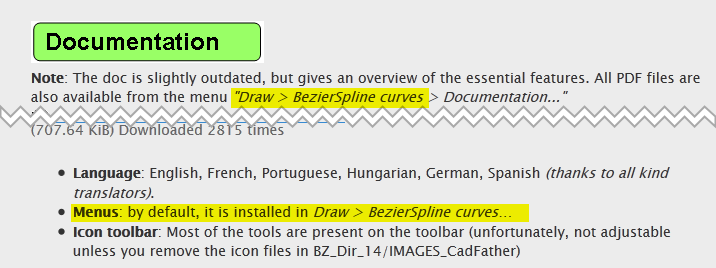
                                I just downloaded the BezierSpline and installed it to the plugins folder on the macintosh HD so, my question is where is the location of the controls when I am in Sketchup8. Thanks.
                                1 條回覆 最後回覆 回覆 引用 0
                                • thomthomT 離線
                                  thomthom
                                  最後由 編輯

                                  @jack camino said:

                                  Hello.
                                  Jack here, new to Sketchup8, plugins, etc. I am designing a guitar and I would really appreciate your help with this and future questions, which are going to be my contribution since at the moment I don't have any answers.
                                  I just downloaded the BezierSpline and installed it to the plugins folder on the macintosh HD so, my question is where is the location of the controls when I am in Sketchup8. Thanks.

                                  UI.png

                                  Thomas Thomassen — SketchUp Monkey & Coding addict
                                  List of my plugins and link to the CookieWare fund

                                  1 條回覆 最後回覆 回覆 引用 0
                                  • J 離線
                                    Jack Camino
                                    最後由 編輯

                                    Thanks Thomas.
                                    Let me show you what I have in my computer, see the attached pictures. Also, I don't understand what do you mean when you say remove the icon files in (BZ dir 14 ....images cad father). I guess that is the reason menu draw doesn't show bezier curves and I don't have a BesierSpline toolbar. Can you see the pictures and help me? Thanks.
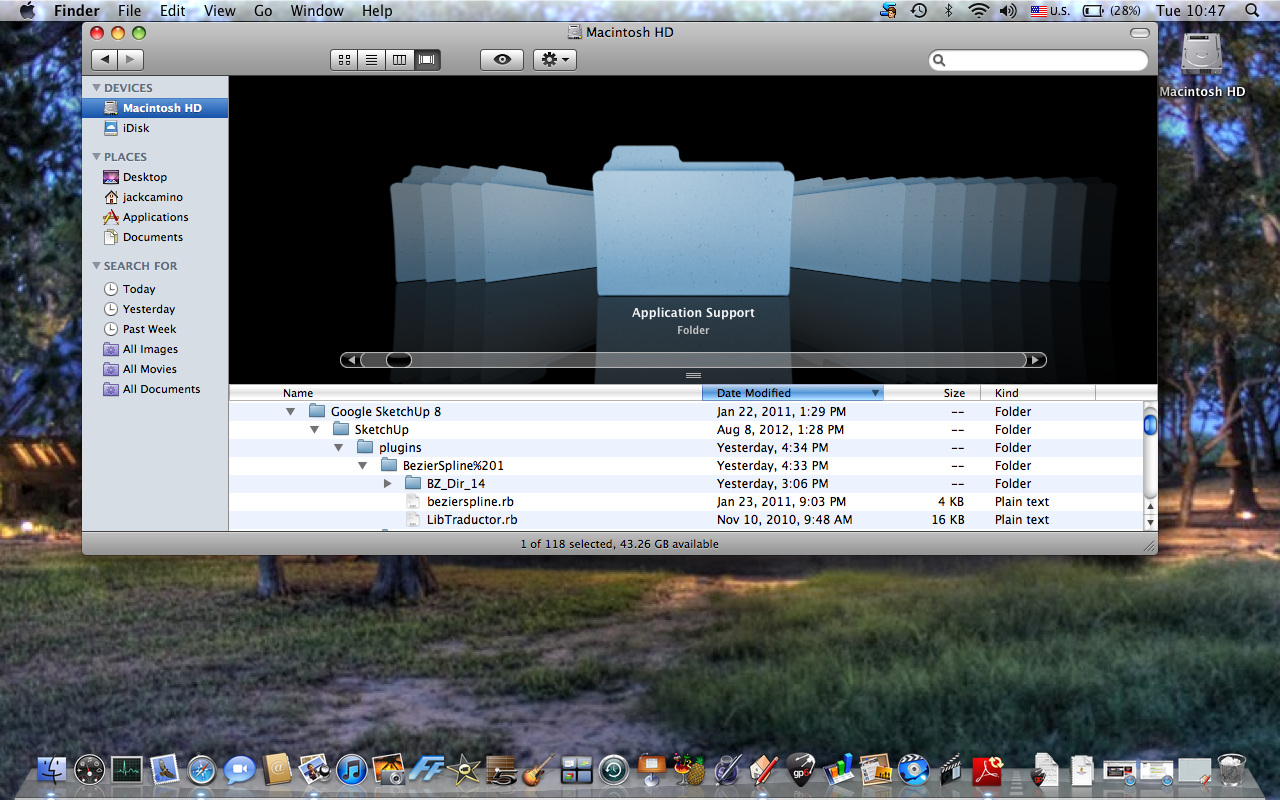
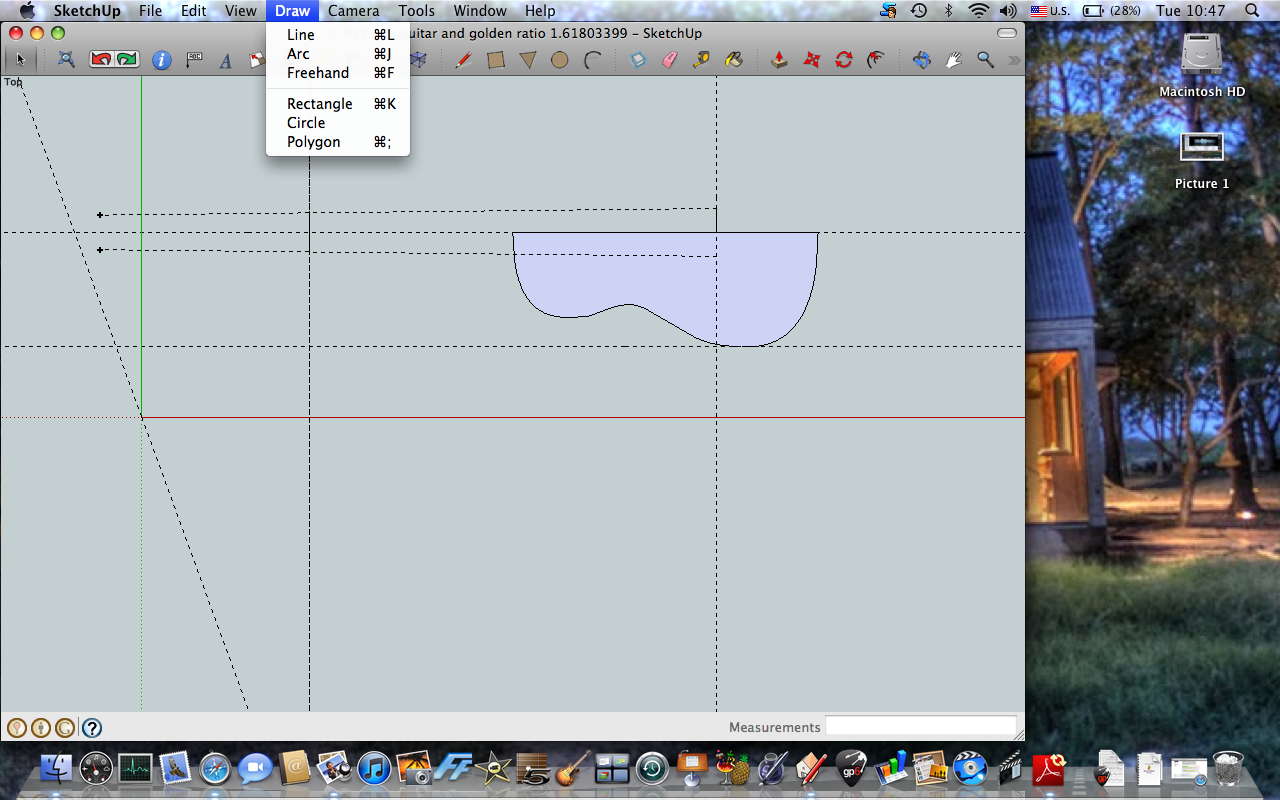
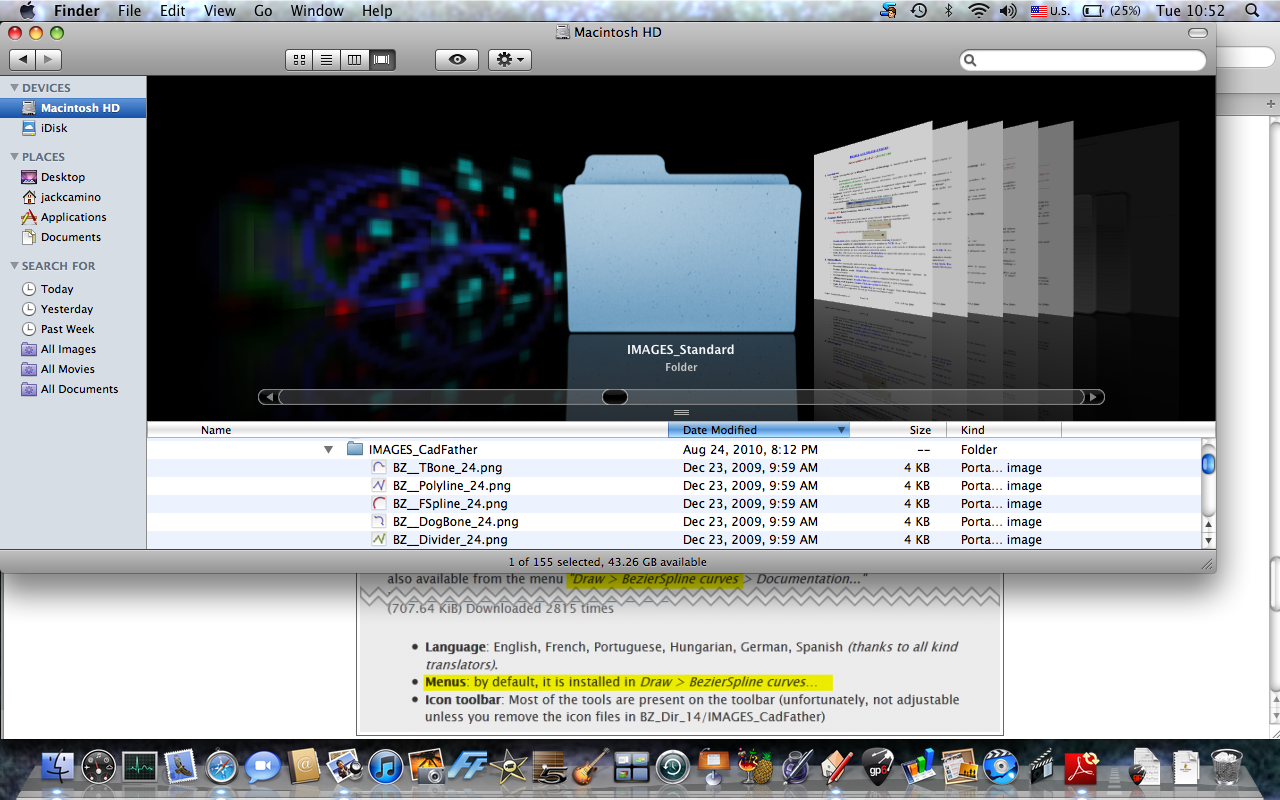
                                    Picture 1.png


                                    Picture 2.png


                                    Picture 3.png

                                    1 條回覆 最後回覆 回覆 引用 0
                                    • Dave RD 離線
                                      Dave R
                                      最後由 編輯

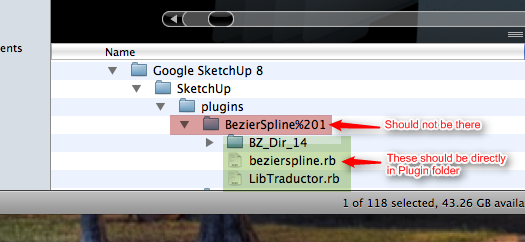
                                      You haven't followed the footprint as laid out in the first post.
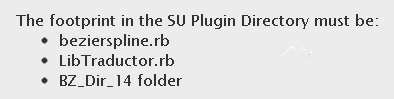
                                      footprint.png

                                      You've got one too many folder levels. Move the contents of the one indicated into the Plugins folder and get rid of that folder.
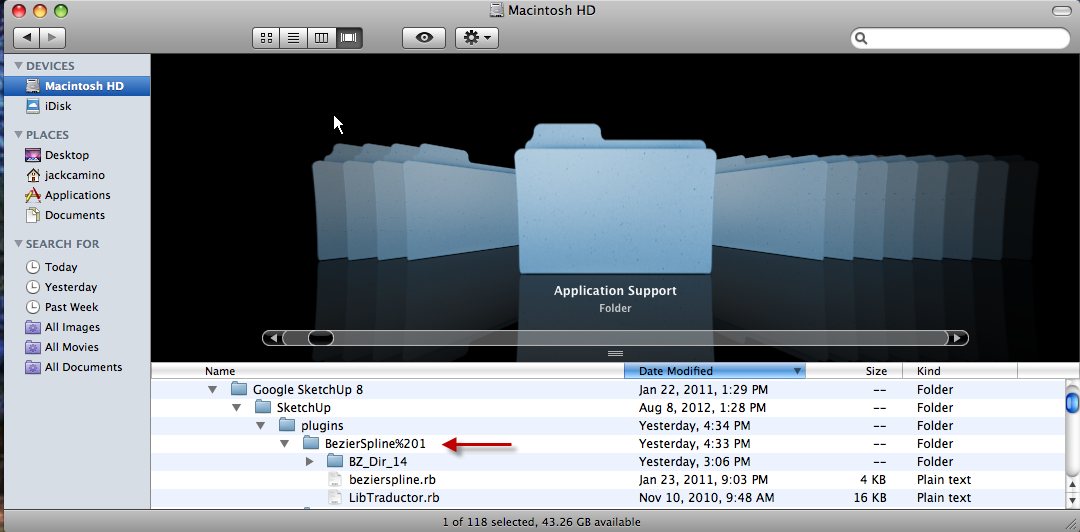
                                      BZ1.png

                                      Also go to the SketchUp menu (to the left of File) and click on Preferences>Extensions and tick any and all boxes you find there.

                                      Etaoin Shrdlu

                                      %

                                      (THERE'S NO PLACE LIKE)

                                      G28 X0.0 Y0.0 Z0.0

                                      M30

                                      %

                                      1 條回覆 最後回覆 回覆 引用 0
                                      • thomthomT 離線
                                        thomthom
                                        最後由 編輯

                                        Installation.png

                                        OSX wraps all extracted ZIPs into a folder with the same name as the ZIP. It is the content of that folder that should be in the Plugins folder. So you want to extract to a temp location, then move the correct files.

                                        You can use this utility to make it easier to install correctly:
                                        http://forums.sketchucation.com/viewtopic.php?t=42315

                                        Also, here's an article on installing plugins:
                                        http://www.thomthom.net/thoughts/2012/01/installing-plugins-for-google-sketchup/

                                        (Dave beat me to it.)

                                        Thomas Thomassen — SketchUp Monkey & Coding addict
                                        List of my plugins and link to the CookieWare fund

                                        1 條回覆 最後回覆 回覆 引用 0
                                        • Dave RD 離線
                                          Dave R
                                          最後由 編輯

                                          @thomthom said:

                                          (Dave beat me to it.)

                                          But you were more thorough.

                                          Etaoin Shrdlu

                                          %

                                          (THERE'S NO PLACE LIKE)

                                          G28 X0.0 Y0.0 Z0.0

                                          M30

                                          %

                                          1 條回覆 最後回覆 回覆 引用 0
                                          • J 離線
                                            jcarter
                                            最後由 編輯

                                            Thanks, hopefully responding allows me to download this tool!

                                            1 條回覆 最後回覆 回覆 引用 0
                                            • 1
                                            • 2
                                            • 15
                                            • 16
                                            • 17
                                            • 18
                                            • 19
                                            • 22
                                            • 23
                                            • 17 / 23
                                            • 第一個貼文
                                              最後的貼文
                                            Buy SketchPlus
                                            Buy SUbD
                                            Buy WrapR
                                            Buy eBook
                                            Buy Modelur
                                            Buy Vertex Tools
                                            Buy SketchCuisine
                                            Buy FormFonts

                                            Advertisement