sketchucation logo sketchucation
    • 登入
    Oops, your profile's looking a bit empty! To help us tailor your experience, please fill in key details like your SketchUp version, skill level, operating system, and more. Update and save your info on your profile page today!
    🔌 Smart Spline | Fluid way to handle splines for furniture design and complex structures. Download

    [Plugin] follow me rotate

    已排程 已置頂 已鎖定 已移動 Plugins
    211 貼文 79 Posters 243.7k 瀏覽 79 Watching
    正在載入更多貼文
    • 從舊到新
    • 從新到舊
    • 最多點贊
    回覆
    • 在新貼文中回覆
    登入後回覆
    此主題已被刪除。只有擁有主題管理權限的使用者可以查看。
    • brookefoxB 離線
      brookefox
      最後由 編輯

      Suggestion for settings dialog, with a tweak.
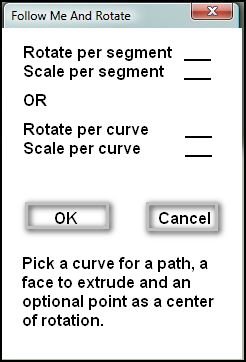

      follow me and rotate-settings dialog-prop-1.JPG

      ~ Brooke

      1 條回覆 最後回覆 回覆 引用 0
      • mitcorbM 離線
        mitcorb
        最後由 編輯

        I downloaded the zip version on page 4 or 5, extracted to V7 Plugins. No sign of any part of the script in the menu. No info in preferences>extensions. No toolbar selection. Nothing in the tools menu. Is it a right click context thing? Did I miss something?

        I take the slow, deliberate approach in my aimless wandering.

        1 條回覆 最後回覆 回覆 引用 0
        • brookefoxB 離線
          brookefox
          最後由 編輯

          Did you try page 1: far.rar?

          C:\Program Files (x86)\Google\Google SketchUp 7 or 8\Plugins\FollowAndRotate_en.rbs

          Called by name in plugin drop down menu...

          ~ Brooke

          1 條回覆 最後回覆 回覆 引用 0
          • mitcorbM 離線
            mitcorb
            最後由 編輯

            The files are in the correct Plugins folder, they just don't "install(?)" to be seen in the drop downs.

            I take the slow, deliberate approach in my aimless wandering.

            1 條回覆 最後回覆 回覆 引用 0
            • Dave RD 離線
              Dave R
              最後由 編輯

              It didn't work for me until I put the ...cn.rbs file in, too. And it shows at the bottom of my Plugins menu

              Etaoin Shrdlu

              %

              (THERE'S NO PLACE LIKE)

              G28 X0.0 Y0.0 Z0.0

              M30

              %

              1 條回覆 最後回覆 回覆 引用 0
              • pilouP 離線
                pilou
                最後由 編輯

                Yes I have made some tuts images for this cool series! 😉

                Must be "Rotation Angle per segment"

                Try also 2 faces + Path by Kyrill 2008
                Very funny plug with options! ☀

                http://forums.sketchucation.com/download/file.php?id=32785

                Frenchy Pilou
                Is beautiful that please without concept!
                My Little site :)

                1 條回覆 最後回覆 回覆 引用 0
                • mitcorbM 離線
                  mitcorb
                  最後由 編輯

                  I had the "Far" folder in the Plugins menu. Opening that and copy/pasting the files out of that folder to the file list was the next step. I don't know why the folder would not deploy the files at the last step. So, now I will experiment.
                  And yes, I see the FollowAndRotate call in the Plugins Menu, now.
                  Thanks, y'all.

                  I take the slow, deliberate approach in my aimless wandering.

                  1 條回覆 最後回覆 回覆 引用 0
                  • mitcorbM 離線
                    mitcorb
                    最後由 編輯

                    And here is my third and fourth attempts.
                    The large circular group is approximately 19,000 feet in diameter, according to the tape measure tool. The inputs were 20 rotations, 2.0 scale on a Bezier curve with a 24s circle roughly perpendicular and touching the end of the curve. The circular disc has a sinusoidal cross section mimicking the shape of the Bezier path.
                    The foreground object is the same items with 10.0 rotations and 0.95 scale.
                    The Bezier curve used the default parameters and two control points.

                    On my first try, I got the "drogue" shape.
                    As Pilou points out, Curviloft does have better controls on the outcome.
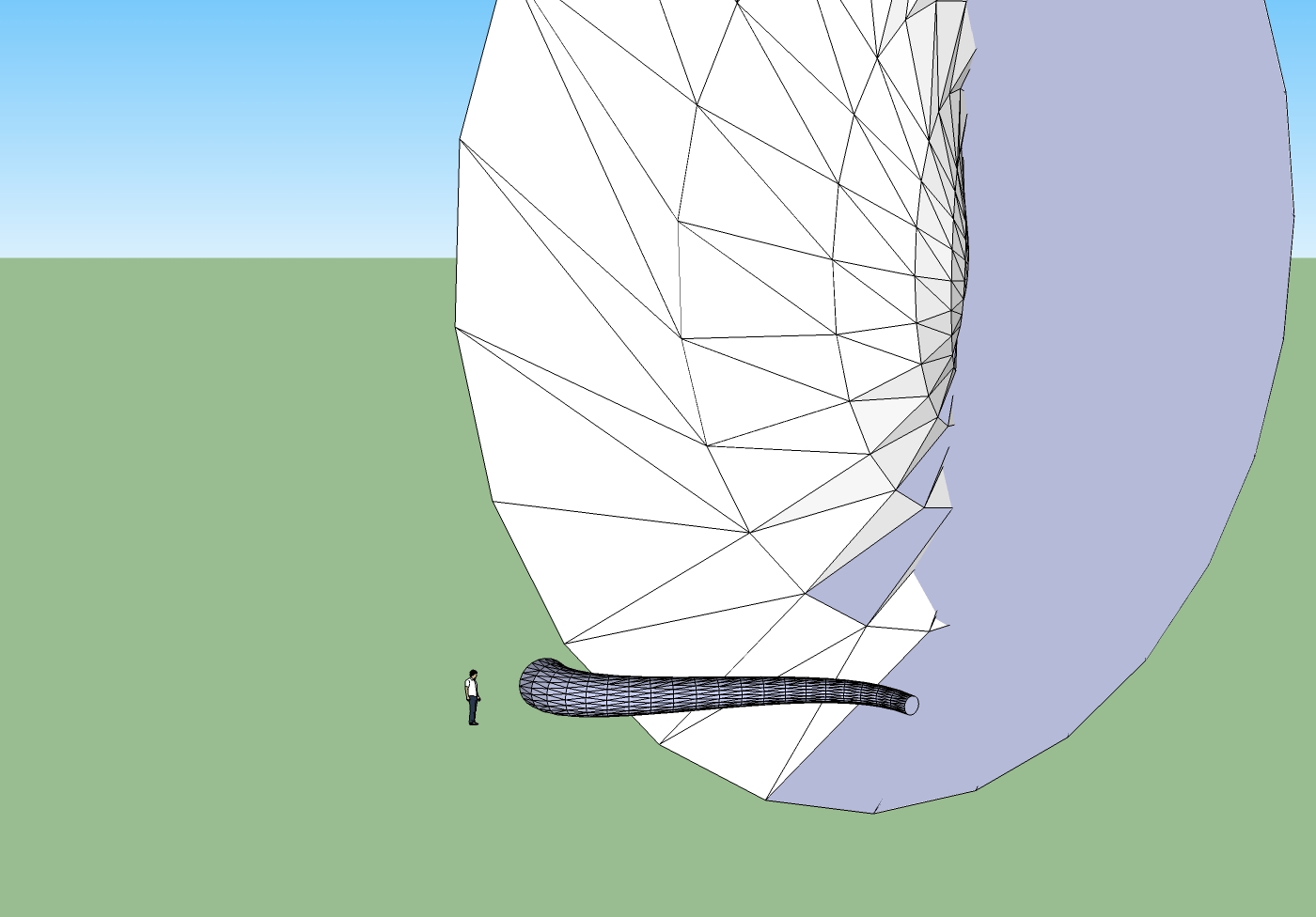

                    followandrotateexample.jpg

                    I take the slow, deliberate approach in my aimless wandering.

                    1 條回覆 最後回覆 回覆 引用 0
                    • pilouP 離線
                      pilou
                      最後由 編輯

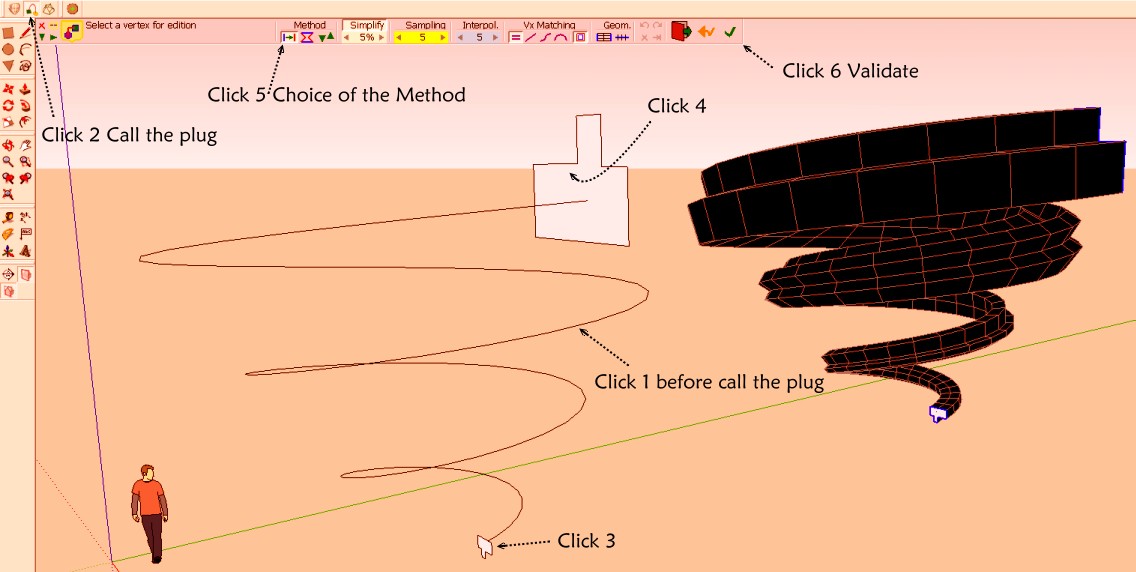
                      Curvy Loft by Fredo6

                      Not exactly the same thing because you have only one progressive rotation between the start form and the End form
                      (if you take just 2 forms)
                      Rotate forms by hand 😉

                      But it's very more friendly and more optional options and you can put any number of different forms (section) on the path!!! 😉
                      So possibility to have the same rotations than the present plug Rotate and follow! 😉

                      PS Click very preciselly with zoom inside the internal surface and not on one edge!
                      heliox.jpg

                      Frenchy Pilou
                      Is beautiful that please without concept!
                      My Little site :)

                      1 條回覆 最後回覆 回覆 引用 0
                      • brookefoxB 離線
                        brookefox
                        最後由 編輯

                        Well, Tim, I 'achieved' what you achieved (that interesting large giant clam shape). Do you want to try some more? If so it would help if you show your initial entities which you can easily do by simply moving the creation off to one side, make the picks and invoke the routine again, which will then still show the settings you used and we can see the before and after all in one view. And then we can 'help' you. Ha.

                        Merci, Pilou, for that very useful alternate.

                        ~ Brooke

                        1 條回覆 最後回覆 回覆 引用 0
                        • mitcorbM 離線
                          mitcorb
                          最後由 編輯

                          Hi, brooke:
                          You can surmise from the "successful" foreground figure that in both cases I used a circle mounted to the left end of the Bezier curve, more or less perpendicular to the end segment. From this, I gathered that there is a range of numbers within which you should select your parameters for both Rotate and Scale. If you pick numbers on the extremes you get drogues and discoids. Of course, I am often wrong in my assumptions. I may experiment a little more as time permits and of course there is the distraction of the change of ownership of Sketchup being discussed next door. Over 9 pages of comments since early this morning, my time.

                          EDIT: That's 8 pages at this edit.

                          I take the slow, deliberate approach in my aimless wandering.

                          1 條回覆 最後回覆 回覆 引用 0
                          • brookefoxB 離線
                            brookefox
                            最後由 編輯

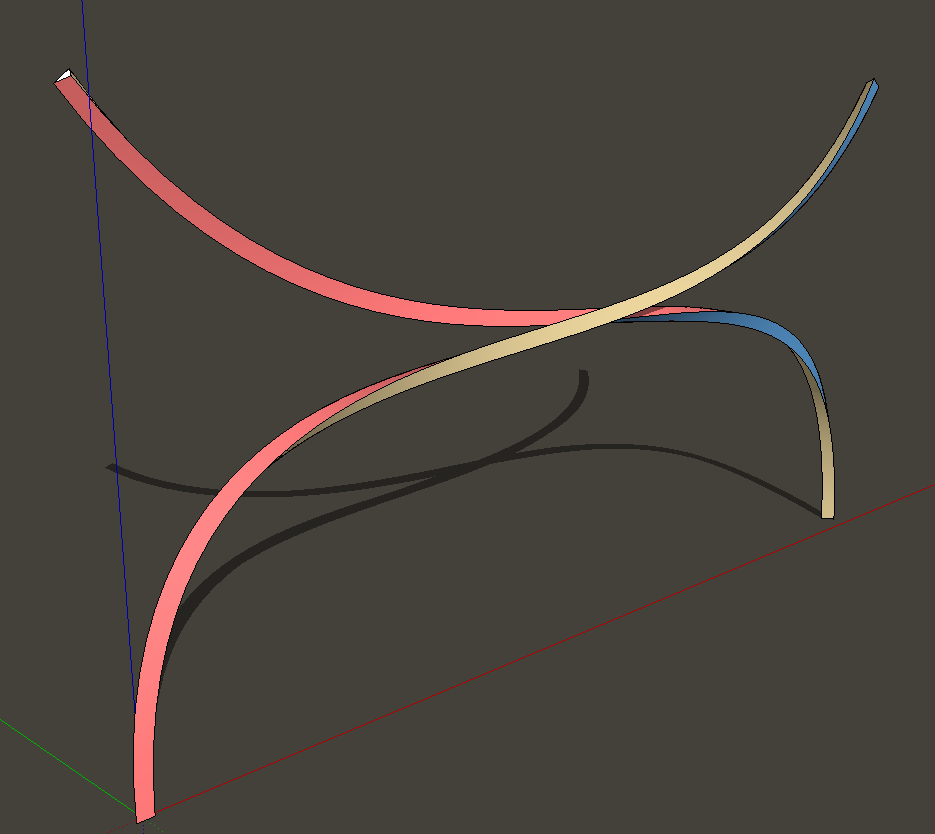
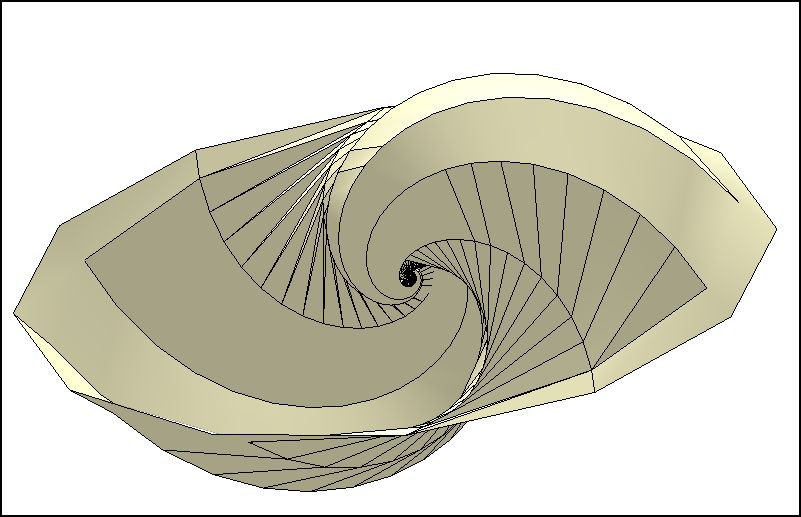
                            This is a somewhat cleaned up failure, which I believe you have also in your collection. I think it is very cool.

                            follow me and rotate-yin yang clam-1

                            follow me and rotate-yin yang clam-1.JPG

                            ~ Brooke

                            1 條回覆 最後回覆 回覆 引用 0
                            • hamedmemarH 離線
                              hamedmemar
                              最後由 編輯

                              Thank you my fiend. 😄
                              it is very useful and is a nice plugin . 😉

                              1 條回覆 最後回覆 回覆 引用 0
                              • F 離線
                                frankfiv3
                                最後由 編輯

                                no funciona, lo selecciono y no pasa nada

                                1 條回覆 最後回覆 回覆 引用 0
                                • M 離線
                                  marialuiz88
                                  最後由 編輯

                                  hi im maria luiz and im new to sketchup 😄 may i know how to install this plugins to my su? thanks alot 😄

                                  1 條回覆 最後回覆 回覆 引用 0
                                  • TIGT 離線
                                    TIG Moderator
                                    最後由 編輯

                                    Look at
                                    http://sketchucation.com/pluginstore?pln=Far
                                    Downloading this gives you an RBZ archive.
                                    Then use Preferences > Extensions > Install... button to install it for you...
                                    Read the tools usage guidance and other related posts...

                                    TIG

                                    1 條回覆 最後回覆 回覆 引用 0
                                    • pep75P 離線
                                      pep75
                                      最後由 編輯

                                      Dear All,

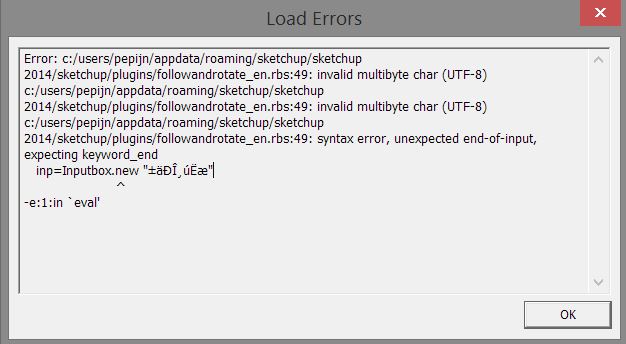
                                      After installing this plugin in SU14, and after a restart, I got this error message. Am I missing something? 😳 Isn't this plugin compatible with the 2014 version? Thanks!!

                                      Capture error.JPG

                                      1 條回覆 最後回覆 回覆 引用 0
                                      • Dave RD 離線
                                        Dave R
                                        最後由 編輯

                                        It does work with SU2014.
                                        Screenshot - 6_27_2014 , 4_20_45 AM.png

                                        Did you install it via the Extension Warehouse?

                                        Etaoin Shrdlu

                                        %

                                        (THERE'S NO PLACE LIKE)

                                        G28 X0.0 Y0.0 Z0.0

                                        M30

                                        %

                                        1 條回覆 最後回覆 回覆 引用 0
                                        • pep75P 離線
                                          pep75
                                          最後由 編輯

                                          Thanks Dave. Uhm yep, via Extension Warehouse and later(after getting the Error)via the "install extensions" option in the preferences...mmm...still the same error.

                                          1 條回覆 最後回覆 回覆 引用 0
                                          • Dave RD 離線
                                            Dave R
                                            最後由 編輯

                                            Well, that's odd. It worked for me as you can see above but that was immediately after installing it via the Plugin Store. I closed SketchUp and reopened it and get the error you got. Now I would say it sort of works. The error is typical of plugins that need to be updated to be compliant with Ruby 2.0.

                                            Alright! Where's wikii? He's got work to do.

                                            By the way, the plugin still functions for me after clearing the error.

                                            Etaoin Shrdlu

                                            %

                                            (THERE'S NO PLACE LIKE)

                                            G28 X0.0 Y0.0 Z0.0

                                            M30

                                            %

                                            1 條回覆 最後回覆 回覆 引用 0
                                            • 1
                                            • 2
                                            • 7
                                            • 8
                                            • 9
                                            • 10
                                            • 11
                                            • 9 / 11
                                            • 第一個貼文
                                              最後的貼文
                                            Buy SketchPlus
                                            Buy SUbD
                                            Buy WrapR
                                            Buy eBook
                                            Buy Modelur
                                            Buy Vertex Tools
                                            Buy SketchCuisine
                                            Buy FormFonts

                                            Advertisement